
1. Overview
The Netzu Digital Alarm Clock is a versatile bedside companion designed for bedrooms, offering a large LED display, dual alarm functionality, and a multi-color night light. It also includes convenient USB charging ports for your devices. Its user-friendly design makes it suitable for all ages, from kids to seniors.

Figure 1: Netzu Digital Alarm Clock
2. Features
- Digital Alarm Clock with Night Light: Easily activate the night light by pressing the top of the clock. Features 8 color options and a warm light mode, providing sufficient illumination without being overly bright.
- Large LED Display: A 7.5-inch LED display with 2-inch tall numbers ensures clear visibility from a distance.
- 0%-100% Full Range Brightness Dimmer: Adjust the display brightness to your preferred level, from brightest for daytime reading to extremely dim for nighttime comfort.
- Dual Alarm Clock & Snooze Function: Set two independent alarms for different wake-up times. The alarm buzzer volume is adjustable. The snooze function provides an additional 9 minutes of sleep.
- USB Charge Ports: Equipped with 5V 1A USB charging ports on the back to conveniently charge your smartphones and other smart devices.
- Easy to Setup & 12/24H Format: Simple setup for time and alarm, with an option to switch between 12-hour and 24-hour display formats.
3. Package Contents
- Netzu Digital Alarm Clock Unit
- USB-C Charging Cable
- Power Adapter (5V 1A)
- User Manual (this document)
4. Setup
4.1 Power Connection
- Connect the provided USB-C charging cable to the USB-C Port (6) on the back of the alarm clock.
- Plug the other end of the USB-C cable into the power adapter.
- Plug the power adapter into a standard wall outlet. The clock display will illuminate.
Note: The clock includes a built-in backup battery to retain time settings during power outages.
4.2 Setting Time
- Press and hold the Time Setting button (2) on the back of the clock until the hour digits begin to flash.
- Use the '+' (8) or '-' (7) buttons to adjust the hour.
- Press the Time Setting button (2) again to switch to minute adjustment. Use '+' (8) or '-' (7) to set the minutes.
- Press the Time Setting button (2) a third time to confirm and exit time setting mode.
- To switch between 12-hour and 24-hour format, press the Time Setting button (2) briefly when not in setting mode.
4.3 Setting Alarms
The clock features two independent alarms (Alarm 1 and Alarm 2).
- Press the Alarm1 button (3) or Alarm2 button (4) to select the alarm you wish to set. The alarm icon will appear on the display.
- Press and hold the selected Alarm button (3 or 4) until the hour digits of the alarm time begin to flash.
- Use the '+' (8) or '-' (7) buttons to adjust the alarm hour.
- Press the selected Alarm button (3 or 4) again to switch to minute adjustment. Use '+' (8) or '-' (7) to set the alarm minutes.
- Press the selected Alarm button (3 or 4) a third time to confirm and activate the alarm. The alarm icon will remain on the display.
- To adjust alarm volume, use the Alarm Volume Selection button (1) on the back of the clock.

Figure 2: Back and Top Controls (1. Alarm Volume Selection, 2. Time Setting, 3. Alarm1, 4. Alarm2, 5. Brightness Control, 6. Type-C USB Port, 7. -, 8. +, 9. USB charging port, 10. Warm Nightlight Brightness Adjustment, 11. Snooze/Nightlight On/Off, 12. Colorful Nightlight Selection)
5. Operating Instructions
5.1 Display Brightness Adjustment
The clock features a 0%-100% full range brightness dimmer for the LED display.
- Use the Brightness Control button (5) on the back of the clock to cycle through brightness levels or adjust continuously.

Figure 3: Display Brightness Levels
5.2 Night Light Operation
The clock offers both warm light and multi-color night light options.
- Warm Light: Tap the Snooze/Nightlight On/Off button (11) on the top of the clock to turn the warm light on/off. Use the Warm Nightlight Brightness Adjustment button (10) on the back to adjust its intensity.
- Colorful Night Light: Press the Colorful Nightlight Selection button (12) on the top of the clock to cycle through 8 different colors.

Figure 4: Night Light Color Options
5.3 Snooze Function
When an alarm sounds, press the large Snooze/Nightlight On/Off button (11) on the top of the clock to activate the snooze function. The alarm will pause for 9 minutes and then sound again.
5.4 USB Charging Ports
The clock is equipped with two 5V 1A USB charging ports (9) on the back.
- Connect your smartphone or other smart devices to these ports using their respective USB cables to charge them.
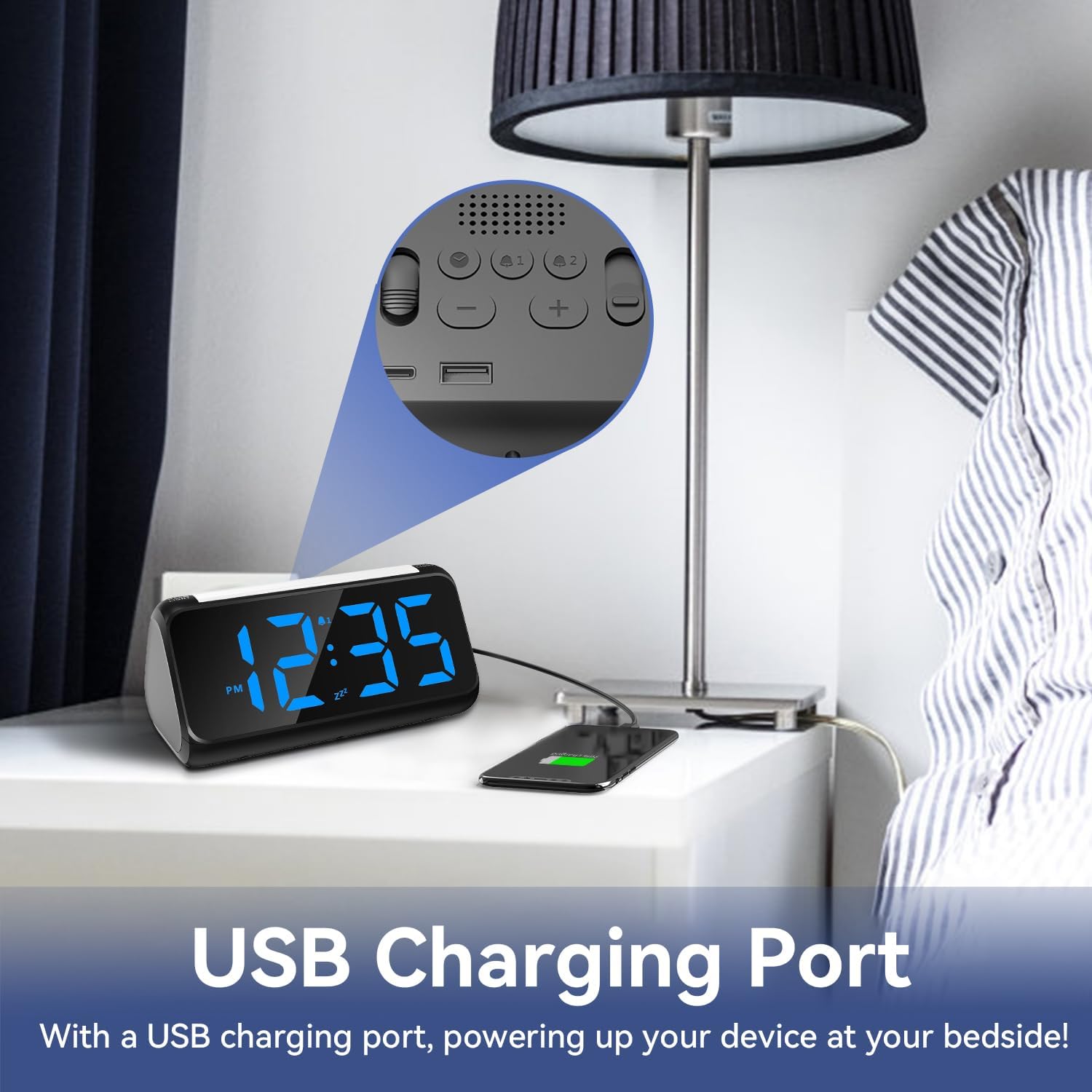
Figure 5: USB Charging Port in Use
6. Maintenance
- To clean the clock, gently wipe it with a soft, dry cloth.
- Do not use abrasive cleaners or solvents, as they may damage the surface.
- Keep the clock away from excessive moisture or direct sunlight.
7. Troubleshooting
| Problem | Possible Cause | Solution |
|---|---|---|
| Clock display is off or not working. | No power connection or power outage. | Ensure the USB-C cable and power adapter are securely connected to a working power outlet. The clock has a backup battery for time retention, but requires continuous power for display. |
| Time/Alarm settings are lost after power disconnection. | Backup battery issue or prolonged power outage. | The internal battery is for short power interruptions. For prolonged outages, settings may need to be re-entered. Ensure the battery tab is removed if applicable for first use. |
| Alarm does not sound or is too quiet. | Alarm not activated or volume too low. | Verify that the alarm is set and activated (alarm icon visible). Adjust the alarm volume using the Alarm Volume Selection button (1). |
| Night light not working or colors not changing. | Incorrect button press. | Ensure you are pressing the correct button for warm light (11) or color light selection (12). |
8. Specifications
| Feature | Detail |
|---|---|
| Brand | Netzu |
| Model Number | 5266 |
| Color | Blue |
| Display Type | Digital LED |
| Product Dimensions | 6.89"W x 3.6"H (170*85*80mm) |
| Display Digit Height | 2 inches (51mm) |
| Power Source | Electrical (5V 1A USB) with Lithium Metal battery backup |
| Special Features | Adjustable Brightness, Adjustable Volume, Dual Alarm, Large Display, Snooze, 8-Color Night Light, USB Charging Ports |
| Material | Plastic |
| Item Weight | 11.7 ounces (0.33 Kilograms) |

Figure 6: Product Dimensions
9. Warranty and Support
For warranty information or technical support, please refer to the product packaging or contact Netzu customer service through the retailer's platform where the product was purchased. Keep your purchase receipt for warranty claims.
