
Dyzeryk JS-01
Dyzeryk MP3 Player User Manual
Model: JS-01
Introduction
Thank you for choosing the Dyzeryk 4GB MP3 Player. This portable device is designed to provide high-fidelity lossless sound, allowing you to enjoy your favorite music anytime, anywhere. It features a compact design, ample storage, and easy connectivity. Please read this manual carefully to ensure proper use and maintenance of your device.
Package Contents

Image: The Dyzeryk MP3 Player in pink, shown alongside a pair of white earphones and a 4GB memory card.
- 1 x Dyzeryk MP3 Music Player
- 1 x Earphones
- 1 x Lanyard
Product Features
- HIFI Lossless Sound Quality: Equipped with a professional intelligent digital noise reduction chip for high sound sampling rate and quality.
- Long Time Playback: Up to 10 hours of music playback on a full charge. Quick charge feature provides 1 hour of use from 1 minute of charging.
- Portable and Lightweight: Compact design measuring 3.3*0.9*0.4 inches and weighing 33.2g for easy portability.
- 4GB Internal Memory: Built-in 4GB storage, expandable up to 64GB with a TF card (not included). Can also function as a USB flash drive.
- Versatile Playback Modes: Supports sequential, random, and single loop playback modes.
- Multiple Charging Options: Can be charged via computer, mobile phone charger, or portable power bank.

Image: A pink MP3 player against a background suggesting high-fidelity audio, emphasizing its sound quality.

Image: A black MP3 player surrounded by musical notes, illustrating its compatibility with various features like memory card support and folder playback.

Image: A collage showing people engaged in activities like running, cycling, and weightlifting, with the pink MP3 player in the center, highlighting its suitability for active lifestyles.
Setup
Charging the Device
Before first use, fully charge your MP3 player. The device must be turned on to charge. When the battery is low, the player will stop playing and shut down automatically. Connect the player to a power source using a USB cable (not included).
- During charging, the red light will flash.
- Once charging is complete, the red light will remain steadily on.
- A full charge typically takes 60-90 minutes.

Image: Illustrations of various charging methods for the MP3 player, including connecting to a computer, a mobile phone charger, and a portable power bank.
Transferring Music Files
The MP3 player functions as a USB flash drive. To transfer music:
- Connect the MP3 player to your computer via a USB port.
- The computer will recognize the device as a removable disk.
- Drag and drop your MP3, WMA, or WAV audio files directly into the player's storage.
- Safely eject the device from your computer once files are transferred.
Operating Instructions
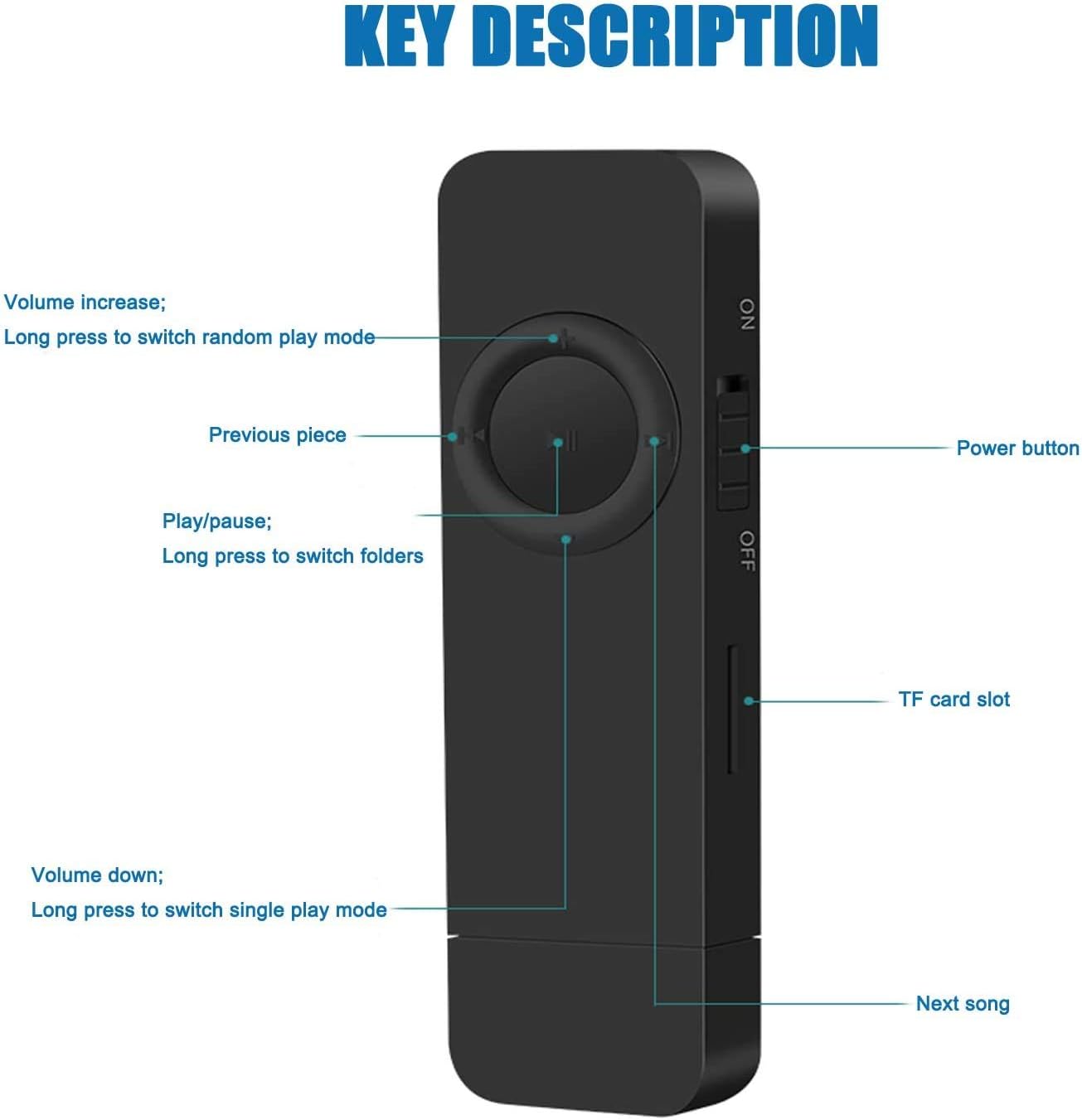
Image: A detailed diagram of the MP3 player's buttons, labeling the power switch, TF card slot, and the functions of the circular control pad (volume, previous/next track, play/pause, folder switching).
Basic Controls
- Power On/Off: Use the ON/OFF switch located on the side of the device.
- Play/Pause: Press the central Play/Pause button.
- Next Song: Press the Next Song button (right arrow).
- Previous Song: Press the Previous Song button (left arrow).
- Volume Up: Press the + button.
- Volume Down: Press the - button.
Playback Modes
The device supports different playback modes indicated by LED light behavior:
- Sequential Playback Mode: The green light flashes.
- Random Play Mode: The red light flashes. To switch to random play mode, long press the Volume Up (+) button.
- Single Loop Mode: The green and red lights alternately flash. To switch to single loop mode, long press the Volume Down (-) button.
Folder Navigation
- To switch between folders, long press the Play/Pause button.
Maintenance
- Keep the device dry. Avoid exposure to moisture or liquids.
- Clean the device with a soft, dry cloth. Do not use harsh chemicals or abrasive cleaners.
- Store the device in a cool, dry place when not in use.
- Avoid dropping or subjecting the device to strong impacts.
Troubleshooting
| Problem | Possible Cause | Solution |
|---|---|---|
| Device does not turn on. | Battery is depleted. | Charge the device for at least 1 hour. Ensure the ON/OFF switch is in the 'ON' position. |
| Cannot transfer files to the device. | Improper connection or device not recognized. | Ensure the USB cable is securely connected. Try a different USB port or computer. Restart your computer. |
| No sound from earphones. | Earphones not properly connected or faulty. Volume too low. | Ensure earphones are fully plugged in. Increase the volume. Test with another pair of earphones if available. |
| Player shuts down unexpectedly. | Low battery. | Charge the device. |
Specifications

Image: A pink MP3 player with its dimensions (3.3 inches length, 0.9 inches width) overlaid, emphasizing its stylish and compact design.
- Model: JS-01
- Dimensions: 3.3 x 0.9 x 0.4 inches (8.38 x 2.29 x 1.02 cm)
- Weight: 33.2g (1.17 ounces)
- Internal Memory: 4GB
- Expandable Memory: Supports TF card up to 64GB
- Connectivity: Hi-Speed USB 2.0 (FS) Flash disk
- Battery: 180mAh Lithium Ion (included)
- Music Formats Supported: MP3, WMA, WAV
- Color: Pink
Warranty and Support
The Dyzeryk MP3 Player comes with a 12-month warranty. If you encounter any problems or require assistance, please do not hesitate to contact our professional after-sales service team directly. We are committed to providing quick responses and satisfactory solutions to ensure your satisfaction.
For support, please refer to the contact information provided with your purchase or visit the official Dyzeryk website.
Ask a question about this manual
Ask about setup, troubleshooting, compatibility, parts, safety, or missing instructions. Manuals+ will review the question and use this page’s manual context to help answer it.