Download PDFFree PDF. The Save button below keeps a bookmark and private notes in your account.
User Manual: TWS Wireless Bluetooth 5.0 Earbuds
Model: TWS Bluetooth 5.0 Earbuds
Brand: SGNICS
1. Product Overview
These SGNICS TWS Wireless Bluetooth 5.0 Earbuds offer a high-quality audio experience with advanced features designed for convenience and durability. They feature Bluetooth V5.0 for stable connectivity, IPX5 water resistance, and intuitive touch controls. The ergonomic design ensures comfort for extended wear, making them suitable for various activities.
Figure 1.1: SGNICS TWS Wireless Bluetooth 5.0 Earbuds in their open charging case, showcasing the earbuds and the charging contacts. The image highlights the compact and sleek design of the product.
Package Contents:
TWS Wireless Bluetooth Earbuds (Left and Right)
Portable Charging Case
Type-C Charging Cable
User Manual
2. Setup and First Use
2.1 Initial Charging
Before first use, ensure the earbuds and charging case are fully charged. This typically takes approximately 1 hour for the charging case to reach full capacity.
Place both earbuds into the charging case, ensuring they are correctly seated.
Connect the provided Type-C charging cable to the charging port on the case and the other end to a USB power source (e.g., computer, wall adapter).
The indicator light on the charging case will illuminate to show charging status. It will typically turn off or change color when fully charged.
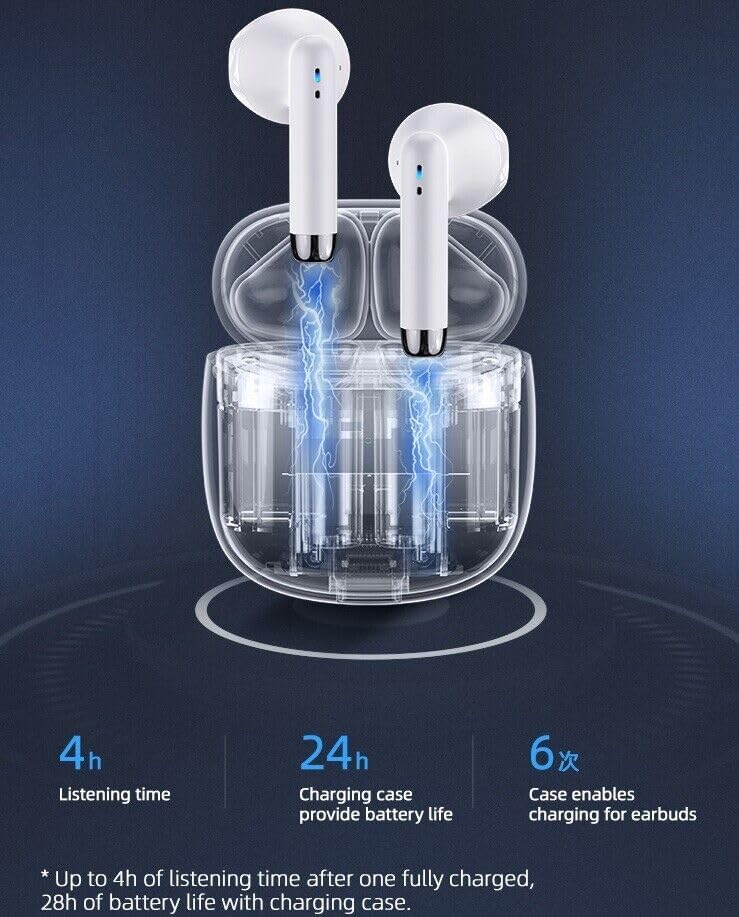
Figure 2.1: Illustration of earbuds charging within the case, highlighting the battery life: 4 hours listening time per charge, 24 hours additional battery life from the case, allowing for 6 full charges of the earbuds.
2.2 Pairing with Your Device
The earbuds feature smart one-step reconnection, automatically connecting to the last paired device after the initial setup.
Ensure the earbuds are charged.
Open the charging case. The earbuds will automatically power on and enter pairing mode.
On your smartphone or Bluetooth-enabled device, navigate to the Bluetooth settings.
Search for available devices and select "TWS Earbuds" (or similar name) from the list.
Once connected, a voice prompt will confirm successful pairing.
Note: If pairing fails, place the earbuds back into the case, close the lid, wait a few seconds, then reopen and try again. Ensure Bluetooth is enabled on your device.
3. Operating Instructions
3.1 Touch Controls
The earbuds are equipped with multi-functional touch panels for easy control of audio playback and calls.
Function
Action
Play/Pause Music
Single tap on either earbud.
Next Track
Double tap on the Right earbud.
Previous Track
Double tap on the Left earbud.
Answer/End Call
Single tap on either earbud.
Reject Call
Press and hold either earbud for 2 seconds.
Activate Voice Assistant (Siri/Google Assistant)
Triple tap on either earbud.
3.2 Single Earbud Use
Either earbud can be used independently for calls or music playback. Simply take one earbud out of the case, and it will automatically connect to your device if previously paired.
4. Maintenance and Care
4.1 Cleaning
Regular cleaning helps maintain optimal performance and hygiene.
Use a soft, dry, lint-free cloth to wipe the earbuds and charging case.
For stubborn dirt, slightly dampen the cloth with water or a mild, non-abrasive cleaner. Avoid excessive moisture.
Clean the charging contacts on both the earbuds and the case periodically to ensure proper charging.
Do not use harsh chemicals, aerosols, or abrasive cleaners.
4.2 Storage
When not in use, store the earbuds in their charging case to protect them from dust, dirt, and physical damage.
4.3 Water Resistance (IPX5)
The earbuds are rated IPX5 water resistant, meaning they can withstand splashes and sweat. They are not designed for submersion in water or for use during swimming.
Figure 4.1: Visual representation of the earbuds' sweat-proof and water-resistant capabilities, suitable for sports and active use.
5. Troubleshooting
If you encounter issues with your earbuds, please refer to the following common solutions:
Problem
Possible Solution
Earbuds not pairing/connecting
Ensure earbuds are charged.
Turn off and on Bluetooth on your device.
Forget "TWS Earbuds" from your device's Bluetooth list and re-pair.
Place earbuds back in case, close lid, wait 10 seconds, then reopen.
No sound from one earbud
Ensure both earbuds are charged.
Place both earbuds back in the case, close the lid, then take them out together.
Check device's audio balance settings.
Charging case not charging
Verify the Type-C cable is securely connected to both the case and the power source.
Try a different USB port or power adapter.
Ensure the charging port on the case is clean and free of debris.
Poor sound quality
Ensure earbuds are fully inserted and fit properly in your ears.
Clean any earwax or debris from the earbud speaker mesh.
Move closer to your connected device to avoid interference.
Figure 6.1: Visual summary of key performance metrics including 4 hours play time, 32 hours standby time, and 1 hour charging time for the earbuds.
Figure 6.2: Diagram showcasing the Bluetooth 5.0 chip and a performance graph indicating low latency for smooth operation.
7. Warranty and Support
For warranty information or technical support, please refer to the contact details provided with your purchase or visit the official SGNICS website. Keep your proof of purchase for any warranty claims.
This product is designed for optimal performance and durability. Should you require assistance beyond the scope of this manual, please do not hesitate to contact customer support.
Ask a question about this manual
Ask about setup, troubleshooting, compatibility, parts, safety, or missing instructions. Manuals+ will review the question and use this page’s manual context to help answer it.