
1. Introduction
Thank you for purchasing the HOOBRO GD77UBZP201 Charging Station End Table. This versatile 3-tier side table is designed to provide convenient power access and ample storage, enhancing the functionality and aesthetic of your living space. Featuring a durable gold metal frame, a tempered glass top, and a built-in charging station with USB ports and AC outlets, this table is a practical addition to any room. Please read this manual carefully before assembly and use to ensure safe and proper operation.
2. Safety Information
- Always place the table on a flat, stable surface to prevent tipping.
- Do not exceed the maximum load capacity: 44 lbs (20 kg) for the top shelf, and 11 lbs (5 kg) for each mesh shelf.
- Keep liquids away from the charging station to prevent electrical shock.
- Do not disassemble or modify the electrical components. Contact qualified personnel for repairs.
- Ensure all connections are secure before plugging the table into a power outlet.
- Keep small parts and packaging materials away from children to avoid choking hazards.
- Avoid exposing the table to direct sunlight or extreme temperatures for prolonged periods.
3. Package Contents
Please verify that all components are present before beginning assembly. If any parts are missing or damaged, please contact customer support.
- Metal Frame Components
- Tempered Glass Top
- Mesh Shelves (2)
- Charging Station Unit (with 2 USB ports, 2 AC outlets, and power cord)
- Adjustable Feet (4)
- Assembly Hardware (screws, bolts, etc.)
- Assembly Tools (e.g., Allen wrench)
- Instruction Manual
4. Setup and Assembly Instructions
Assembly is designed to be straightforward and typically takes about 15 minutes. Follow these steps carefully:
- Unpack Components: Carefully remove all parts from the packaging and lay them out on a clean, soft surface to prevent scratches.
- Assemble the Frame: Connect the metal frame components using the provided hardware. Ensure all screws are finger-tightened initially.
- Install Mesh Shelves: Slide the two mesh shelves into their designated slots within the frame. Secure them with the appropriate hardware.
- Attach Charging Station: Mount the charging station unit to the designated area on the frame. Ensure the power cord is routed correctly and not pinched.
- Place Tempered Glass Top: Carefully place the tempered glass top onto the top of the frame. Ensure it is seated securely.
- Install Adjustable Feet: Screw the four adjustable feet into the bottom of the table legs.
- Final Tightening: Once all parts are assembled, fully tighten all screws and bolts using the provided tool.
- Adjust Leveling: Adjust the feet as needed to ensure the table is stable and level on your floor.

Image 1: The HOOBRO GD77UBZP201 End Table fully assembled, positioned next to a bed.
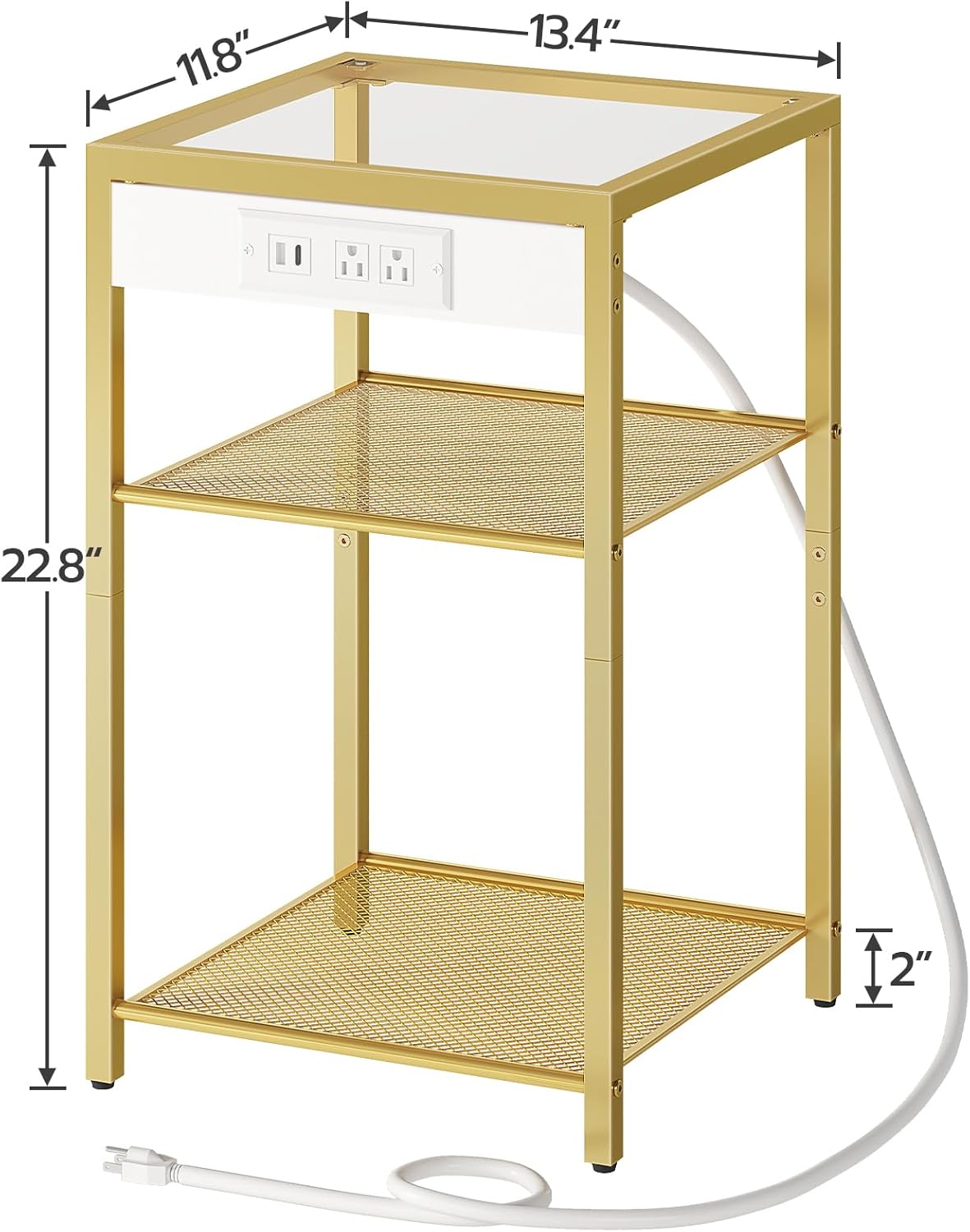
Image 2: Diagram showing the dimensions of the end table: 13.4 inches (length) x 11.8 inches (width) x 22.8 inches (height).
5. Operating Instructions
The HOOBRO GD77UBZP201 End Table features an integrated charging station for your electronic devices.
- Power Connection: Plug the table's power cord (4.9 feet long) into a standard 125V/12A AC wall outlet.
- Using AC Outlets: The charging station includes two 125V/12A AC outlets. Plug your devices (e.g., lamps, laptops, small appliances) directly into these outlets.
- Using USB Ports: Two 5V/2A USB ports are provided for charging smartphones, tablets, and other USB-powered devices. Connect your device's USB cable to the port.
- Using Type-C Port: One 5V/2A Type-C port is available for compatible devices, offering fast charging capabilities.
Always ensure that the total power draw of all connected devices does not exceed the charging station's maximum capacity.

Image 3: A close-up view of the integrated charging station, showing the two AC outlets, two USB ports, and one Type-C port.
6. Maintenance
Proper care will extend the life and appearance of your HOOBRO End Table.
- Cleaning the Glass Top: Use a soft, damp cloth and a mild glass cleaner to wipe the tempered glass surface. Avoid abrasive cleaners or harsh chemicals that may scratch or damage the glass.
- Cleaning the Metal Frame: Wipe the gold metal frame with a soft, dry cloth. For stubborn marks, a slightly damp cloth can be used, followed by immediate drying.
- Dusting: Regularly dust all surfaces with a soft cloth to prevent buildup.
- Electrical Components: Ensure the charging station and power cord are kept clean and free of dust. Do not use liquid cleaners directly on electrical parts.
- Check Connections: Periodically check all screws and bolts to ensure they remain tight. Retighten if necessary.
7. Troubleshooting
If you encounter any issues with your end table, refer to the following common problems and solutions:
| Problem | Possible Cause | Solution |
|---|---|---|
| Table is wobbly/unstable | Uneven floor; loose screws | Adjust the leveling feet; tighten all assembly screws. |
| Charging station not working | Not plugged in; power outage; faulty device cable; overloaded circuit | Ensure power cord is securely plugged into a live outlet; check household circuit breaker; try a different device cable; reduce number of connected devices. |
| Scratches on glass top | Abrasive cleaning; sharp objects | Use soft cloths and non-abrasive cleaners; avoid dragging sharp objects across the surface. |
If the problem persists after attempting these solutions, please contact HOOBRO customer support.
8. Specifications
- Brand: HOOBRO
- Model: GD77UBZP201
- Dimensions (L x W x H): 13.4" x 11.8" x 22.8" (34 cm x 30 cm x 57.9 cm)
- Material: Tempered Glass, Metal Frame (Gold finish)
- Top Shelf Load Capacity: 44 lbs (20 kg)
- Mesh Shelf Load Capacity: 11 lbs (5 kg) per shelf
- AC Outlets: 2 (125V/12A)
- USB Ports: 2 (5V/2A)
- Type-C Port: 1 (5V/2A)
- Power Cord Length: 4.9 feet
- Assembly Required: Yes
- Room Type: Living Room, Bedroom
9. Warranty and Support
HOOBRO products are designed for quality and durability. For warranty information, product support, or to report missing/damaged parts, please refer to the contact information provided with your purchase or visit the official HOOBRO website. Please have your model number (GD77UBZP201) and purchase details ready when contacting support.

