
LUTEC 76328010xx
LUTEC 3-Head LED Floodlight User Manual
Model: 76328010xx
Product Overview
The LUTEC 3-Head LED Floodlight is a high-performance outdoor lighting solution designed for security and illumination. It features three adjustable LED heads, a sensitive motion detector, and multiple lighting modes, making it suitable for various outdoor applications such as garages, yards, porches, and driveways.

Figure 1: Front view of the LUTEC 3-Head LED Floodlight.
Key Features
- Energy Efficient: 72W LED lamps provide 7500 lumens of 5000K daylight white light, equivalent to a 630W incandescent bulb, saving up to 88% on electricity.
- Motion Detection: 180-degree detection angle, sensing motion from 0 to 21 meters (0-69 feet). Adjustable timer for 1, 3, or 10 minutes.
- Multiple Lighting Modes: Includes Test Mode, Security Mode, Dusk-to-Dawn Mode, and Manual Mode for flexible operation.
- Adjustable Design: Rotatable metal heads allow for customizable coverage.
- Durable Construction: Made from aluminum with an IP65 waterproof rating, ensuring a 50,000-hour lifespan.

Figure 2: Illustration of the floodlight's super brightness, showing 72W power, 5000K color temperature, and 7500 lumens output.

Figure 3: The flexible adjustable design allows for broad and wide light coverage, with heads rotating up to 300 degrees.
Setup and Installation
Package Contents
Ensure all components are present before beginning installation:
- LUTEC 3-Head LED Floodlight unit
- Mounting hardware
- User Manual (this document)
Installation Steps
This floodlight is designed for hardwired installation. A junction box is required but not included. Professional installation is recommended.
- Safety First: Before starting, ensure the power supply to the installation area is turned off at the circuit breaker.
- Mounting Location: Choose a suitable outdoor location (e.g., wall, eaves) that provides the desired coverage and is within reach of electrical wiring. The unit is designed for ground mounting, but can be wall-mounted.
- Mounting the Fixture: Securely attach the floodlight base to the mounting surface using the provided hardware. Ensure it is firmly fixed to prevent movement.
- Wiring Connection: Connect the floodlight's wires to your household electrical wiring.
- Connect the Live Wire (typically black or brown) from the fixture to the Live wire from the junction box.
- Connect the Neutral Wire (typically white or blue) from the fixture to the Neutral wire from the junction box.
- Connect the Earth Wire (typically green/yellow or bare copper) from the fixture to the Earth wire from the junction box.
- Adjusting Heads: Once mounted, adjust the three light heads to direct illumination to your desired areas.
- Restore Power: Turn the power back on at the circuit breaker.

Figure 4: Wiring connections for installation, showing Live, Neutral, and Earth wires.
Operating Instructions
Motion Sensor Operation
The integrated motion sensor detects movement within its 180-degree field of view, up to 69 feet (21 meters) away. The light will activate when motion is detected and remain on for a set duration.

Figure 5: The motion sensor offers a 180-degree sensing angle with a maximum range of 69 feet. The sensor deactivates during daylight hours.
Adjusting Sensitivity and Time
The motion sensor has adjustable settings for sensitivity (distance) and the duration the light stays on (time). These controls are typically located on the sensor unit itself.
- Sensitivity (DISTANCE):
- L (Low): 0-20 ft. detection range.
- M (Medium): 20-39 ft. detection range.
- H (High): 39-69 ft. detection range.
- Time (TIME): Sets how long the light remains on after motion is no longer detected.
- 1 MIN: Light stays on for 1 minute.
- 3 MIN: Light stays on for 3 minutes.
- 10 MIN: Light stays on for 10 minutes.

Figure 6: Close-up of the motion sensor controls for adjusting sensitivity (DISTANCE) and illumination time (TIME).
Lighting Modes
The floodlight offers four distinct operating modes:
- Test Mode: Used during installation to check sensor functionality and light coverage. The light will turn on briefly with any detected motion, regardless of ambient light.
- Security Mode: The light activates only when motion is detected during nighttime hours.
- Dusk-to-Dawn Mode: The light automatically turns on at a lower brightness (e.g., 20%) at dusk and stays on until dawn. It will switch to full brightness if motion is detected.
- Manual Mode (Override Mode): Allows the light to stay on constantly at 100% brightness for a selected period, typically 6 hours, overriding the motion sensor and dusk-to-dawn functions. This mode is usually activated by quickly toggling the power switch.

Figure 7: Illustration of Dusk-to-Dawn mode, where the light automatically turns on at night and off at dawn, with full brightness activation upon motion detection.
Maintenance
The LUTEC LED Floodlight is designed for minimal maintenance. Follow these guidelines to ensure optimal performance and longevity:
- Cleaning: Periodically clean the light heads and motion sensor lens with a soft, damp cloth to remove dirt, dust, or debris. Do not use abrasive cleaners or solvents.
- Inspection: Annually inspect the wiring and mounting hardware for any signs of wear, corrosion, or loosening. Tighten any loose screws and replace damaged wiring if necessary (ensure power is off before inspection).
- LED Longevity: The LED lamps are designed for a long lifespan (50,000 hours) and are not user-replaceable. If the LEDs fail, the entire unit may need replacement.
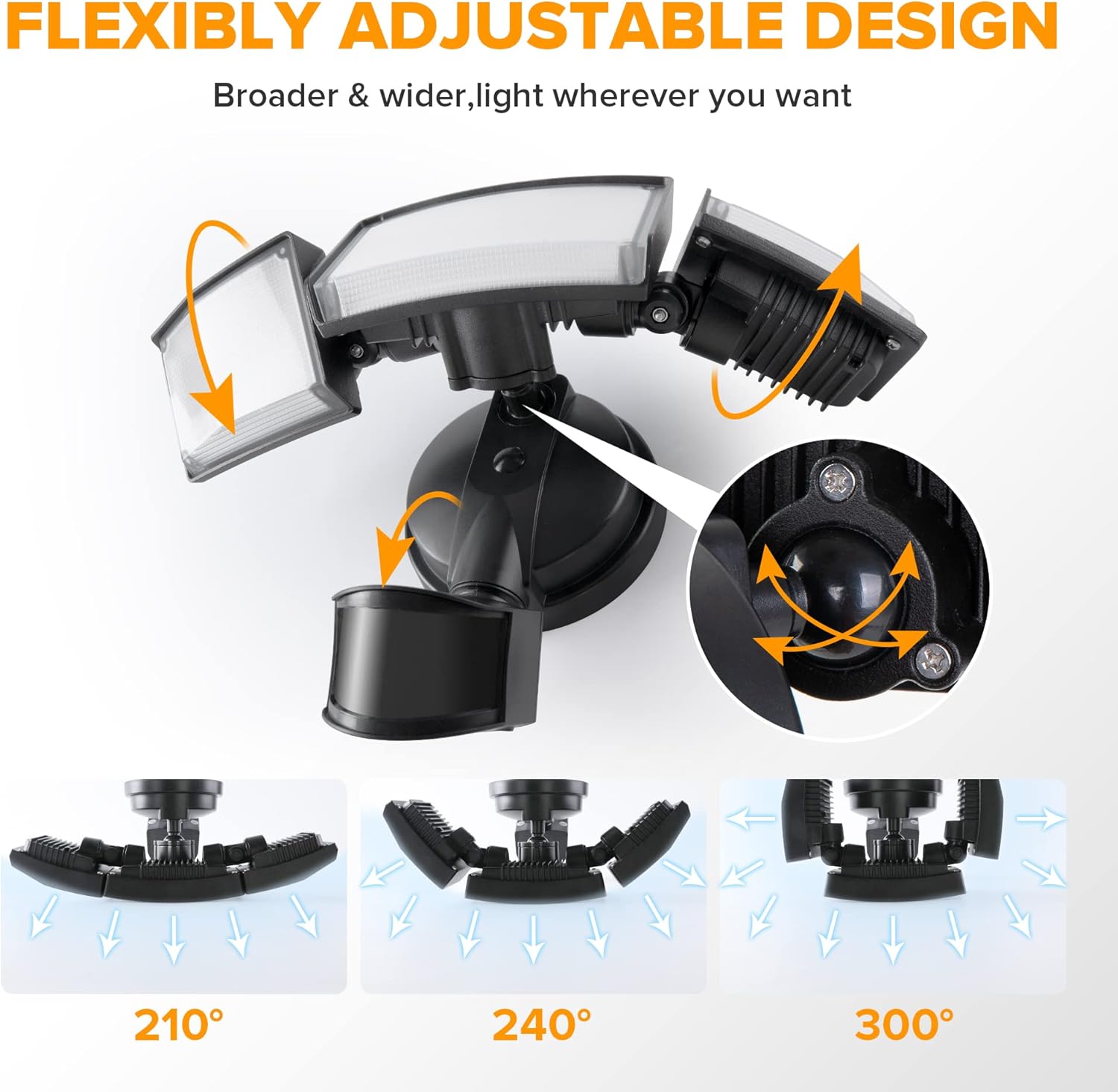
Figure 8: Internal view showing the professional filter lens, high-quality LED beads, and aluminum construction, contributing to the product's durability.
Troubleshooting
If you encounter issues with your LUTEC LED Floodlight, refer to the following common troubleshooting steps:
| Problem | Possible Cause | Solution |
|---|---|---|
| Light does not turn on. | No power; faulty wiring; sensor blocked; incorrect mode setting. | Check circuit breaker. Verify wiring connections. Clear any obstructions from the sensor. Ensure the light is not in "Dusk-to-Dawn" mode during daylight or "Test" mode is not active. |
| Light stays on constantly. | Sensor continuously detecting motion; "Manual Mode" activated; faulty sensor. | Check for constant motion in the detection area (e.g., swaying branches). Toggle power off/on quickly to exit "Manual Mode". If problem persists, sensor may be faulty. |
| Light turns on for no apparent reason. | Sensor sensitivity too high; environmental factors (wind, small animals). | Reduce sensor sensitivity (set to 'L' or 'M'). Adjust sensor angle to avoid unwanted triggers. |
| Light flickers or dims. | Unstable power supply; loose wiring connection; end of product life. | Consult an electrician to check power supply stability. Inspect and secure wiring connections (power off). If the product is old, it may be reaching the end of its lifespan. |
If these steps do not resolve the issue, please contact LUTEC customer support.
Specifications
| Brand | LUTEC |
| Model Number | 76328010xx |
| Dimensions (L x W x H) | 32.99 x 20.5 x 13 cm (12.99 x 8.07 x 5.12 inches) |
| Weight | 1.11 Kilograms (2.45 lbs) |
| Power Consumption | 72 Watts |
| Luminous Flux | 7500 Lumens |
| Color Temperature | 5000 Kelvin (Daylight White) |
| Material | Aluminum (excluding motion sensor) |
| Ingress Protection (IP) Rating | IP65 (Weather-resistant, Frost-resistant) |
| Voltage | 120 Volts |
| Special Features | Motion Detector, Adjustable Heads, Dusk-to-Dawn Mode |
| Lifespan | 50,000 hours |
Warranty and Support
For warranty information, technical support, or replacement parts, please contact LUTEC customer service directly. Refer to the product packaging or the official LUTEC website for the most up-to-date contact details.
Please have your model number (76328010xx) and purchase date ready when contacting support.
Related documents76328010xx


Ask a question about this manual
Ask about setup, troubleshooting, compatibility, parts, safety, or missing instructions. Manuals+ will review the question and use this page’s manual context to help answer it.