
1. Introduction
This manual provides essential instructions for the safe and effective use of your Otech DIV004 Li-ion battery, designed for compatibility with Doro DFC-0130 portable telephones. Please read this manual thoroughly before installation and use to ensure optimal performance and safety.

Image 1: Front view of the Otech DIV004 Li-ion Battery Pack, showing brand, model, voltage, capacity, and safety warnings.
2. Safety Information
Your safety is paramount. Please observe the following precautions:
- Disposal: Do not dispose of the battery in fire. This may cause an explosion.
- Charging: Use only the specified charger for your Doro DFC-0130 telephone. Using an incompatible charger may damage the battery or device and poses a fire risk.
- Short Circuit: Do not short circuit the battery terminals. This can lead to overheating, fire, or explosion.
- Temperature: Avoid exposing the battery to extreme temperatures (hot or cold).
- Damage: Do not use the battery if it appears damaged, swollen, or leaking.
- Children: Keep batteries out of reach of children.
3. Setup and Installation
Follow these steps to install the Otech DIV004 battery into your Doro DFC-0130 telephone:
- Power Off: Ensure your Doro DFC-0130 telephone is completely powered off before beginning installation.
- Remove Battery Cover: Locate and carefully remove the battery compartment cover on the back of your telephone. Refer to your phone's original manual if you need assistance.
- Remove Old Battery (if applicable): If replacing an existing battery, gently lift it out of the compartment.
- Insert New Battery: Align the Otech DIV004 battery with the contacts in the battery compartment. Ensure the battery is inserted with the correct polarity, matching the markings inside the compartment. Do not force the battery into place.
- Secure Cover: Replace the battery compartment cover, ensuring it clicks securely into place.
- Initial Charge: It is recommended to fully charge the new battery before its first use.
4. Operating Instructions (Charging)
To ensure the longevity and performance of your Otech DIV004 battery, follow these charging guidelines:
- First Use: For optimal performance, fully charge the battery before its initial use.
- Charger Compatibility: Always use the original or a certified compatible charger designed for your Doro DFC-0130 telephone.
- Charging Process: Connect your telephone to its charger. The phone's display or indicator light will typically show that it is charging.
- Full Charge: Disconnect the charger once the battery is fully charged to prevent overcharging, although modern batteries and chargers have built-in protection.
- Avoid Deep Discharge: While Li-ion batteries do not suffer from 'memory effect', it is generally best to recharge them before they are completely depleted.
5. Maintenance
Proper maintenance will help extend the life of your Otech DIV004 battery:
- Storage: If storing the battery for an extended period, keep it in a cool, dry place, ideally at about 50% charge. Avoid extreme temperatures.
- Cleaning: Periodically clean the battery contacts and the phone's battery terminals with a clean, dry cloth to ensure good connection.
- Avoid Physical Damage: Do not drop, puncture, or disassemble the battery.
- Recycling: When the battery reaches the end of its life, dispose of it responsibly at an authorized recycling facility. Do not discard with household waste.
6. Troubleshooting
If you encounter issues with your Otech DIV004 battery, consider the following:
- Battery Not Charging:
- Ensure the charger is properly connected to both the phone and a working power outlet.
- Verify that the battery is correctly seated in the phone's compartment.
- Try using a different compatible charger or power outlet to rule out charger or outlet issues.
- Clean the battery and phone contacts.
- Short Battery Life:
- Ensure the battery has been fully charged.
- Reduce background applications or features on your phone that consume significant power.
- Battery life naturally diminishes over time and with usage cycles. If the battery is old, replacement may be necessary.
- Battery Swelling or Overheating:
- Immediately discontinue use of the battery and phone.
- Carefully remove the battery if safe to do so and dispose of it properly at a recycling facility.
- Do not attempt to charge or use a swollen or excessively hot battery.
If problems persist, contact Otech customer support or your retailer for further assistance.
7. Specifications
| Feature | Specification |
|---|---|
| Brand | Otech |
| Model | DIV004 |
| Compatibility | Doro DFC-0130 |
| Battery Type | Li-ion |
| Voltage | 3.7V |
| Capacity | 850mAh |
| Energy | 3.14Wh |
| Manufacturer | Otech |
| ASIN | B0BBTKB9DJ |
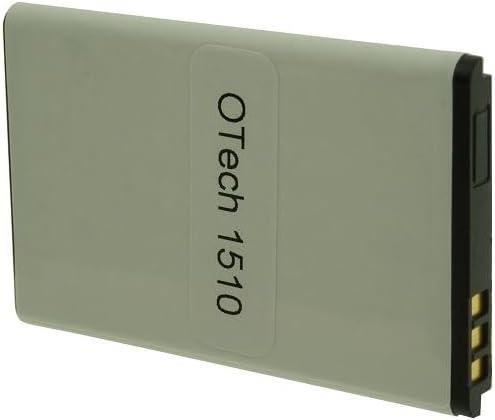
Image 2: Back view of the Otech DIV004 Li-ion Battery Pack, showing the 'Otech 1510' label.
8. Warranty and Support
The Otech DIV004 battery comes with a 1-year warranty from the date of purchase. This warranty covers manufacturing defects under normal use.
For warranty claims, technical support, or any questions regarding your Otech battery, please contact your retailer or Otech customer service directly. Please have your purchase receipt and product information available when contacting support.
For more information, you may visit the Otech brand page.

