
1. Product Overview
The Vonets VAP11G-500S is an industrial-grade 2.4GHz Mini WiFi Bridge, Wireless Repeater, Router, and Ethernet to WiFi Adapter. It is designed for robust performance in various industrial applications, offering stable and reliable network connectivity. This device supports both WiFi to wired and wired to WiFi functions, making it versatile for different networking needs. It features an inbuilt antenna and a compact design, providing a strong signal despite its small size.
Key features include a WiFi rate of 300Mbps, selectable WiFi transmit power (19dBm/23dBm), and a point-to-point transmission distance exceeding 100m in obstacle-free environments for small data, or less than 100m for video transmission. It is powered by a wide voltage range of DC5V-24V and includes two-stage automatic overvoltage protection.
2. Package Contents
Please check the package contents upon unboxing. If any items are missing or damaged, contact customer support.
- 1 x Vonets VAP11G-500S Device
- 1 x USB Power Cable (with DC connector)
- 1 x Ethernet Cable
- 1 x Fixing Kit
- 1 x Quick Setting Guide

Image: Vonets VAP11G-500S device with its USB power cable and Ethernet cable.
3. Product Diagram
Familiarize yourself with the device components and connection ports.
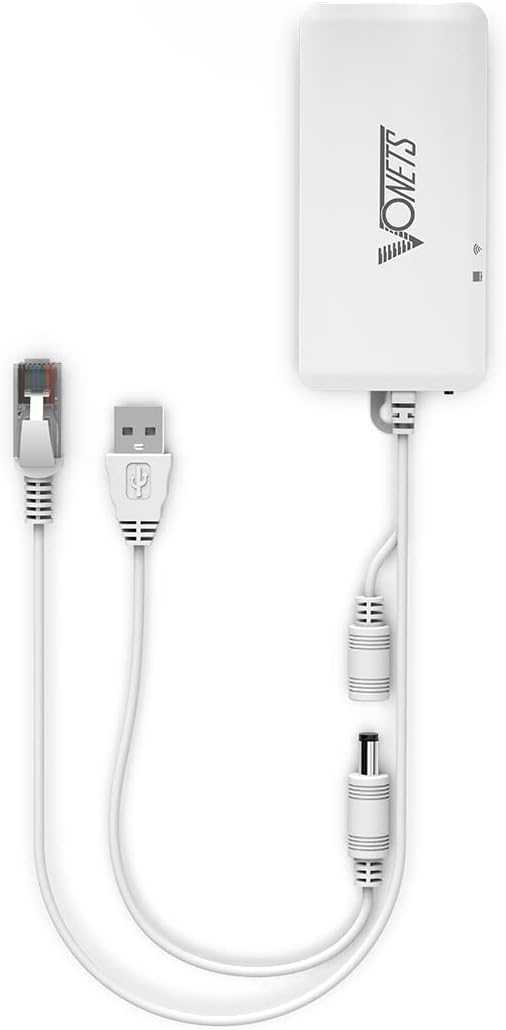
Image: Top view of the VAP11G-500S showing the Ethernet port, power input, and indicator lights.

Image: Illustration of power supply options including USB, industrial wiring head, and DC power supply for the VAP11G-500S.
4. Installation & Setup
Follow these steps to install and configure your VAP11G-500S device.
4.1 Powering the Device
- Connect the USB power cable to the device's power input port.
- Connect the USB end of the cable to a 5V/2A USB power adapter or a computer's USB port.
- Ensure the device powers on, indicated by the LED lights.
4.2 Initial Configuration (via Computer)
To configure the device, you will need to connect it to a computer via an Ethernet cable.
- Connect one end of the Ethernet cable to the VAP11G-500S Ethernet port and the other end to your computer's Ethernet port.
- Open a web browser on your computer.
- In the address bar, enter
http://vonets.cfgor the default IP address192.168.254.254and press Enter. - You will be prompted for a User ID and password. The default for both is
admin. Click "Login". - Navigate to the "Scan Hotspots" section. The device will search for available WiFi networks.
- Select your desired WiFi network (SSID) from the list and click "Next".
- Enter the password for your selected WiFi network.
- Click "Apply" and then "Reboot" (or power off and on the device). The device will reboot, which may take approximately 1 minute. Wait until the LED lights flash normally.
- Once rebooted, the device should be connected to your WiFi network, and you can access the internet.
5. Operating Modes & Applications
The VAP11G-500S supports multiple operating modes and is suitable for various applications.
5.1 WiFi Bridge/Repeater Application
This mode expands existing WiFi networks. The WiFi signal is converted into a wired signal, which can then be connected to a network port device via an RJ45 cable. This eliminates the need for extensive wiring and is suitable for devices like cash registers, printers, surveillance video recorders, and attendance machines.
5.2 Access Point (AP) Application
In AP mode, the device functions as a wireless access point for a wired network. This is ideal for scenarios where a network cable is connected to a computer, allowing other wireless devices to access the internet without requiring a dial-up connection.
5.3 Industrial Applications
The VAP11G-500S is designed for industrial environments, offering stable connectivity for:
- PLC (Programmable Logic Controller) Systems: Facilitates wireless communication for industrial automation.
- Robotic Arms: Enables data transfer for industrial robotic arms.
- Video Transmission: Supports long-distance point-to-point wireless video transmission, useful for security systems, DVRs, and IP cameras.
- Medical Devices: Provides reliable networking for sensitive medical equipment.
- IoT Devices: Connects various Internet of Things devices in industrial settings.

Image: Various application scenarios for the VAP11G-500S, demonstrating its versatility in networking.
6. Specifications
Detailed technical specifications for the Vonets VAP11G-500S.
| Feature | Specification |
|---|---|
| Brand | Vonets |
| Model | VAP11G-500S |
| Wireless Communication Standard | 802.11b, 802.11g, 802.11n |
| Data Transfer Rate | 300 Megabits Per Second |
| Frequency Band Class | Single-Band (2.4 GHz) |
| Connector Type | USB, DC, RJ45 |
| Compatible Devices | Various network devices (except WiFi6, enterprise level encrypted devices) |
| Range | Up to 300 meters (without obstacles, small data) |
| Item Weight | 0.13 Kilograms |
| Power Supply | DC5V-24V (Typical 5V/2A, ripple less than 100mV) |
| Overvoltage Protection | Two-stage automatic (Protection voltage upper limit 27V) |
7. Troubleshooting
If you encounter issues with your VAP11G-500S, consider the following common solutions:
- No Power: Ensure the power cable is securely connected and the power source (USB adapter or DC supply) is functioning correctly. Verify the power supply meets the DC5V-24V requirement.
- Cannot Access Configuration Page: Double-check that your computer is directly connected to the device via Ethernet. Ensure your computer's IP settings are set to obtain an IP address automatically (DHCP). Try entering both
http://vonets.cfgand192.168.254.254in your browser. - No Internet Connection After Configuration: Verify that the WiFi password entered during configuration is correct. Ensure the source WiFi network is active and providing internet access. Reboot the VAP11G-500S device after applying settings.
- Poor WiFi Signal: Ensure the device is placed in an optimal location, free from obstructions. While the VAP11G-500S has an inbuilt antenna, environmental factors can affect signal strength.
- Device Not Responding: Try performing a factory reset if the device becomes unresponsive. Refer to the Quick Setting Guide for factory reset instructions.
8. Warranty & Support
The Vonets VAP11G-500S comes with a one-year warranty from the date of purchase. This warranty covers manufacturing defects and ensures the product meets its specified performance standards under normal use.
For technical assistance, troubleshooting, or warranty claims, please contact Vonets customer support. You can reach them via email at support@vonets.com.
Please retain your proof of purchase for warranty validation.


