
Introduction
Thank you for purchasing the OUTON Floor Lamp with Table. This integrated unit combines a functional floor lamp with a convenient side table, featuring charging ports and adjustable lighting. This manual provides essential information for safe assembly, operation, and maintenance of your new product. Please read it thoroughly before use and retain it for future reference.
Product Features
- Integrated Floor Lamp with Built-in Shelf: Combines lighting with a display area for small items. The lamp arm can rotate for adjustable illumination.
- 4 Color Temperature & Stepless Dimmable: Features a 9W (810LM) LED light with stepless brightness dimming (5%-100%) and four color temperature options (3000K/4000K/5000K/6000K).
- Side Table with Charging Ports: Includes 5V 2A USB and Type-C charging ports, accessible whether the lamp is on or off.
- Includes Bulb and Remote Control: Comes with an energy-efficient LED bulb and a magnetic remote control with a 49-foot range.
- Rotatable Cloth Cover & Easy Assembly: The lampshade can be rotated 180 degrees. Assembly is straightforward with included instructions and no extra tools required.
Setup and Assembly
The OUTON Floor Lamp with Table is designed for easy assembly. Follow the included assembly drawings. No additional tools are required.

Image: Components laid out for easy assembly, including shelves, poles, lamp head, and power unit.
Video: Official OUTON video demonstrating the assembly process for the Floor Lamp with Table. This video shows how to connect the table shelves to the lamp's frame and attach the lampshade.
Video: Official OUTON video showcasing the assembly of the Floor Lamp with Shelf, highlighting the ease of putting together the components.
Operating Instructions
Light Control
The lamp can be controlled using the included magnetic remote control or the foot pedal switch. The remote offers comprehensive control over brightness, color temperature, and special modes.

Image: Customizable light settings and dimming levels controlled by the remote.

Image: Dual control options: remote control and foot pedal switch.
- Power On/Off: Use the power button on the remote or step on the foot pedal switch.
- Brightness Adjustment: Use the '+' and '-' buttons on the remote for stepless dimming (5%-100%).
- Color Temperature: Use the 'K' button to cycle through 3000K (Warm White), 4000K (Daylight), 5000K (Cool White), and 6000K (Cool White).
- Preset Modes: The remote includes buttons for specific lighting modes such as Reading Mode (book icon), Working Mode (laptop icon), Breastfeeding Mode (bottle icon), and Night Light Mode (moon icon).
- Timer Function: Set a 1-hour timer using the '1H' button on the remote.
- Memory Function: The lamp remembers your last brightness and color temperature settings when turned off and on.
- Adjustable Lampshade: The lampshade can be rotated 180 degrees to direct light as needed.

Image: Examples of different lighting modes for various activities.
Charging Ports
The side table is equipped with convenient charging ports.

Image: Close-up of the 3-in-1 charging station on the side table.
- AC Outlet: One 125V/12A AC outlet for standard electrical devices.
- USB A Port: One 5V/2A USB A charging port.
- USB C Port: One 5V/2A USB Type-C charging port.
- These ports are functional whether the lamp is turned on or off.
Video: Official OUTON video demonstrating the use of the charging ports on the Floor Lamp with Table.
Maintenance
To ensure the longevity and optimal performance of your OUTON Floor Lamp with Table, follow these maintenance guidelines:
- Cleaning: Wipe the lamp and table surfaces with a soft, dry cloth. Avoid using abrasive cleaners or solvents that may damage the finish.
- Bulb Replacement: The lamp uses a 9-watt E26 LED bulb. Ensure the lamp is unplugged before replacing the bulb. Use only compatible LED bulbs (maximum 60 Watts).
- Cord Care: Regularly inspect the power cord for any damage. Keep the cord away from heat sources and sharp objects.
- Stability: Periodically check all connections and screws to ensure they are tight and secure.
Troubleshooting
If you encounter any issues with your OUTON Floor Lamp with Table, please refer to the following common solutions:
- Lamp Not Turning On:
- Ensure the power cord is securely plugged into a working electrical outlet.
- Check if the bulb is correctly installed and not burnt out.
- Verify that the foot pedal switch is pressed to the 'on' position.
- Confirm the remote control batteries are functional and the remote is within range.
- Charging Ports Not Working:
- Ensure the foot switch is kept on for the charging ports to function.
- Verify that the devices are connected with the correct charging cables.
- Check if the main power switch for the charging ports (if present) is in the 'on' position.
- Remote Control Not Responding:
- Replace the remote control batteries.
- Ensure there are no obstructions between the remote and the lamp.
If the issue persists, please contact OUTON customer support for further assistance.
Specifications
| Feature | Specification |
|---|---|
| Model Number | ZZZ01 |
| Brand | OUTON |
| Product Dimensions | 16"D x 12"W x 62"H |
| Item Weight | 12.39 pounds (5.63 Kilograms) |
| Material | Linen (Shade), Wood (Base) |
| Finish Type | Lacquered |
| Light Source Type | LED |
| Wattage | 9 watts (Max Compatible 60 Watts) |
| Brightness | 810 Lumens |
| Color Temperature | 3000K/4000K/5000K/6000K (Adjustable) |
| Control Method | Remote Control |
| Special Features | Adjustable Color Temperature, Dimmable, Memory Function, USB & Type-C Charging Ports, AC Outlet |
| Included Components | Bulb, Power Cable, Remote Control |
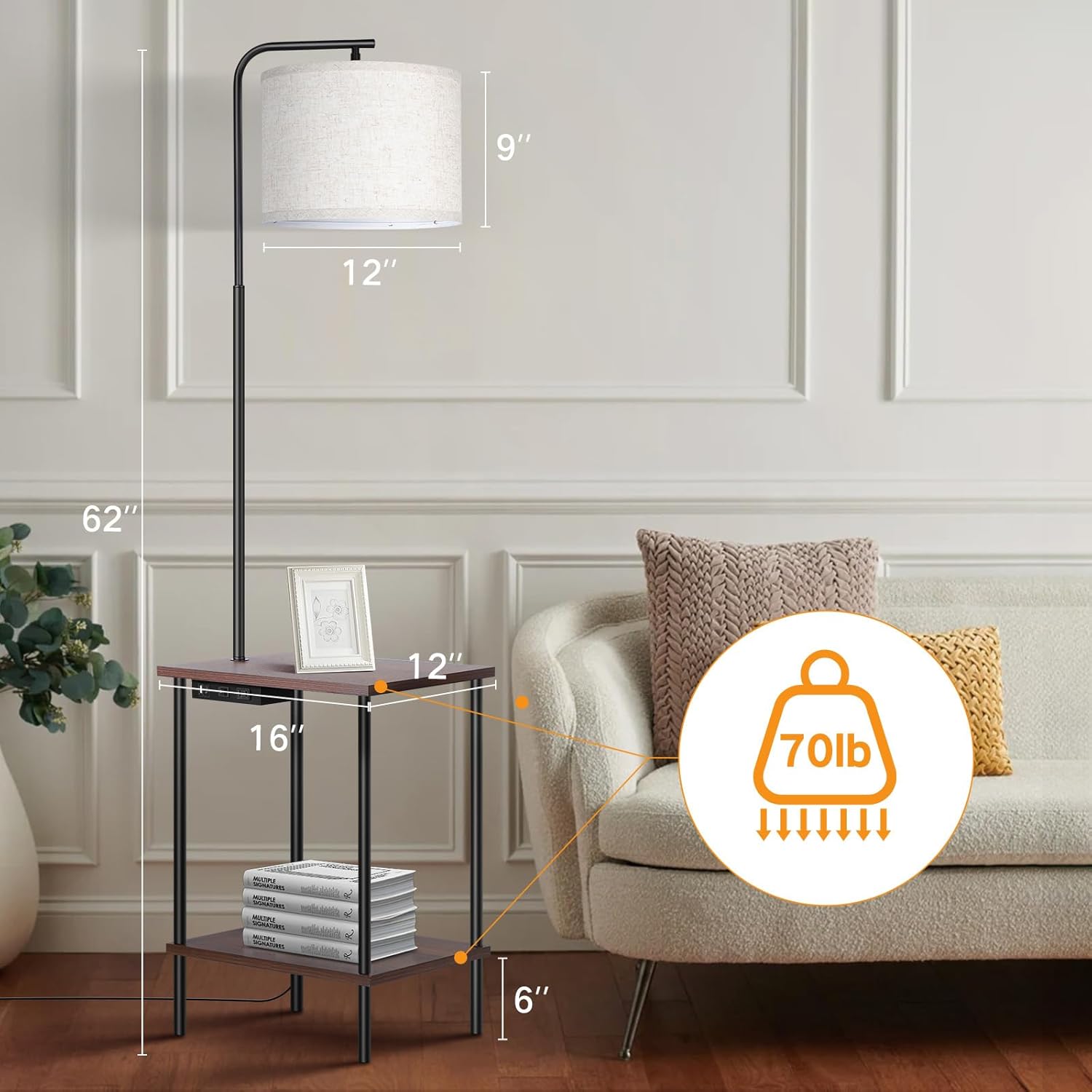
Image: Product dimensions for the OUTON Floor Lamp with Table.

Image: Energy efficiency label for the included LED bulb. For more details, visit EPREL Database.
Warranty and Support
OUTON products are designed for quality and durability. For any warranty claims, technical support, or questions not covered in this manual, please contact OUTON customer service directly. Refer to your purchase documentation for specific warranty terms and contact information.


