
DWEII GY-NEO6MV2
GY-NEO6MV2 NEO-6M GPS Module Instruction Manual
Model: GY-NEO6MV2
Brand: DWEII
1. Introduction
This manual provides detailed instructions for the DWEII GY-NEO6MV2 NEO-6M GPS Module. This module is designed for integration into various electronic projects, including flight control systems such as MWC and APM2.5, and is compatible with Arduino platforms. It features a ceramic antenna for strong signal reception and EEPROM for saving configuration parameters.
Key features include:
- Universal 3V-5V power supply.
- Integrated ceramic patch antenna for enhanced signal reception.
- EEPROM for non-volatile storage of configuration data.
- Data backup battery for maintaining time and satellite data.
- LED signal indicator for status feedback.
- Default baud rate of 9600 bps, with RS232 TTL interface.
- Compatibility with various flight control modules and GPS computer test software.
2. Product Components
The GY-NEO6MV2 NEO-6M GPS Module set includes the main GPS module board and a separate ceramic patch antenna with an attached cable.

Figure 2.1: Overview of the GY-NEO6MV2 NEO-6M GPS Module and its ceramic antenna.
2.1. GPS Module Board
The main module board (Model: GY-GPS6MV2) houses the NEO-6M GPS receiver chip, EEPROM, and necessary voltage regulators. It features a compact design with clearly labeled pins for easy integration.

Figure 2.2: Top view of the GPS module board, highlighting the VCC, RX, TX, and GND pins.

Figure 2.3: Bottom view of the GPS module board.
2.2. Ceramic Patch Antenna
The module is supplied with a high-gain ceramic patch antenna (size 25x25mm) designed for optimal satellite signal reception. It connects to the main module via a coaxial cable with a U.FL connector.
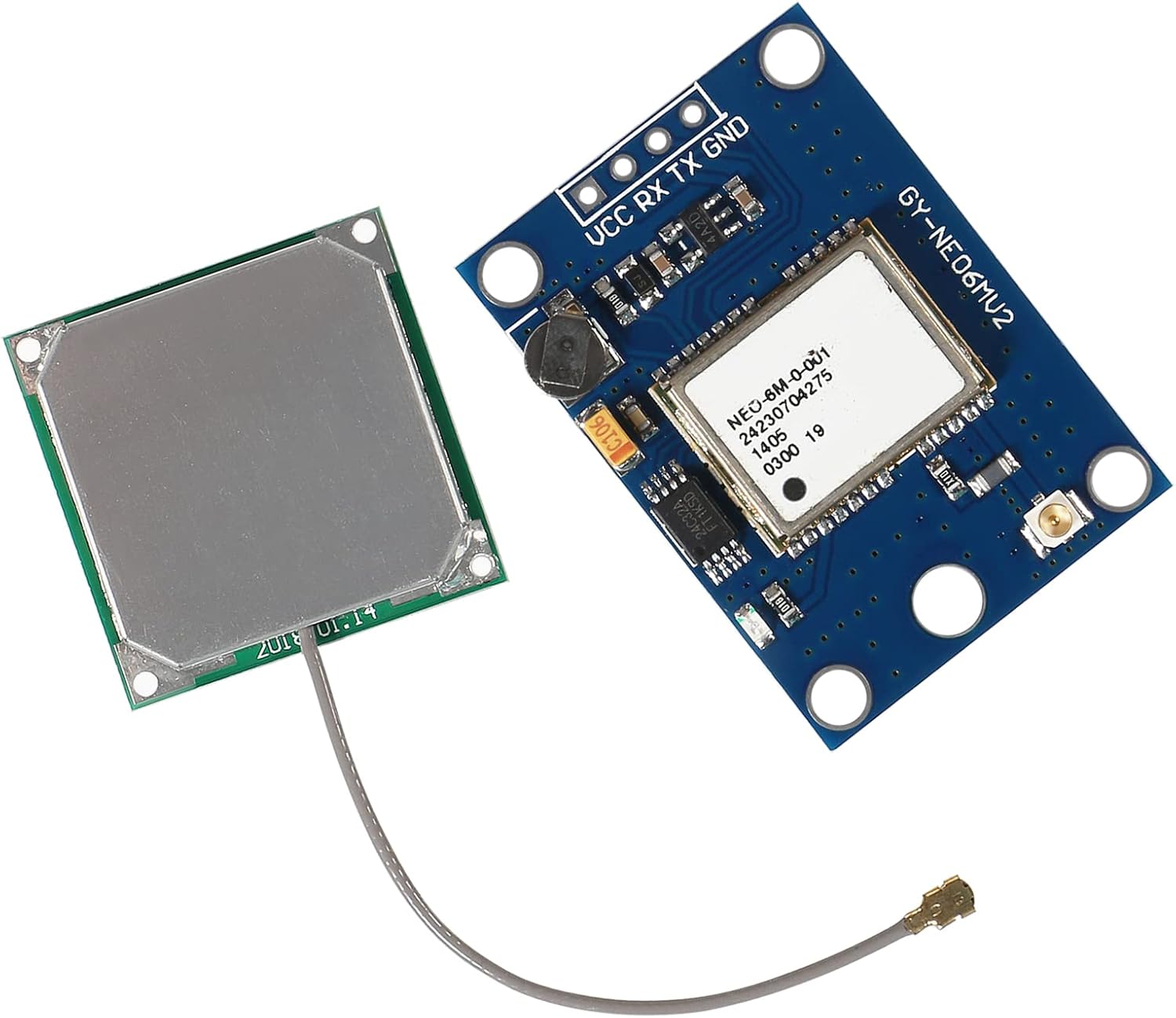
Figure 2.4: Front and back views of the ceramic patch antenna.
3. Technical Specifications
| Feature | Specification |
|---|---|
| Model | GY-GPS6MV2 (Module), NEO-6M (Chip) |
| Power Supply Voltage | 3V - 5V DC |
| Interface | RS232 TTL |
| Default Baud Rate | 9600 bps |
| Antenna Type | Ceramic Patch Antenna |
| Antenna Dimensions | 25mm x 25mm |
| Module Dimensions | 25mm x 35mm |
| Installation Aperture | 3mm |
| Weight | Approximately 0.317 ounces (9 grams) |
| Special Features | EEPROM for configuration save, Data backup battery, LED signal indicator |
4. Installation and Wiring
Proper connection of the GPS module is crucial for its functionality. The module features four primary pins: VCC, RX, TX, and GND.

Figure 4.1: GPS module with antenna connected, ready for integration.
4.1. Pinout Description
- VCC: Power supply input (3V-5V DC).
- RX: Receiver pin (data input to the GPS module). Connect to the TX pin of your microcontroller/flight controller.
- TX: Transmitter pin (data output from the GPS module). Connect to the RX pin of your microcontroller/flight controller.
- GND: Ground connection.
4.2. Connection Steps
- Connect the Antenna: Carefully connect the coaxial cable from the ceramic patch antenna to the U.FL connector on the GPS module board. Ensure a secure connection.
- Power Connection: Connect the VCC pin of the GPS module to a 3V-5V power source and the GND pin to the ground of your system.
- Data Connection:
- Connect the TX pin of the GPS module to the RX pin of your microcontroller (e.g., Arduino, flight controller).
- Connect the RX pin of the GPS module to the TX pin of your microcontroller.
- Baud Rate Configuration: The default baud rate for the module is 9600 bps. Ensure your microcontroller's serial communication is configured to match this baud rate for proper data exchange.
Note: Some flight controllers or microcontrollers may require specific libraries (e.g., TinyGPS++, UBLOX) for parsing NMEA data from the GPS module.
5. Operation
Once properly connected and powered, the GPS module will begin the process of acquiring satellite signals to determine its position.
5.1. Signal Acquisition
Upon power-up, the module will search for available GPS satellites. The initial fix (cold start) can take several minutes, especially if the module is used indoors or has been unpowered for an extended period. For best performance, operate the module outdoors with a clear view of the sky.
5.2. LED Signal Indicator
The module is equipped with an LED indicator that provides visual feedback on its status:
- No Light / Solid Light: The module is powered on but has not yet acquired a satellite fix, or is in the process of acquiring one.
- Blinking Light: The module has successfully acquired a 3D GPS fix (position, altitude, and time) and is actively outputting data. The blinking rate may vary.
5.3. Data Output
The GPS module outputs NMEA 0183 standard sentences via its TX pin. These sentences contain various navigation data, including latitude, longitude, altitude, speed, time, and satellite information. Your connected microcontroller or flight controller will process this data for its intended application.
6. Troubleshooting
If you encounter issues with your GY-NEO6MV2 NEO-6M GPS Module, consider the following common problems and solutions:
6.1. No Satellite Fix / No Blinking LED
- Environment: Ensure the module and antenna have a clear, unobstructed view of the sky. Indoor environments, dense foliage, or tall buildings can significantly impede satellite signal reception. Move the module outdoors for initial testing.
- Initial Fix Time: A cold start (first power-up or after a long period of inactivity) can take several minutes (5-15 minutes) to acquire a fix. Be patient.
- Antenna Connection: Verify that the ceramic patch antenna is securely connected to the U.FL connector on the module. A loose connection will prevent signal reception.
- Power Supply: Confirm that the module is receiving stable power within the 3V-5V range. Insufficient or fluctuating power can lead to erratic behavior or failure to acquire a fix.
6.2. No Data Output / Garbled Data
- Wiring: Double-check your RX and TX connections. Remember that the TX of the GPS module connects to the RX of your microcontroller, and the RX of the GPS module connects to the TX of your microcontroller.
- Baud Rate Mismatch: The default baud rate for the GY-NEO6MV2 module is 9600 bps. Ensure your microcontroller's serial port is configured to communicate at this exact baud rate. Incorrect baud rates will result in garbled or no data.
- Software/Library Issues: If using a microcontroller, ensure your code or library (e.g., TinyGPS++, UBLOX library) is correctly initialized and configured to read NMEA data from the serial port.
- Module Functionality: If all other troubleshooting steps fail, and you have access to a USB-to-TTL serial adapter, you can connect the module directly to a computer and use a serial terminal program (e.g., PuTTY, RealTerm) to verify if the module is outputting NMEA data at 9600 bps.
7. Care and Maintenance
To ensure the longevity and optimal performance of your GPS module, follow these care and maintenance guidelines:
- Handle with Care: Electronic components are sensitive. Avoid dropping the module or subjecting it to excessive physical shock.
- Environmental Protection: Keep the module away from moisture, extreme temperatures, and direct sunlight. While the module has some robustness, it is not waterproof or designed for harsh industrial environments without additional protection.
- Cleanliness: Keep the module and its connectors free from dust and debris. Use a soft, dry brush or compressed air for cleaning if necessary. Avoid using liquid cleaners.
- Power Supply: Always use a stable and regulated power supply within the specified 3V-5V range. Over-voltage can permanently damage the module.
- Antenna Placement: Ensure the antenna is placed in an area with minimal electromagnetic interference from other electronic components.
8. Warranty Information
This product is subject to a return policy that allows for a refund or replacement within 30 days of purchase. For specific details regarding warranty claims, returns, or replacements, please refer to the retailer's return policy where the product was purchased.
Note: Warranty coverage typically applies to manufacturing defects and does not cover damage caused by misuse, improper installation, or unauthorized modifications.
9. Customer Support
For further assistance, technical inquiries, or support regarding the DWEII GY-NEO6MV2 NEO-6M GPS Module, please contact the seller or manufacturer through the platform where the product was acquired. Provide your purchase details and a clear description of the issue to facilitate a prompt resolution.
Additional resources and community forums for Arduino and flight control systems may also offer valuable insights and solutions for common integration challenges.
Ask a question about this manual
Ask about setup, troubleshooting, compatibility, parts, safety, or missing instructions. Manuals+ will review the question and use this page’s manual context to help answer it.