
1. Product Overview
The DOUBLE E Raptor F150 RC Car is a 1:18 scale 4WD monster truck designed for off-road adventures. Featuring dual motors and high-grip rubber tires, it is engineered to conquer various terrains including grass, sand, and rocky paths. Its durable construction with metal shock absorbers ensures resilience during play. The 2.4Ghz radio transmitter allows for responsive control and multi-vehicle operation without interference.

Image: The pink Double E Raptor F150 RC Car with its remote control, showcasing its robust design and large tires.
2. Package Contents
- 1 x DOUBLE E Raptor F150 RC Car (Pink)
- 1 x 2.4Ghz Radio Transmitter
- 1 x 7.4V 900mAh Rechargeable Battery (for RC Car)
- 1 x USB Charging Cable
- 1 x Screwdriver
- 1 x AA Battery (for Remote Control)
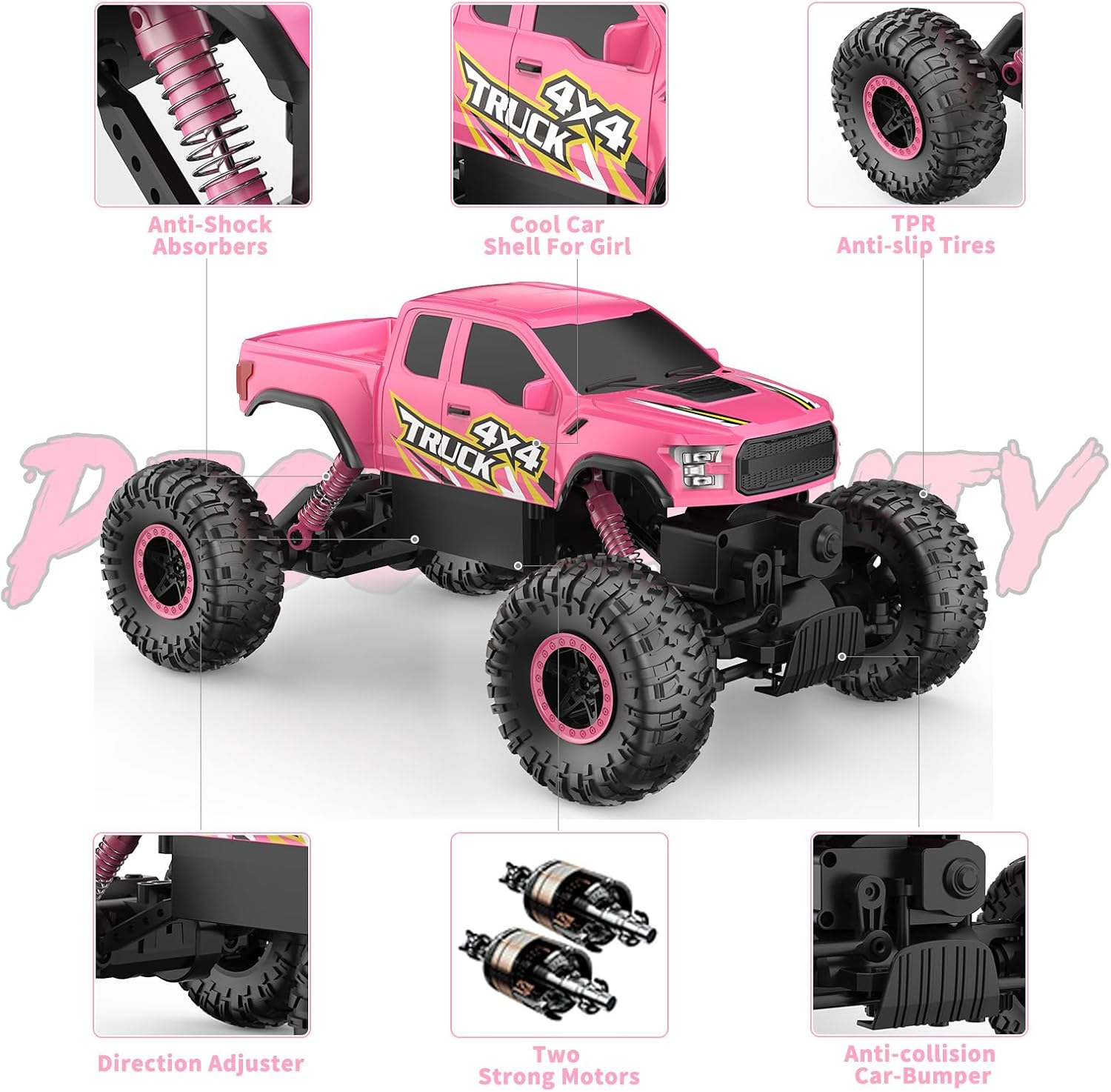
Image: A detailed view highlighting key features of the RC car, including anti-shock absorbers, TPR anti-slip tires, dual strong motors, and an anti-collision car bumper.
3. Specifications
| Feature | Detail |
|---|---|
| Model Number | E341 |
| Dimensions | 11.2 x 7.3 x 6.1 inches (approx. 284 x 185 x 154 mm) |
| Weight | 2.03 pounds |
| Scale | 1:18 |
| Drive System | 4-Wheel Drive (4WD) |
| Motors | Dual Motors |
| Max Speed | 20-25 km/h |
| Car Battery | 7.4V 900mAh Rechargeable Battery |
| Remote Control Battery | 1 x AA Battery (included) |
| Control Frequency | 2.4Ghz |
| Recommended Age | 6 - 12 Years |

Image: Visual representation of the RC car's dimensions, including length, width, height, clearance, wheelbase, and tire size.
4. Setup
4.1. Charging the Car Battery
- Locate the battery compartment on the underside of the RC car.
- Using the provided screwdriver, carefully unscrew the battery compartment cover.
- Disconnect the car's rechargeable battery from its connector.
- Connect the rechargeable battery to the USB charging cable.
- Plug the USB charging cable into a compatible USB power source (e.g., computer USB port, USB wall adapter).
- The charging indicator light on the USB cable will show the charging status (refer to the cable's instructions for specific light indications).
- Once fully charged (approximately 2-3 hours), disconnect the battery from the charging cable.
- Reconnect the charged battery to the RC car's connector and secure it inside the compartment.
- Replace the battery compartment cover and tighten the screws with the screwdriver.
4.2. Installing Remote Control Battery
- Open the battery compartment on the back of the 2.4Ghz Radio Transmitter.
- Insert the included 1 x AA battery, ensuring correct polarity (+/-).
- Close the battery compartment cover securely.
4.3. Pairing the RC Car and Remote Control
- Ensure both the RC car and the remote control have fresh or fully charged batteries installed.
- Turn on the RC car using the ON/OFF switch located on its chassis.
- Turn on the remote control.
- The remote control and car should automatically pair. A successful connection is usually indicated by a solid light on the remote control.
- If pairing fails, turn both devices off and repeat the steps.
5. Operating Instructions
5.1. Basic Controls
- Trigger: Pull the trigger to move the car forward. Push the trigger to move the car backward (reverse).
- Steering Wheel: Turn the steering wheel left to turn the car left. Turn the steering wheel right to turn the car right.
- Steering Trim: If the car veers left or right when driving straight, use the steering trim dial on the remote control to adjust its alignment until it drives straight.
5.2. Driving Tips
- The 4WD system and large tires allow the car to handle various terrains, including grass, sand, and small rocks.
- For optimal performance on rough terrain, drive at a moderate speed to allow the suspension to absorb impacts.
- Avoid driving in deep water or mud to prevent damage to electronic components.
- Practice in an open area to get familiar with the controls before attempting more challenging maneuvers.

Image: The RC car navigating different surfaces, highlighting its ability to drive across various terrains like grass, sand, and paved areas.
5.3. Safety Precautions
- Always operate the RC car in a safe environment, away from people, pets, and obstacles.
- Do not operate near public roads or in crowded areas.
- Keep fingers, hair, and loose clothing away from moving parts (wheels, suspension).
- Adult supervision is recommended for younger users.
- Do not attempt to modify or disassemble the RC car or its components, as this may void the warranty and cause damage.
5.4. Official Product Videos
RC Car for Girls - General Operation
Video: Demonstrates the general operation and movement of the pink RC car, showcasing its agility and responsiveness.
DOUBLE E Pink RC Car Features
Video: Highlights various features of the DOUBLE E pink RC car, including its robust build and ability to handle different surfaces.
RC Truck for Kids - Terrain Handling
Video: Shows the RC truck navigating various terrains, emphasizing its climbing capabilities and durable design.
6. Maintenance
6.1. Cleaning
- After each use, especially after driving on dirty or dusty surfaces, gently wipe down the car with a soft, dry cloth.
- Remove any debris (grass, small stones, dirt) from the wheels, suspension, and chassis to ensure smooth operation.
- Do not use water or harsh chemicals to clean the electronic components.
6.2. Storage
- Store the RC car and remote control in a cool, dry place away from direct sunlight and extreme temperatures.
- Remove batteries from both the car and the remote control if storing for extended periods to prevent leakage and damage.
6.3. Battery Care
- Always use the provided USB charging cable for the car's rechargeable battery.
- Do not overcharge the battery. Disconnect once fully charged.
- If the battery becomes hot during charging or use, discontinue use immediately.
- Dispose of old batteries responsibly according to local regulations.
7. Troubleshooting
| Problem | Possible Cause | Solution |
|---|---|---|
| Car does not respond to remote control. | Low battery in car or remote; Not paired; Power switch off. | Charge/replace batteries; Re-pair car and remote; Ensure power switches are ON. |
| Car runs slowly or lacks power. | Low car battery; Obstruction in wheels/gears. | Fully charge car battery; Clear any obstructions. |
| Car veers to one side. | Steering trim needs adjustment. | Adjust the steering trim dial on the remote control. |
| Short operating time. | Battery not fully charged; Old battery. | Ensure full charge; Consider replacing battery if performance degrades significantly. |
8. Warranty and Support
For warranty information or technical support, please refer to the contact details provided on the product packaging or visit the official DOUBLE E website. Keep your purchase receipt as proof of purchase for any warranty claims.


