
1. Introduction
The BYGD Smart Car Battery Charger is a fully automatic, intelligent charging solution designed for 6V and 12V lead-acid and lithium-ion batteries. This versatile device functions as a battery charger, maintainer, trickle charger, and desulfator, offering comprehensive battery care. It is engineered to restore lost battery performance, extend battery life, and ensure safe, efficient charging for a wide range of vehicles and equipment.
Key features include:
- Built-in circuit protection against reverse polarity, spark, overcharge, overcurrent, open circuit, short circuit, and overheating.
- Ability to charge two batteries simultaneously with smart chip BMS technology.
- IP65-rated ABS housing for dust, dirt, and water resistance.
- Automatic detection of battery sulfation and acid stratification with pulse repair function.
- Compatibility with flooded, gel, AGM, maintenance-free, and lithium-ion batteries.
- Suitable for cars, trucks, SUVs, PWCs, motorcycles, scooters, ATVs, lawn mowers, RVs, and boats.
2. Safety Information
Always read and understand all safety information before using the battery charger. Failure to follow these instructions may result in electric shock, fire, or serious injury.
- Ventilation: Ensure the charging area is well-ventilated. Batteries can produce explosive gases.
- Eye and Face Protection: Always wear appropriate eye protection (safety glasses) and face protection when working near batteries.
- Gloves: Wear protective gloves to prevent contact with battery acid.
- No Smoking/Sparks: Do not smoke or allow sparks or flames in the vicinity of the battery or charger.
- Connection Order: Connect the output clips to the battery first, then plug the charger into the power outlet. Disconnect in reverse order.
- Damaged Cables: Do not operate the charger with damaged cords or clips. Replace immediately.
- Water Exposure: Do not expose the charger to rain or excessive moisture. Although IP65 rated, direct submersion is not recommended.
- Children and Pets: Keep the charger and batteries out of reach of children and pets.
- Battery Type: Ensure the charger settings match the battery type (6V/12V, Lead-Acid/Lithium) to prevent damage.
3. Product Overview
The BYGD Smart Car Battery Charger features a robust design with intuitive controls and indicators for easy operation.

Figure 3.1: The BYGD Smart Car Battery Charger, showing the main unit and two sets of red and black alligator clips for battery connection.
3.1 Components and Indicators

Figure 3.2: Detailed diagram illustrating the various components and indicators of the BYGD Smart Car Battery Charger. This includes positive crocodile clips, standby indicator, mode switch, fuse, and various battery indicators (6V, 12V lithium, 12V AGM, 12V standard).
The charger features two independent charging banks (A and B), each with its own set of indicators and controls:
- Over Temperature Protection Indicator: Illuminates if the charger overheats.
- Reverse Connection Indicator: Illuminates if the battery clips are connected incorrectly.
- Bad Battery Indicator: Illuminates if a fault is detected with the connected battery.
- Battery Voltage Error Indicator: Indicates an issue with the battery voltage.
- Battery Indicator Light: Shows the charging status.
- Standby Indicator (Power Supply): Indicates the charger is powered on and in standby mode.
- Mode Switch: Button to cycle through charging modes (Standard, AGM, Lithium, 6V, 12V).
- Battery Type Indicators: Separate lights for 12V Standard, 12V AGM, 12V Lithium, and 6V batteries.
- Fuse: Integrated fuse for circuit protection.
- Positive/Negative Crocodile Clips: For connecting to battery terminals.
3.2 Functional Features

Figure 3.3: Visual representation of the charger's functional features, including its smart chip, BMS unlocking capability, and IP65 waterproof rating. It also emphasizes wide voltage input and support for charging two batteries simultaneously.
The charger incorporates advanced technology for optimal performance and safety:
- Smart Chip & BMS Unlocked: Enables intelligent charging and compatibility with various battery management systems.
- IP65 Waterproof: Provides protection against dust ingress and low-pressure water jets.
- Wide Voltage Input: Adaptable to various power sources.
- Temperature Compensation: Adjusts charging parameters based on ambient temperature for accurate recharging.
- Spark-Proof and Reverse Polarity Protection: Enhances user safety during connection.
3.3 Wide Application

Figure 3.4: Illustration depicting the diverse applications of the BYGD Smart Car Battery Charger, including RVs, cars, motorcycles, battery cars, weeding machines, and yachts.
This charger is designed for use with a broad range of 6V and 12V battery types found in:
- Cars
- Trucks
- SUVs
- PWCs (Personal Watercraft)
- Motorcycles
- Scooters
- ATVs (All-Terrain Vehicles)
- Lawn Mowers
- RVs (Recreational Vehicles)
- Boats / Yachts
4. Setup
Before connecting the charger, ensure the battery terminals are clean and free of corrosion. Always follow the correct connection sequence.
- Prepare the Battery: If the battery is in a vehicle, ensure the vehicle's ignition is off and all accessories are disconnected. For marine batteries, ensure the boat is safely docked or on land.
- Connect Positive Clip: Connect the RED (+) positive alligator clip from the charger to the positive (+) terminal of the battery.
- Connect Negative Clip: Connect the BLACK (-) negative alligator clip from the charger to the negative (-) terminal of the battery. If connecting to a vehicle battery, connect the negative clip to a metal part of the vehicle chassis away from the battery and fuel line, if the battery is not removed from the vehicle.
- Plug in Charger: Once the clips are securely connected to the battery, plug the charger's AC power cord into a suitable electrical outlet. The standby indicator light should illuminate.
- Select Mode: The charger will automatically detect the battery voltage (6V or 12V). Use the "MODE" button to select the appropriate battery type (Standard, AGM, or Lithium) for optimal charging.
To disconnect, reverse the order: unplug the charger from the AC outlet first, then disconnect the negative clip, followed by the positive clip.
5. Operating Instructions
The BYGD Smart Car Battery Charger operates automatically once connected and the correct mode is selected. It employs intelligent segmented charging for efficient and safe battery restoration.
5.1 Charging Process

Figure 5.1: Charts detailing the intelligent segmented charging process. The top chart shows a three-stage charging cycle for lithium batteries (Fast charge, Float voltage), while the bottom chart illustrates an eight-stage charging process for other battery types (Pulse, Soft start, Constant current, Constant voltage, Analysis, Repair, Floating charge, Maintain).
The charger utilizes different charging algorithms based on the battery type:
- Three-Stage Charging (Lithium Battery):
- Stage 1: Constant Current Charging (Fast Charge)
- Stage 2: Constant Voltage Charging (Float Voltage)
- Stage 3: Floating Charge
- Eight-Stage Charging (Standard/AGM Batteries):
- Stage 1: Pulse Charging
- Stage 2: Soft Start
- Stage 3: Constant Current Charging
- Stage 4: Constant Voltage Charging
- Stage 5: Charging Analysis
- Stage 6: Supplementary Charging (Repair)
- Stage 7: Floating Charge
- Stage 8: Maintenance of Charging
The charger automatically detects the battery's state and applies the appropriate charging stage to optimize performance and extend battery life.
5.2 Mode Selection

Figure 5.2: A hand pressing the mode button on the BYGD Smart Battery Charger, indicating selection for various battery types such as AGM, MF, EFB, GEL, LI, WET, and CA. This highlights the charger's versatility for different lead-acid and lithium battery chemistries.
After connecting the charger and plugging it in, the charger will automatically detect the battery voltage. To select the correct charging mode for your battery type:
- Press the MODE button (A or B, corresponding to the bank you are using) repeatedly to cycle through the available battery types.
- The corresponding indicator light (e.g., "STANDARD", "AGM", "LI", "6V", "12V") will illuminate to show the currently selected mode.
- Ensure the selected mode matches your battery's chemistry (e.g., Flooded, Gel, AGM, Lithium-ion).
The charger will then begin the charging process automatically. The battery indicator lights will show the progress of the charge.
6. Maintenance
Proper maintenance ensures the longevity and optimal performance of your BYGD Smart Car Battery Charger.
- Cleaning: Disconnect the charger from power and batteries before cleaning. Wipe the exterior with a soft, damp cloth. Do not use harsh chemicals or abrasive cleaners.
- Cable Inspection: Regularly inspect the power cord and battery cables for any signs of damage, cuts, or fraying. Do not use if damaged.
- Clip Maintenance: Keep the alligator clips clean and free of corrosion. Clean them with a wire brush if necessary.
- Storage: Store the charger in a cool, dry place when not in use. Avoid extreme temperatures and direct sunlight.
- Battery Terminals: Periodically check and clean battery terminals to ensure good contact and prevent corrosion.
7. Troubleshooting
If you encounter issues with your BYGD Smart Car Battery Charger, refer to the following common problems and solutions:
| Problem | Possible Cause | Solution |
|---|---|---|
| Charger does not power on. | No power from outlet; damaged power cord; internal fault. | Check the power outlet with another device. Inspect the power cord for damage. If still no power, contact customer support. |
| Charger not charging battery. | Incorrect connection; battery deeply discharged; incorrect mode selected; bad battery. | Ensure clips are securely connected to correct terminals. Try "Force Mode" if available for deeply discharged batteries. Verify the selected battery type matches the battery. Check for "Bad Battery Indicator" light. |
| Reverse Connection Indicator is on. | Battery clips connected incorrectly (positive to negative, or vice versa). | Disconnect the charger from the AC outlet, then correctly re-connect the RED clip to the positive (+) terminal and the BLACK clip to the negative (-) terminal. |
| Over Temperature Protection Indicator is on. | Charger is overheating due to poor ventilation or prolonged use in high temperatures. | Disconnect the charger and allow it to cool down in a well-ventilated area. Ensure no obstructions are blocking the charger's vents. |
| One charging bank is not working. | Internal fault in one bank. | This may indicate an internal component failure. Contact customer support for assistance or warranty claim. |
If the problem persists after attempting these solutions, please contact BYGD customer service for further assistance.
8. Specifications
Detailed technical specifications for the BYGD Smart Car Battery Charger (Model F2000X2).
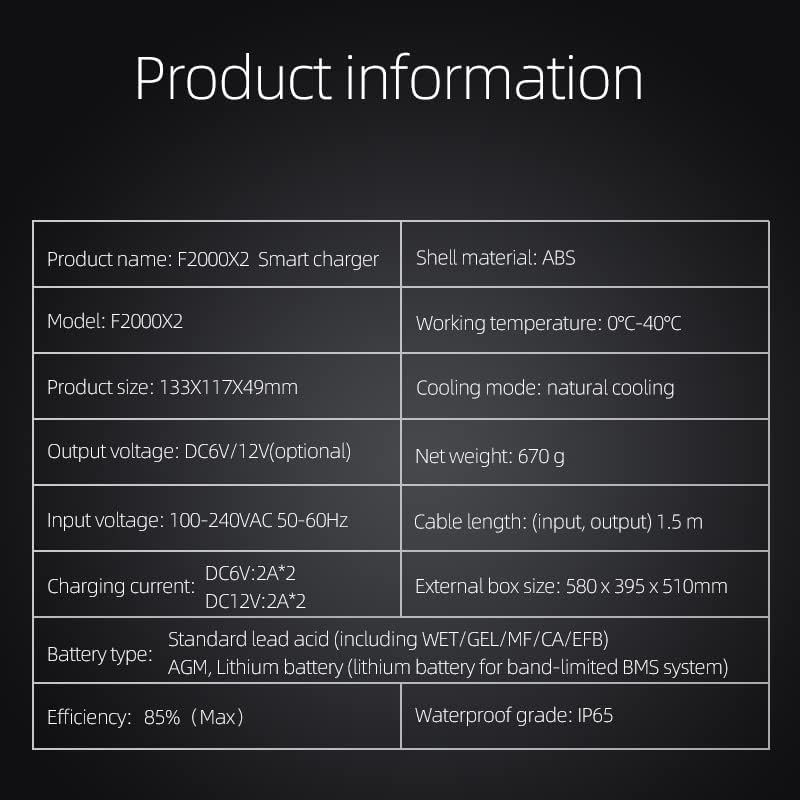
Figure 8.1: Table presenting key product information and specifications for the BYGD F2000X2 Smart Charger.
| Attribute | Detail |
|---|---|
| Product Name | F2000X2 Smart Charger |
| Model | F2000X2 |
| Product Size | 133 x 117 x 49 mm (5.23 x 4.60 x 1.92 inches) |
| Output Voltage | DC 6V / 12V (optional) |
| Input Voltage | 100-240VAC 50-60Hz |
| Charging Current | DC 6V: 2A*2, DC 12V: 2A*2 |
| Battery Type Compatibility | Standard Lead Acid (WET/GEL/MF/CA/EFB), AGM, Lithium battery (for band-limited BMS system) |
| Efficiency | 85% (Max) |
| Shell Material | ABS |
| Working Temperature | 0°C - 40°C (32°F - 104°F) |
| Cooling Mode | Natural Cooling |
| Net Weight | 670 g (1.47 lbs) |
| Cable Length (Input, Output) | 1.5 m |
| Waterproof Grade | IP65 |
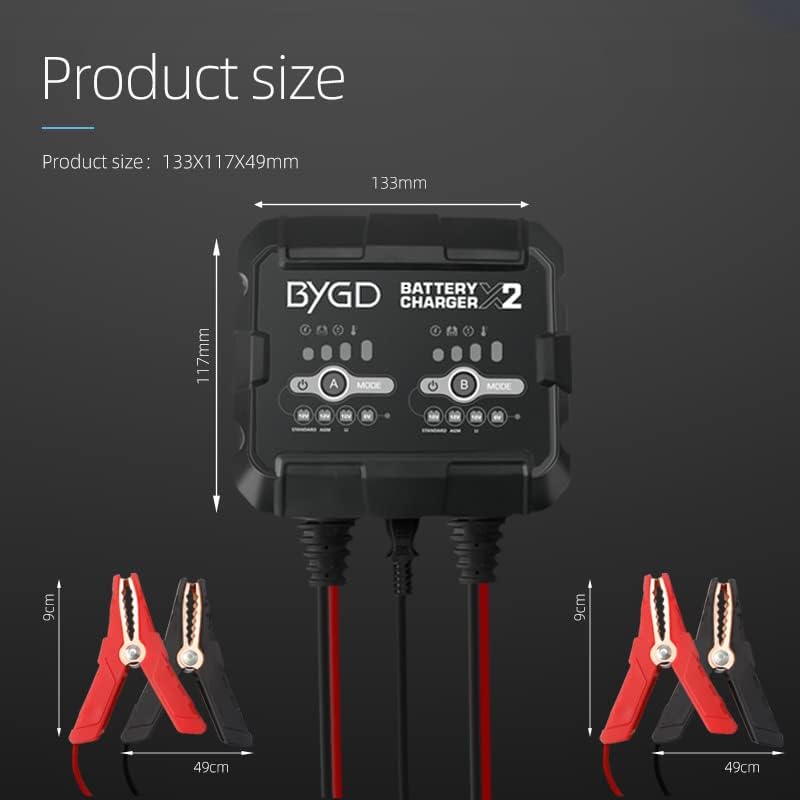
Figure 8.2: Dimensions of the BYGD Smart Car Battery Charger unit (133mm x 117mm x 49mm) and the alligator clips (9cm length, 49mm width).
9. Warranty and Support
BYGD provides comprehensive support for its products.
- Warranty: The BYGD Smart Car Battery Charger comes with an 18-month warranty from the date of purchase. This warranty covers defects in materials and workmanship under normal use.
- Customer Service: For any questions, technical assistance, or warranty claims, please contact BYGD customer service. We offer 24-hour customer service support to ensure your satisfaction.
Please retain your proof of purchase for warranty purposes.
10. Package Content
The standard package for the BYGD F2000X2 Smart Charger includes the following items:

Figure 10.1: Image showing the package contents, including the BYGD F2000X2 charger unit, power line, battery clamps, and user instructions.
- BYGD F2000X2 Smart Charger Unit
- AC Power Line
- Battery Clamp Cables (2 sets)
- User Manual (this document)