
1. Introduction
Thank you for purchasing the ODK 120cm Computer Desk. This desk is designed to provide a practical and organized workspace for various uses, including home office, gaming, and study. Its simple yet functional design ensures it fits seamlessly into any room while offering ample storage and a spacious desktop for enhanced productivity.
2. Safety Information
- Read all instructions carefully before assembly and use.
- Ensure all parts are present and undamaged before beginning assembly.
- Assemble the desk on a soft, clean surface to prevent scratches.
- Do not overtighten screws during assembly to avoid damaging the material.
- Do not stand or sit on the desk.
- Distribute weight evenly on the desktop and shelves. Do not overload.
- Keep small parts and packaging materials away from children.
- Regularly check all connections and tighten if necessary to maintain stability.
3. Package Contents
Please verify that all components listed below are included in your package. If any parts are missing or damaged, please contact customer support.
- Desktop Panels (3 pieces)
- Steel Frame Components (Legs, Crossbars)
- Left Storage Shelves (2 pieces)
- CPU Shelf (1 piece)
- Adjustable Feet (4 pieces)
- Assembly Hardware (Screws, Bolts, etc.)
- Wrench (1 piece)
- Assembly Instruction Manual (Japanese)
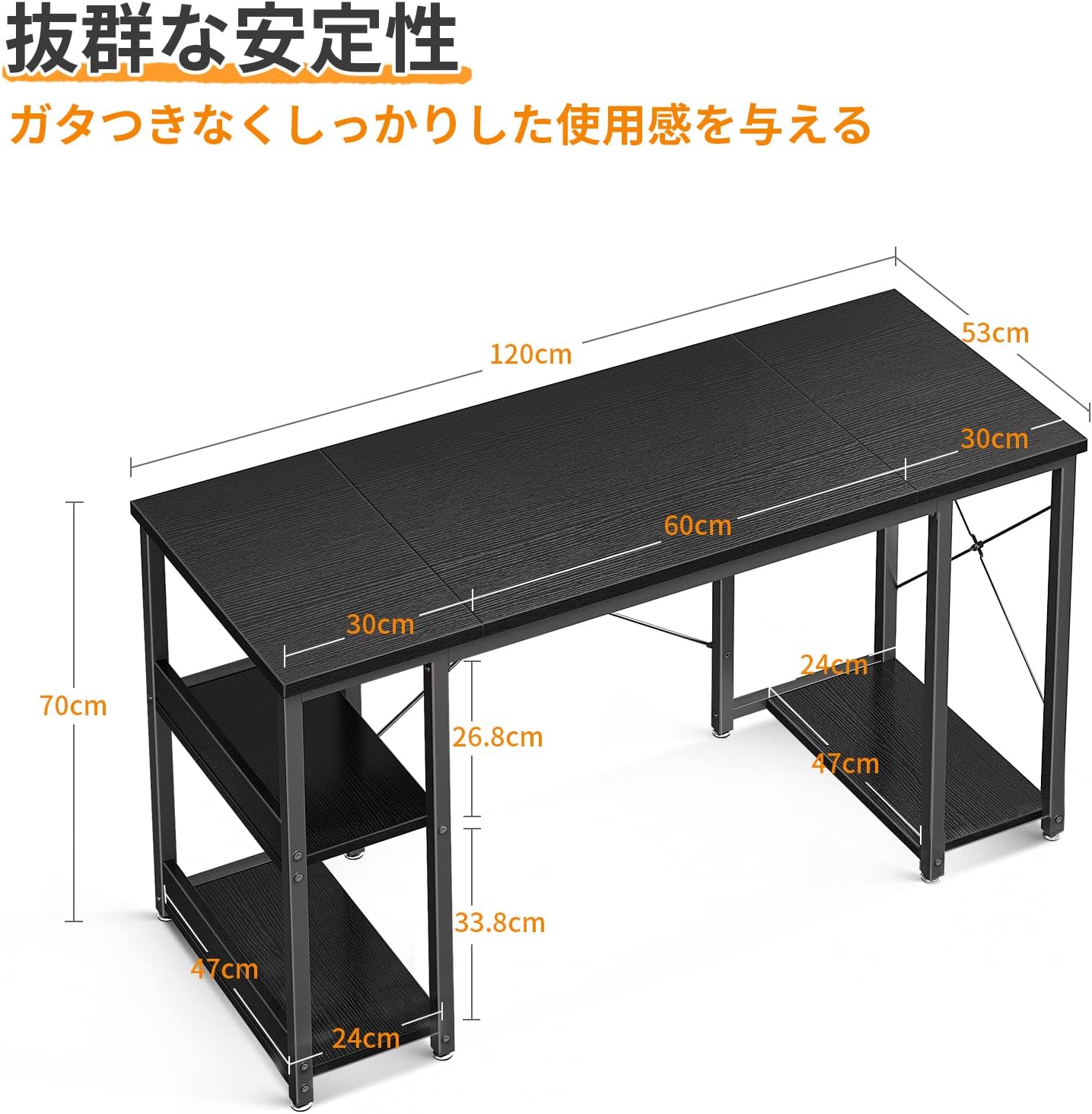
4. Assembly Instructions
Follow these steps to assemble your ODK Computer Desk. An assembly wrench is included, so no additional tools are required.
- Unpack and Identify Parts: Carefully unpack all components and lay them out on a soft, clean surface. Refer to the "Package Contents" section to ensure all parts are present.
- Assemble the Frame: Attach the steel frame components together using the provided hardware. Ensure the crossbars are securely fastened to prevent wobbling.
- Install Shelves: Attach the two storage shelves to the left side of the desk frame. The upper shelf can be removed later if needed for taller items.
- Install CPU Shelf: Secure the CPU shelf to the right side of the desk frame.
- Attach Desktop Panels: Carefully place the three desktop panels onto the assembled frame. Align them properly and secure them with the remaining hardware. Note that the desktop is formed by connecting three panels.
- Attach Adjustable Feet: Screw the adjustable feet into the bottom of each leg. Adjust them as needed to ensure the desk is level and stable on uneven floors.
- Final Check: Once assembled, gently shake the desk to ensure all connections are tight and the desk is stable.


5. Usage
The ODK Computer Desk is designed for versatile use, offering features that enhance your work or gaming experience.
- Spacious Desktop: The 120cm wide desktop provides ample space for multiple monitors, a keyboard, and other peripherals, ensuring a comfortable and efficient workspace.
- Integrated Storage: Utilize the two shelves on the left for books, documents, or office supplies. The upper shelf can be removed to accommodate taller items.
- CPU Shelf: The dedicated CPU shelf on the right side keeps your PC tower off the floor, protecting it from dust and freeing up desktop space.
- Ample Legroom: The desk's design ensures sufficient legroom (70cm width), allowing you to comfortably use chairs with armrests.


6. Maintenance
To keep your ODK Computer Desk in excellent condition, follow these simple maintenance guidelines:
- Cleaning: The desktop is made of melamine material, which is easy to clean. Simply wipe any dirt or spills with a damp cloth. Avoid using harsh chemicals or abrasive cleaners that could damage the surface.
- Regular Checks: Periodically check all screws and bolts to ensure they remain tight. Retighten if necessary to maintain the desk's stability.
- Avoid Excessive Moisture: While the surface is easy to clean, avoid prolonged exposure to excessive moisture.
- Protect from Heat: Do not place hot items directly on the desktop without a protective coaster.
7. Troubleshooting
If you encounter any issues with your ODK Computer Desk, please refer to the following common solutions:
- Desk is Wobbly:
- Ensure all screws and bolts are securely tightened.
- Adjust the leveling feet at the bottom of each leg to compensate for uneven floor surfaces.
- Missing Parts or Initial Defects:
- If you find any parts missing or discover initial defects upon unpacking, please contact our customer support immediately for assistance.
- Difficulty Assembling:
- Review the assembly instructions carefully. Ensure you are using the correct hardware for each step.
- Do not force parts together. If a part does not fit, re-check the instructions and part orientation.
8. Specifications
| Feature | Detail |
|---|---|
| Brand | ODK |
| Model Number | B01XS011333JP |
| Product Dimensions (D x W x H) | 53 cm x 120 cm x 70 cm |
| Item Weight | 15.3 KG |
| Color | Black |
| Style | Desk with Rack |
| Finish Type | Powder Coated |
| Frame Material | Metal |
| Special Feature | Space Saving |
| Room Type | Office |
| Recommended Uses For Product | Gaming |
| Assembly Required | Yes |
9. Warranty & Support
For any issues regarding initial defects, missing parts, or general inquiries about your ODK Computer Desk, please do not hesitate to contact our customer support team. We are committed to providing prompt assistance to ensure your satisfaction.
Please refer to your purchase documentation or the retailer's website for specific warranty details and contact information.


