Introduction
The HGLRC Thor Pro is a versatile 6-port balance charging board designed for LiPo batteries. It features integrated discharging capabilities and supports both XT30 and XT60 connectors. This manual provides essential information for the safe and efficient operation of your Thor Pro balance charging board.
Safety Information
WARNING: Failure to follow these safety instructions can result in fire, property damage, or personal injury.
- Always operate the charging board in a well-ventilated area, away from flammable materials.
- Do not leave the charging process unattended.
- Ensure correct battery polarity before connecting. Incorrect connection can damage the board and battery.
- The board is equipped with connector protection and self-resetting thermal fuses. If an LED indicator illuminates due to a short circuit, disconnect the battery immediately.
- Do not touch the board's components during operation, especially the discharge module, as it may become hot.
- Keep out of reach of children. Recommended age for use is 14 years and up.
Product Overview
The HGLRC Thor Pro balance charging board is designed for efficient and safe charging and discharging of multiple LiPo batteries simultaneously.
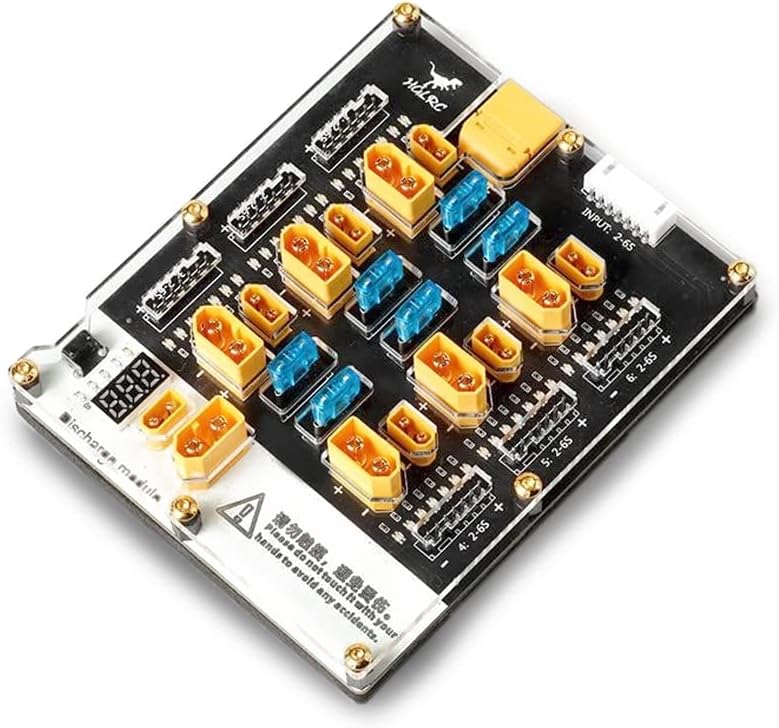
Figure 1: Top-down view of the HGLRC Thor Pro Balance Charging Board, showing the XT30 and XT60 ports, balance ports, and digital display.

Figure 2: Detailed top view highlighting the six balance ports (2-6S) and the XT30/XT60 charging ports.

Figure 3: Side view of the charging board, illustrating its compact design and clear acrylic top plate.

Figure 4: Bottom view of the board, displaying key specifications and safety warnings printed on the base.
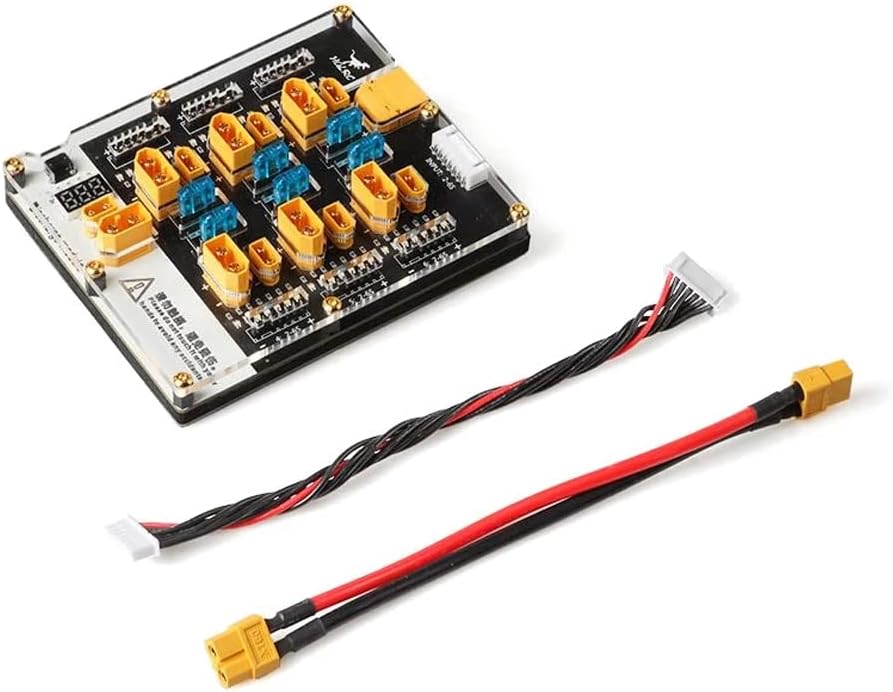
Figure 5: The HGLRC Thor Pro board shown with the included balance XT60 cable and standard balance cable.
Key Features:
- 6 Ports: Supports simultaneous charging of up to six LiPo batteries.
- XT30/XT60 Interface: Compatible with common battery connectors.
- Integrated Discharger: Allows for safe discharging of LiPo batteries.
- Digital Display: Provides real-time information.
- Connector Protection: Each XT30/XT60 port has a 15A automotive fuse.
- Battery Balancing Connector Protection: Self-resetting thermal fuses between every balancing pin with LED short indication.
Setup
- Unpack: Carefully remove the HGLRC Thor Pro board and included cables from its packaging.
- Inspect: Check the board for any visible damage. Do not use if damaged.
- Connect to Charger: Connect the main input cable (e.g., XT60 cable) from your primary LiPo charger to the "INPUT: 2-6S" port on the Thor Pro board. Ensure your primary charger is capable of supplying the necessary current (Max Input Current: 40A).
- Placement: Place the board on a stable, non-flammable surface, ensuring adequate ventilation.
Operating Instructions
Charging LiPo Batteries:
- Prepare Batteries: Ensure all batteries to be charged are of the same cell count (e.g., all 4S, all 6S). The board supports 2-6S batteries.
- Connect Main Power: Connect the main power lead (XT30 or XT60) of each battery to an available XT30 or XT60 port on the Thor Pro board.
- Connect Balance Lead: Connect the balance lead of each battery to the corresponding balance port on the Thor Pro board. Ensure the correct cell count port is used (e.g., 4S battery to 4S balance port).
- Set Primary Charger: Configure your primary LiPo charger to the correct battery type (LiPo), cell count (e.g., 4S), and desired charge current. The Thor Pro board distributes the current, so set the current on your primary charger based on the total capacity of all connected batteries. Max Balance Current is 2A.
- Start Charging: Initiate the charging process on your primary LiPo charger. Monitor the digital display on the Thor Pro board for status.
- Monitor: Continuously monitor the charging process. If any LED indicator illuminates near a balance pin, it indicates a short circuit; immediately stop charging and disconnect the battery.
Discharging LiPo Batteries:
The Thor Pro features an integrated discharger module.
- Connect Battery: Connect the XT30 or XT60 main power lead of the LiPo battery you wish to discharge to the designated discharge module port.
- Monitor: The digital display will show the battery voltage. The discharge process will automatically stop when the single-chip cut-off voltage of 3.8V per cell is reached.
- Safety: The discharge module may become warm during operation. Ensure adequate ventilation and do not touch it.
Maintenance
- Cleaning: Use a dry, soft cloth to clean the surface of the board. Do not use liquids or solvents.
- Storage: Store the board in a cool, dry place away from direct sunlight and moisture when not in use.
- Inspection: Periodically inspect all connectors and cables for wear or damage. Replace any damaged components immediately.
Troubleshooting
| Problem | Possible Cause | Solution |
|---|---|---|
| Board not powering on / Digital display off | No input power from primary charger, or incorrect connection. | Ensure the primary charger is connected and powered on. Check the main input cable connection to the Thor Pro board. |
| LED indicator illuminates near a balance pin | Short circuit detected on a balance lead. | Immediately disconnect the battery. Inspect the battery's balance lead and the board's balance port for damage or debris. Do not reconnect until the issue is resolved. |
| Batteries not charging or discharging | Incorrect battery connection, primary charger settings, or faulty battery. | Verify all XT30/XT60 and balance connections are secure and correct. Check primary charger settings (battery type, cell count, current). Test the battery with another known good charger if possible. |
| Discharge module gets very hot | Normal operation during discharge, or insufficient ventilation. | Heat is normal during discharge. Ensure the board is placed in a well-ventilated area. If excessively hot, disconnect and allow to cool. |
Specifications
| Feature | Specification |
|---|---|
| Charge Connector Protection | Each XT30/XT60 port has its own 15A Automotive fuse |
| Supported Simultaneous Charging | 6x XT60/XT30 ports |
| Max Balance Current | 2A |
| Cell Count Support (Charging) | 2-6S |
| Max Input Current | 40A |
| Discharger Cut-off Voltage (Single-chip) | 3.8V |
| Battery Interface (Discharger) | XT30/XT60 |
| Input Voltage (Discharger) | 2-6S |
| Display | LED digital tube |
| Item Weight | 10.4 ounces (0.65 Pounds) |
| Manufacturer Recommended Age | 14 years and up |
Warranty and Support
For warranty information and technical support, please refer to the official HGLRC website or contact your retailer. Keep your proof of purchase for warranty claims.
Manufacturer: HGLRC


