
Introduction
The KIDYWOLF KIDYALARM is an innovative alarm clock designed to assist children in learning to read both analog and digital time. It features a dual display, two independent alarm systems, and is equipped with a backlight for visibility in low-light conditions. The device is rechargeable via a universal USB-C port and is designed to operate without emitting radio waves during sleep periods.
Safety Information
- Warning: Not suitable for children under 3 years due to small parts.
- Always supervise children when they are interacting with electronic devices.
- Do not expose the device to water or excessive moisture.
- Use only the provided USB-C cable or a certified equivalent for charging.
- Avoid extreme temperatures.
Package Contents
Please check the package for the following items:
- 1x KIDYALARM Analog and Digital Alarm Clock
- 2x Interchangeable Dials
- 1x USB-C Charging Cable
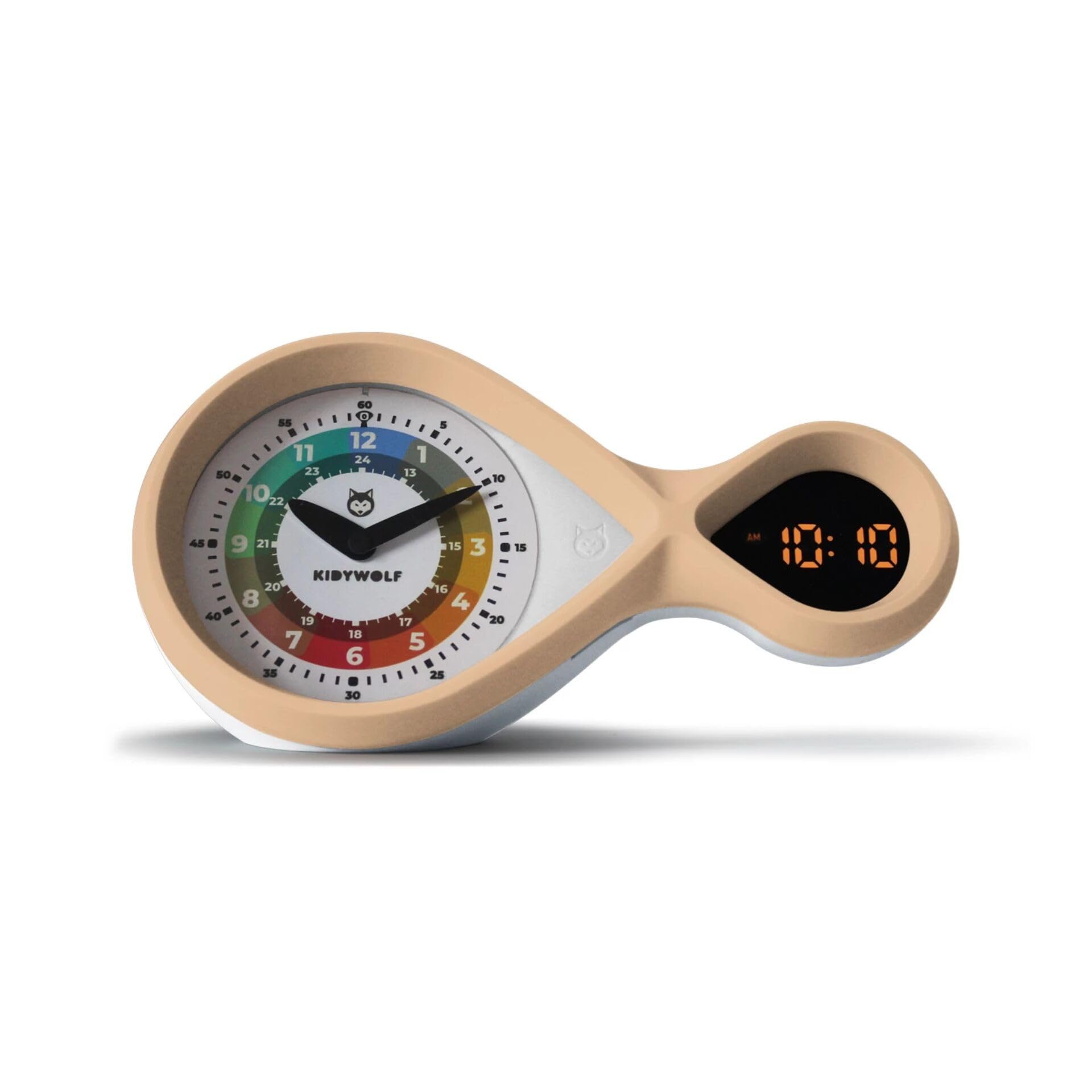
Image: Front view of the KIDYWOLF KIDYALARM, showing both analog and digital displays.
Setup
1. Charging the Device
- Connect the provided USB-C charging cable to the charging port located on the back or side of the alarm clock.
- Plug the other end of the USB-C cable into a compatible USB power adapter (not included) or a computer USB port.
- The charging indicator light will illuminate during charging and turn off or change color when fully charged.
2. Inserting/Changing Dials
- Gently remove the current dial from the front of the clock.
- Select one of the two provided dials.
- Align the chosen dial with the clock face and carefully press it into place until it sits securely.

Image: A child's hand near the KIDYALARM, illustrating interaction with the clock face.
Operating Instructions
1. Setting the Time
The KIDYALARM features both analog and digital time displays. The digital time is typically set first, and the analog hands will synchronize or can be manually adjusted.
- Locate the control buttons on the back or bottom of the clock. These typically include "SET", "UP", and "DOWN" buttons.
- Press and hold the "SET" button until the digital time display begins to flash.
- Use the "UP" and "DOWN" buttons to adjust the hours. Press "SET" again to confirm and move to minutes.
- Adjust minutes using "UP" and "DOWN" buttons. Press "SET" to confirm.
- Some models may allow manual adjustment of analog hands via a small knob or by rotating the hands directly. Refer to the specific markings on your device.
2. Setting Alarms (Alarm 1 & Alarm 2)
The clock supports two independent alarms.
- Press the "ALARM" button (or "SET" repeatedly until alarm setting mode is reached).
- The alarm time for Alarm 1 will flash. Use "UP" and "DOWN" to set the desired hour and then minutes. Press "ALARM" (or "SET") to confirm each step.
- After setting Alarm 1, you may be prompted to set Alarm 2. Repeat the process.
- To activate/deactivate an alarm, press the "ALARM" button briefly. An alarm icon (e.g., bell symbol) will appear on the digital display when an alarm is active.
3. Snooze Function
When an alarm sounds, press the large button on top of the clock (or designated snooze button) to activate the snooze function. The alarm will temporarily stop and sound again after a set interval (e.g., 5-10 minutes).
4. Disabling an Alarm
To completely turn off a sounding alarm, press any button other than the snooze button, or flip the alarm switch to the OFF position if available. To deactivate an alarm for the next day, refer to step 2 for activating/deactivating alarms.
5. Backlight / Night Light
The clock features a backlight for easy reading in the dark. This may be activated automatically in low light conditions or by pressing a specific button (e.g., "LIGHT" or the snooze button briefly).

Image: Side profile of the KIDYWOLF KIDYALARM, highlighting its unique design.
Maintenance
- Cleaning: Wipe the clock with a soft, dry cloth. Do not use abrasive cleaners or solvents.
- Storage: When not in use for extended periods, store the clock in a cool, dry place.
- Battery Care: Recharge the device regularly to maintain battery health. Avoid fully discharging the battery frequently.
Troubleshooting
| Problem | Possible Cause | Solution |
|---|---|---|
| Clock not turning on. | Low battery or no power. | Charge the clock using the USB-C cable. Ensure the power source is active. |
| Alarm not sounding. | Alarm not activated or set incorrectly. | Verify alarm settings and ensure the alarm icon is displayed. Check volume settings if applicable. |
| Digital display is dim or unreadable. | Low battery or backlight setting. | Charge the device. Check if there's a brightness setting or if the backlight needs manual activation. |
| Analog hands not matching digital time. | Synchronization issue or manual adjustment needed. | Some models require manual adjustment of analog hands after setting digital time. Refer to operating instructions. |
Specifications
- Model: KIDYALARM
- Dimensions (L x W x H): 12 x 22 x 7 cm
- Weight: 530 Grams
- Display Type: Analog and Digital
- Power Source: Rechargeable via USB-C Cable (Electric)
- Special Features: Temperature Display, Two Alarm Systems, Backlight, Interchangeable Dials
- Materials: Plastic, Wood
- Movement Type: Quartz
- Batteries Included: No (Internal rechargeable battery)
- Connectivity: USB-C

Image: Rear view of the KIDYWOLF KIDYALARM, indicating the USB-C charging port and control buttons.
Warranty and Support
For warranty information and technical support, please contact the manufacturer:
- Manufacturer: NESPART SPRL
- Email: info@nespart.com
Please retain your proof of purchase for warranty claims.


