
RCYAGO YY-1030
RCYAGO Digital pH Meter YY-1030
Instruction Manual
1. Introduction
The RCYAGO Digital pH Meter YY-1030 is a high-precision instrument designed for accurate pH testing across a wide range of samples. It is particularly well-suited for soft solid samples such as various food items (meat, bread, cheese, fruits, dough, jam, sauce), skincare products, and soft soil. Additionally, it provides reliable pH measurements for aqueous solutions. Featuring a backlit LCD display, automatic temperature compensation (ATC), and Bluetooth connectivity, this meter offers convenience and advanced functionality for both professional and home use.
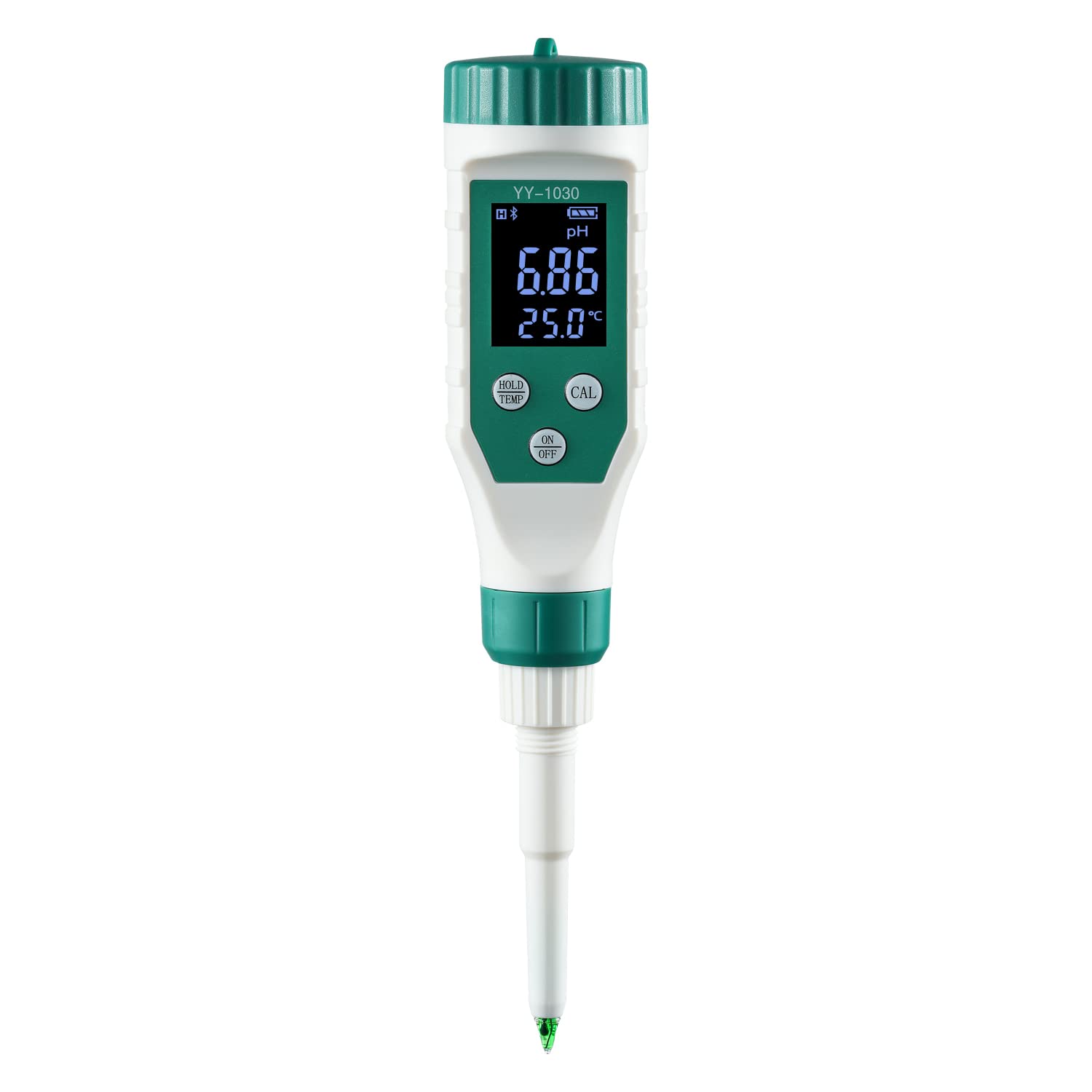
Figure 1: RCYAGO Digital pH Meter YY-1030
2. Package Contents
Upon opening the package, please verify that all the following items are included:
- RCYAGO Digital pH Meter YY-1030
- pH 4.00 Calibration Powder
- pH 6.86 Calibration Powder
- pH 9.18 Calibration Powder
- pH 7.00 Calibration Powder
- pH 10.01 Calibration Powder
- 4 x LR44 Batteries (pre-installed or included separately)
- Instruction Manual (this document)

Figure 2: Included items in the package
3. Setup
3.1 Battery Installation
The pH meter requires 4 LR44 batteries for operation. These are typically included and may be pre-installed. If not, open the battery compartment and insert the batteries, ensuring correct polarity. Close the compartment securely.
3.2 App Download and Bluetooth Connection
The RCYAGO pH meter features Bluetooth connectivity, allowing for enhanced functionality via a dedicated mobile application. The app is compatible with both iOS and Android devices.
- Download the App: Scan the QR code provided in the physical manual or search for the 'YY-1030' or 'RCYAGO' app in your device's app store (App Store for iOS, Google Play Store for Android).
- Turn on Meter's Bluetooth: Press and hold the 'ON/OFF' button on the pH meter for 3-5 seconds. The screen will display a Bluetooth icon, indicating that Bluetooth is active.
- Enable Phone's Bluetooth: Go to your phone's settings and ensure Bluetooth is turned on. Also, enable location services for the app to ensure proper connection.
- Open the App: Launch the downloaded application. The app should automatically detect and connect to the pH meter. Once connected, you will see live readings on your phone screen.
Video 1: RCYAGO Bluetooth pH Meter for Food - Demonstrates Bluetooth connection and app interface.
4. Operating Instructions
4.1 General Usage
To obtain a pH reading, simply immerse the electrode of the pH meter into the sample to be tested. Readings will quickly display on the large LCD screen. The meter will automatically enter standby mode after 5 minutes of inactivity to conserve power, while still recording data. Press 'HOLD/TEMP' or 'CAL' to wake up the screen. To turn off the meter, press the 'On/Off' button.

Figure 3: Backlit LCD display for clear readings.
4.2 Specific Applications
The YY-1030 pH meter is versatile and can be used for various applications:
- Food Testing: Ideal for soft solid foods such as cheese, sushi rice, meat, fruit, dough, jam, and sauce. Insert the spear probe directly into the food item.
- Soil Testing: For soil, ensure the soil is moist before inserting the electrode. Do not insert into hard, dry soil directly, as this may damage the electrode.
- Water & Aqueous Solutions: Suitable for regular pH testing of water, skincare products, and other liquid mediums.
Video 2: pH Meter for Food - General demonstration of use across various food types.
Video 3: How to use the food pH tester? - Detailed guide on using the meter for different food items and soil.

Figure 4: The pH meter is suitable for various applications including cheese, dough, meat, soil, fruits, water quality, and cosmetics.
4.3 Understanding pH Values
The pH scale ranges from 0 to 14, indicating the acidity or alkalinity of a substance:
- pH 0-6: Acidic
- pH 7: Neutral
- pH 8-14: Alkaline (Basic)
The meter also features Automatic Temperature Compensation (ATC) to ensure accurate readings regardless of sample temperature (within 0.1 to 60.0°C range).

Figure 5: pH values of common substances, illustrating acidic, neutral, and alkaline ranges.

Figure 6: Explanation of Automatic Temperature Compensation (ATC) for accurate readings.
5. Calibration
Regular calibration ensures the accuracy of your pH meter. The meter supports calibration with pH 6.86, 4.00, 9.18, 7.00, and 10.01 buffer solutions. It is recommended to calibrate the meter before first use and periodically thereafter, especially if readings seem inconsistent or after prolonged storage.
5.1 Calibration Procedure
Follow these steps to calibrate your pH meter:
- Prepare the buffer solutions by dissolving the provided powder packets in distilled water according to their instructions.
- Rinse the electrode with distilled water and gently blot dry.
- Immerse the electrode into the first buffer solution (e.g., pH 6.86).
- Press and hold the 'CAL' button for 5 seconds. The display will flash the buffer value (e.g., '6.86') three times, indicating successful calibration for that point.
- Remove the electrode, rinse thoroughly with distilled water, and gently blot dry.
- Repeat steps 3-5 for the remaining buffer solutions (e.g., pH 4.00 and pH 9.18 for a three-point calibration, or 7.00 and 10.01 if using EU standard).
Video 4: How to calibrate food pH meter? - Visual guide to the calibration process.

Figure 7: Example of pH buffer solutions used for calibration.
6. Maintenance
6.1 Electrode Care
The pH meter's spear probe electrode is crucial for accurate readings. It is protected by a damp sponge soaked in KCL solution within the protective cap. Always ensure the sponge remains moist to extend the electrode's lifespan. Replace the electrode if it becomes damaged or provides inconsistent readings.
6.2 Cleaning
After each use, especially when testing different samples, rinse the electrode thoroughly with distilled water. Gently blot dry with a clean, soft cloth or tissue. Do not rub the electrode vigorously, as this can damage it. Always replace the protective cap with the moist sponge after cleaning and storage.
7. Troubleshooting
If you encounter issues with your RCYAGO Digital pH Meter, consider the following common solutions:
- Inaccurate Readings: Recalibrate the meter using fresh buffer solutions. Ensure the electrode is clean and the sponge in the protective cap is moist.
- No Display/Power Issues: Check battery installation and replace batteries if necessary. Ensure the 'On/Off' button is pressed correctly.
- Bluetooth Connection Failure: Ensure Bluetooth is enabled on both the meter and your phone. Verify that location services are enabled for the app. Restart both the meter and the app, then try connecting again.
- Electrode Damage: If the electrode appears physically damaged or consistently provides erratic readings despite calibration, it may need replacement.
For further assistance, please refer to the 'Warranty and Support' section.
8. Specifications
| Feature | Specification |
|---|---|
| Product Dimensions | 9.05 x 1.65 x 1.65 inches |
| Weight | 3.84 ounces |
| Batteries | 4 LR44 batteries (included) |
| Manufacturer | RCYAGO |
| First Available Date | August 22, 2022 |
| pH Resolution | 0.01 |
| Automatic Temperature Compensation (ATC) | Yes |
| Connectivity | Bluetooth |
9. Warranty and Support
RCYAGO values excellent service quality. The Food pH tester features replaceable electrodes, thoughtfully pre-protected with a specific fluid to extend their lifespan. We confidently offer a 6-month quality guarantee for electrodes. Should your pH meter encounter any damage or defects within this period, please do not hesitate to contact RCYAGO customer support for swift and comprehensive assistance.
For support inquiries, please refer to the contact information provided on the product packaging or the official RCYAGO website.
Ask a question about this manual
Ask about setup, troubleshooting, compatibility, parts, safety, or missing instructions. Manuals+ will review the question and use this page’s manual context to help answer it.