
1. Introduction
This manual provides essential information for the safe and efficient operation of your ZBAITU M81 10W Laser Cutter and Engraver Machine. Please read this manual thoroughly before operating the device to ensure proper usage and to prevent damage or injury.
The ZBAITU M81 is a versatile laser engraving and cutting machine featuring a 10W optical output power laser module with air assist. It is designed for high-accuracy engraving and cutting on a variety of materials, including wood, metal, glass, and leather, within a large working area of 810 x 460 mm.
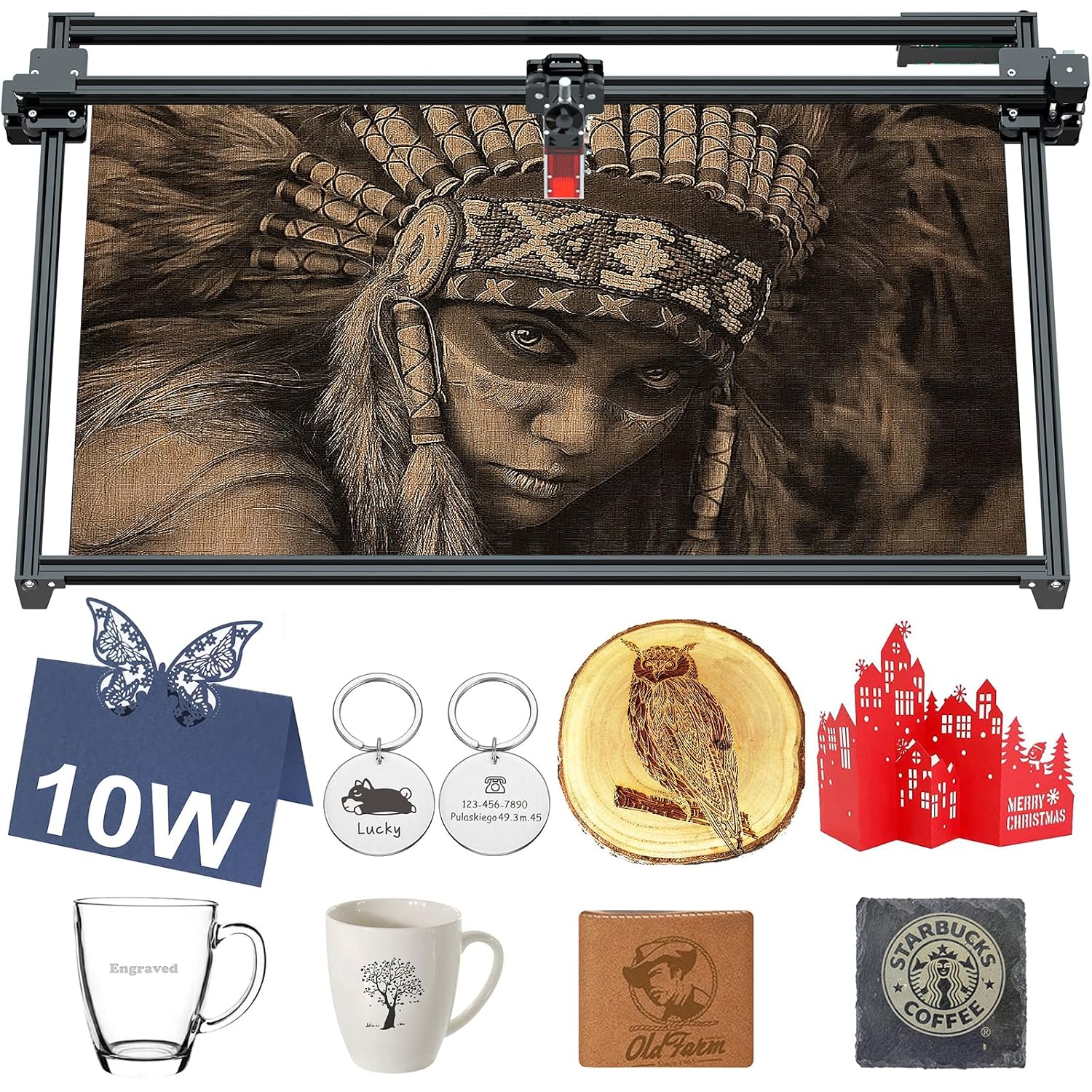
Image 1: The ZBAITU M81 Laser Engraver Machine showcasing its large working area and examples of engraved and cut materials such as wood, metal keychains, and glass.
2. Safety Information
WARNING: Laser radiation can cause eye damage and skin burns. Always wear appropriate laser safety glasses during operation. Never look directly into the laser beam.
- Ensure the machine is operated in a well-ventilated area to dissipate fumes and smoke generated during engraving and cutting.
- Keep a fire extinguisher nearby. Do not leave the machine unattended during operation, especially when cutting flammable materials.
- Keep children and pets away from the operating area.
- Do not engrave or cut unknown materials. Some materials can produce toxic fumes or catch fire easily.
- Ensure all electrical connections are secure and grounded.
- Avoid touching the laser module or work area during operation as components can become hot.
3. Setup
The ZBAITU M81 is designed for quick assembly. The entire structure can typically be assembled within 15 minutes.
- Unpack all components and verify against the packing list (refer to your specific packing list for details).
- Assemble the frame components according to the included assembly guide. The full metal frame design and integrated screw rod contribute to stability.
- Mount the laser module onto the gantry.
- Connect all necessary cables, including power and data cables.
- Ensure the machine is placed on a stable, level surface.

Image 2: Illustration of the ZBAITU M81's synchronous shaft with a 4-wheel design, which provides greater stability and precision compared to traditional 3-wheel designs.
4. Operating Instructions
4.1 Software Compatibility
The ZBAITU M81 is compatible with popular engraving software:
- LaserGRBL: Supported on Windows XP/7/8/10. (Free software)
- LightBurn: Supported on Windows XP/7/8/10 and MacOS. (Paid software)
4.2 Supported File Types
The machine supports common vector graphic and image formats, including:
- AI (Adobe Illustrator)
- PDF (Portable Document Format)
- SVG (Scalable Vector Graphics)
- DXF (Drawing Exchange Format)
- PLT (HPGL Plot File)
- PNG (Portable Network Graphics)
- JPG (Joint Photographic Experts Group)
- GIF (Graphics Interchange Format)
- BMP (Bitmap)
- NC (G-code)
4.3 Focusing the Laser
Achieving proper focus is crucial for optimal engraving and cutting results. The M81 features an easy-to-focus mechanism.
4.4 Offline Operation (SD Card)
The M81 supports offline working via an SD card. You can drag NC files to the SD card, insert it into the machine, and the laser engraver will start working automatically. This allows you to close your computer or cellphone, preventing interruptions during long engraving or cutting tasks.

Image 3: Overview of key operational features including the large 810x460mm work area, easy focusing mechanism, compatibility with LaserGRBL and LightBurn software, and the convenience of SD card offline operation.
4.5 Engraving and Cutting Materials
The ZBAITU M81 is capable of engraving and cutting a wide range of materials:
| Function | Materials |
|---|---|
| Engraving | Stainless steel, Coated metal, MDF, Balsa, Plywood, Bamboo, Foam Paper, Wood, Fabric, Leather, Glass, Colored acrylic, Paper, Sticker, Ceramic, Slate, etc. |
| Cutting | MDF, Balsa, Wood, Fabric, Plywood, Bamboo, Leather, Foam, Paper, Colored acrylic, Sticker, etc. (Can cut 10mm wood in one pass) |

Image 4: Examples of diverse materials suitable for processing with the ZBAITU M81, including leather, wood, acrylic, bamboo, paper, coated metal, ceramic, carton, plastic, stone, glass, and even food.
4.6 Laser Module and Air Assist
The ZBAITU M81 is equipped with the FF80EAIR laser module, featuring a 10W optical output power. The latest FAC process ensures a laser compression point as tiny as 0.08mm, resulting in finer engraving and cutting lines with reduced burn marks.
The innovative air assist function blows away scraps and smoke from the work area, significantly improving cutting speed and quality, and effectively reducing lens contamination.

Image 5: Visual comparison illustrating the concentrated laser energy and smaller 0.08mm laser spot size of the ZBAITU M81, leading to finer details compared to other lasers with larger, dispersed spots.

Image 6: Illustration of the integrated air assist system, demonstrating how it provides a strong airflow to protect the laser lens and ensure clean cutting results by removing debris and smoke.
5. Maintenance
- Clean the Laser Lens: Regularly inspect and clean the laser lens to ensure optimal performance and prevent contamination, especially with the air assist function.
- Clean the Work Area: Remove debris and dust from the engraving area after each use.
- Lubricate Moving Parts: Periodically lubricate the guide rails and lead screws to ensure smooth movement.
- Check Connections: Ensure all cables and connections are secure.
- Software Updates: Keep your engraving software updated to the latest versions for best compatibility and features.
6. Troubleshooting
This section provides solutions to common issues. For more complex problems, please refer to the manufacturer's support resources.
| Problem | Possible Cause | Solution |
|---|---|---|
| Laser not firing | Power cable disconnected, software error, laser module fault. | Check power connections. Restart software and machine. Verify laser module connection. |
| Poor engraving/cutting quality | Incorrect focus, wrong power/speed settings, dirty lens, material issues. | Adjust laser focus. Calibrate power and speed settings for the material. Clean the laser lens. Ensure material is suitable. |
| Machine not connecting to computer | USB cable issue, driver not installed, software not recognizing device. | Try a different USB port/cable. Install necessary drivers. Ensure software is correctly configured to detect the machine. |
| Unexpected machine movement or vibration | Loose components, unstable surface, motor issues. | Check all screws and connections. Ensure the machine is on a stable surface. Contact support if motors seem faulty. |
7. Specifications
| Machine Specifications | |
|---|---|
| Brand | ZBAITU |
| Model | M81 |
| Machine Weight | 5.28 kg |
| Machine Dimensions | 102.87 x 62.99 x 14.99 cm |
| Engraving Area | 810 x 460 mm (31.8 x 18.1 in) |
| Compatible System | Windows XP/7/8/10, MacOS |
| Support Software | LaserGRBL, LightBurn |
| Supported File Types | AI, PDF, SVG, DXF, PLT, PNG, JPG, GIF, BMP, NC, etc. |
| Material | Stainless Steel (frame) |
| Operation Mode | Manual |
| Laser Module Specifications (FF80EAIR) | |
|---|---|
| Brand | ZBAITU |
| Model | FF80EAIR |
| Laser Output Power | 10W |
| Featured Feature | Air Assist |
| Laser Accuracy (Spot Size) | 0.08mm |
| Module Size | 4.1 x 1.5 x 1.5 in |
| Module Weight | 0.2 kg (0.44 lbs) |
8. Warranty and Support
8.1 Warranty Information
Extended warranty options are available for purchase:
- 1-Year Extended Warranty: Provided by Salama Care.
- 2-Year Extended Warranty: Provided by Salama Care.
Please refer to your purchase documentation or contact your retailer for specific warranty terms and conditions.
8.2 Technical Support
For technical assistance, troubleshooting beyond this manual, or inquiries regarding your ZBAITU M81, please contact the manufacturer or your authorized dealer. Keep your product model number (M81) and purchase details ready when seeking support.


