
Introduction
Thank you for choosing Wekily S60-R Wireless Earbuds. This manual provides essential information for setting up, operating, and maintaining your earbuds to ensure optimal performance and longevity. Please read this manual thoroughly before use.
What's in the Box
- Wekily S60-R Wireless Earbuds (Left and Right)
- Charging Case
- USB-C Charging Cable
- Silicone Eartips (Small, Medium, Large)
- User Manual
Product Overview
The Wekily S60-R earbuds feature an ergonomic design for comfort and a charging case with an LED digital display for battery status. Each earbud is equipped with touch controls for easy operation.

Image: Wekily S60-R Earbuds and Charging Case with LED Digital Display. The charging case features an LED digital display showing the battery percentage of the case and individual earbuds.

Image: Smart Touch Control Diagram. Illustrates the touch control functions for volume, track navigation, call management, and voice assistant activation.
Setup
1. Charging the Earbuds and Case
Before first use, fully charge both the earbuds and the charging case. Place the earbuds into the charging case. Connect the USB-C charging cable to the charging port on the case and to a power source. The LED digital display on the case will show the charging status and battery percentage. A full charge provides up to 108 hours of total playtime with the charging case.

Image: Ultra-Long Battery Life. The 2600mAh charging case provides extended playtime and can also serve as a power bank for other devices.
2. Bluetooth Pairing
- Ensure the earbuds are charged.
- Open the charging case. The earbuds will automatically enter pairing mode (indicated by flashing lights, if applicable).
- On your device (smartphone, tablet, etc.), enable Bluetooth.
- Search for "Wekily S60-R" in the list of available Bluetooth devices and select it to connect.
- Once connected, a voice prompt will confirm successful pairing.
3. Wearing the Earbuds
Choose the silicone eartips that provide the most comfortable and secure fit for your ears. Insert the earbuds gently into your ear canal and rotate slightly until they feel snug. A proper fit is crucial for optimal sound quality and noise isolation.

Image: Comfort Wear Close Fit. Shows the ergonomic design of the earbuds for a secure and comfortable fit during various activities.
Operating Instructions
Touch Controls
The Wekily S60-R earbuds feature intuitive touch controls on each earbud. Refer to the 'Smart Touch Control' image in the Product Overview section for a visual guide.
- Play/Pause: Single tap on either earbud.
- Volume Up: Tap and hold the right earbud.
- Volume Down: Tap and hold the left earbud.
- Next Track: Double tap the right earbud.
- Previous Track: Double tap the left earbud.
- Answer/End Call: Single tap on either earbud during an incoming call or active call.
- Reject Call: Tap and hold either earbud during an incoming call.
- Activate Voice Assistant (Google Assistant): Triple tap on either earbud.
Sound Quality
Experience immersive audio with Hi-Fi stereo sound, enhanced by graphene drivers and 10mm speakers. This technology delivers up to 43% bass enhancement and clear, lossless audio transmission.
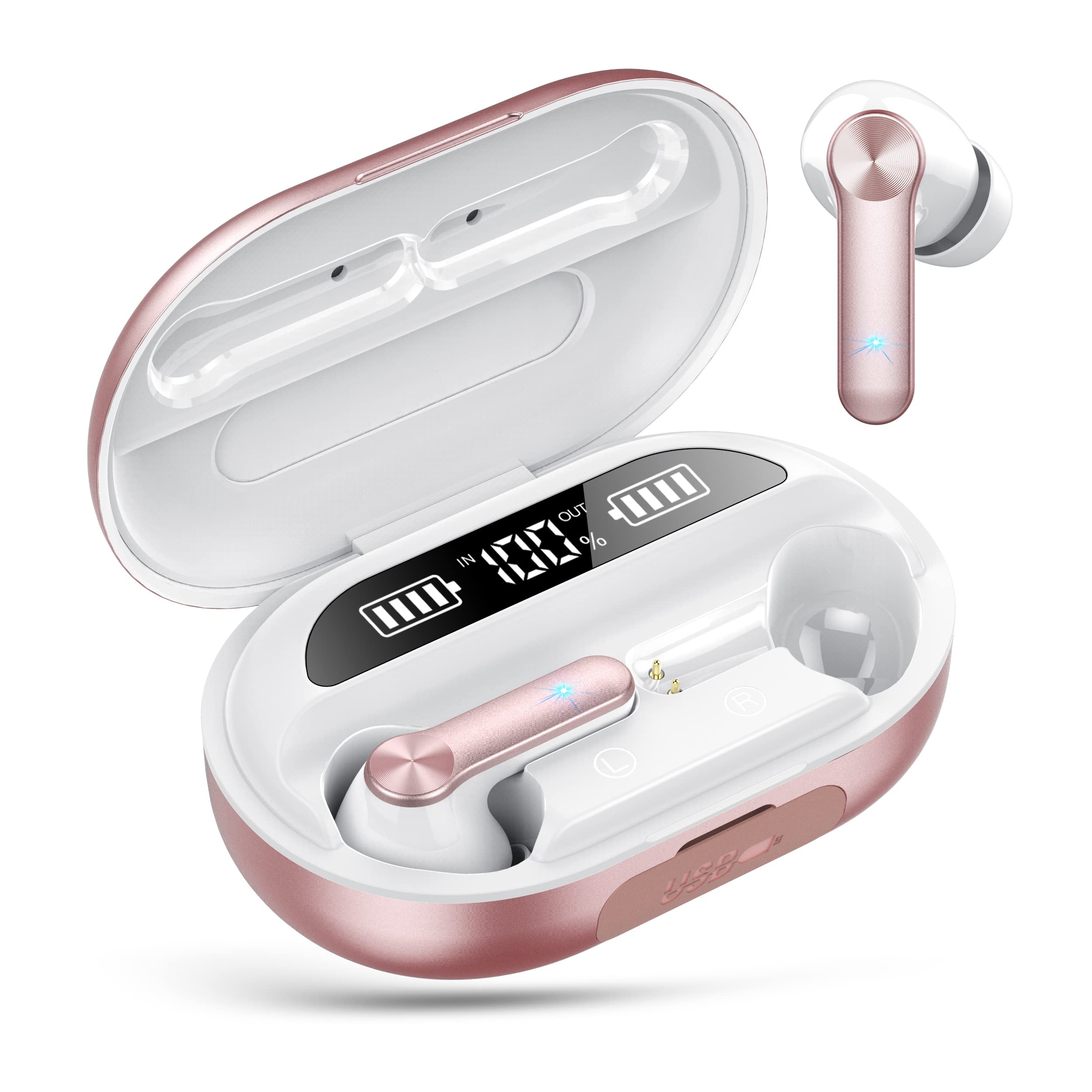
Image: Immersive Sound with Bass. Detailed view of the earbud's internal structure, highlighting the graphene drivers and 10mm big driver for enhanced bass and sound quality.
Clear Call Technology
The earbuds incorporate 4-microphone Environmental Noise Cancellation (ENC) technology, ensuring clear voice transmission during calls, even in noisy environments like gyms or public spaces.

Image: ENC for Clear Calls. Depicts the dual microphone setup on each earbud, utilizing ENC technology for clear call quality.
Maintenance
- Cleaning: Regularly clean the earbuds and charging case with a soft, dry, lint-free cloth. Do not use harsh chemicals or abrasive materials.
- Water Resistance: The earbuds are IPX7 waterproof, making them resistant to sweat and splashes. However, they are not designed for swimming or prolonged submersion. Ensure the charging port is dry before charging.
- Storage: When not in use, store the earbuds in their charging case to protect them and keep them charged. Avoid extreme temperatures.
Troubleshooting
- Earbuds not pairing: Ensure both earbuds are charged. Place them back in the case, close the lid, then open it again to re-initiate pairing mode. Delete previous pairings on your device and try connecting again.
- No sound from one earbud: Check if both earbuds are charged. Try resetting the earbuds by placing them in the case and then taking them out. Re-pair with your device.
- Charging issues: Ensure the USB-C cable is securely connected to both the case and the power source. Check the charging cable and adapter for damage.
- Poor call quality: Ensure the earbuds are properly seated in your ears. Check for any obstructions around the microphones.
Specifications
- Brand: Wekily
- Model: S60-R
- Color: Rose Gold
- Connectivity: Bluetooth 5.3
- Earbud Playtime: Up to 8 hours (single charge)
- Total Playtime (with Charging Case): Up to 108 hours
- Charging Case Battery: 2600mAh (can act as a power bank)
- Quick Charge: 10 minutes charge for 1 hour of use
- Water Resistance: IPX7
- Microphones: 4-microphone ENC (Environmental Noise Cancellation)
- Drivers: Graphene drivers, 10mm speakers
- Control Method: Touch
- Compatible Devices: iPhone and other Bluetooth-enabled devices
- Material: Plastic
- Item Weight: 50 Grams
Warranty and Support
Your Wekily S60-R Wireless Earbuds come with a 30-day money-back guarantee and a 12-month warranty. For any questions or support needs, please contact our 24-hour online customer care service.