
1. Introduction
This manual provides essential instructions for the safe and effective use, setup, operation, and maintenance of your XLAQ 7.4V 4400mAh Lithium-Ion Battery. This battery is designed for compatibility with Yongnuo YN-900, YN-900 II CRI 95+ 3200-5500K, and YN-900 II CRI 95+ 5500K LED lights. Please read this manual thoroughly before using the product and retain it for future reference.
2. Important Safety Information
Failure to follow these safety instructions may result in fire, electric shock, injury, or damage to the product or property.
- DO NOT attempt to disassemble, open, or service the battery pack.
- Replace only with the battery pack designated for this product.
- DO NOT crush, puncture, short external contacts, or dispose of in fire or water.
- DO NOT store above 60°C (140°F).
- Keep the battery away from children.
- Dispose of used batteries according to local regulations.
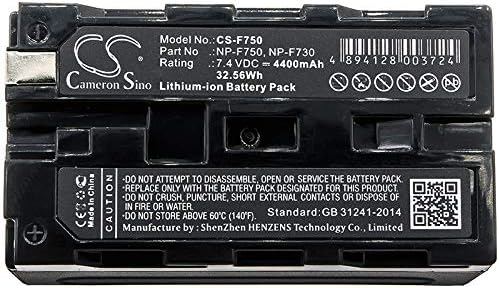
Image 1: Bottom view of the battery, displaying critical safety warnings and manufacturing details. Note the "DO NOT" instructions and temperature limits.
3. Setup
3.1 Initial Charging
Before first use, fully charge the battery. Use a compatible charger designed for NP-F series Lithium-Ion batteries. Connect the charger to a power source and then insert the battery. The charger's indicator light will typically show charging status (e.g., red for charging, green for fully charged).
3.2 Battery Installation
To install the battery into your Yongnuo LED light (e.g., YN-900 series):
- Ensure the LED light is powered off.
- Locate the battery compartment on the back of your LED light.
- Align the battery's terminals with the contacts in the compartment.
- Slide the battery into the compartment until it clicks securely into place.
- Gently tug on the battery to ensure it is firmly seated and will not accidentally detach.

Image 2: Top view of the battery, highlighting the connection terminals and model number for proper alignment during installation.
4. Operating Instructions
4.1 Powering On/Off
Once the battery is securely installed, you can power on your Yongnuo LED light using its dedicated power switch. Refer to your LED light's manual for specific power-on procedures.
4.2 Monitoring Battery Level
Most compatible LED lights will have an indicator to show the remaining battery charge. Monitor this indicator to avoid unexpected power loss during operation. It is recommended to recharge the battery before it is completely depleted to prolong its lifespan.
4.3 Recharging the Battery
When the battery level is low, remove it from the LED light and place it back into a compatible charger. Allow the battery to charge fully before its next use. Overcharging is generally prevented by modern chargers, but it's good practice to disconnect once fully charged.
5. Maintenance
5.1 Cleaning
Wipe the battery's exterior and terminals with a clean, dry cloth. Do not use liquid cleaners or solvents, as these can damage the battery or its contacts.
5.2 Storage
If storing the battery for an extended period, ensure it is charged to approximately 50-70% capacity. Store it in a cool, dry place, away from direct sunlight and extreme temperatures (below 60°C / 140°F). Avoid storing fully charged or fully depleted batteries for long durations.
5.3 Battery Lifespan
Lithium-Ion batteries have a finite number of charge cycles. Proper charging and storage practices can help maximize the battery's overall lifespan.
6. Troubleshooting
| Problem | Possible Cause | Solution |
|---|---|---|
| Battery not charging. | Charger not connected, faulty charger, or battery not seated correctly. | Ensure charger is plugged in and functional. Re-seat the battery firmly in the charger. Try a different compatible charger if available. |
| LED light not powering on with battery. | Battery not fully charged, battery not installed correctly, or battery is faulty. | Verify battery is fully charged. Re-install the battery, ensuring it clicks into place. Test with another known-good battery if possible. |
| Short operating time after full charge. | Battery capacity degradation (normal wear and tear) or improper charging/storage. | Ensure proper charging and storage practices. If the battery is old, consider replacing it. |
7. Specifications
- Model No.: CS-F750 (Compatible with NP-F750, NP-F730)
- Battery Type: Lithium-Ion
- Voltage: 7.4V DC
- Capacity: 4400mAh (32.56Wh)
- Dimensions: 70.60 x 38.50 x 39.90mm
- Weight: 260.0g
- Manufacturer: Shenzhen HENZENS Technology Co., Limited (as per image)
- Standard: GB 31241-2014 (as per image)
- Brand: XLAQ
Note: Specifications are subject to change without notice.
8. Warranty and Support
Your XLAQ battery comes with a 12-month Warranty and a 14-day Money Back Guarantee. For any questions, concerns, or support needs, please do not hesitate to contact our customer service team. We offer 24/7 email support to ensure your satisfaction.
For further information or to contact support, please refer to the seller's contact details or visit the official website: www.cameronsino.com