
Eumspo G3
Eumspo G3 Wireless Headset User Manual
Model: G3 | Brand: Eumspo
1. Introduction
The Eumspo G3 Wireless Headset is designed for clear communication and extended use, featuring dual-mic noise cancellation and a long-lasting battery. This manual provides detailed instructions to help you get the most out of your device.
Key Features:
- Quick Pairing: Advanced chip for smooth signal transmission, low latency, and stable connection up to 33 feet.
- Dual Mic Noise Canceling: Built-in HD microphones and high-quality speakers eliminate background noise for clear calls.
- Extended Playtime: Up to 60 hours of playback with the 400mAh charging case, and 12-15 hours on a single 1.5-hour charge.
- Easy Control: Button controls for music, calls, and voice assistant activation. Includes a mute function.
- Comfortable Fit: Flexible rotatable ear hook and boom mic, adjustable for comfortable and stable wear on either ear.
2. What's in the Box
Verify that all items are present in your package:
- Wireless Headset (Eumspo G3)
- Charging Case
- USB-C Cable
- Replacement Eartips (S, M, L sizes)
- User Manual
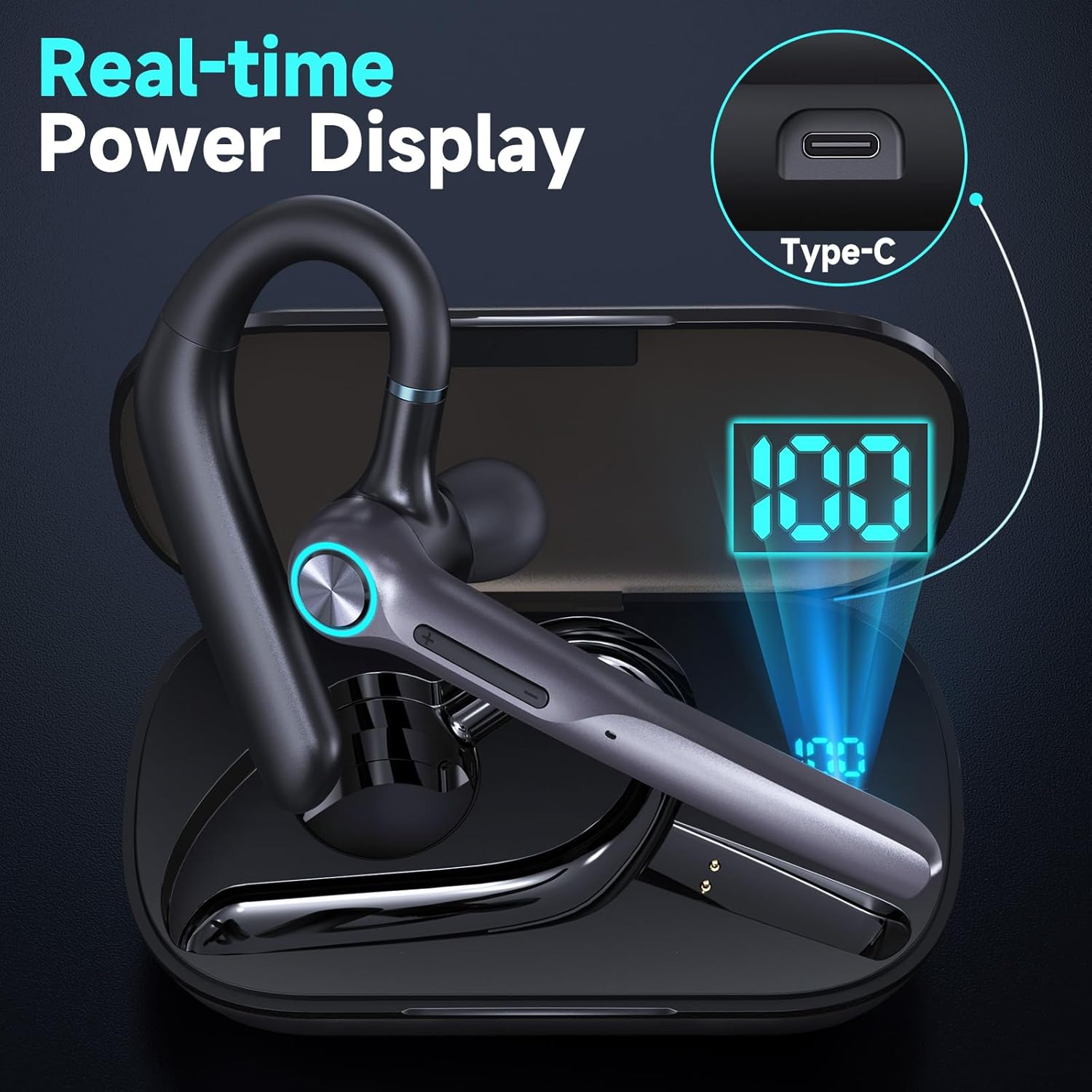
Figure 2.1: Package Contents
3. Setup and Pairing
3.1 Initial Charge
Before first use, fully charge the headset and charging case. The LED display on the charging case indicates the battery level.

Figure 3.1: Headset in Charging Case with LED Display
3.2 Pairing with Your Device
- Ensure the headset is charged.
- Take the earphone out of the charging case. It will automatically power on and enter pairing mode (indicated by a flashing light).
- On your smartphone, tablet, or laptop, activate the Bluetooth function.
- Search for "G3" in the list of available devices and select it to connect.
- Once connected, the headset will provide an audio confirmation, and the light indicator will stop flashing.
The headset supports dual device Bluetooth pairing, allowing connection to two devices simultaneously (e.g., a smartphone and a laptop).

Figure 3.2: Dual Device Bluetooth Pairing
3.3 Wearing Instructions
The Eumspo G3 headset is designed for comfortable and stable wear on either ear. The ear hook and boom mic are flexible and rotatable.
- Insert the ear tip into your ear canal.
- Position the ear hook over the back of your ear.
- Adjust the boom mic and earbud angle for a comfortable and secure fit. The earbud rotates 20 degrees, and the ear hook can be adjusted 180 degrees. The microphone rotates 270 degrees.

Figure 3.3: Wearing the Headset
4. Operating Instructions
4.1 Button Controls
The headset features intuitive button controls for various functions:
- MFB Button (Multi-Function Button):
- Click once: Answer/End call, Play/Pause music.
- Press & Hold for 1.5-2s: Activate voice assistant (Siri, Google Assistant).
- Press & Hold for 3s during call: Mute/Unmute microphone.
- Press & Hold for 3s (not during call): Power On/Off.
- Volume Buttons (+/-):
- Click once: Adjust volume up/down.
- Press & Hold for 2s: Previous/Next track.

Figure 4.1: Headset Features Showcase
4.2 Noise Cancellation
The dual-mic noise canceling technology actively reduces background noise, ensuring clear audio for both you and the person on the other end of the call. This feature is particularly beneficial in noisy environments like offices or while driving.

Figure 4.2: Noise Cancelling Headset
5. Maintenance
5.1 Charging the Headset and Case
To charge the headset, place it back into its charging case. The case will automatically begin charging the headset. To charge the case itself, connect the provided USB-C cable to the charging port on the case and a power source.
- A single 1.5-hour charge provides 12-15 hours of playtime for the headset.
- The 400mAh charging case can provide up to 4 full charges for the headset, offering a total of 60 hours of playtime.
- The case has a standby time of up to 500 hours.

Figure 5.1: Long Battery Life Overview
5.2 Cleaning
Regularly clean the ear tips and charging contacts with a soft, dry cloth to ensure optimal performance and hygiene. Avoid using harsh chemicals or abrasive materials.
6. Troubleshooting
| Problem | Possible Cause | Solution |
|---|---|---|
| Headset not pairing/connecting. | Bluetooth not enabled on device, headset not in pairing mode, out of range. | Ensure Bluetooth is on. Take headset out of case to activate pairing mode. Move device closer to headset (within 33 feet). Try restarting both devices. |
| Headset not charging. | Charging cable or port issue, headset not properly seated in case, case battery low. | Check USB-C cable and power source. Ensure headset is correctly placed in the charging case. Charge the charging case. Clean charging contacts. |
| Poor audio quality/noise. | Interference, headset too far from device, ear tip fit. | Move away from sources of interference. Stay within Bluetooth range. Adjust ear tip for a secure fit. |
| Mute function not working on computer. | Feature limitation. | The mute function is not supported on computers. Use your computer's software mute controls. |
7. Specifications
| Feature | Detail |
|---|---|
| Model Name | G3 |
| Connectivity Technology | Wireless (Bluetooth) |
| Wireless Communication Technology | Bluetooth |
| Battery Life | 60 Hours (with charging case) |
| Charging Time | 1.5 Hours (single charge) |
| Charging Case Capacity | 400mAh |
| Noise Control | Active Noise Cancellation |
| Control Type | Voice Control, Touch |
| Compatible Devices | iOS/Android smart phones, tablets, laptops |
| Wireless Range | Up to 33 feet |
| Material | Plastic |
| Item Weight | 4.6 ounces (0.13 Kilograms) |
| Product Dimensions | 4.13 x 2.17 x 1.14 inches |
| Water Resistance Level | Waterproof (IPX5 Sweatproof & Water-Resistant) |
| Frequency Range | Approximately 20 Hz - 20,000 Hz |
| UPC | 717021978163 |
| Manufacturer | Eumspo |
8. Warranty and Support
Eumspo products are manufactured with high-quality standards. For any issues or support needs, please contact Eumspo customer service through the retailer's platform or the official Eumspo website. Please retain your proof of purchase for warranty claims.
Related documentsG3

Ask a question about this manual
Ask about setup, troubleshooting, compatibility, parts, safety, or missing instructions. Manuals+ will review the question and use this page’s manual context to help answer it.