
Introduction
This manual provides instructions for the PERFASCIN RC-342 replacement remote control, designed for use with specific TEAC CD Player models. This remote offers direct functionality without the need for programming.
Setup: Battery Installation
The RC-342 remote control requires two (2) 1.5V AAA alkaline batteries for operation. No programming or pairing is necessary; simply install the batteries, and the remote will be ready for use.
- Locate the battery compartment on the back of the remote control.
- Slide the battery compartment cover downwards to open it.
- Insert two (2) AAA batteries, ensuring correct polarity (+ and - terminals match the indicators inside the compartment).
- Slide the battery compartment cover back into place until it clicks securely.

This image shows the back of the PERFASCIN RC-342 remote control with the battery compartment cover removed, revealing the slots for two AAA batteries.

This image displays the back of the PERFASCIN RC-342 remote control with the battery compartment securely closed.
Operating Instructions
This remote control is designed to function identically to the original TEAC remote for compatible CD player models. Point the remote directly at your TEAC CD player and press the desired function button.
Key Functions Overview:
- OPEN/CLOSE: Opens and closes the CD tray.
- PLAY: Starts CD playback.
- PAUSE: Temporarily stops CD playback.
- STOP: Halts CD playback.
- SKIP (<< / >>): Skips to the previous or next track.
- SEARCH (< / >): Fast forwards or rewinds within a track.
- Number Buttons (0-9, +10): Direct track selection.
- PGM (Program): Initiates program play mode.
- DELETE: Deletes programmed tracks.
- CHECK: Checks programmed tracks.
- TIME: Displays elapsed or remaining time.
- REPEAT (1/ALL): Repeats current track or all tracks.
- A-B: Repeats a specific section of a track.
- INDEX: Accesses index points within a track.
- AUTO SPACE: Inserts a pause between tracks during recording (if supported by CD player).
- CLEAR: Clears entries or selections.
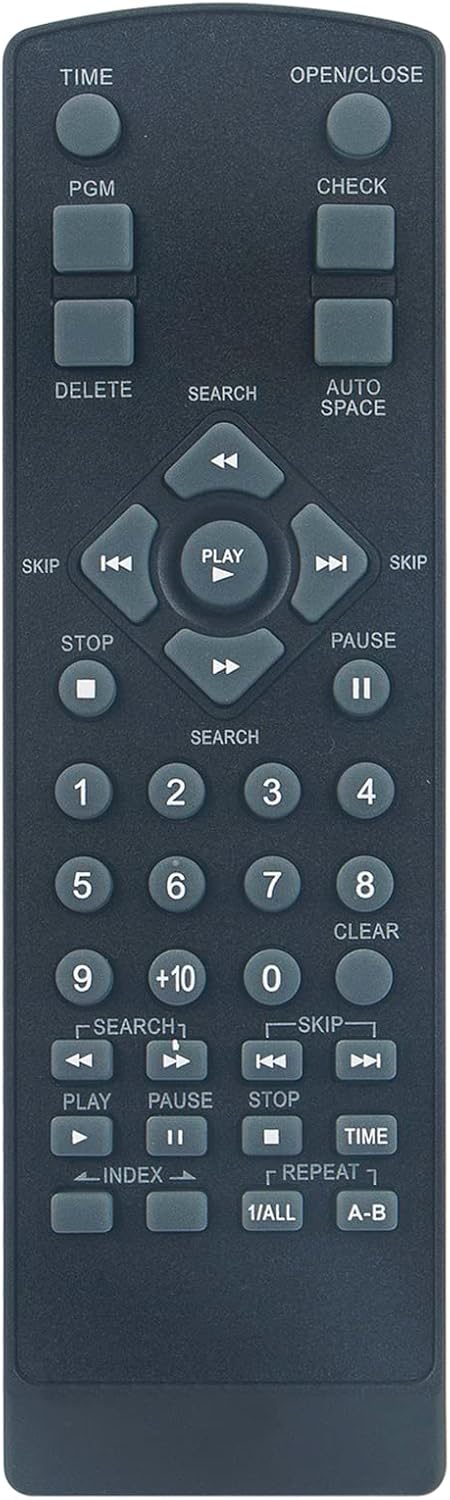
This image displays the front of the PERFASCIN RC-342 remote control, showing all buttons including numerical keys, playback controls, and function buttons like PGM, TIME, and OPEN/CLOSE.
Compatibility
The PERFASCIN RC-342 replacement remote control is compatible with the following TEAC CD Player models:
- TEAC CD5
- TEAC CD7
- TEAC CD10
- TEAC CD15
If your TEAC CD player model is not listed, please contact customer support for assistance.

This image illustrates the PERFASCIN RC-342 replacement remote on the left, with a large red arrow pointing to the right, where an older, original TEAC remote control is shown. This highlights the replacement nature of the product.
Specifications
| Feature | Detail |
|---|---|
| Model Number | RC-342 |
| Power Supply | 2 x 1.5V AAA Alkaline Batteries (Not Included) |
| Connectivity Technology | Infrared (IR) |
| Compatible Devices | TEAC CD Players (CD5, CD7, CD10, CD15) |
| Dimensions | 7 x 2 x 0.65 inches (approx.) |
| Item Weight | 2.3 ounces (approx.) |
| Special Feature | Ergonomic design |
Troubleshooting
Remote Not Responding:
- Check Batteries: Ensure that two (2) new 1.5V AAA alkaline batteries are correctly installed with the proper polarity. Weak or dead batteries are the most common cause of remote control issues.
- Line of Sight: Ensure there is a clear line of sight between the remote control and the infrared sensor on your TEAC CD player. Obstructions can block the signal.
- Remote Sensor: Verify that the infrared sensor on your CD player is not obstructed or dirty.
- Compatibility: Confirm that your TEAC CD player model is listed as compatible with the RC-342 remote control.
Customer Support
If you encounter any issues or have questions regarding your PERFASCIN RC-342 replacement remote control, please contact our customer service for professional assistance.
For further inquiries, refer to the seller's contact information on the product purchase page.