
Introduction
The Coast PM100R is a versatile, rechargeable work light designed for various tasks. It features multiple lighting modes, a 180-degree rotating hook, and a magnetic base for flexible positioning. This manual provides essential information for the safe and efficient operation, charging, and maintenance of your PM100R work light.

Image: The Coast PM100R work light, showcasing its compact design.
Package Contents
- Coast PM100R Worklight
- USB-C Charging Cable
- Integrated Lithium Ion Battery (pre-installed)

Image: The PM100R work light shown with its included USB-C charging cable.
Product Features
The PM100R work light offers several key features for enhanced utility:
- Dual Beam Options: Features both a main beam with fixed flood and spot options, and an independently controlled C.O.B. (Chip On Board) side area light.
- Multiple Output Modes: The C.O.B. area light has high, medium, and low settings. The main beam offers spot, flood, and combined spot & flood modes.
- 180-Degree Rotating Hook/Stand: A fold-out hook allows for hands-free hanging and also functions as a stand. It rotates 180 degrees for optimal light positioning.
- Magnetic Base: The integrated magnetic base provides secure attachment to metallic surfaces.
- Dual Power Source: Operates on a built-in COAST ZITHION rechargeable lithium-ion battery or via USB-C connection for continuous power.
- Battery Life Indicator: Real-time charge monitoring is provided by a battery life indicator.
- Durable Construction: Rated IP57 for dust resistance and waterproofing.
- Integrated Ruler: A ruler is etched into the handle for quick measurements.

Image: Illustration of the PM100R's spot, flood, and area light beam patterns.

Image: The PM100R demonstrating its 180-degree rotating hook and magnetic base for versatile mounting.
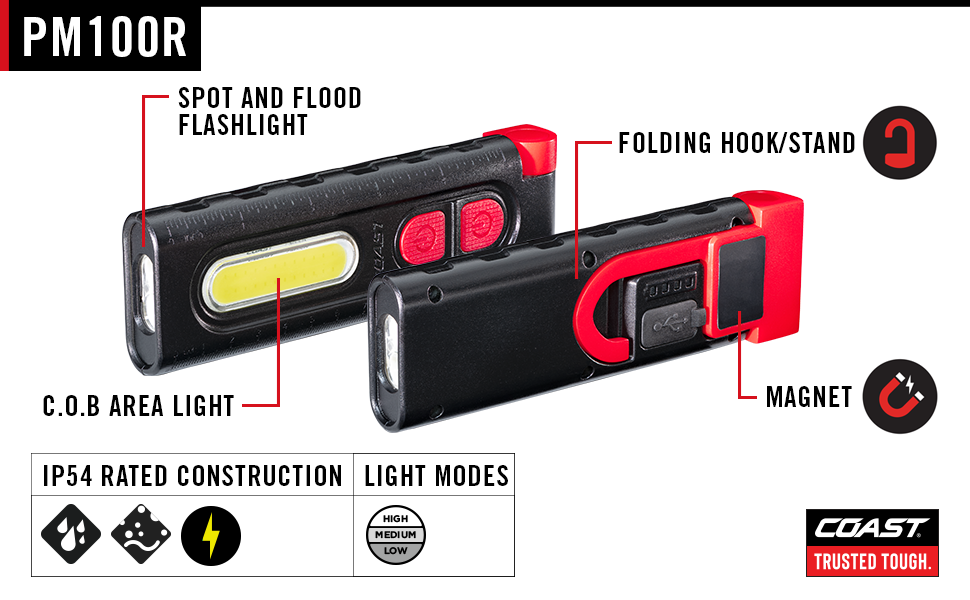
Image: Detailed diagram highlighting the PM100R's components: spot and flood flashlight, C.O.B. area light, folding hook/stand, and magnet.
Setup
Initial Charge
Before first use, fully charge the PM100R work light. Connect the provided USB-C charging cable to the light's USB-C port and plug the other end into a compatible USB power source (e.g., wall adapter, computer USB port). The battery life indicator lights will illuminate during charging.
Operating Instructions
Power On/Off and Mode Selection
The PM100R features two separate buttons for controlling the main beam and the C.O.B. area light.
- Main Beam (Spot/Flood): Press the designated button to cycle through spot, flood, and combined spot & flood modes. Press again to turn off.
- C.O.B. Area Light: Press the other designated button to cycle through high, medium, and low brightness settings. Press again to turn off.
Positioning the Worklight
- Using the Hook: Extend the fold-out hook and rotate it 180 degrees to hang the light from various objects for hands-free illumination.
- Using the Stand: The fold-out hook can also be used as a stand to prop the light on flat surfaces.
- Magnetic Attachment: Utilize the magnetic base to securely attach the work light to ferrous metal surfaces, such as car hoods, toolboxes, or metal beams.
Charging
The PM100R is equipped with a built-in rechargeable lithium-ion battery. To charge:
- Locate the USB-C charging port, typically protected by a rubber cover.
- Open the rubber cover and insert the USB-C end of the charging cable into the port.
- Connect the USB-A end of the cable to a powered USB port (e.g., computer, wall adapter, power bank).
- The battery life indicator lights will show the charging status. All lights illuminated indicate a full charge.
- Once fully charged, disconnect the cable and ensure the rubber cover is securely closed to maintain dust and water resistance.
The light can also operate while connected to a USB-C power source, providing continuous illumination (Dual Power feature).

Image: The PM100R work light being charged via its USB-C port.

Image: Close-up of the PM100R's battery life indicator, showing charge status.
Maintenance
Cleaning
Wipe the exterior of the work light with a soft, damp cloth. Do not use abrasive cleaners or solvents, as these may damage the finish or internal components. Ensure the USB-C port cover is closed before cleaning with moisture.
Storage
Store the PM100R in a cool, dry place away from direct sunlight and extreme temperatures. For long-term storage, it is recommended to charge the battery to approximately 50% every few months to maintain battery health.
Troubleshooting
| Problem | Possible Cause | Solution |
|---|---|---|
| Light does not turn on. | Battery is depleted. | Charge the work light using the provided USB-C cable. |
| Light flickers or dims unexpectedly. | Low battery charge. | Recharge the battery. |
| Charging indicator lights do not illuminate. | Charging cable or power source issue. | Ensure the USB-C cable is properly connected and the power source is active. Try a different cable or power source. |
| Magnetic base does not hold securely. | Surface is not ferrous or is too thin/uneven. | Ensure attachment to a clean, flat, ferrous metal surface. |
Specifications
| Feature | Detail |
|---|---|
| Model Number | PM100R (30687) |
| Light Source Type | LED (C.O.B. Optic, Bulls-Eye Spot Beam Optic) |
| Brightness | Up to 850 lumens (overall, specific modes vary) |
| Power Source | Rechargeable Lithium Ion Battery (included) / USB-C |
| Max Run Time | Up to 31 hours (low setting) |
| Charging Port | USB-C |
| Dimensions (L x W x H) | 6.34" x 1.97" x 0.85" |
| Weight | 3.84 ounces |
| Material | Aluminum / Plastic |
| Ingress Protection (IP) Rating | IP57 (Dust resistant and waterproof) |
| Special Features | 180-Degree Rotating Hook, Magnetic Base, Battery Life Indicator, Integrated Ruler |

Image: The PM100R work light held in a hand, indicating its approximate length of 6.25 inches.
Warranty and Support
Warranty Information
The Coast PM100R Worklight comes with a Lifetime Warranty. For specific terms and conditions, please refer to the official Coast website or contact customer support.
Customer Support
For technical assistance, warranty claims, or product inquiries, please visit the official Coast website or contact their customer service department.
Proposition 65 Warning
WARNING:
This product contains chemicals known to the State of California to cause cancer and birth defects or other reproductive harm.