
1. Important Safety Information
Read and understand all instructions before installing and using this product. Keep this manual for future reference. Failure to follow these instructions may result in serious injury or death.
- Always supervise children.
- Do not use the spa if the temperature is below 4°C (40°F).
- Consult a physician before use if you have health conditions.
- Do not use electrical appliances near the spa.
2. Product Overview
The Intex PureSpa Plus 28441EP is a portable inflatable hot tub designed for relaxation and hydrotherapy. It features durable construction, a powerful bubble jet system, and an integrated water treatment system.

Key features include 170 high-powered bubble jets, two spa headrests, a multi-color LED light, a wireless control panel, easy FastFill inflation, and the Intex Link Spa Management App.

3. Setup Instructions
3.1 Unpacking and Site Selection
Carefully remove all components from the packaging. Ensure all parts listed in the 'Included Components' section are present. Select a firm, flat, and level surface capable of supporting the weight of the filled spa and occupants. The area should be free of sharp objects and debris.
3.2 Inflation
The spa features an internal pump for easy inflation. Connect the inflation hose to the spa's air valve and the pump. Activate the pump to inflate the spa walls until they are firm to the touch, but not over-inflated. Do not use an external air compressor.
3.3 Filling with Water
Once inflated, fill the spa with water using a garden hose. Ensure the water level is between the minimum and maximum fill lines indicated on the spa's interior. If using cold well water, be aware that heating to the desired temperature (e.g., 104°F) can take approximately 17 hours, as the heater warms at about 2 degrees per hour. Filling with pre-heated water can reduce this time, but do not exceed 104°F to prevent damage.
3.4 Initial Heating
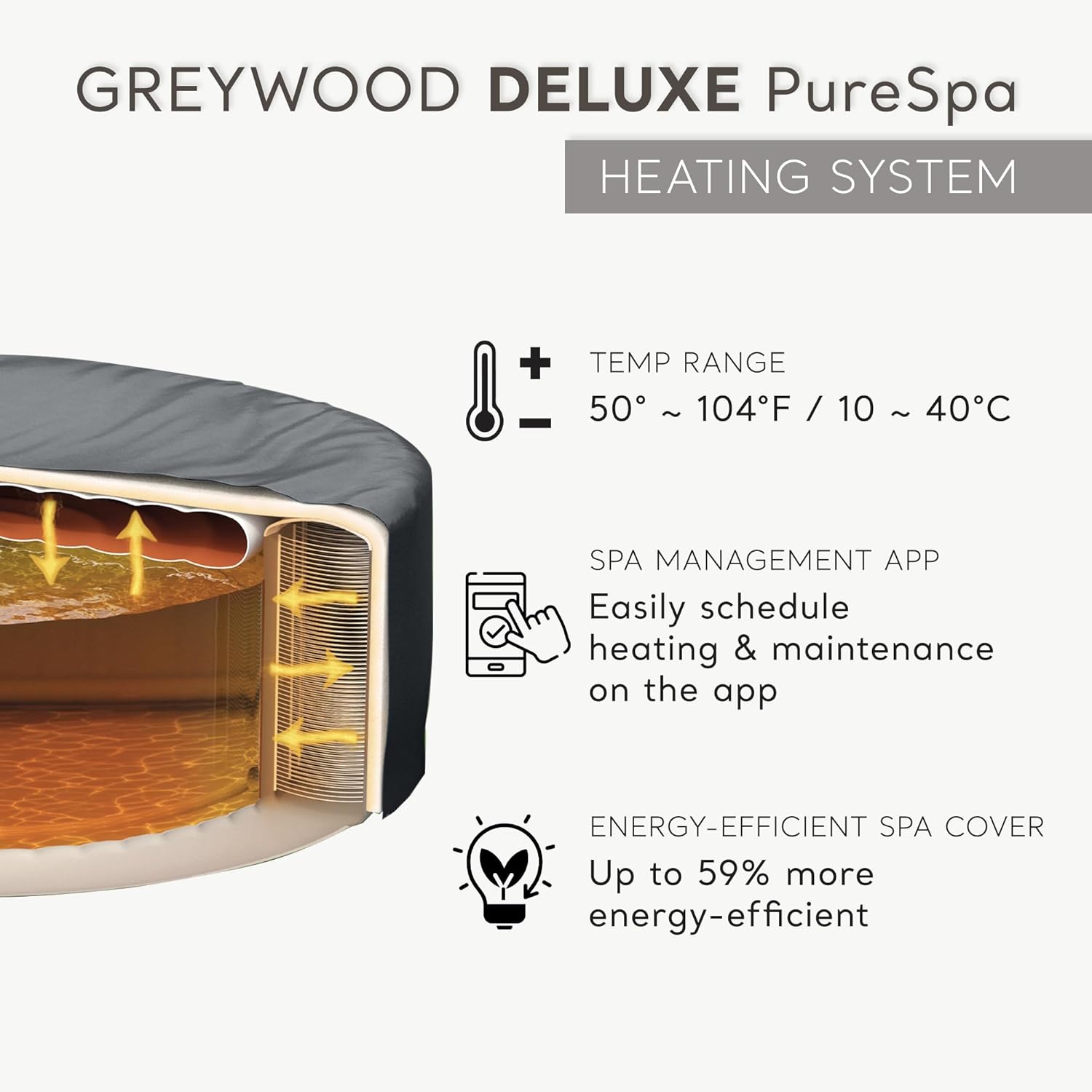
After filling, activate the heater. It is recommended to place the energy-efficient spa cover on the tub during heating to minimize heat loss and reduce energy consumption.
4. Operating Instructions
4.1 Wireless Control Panel
The spa is equipped with a wireless control panel for convenient operation. Use the panel to activate the bubble jets, adjust temperature, and manage other settings.

4.2 Bubble Jet Activation
Press the bubble jet button on the control panel to activate the 170 high-pressure bubble jets for a relaxing massage experience.
4.3 Temperature Adjustment
Use the up and down arrows on the control panel to set your desired water temperature. The maximum temperature is 104°F (40°C).
4.4 Intex Link Spa Management App
Download the Intex Link Spa Management App from your device's app store to control your spa remotely. The app allows you to schedule heating, filtration, and sanitation cycles.

4.5 Multi-color LED Light
The spa includes a multi-color LED light to enhance your spa experience. Refer to the light's specific instructions for operation and battery replacement (3 AAA batteries not included).
5. Maintenance
5.1 Water Treatment System
The built-in hard water treatment system helps reduce calcium buildup, making the water gentler on your skin and extending the life of the spa's components. Regular use of this system is recommended.

5.2 Filter Cartridges
The spa includes two filter cartridges. Check and clean the filter cartridges regularly (daily or every other day depending on usage) to ensure optimal water filtration. Replace cartridges every 2-4 weeks or when they can no longer be cleaned effectively.
5.3 Chlorine Dispenser and Test Strips
Use the included chlorine dispenser to maintain proper water sanitation. Regularly test the water chemistry using the provided test strips and adjust chemical levels as needed to keep the water clean and safe.
5.4 Spa Cover and Ground Cloth
Always use the energy-efficient spa cover when the spa is not in use to prevent heat loss and keep debris out. The ground cloth provides an additional layer of insulation and protection for the spa's base.
6. Troubleshooting
- Spa not heating: Ensure the power supply is connected, the heater is activated on the control panel/app, and the water level is correct. Check for clogged filters.
- Water quality issues: Test water regularly and adjust chemicals. Clean or replace filter cartridges. Ensure the hard water treatment system is functioning.
- Error codes: Refer to the specific error code section in the full product manual for detailed solutions.
- Low water flow: Check for clogged filters or debris in the pump intake.
7. Specifications
| Feature | Specification |
|---|---|
| Model Number | 28441EP |
| Dimensions (L x W x H) | 85" x 85" x 28" |
| Capacity | 6-person |
| Water Capacity | 290 Gallons |
| Material | Polyvinyl Chloride (PVC) with Fiber-Tech Construction |
| Jets | 170 High-Pressure Bubble Jets |
| Temperature Range | 50°F - 104°F (10°C - 40°C) |
| Special Features | Adjustable Heat, Portable, Built-in Hard Water Treatment System, Wireless Control Panel, Spa Management App, Multi-color LED Light, 2 Headrests, 2 Cushions |
| Included Components | Tub, cover, treatment systems, light, 2 filters, 2 headrests, 2 cushions, ground cloth, hose, bag, chlorine dispenser, and test strips |
8. Warranty and Support
For warranty information, technical support, or replacement parts, please contact Intex customer service directly. Retain your proof of purchase for warranty claims.
Visit the official Intex website for additional resources and contact details: Intex Store


