Introduction
This manual provides comprehensive instructions for the setup, operation, maintenance, and troubleshooting of your Megadream MFi Wireless Bluetooth Game Controller. Designed for mobile gaming enthusiasts, this controller offers an immersive and precise gaming experience across various platforms.

Image: The Megadream MFi Wireless Bluetooth Game Controller, shown in blue and red, with a smartphone securely mounted in its center, displaying a game. This illustrates the primary use of the device.
Package Contents
- 1 x Megadream MFi Wireless Bluetooth Game Controller
- 1 x USB Type-C Charging Cable
- 1 x User Manual (this document)
Setup Guide
1. Charging the Controller
Before first use, fully charge the controller. Connect the provided USB Type-C charging cable to the charging interface on the controller and the other end to a 5V/500mA power source (e.g., a USB wall adapter or computer USB port).
- Battery Capacity: 350mAh
- Charging Voltage: 5V/500mA
- Charging Time: Approximately 2-3 hours for a full charge.
- Continuous Use Time: > 20 hours
- Standby Time: Approximately 60 days when fully charged.

Image: A visual representation of the controller's charging process and battery life, indicating 15-18 hours working time, 2-3 hours charging time, and 400mAh battery capacity. Note: The product description states 350mAh battery capacity.
2. Connecting to Your Device (Bluetooth Pairing)
The controller uses Bluetooth 5.0 for wireless connection.
- Ensure your mobile device's Bluetooth is enabled.
- Turn on the Megadream controller by pressing the Power button. The indicator lights will flash, indicating it's in pairing mode.
- On your device, search for available Bluetooth devices.
- Select "Megadream Controller" (or similar name) from the list to pair.
- Once paired, the indicator lights on the controller will become solid.
For iOS users (iOS 13.4+), direct connection is supported without needing to download additional applications. For Android users (Android 10.0+), the controller supports KeyMap functionality, which may require downloading a specific application for optimal use with certain games. Please note, this controller is not compatible with Android devices using MediaTek processors.

Image: An illustration highlighting the multi-platform compatibility of the controller, including icons for Apple iOS, Android, and Windows, indicating support for iPhone, Android phones, iPads, tablets, and PCs.
Operating Instructions
1. Device Compatibility
The Megadream controller is compatible with a wide range of mobile devices:
- iOS: iPhone 13/13 Pro/Max, iPhone 12/12 Pro/12 Mini, iPhone 11/11 Pro/Max, iPhone Xs, XR, X, 8 Plus, 8, 7 Plus, iPad/iPad Pro/Air/Mini, iPhone 13 Mini (iOS 13.4+ required).
- Android: Samsung Galaxy A53/A52/F52/S20/Note 20/S21 Ultra/S21 FE/S21 Plus, Nokia, OPPO, Google, Xiaomi, Motorola, Sony, Huawei (Android 10.0+ required).
- Note: Not compatible with Apple TV, MacBook, iPod, or Android devices with MediaTek processors.
2. Game Support
This MFi Bluetooth controller supports most controller-enabled games available on the Android App Store and iOS App Store. This includes various genres such as Action, Racing, Fighting, Shooting, and Athletics games. Popular supported titles include:
- Apex Legends Mobile
- Call of Duty / COD
- Genshin Impact
- Minecraft
- Modern Combat 5
- Asphalt 8/9
- CSR Racing 2
- Guns of Glory
- Garena Free Fire
- And many more.
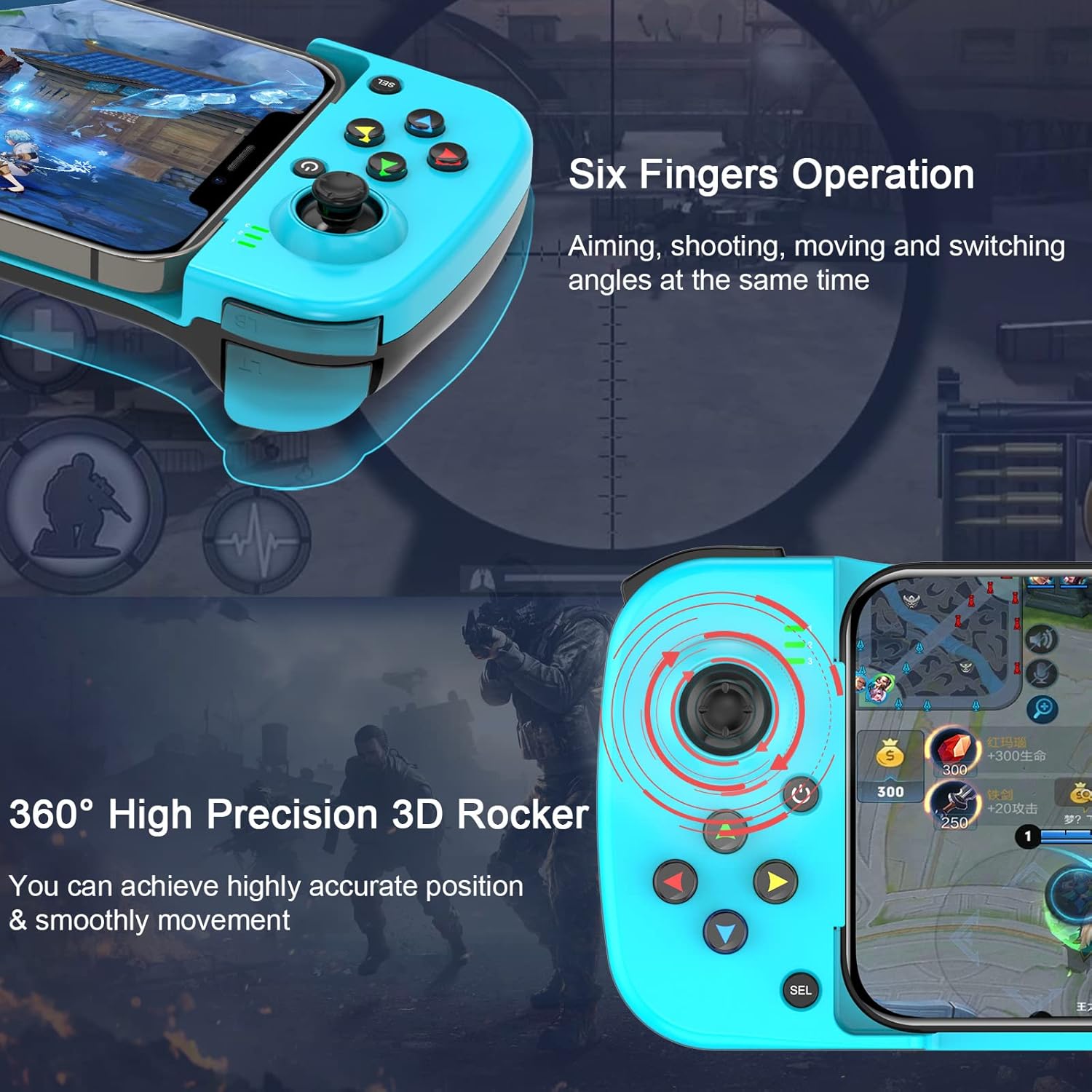
Image: A collage of popular game titles and their logos, demonstrating the wide range of games compatible with the Megadream controller, including Forza Horizon 5, Red Dead Redemption 2, Roblox, Call of Duty: Mobile, and more.
3. Ergonomic Design and Precision
The controller is designed for comfort during extended gaming sessions. Its shape naturally fits the hand, and features like the 360° rotatable joystick provide precise control for an immersive gaming experience.
- Six Fingers Operation: Allows for simultaneous aiming, shooting, moving, and switching angles.
- High Precision 3D Rocker: Ensures accurate positioning and smooth movement within games.

Image: A detailed view of the controller highlighting its "Six Fingers Operation" capability for complex in-game actions and the "360° High Precision 3D Rocker" for accurate character control.
4. Telescopic Holder
The integrated telescopic holder securely accommodates mobile phones with lengths between 128mm and 175mm (5.0-6.9 inches), ensuring stability during gameplay.

Image: A diagram illustrating the telescopic holder feature of the controller, showing its adjustable length from 128mm to 175mm, designed to securely fit various smartphone sizes.
Maintenance
To ensure the longevity and optimal performance of your Megadream controller, follow these maintenance guidelines:
- Cleaning: Use a soft, dry cloth to wipe the controller. For stubborn dirt, slightly dampen the cloth with water. Avoid using harsh chemicals or abrasive cleaners.
- Storage: Store the controller in a cool, dry place away from direct sunlight and extreme temperatures.
- Battery Care: Avoid fully discharging the battery frequently. If storing for a long period, charge the controller to about 50% to prevent battery degradation.
- Handling: Do not drop, disassemble, or attempt to repair the controller yourself. This can void the warranty and cause damage.
Troubleshooting
If you encounter issues with your Megadream controller, please refer to the following common solutions:
| Problem | Possible Solution |
|---|---|
| Controller does not turn on. | Ensure the controller is fully charged. Connect it to a power source using the Type-C cable. |
| Unable to pair via Bluetooth. |
|
| Controller disconnects frequently. |
|
| Buttons or joysticks are unresponsive. |
|
| Controller not working with Android MediaTek device. | This controller is explicitly stated as not compatible with Android devices that use MediaTek processors. There is no workaround for this limitation. |
Specifications
| Feature | Detail |
|---|---|
| Product Model | BSP-D3 |
| Connection Mode | Wireless (Bluetooth 5.0) |
| Operating System Compatibility | iOS 13.4+ / Android 10.0+ |
| Battery Capacity | 350mAh |
| Working Power Supply | 400mAh (Internal circuit power) |
| Working Voltage | 3.7V DC |
| Working Current | Approx. 10mA |
| Continuous Use Time | > 20 hours |
| Standby Current | < 5uA |
| Charging Voltage | 5V/500mA |
| Extendable Distance (Telescopic Holder) | 128-175 mm (5.0-6.9 inches) |
| Product Weight | 168g |
| Product Dimensions | 85 x 42 x 208 mm |
| Package Dimensions | 29.4 x 20.9 x 4.9 cm |
| Country of Origin | China |
Image: A detailed diagram of the Megadream controller, labeling its various buttons and components such as LB/LT key, Power Indicator, Power button, Left joystick, Arrow keys, Charging interface, M1/M2 keys, RB/RT key, A/B/X/Y keys, Right joystick, and Start button. It also lists product model, connection mode, working power supply, product size, product weight, and operating system.
Warranty and Support
Megadream is committed to providing quality products. While specific warranty details are not provided in this manual, please retain your proof of purchase for any warranty claims.
For technical support, troubleshooting assistance, or inquiries regarding your product, please contact Megadream customer service through the retailer where you purchased the product or visit the official Megadream website for contact information.
We value your feedback and are dedicated to ensuring your satisfaction with our products.


