
1. Introduction
This manual provides essential information for the safe and efficient installation, operation, and maintenance of the ebm-papst W1G250-HJ87-02 EC Axial Fan. Please read this manual thoroughly before using the product and retain it for future reference. This fan is designed for industrial and scientific applications requiring efficient air movement.
2. Safety Instructions
Always observe the following safety precautions to prevent injury or damage to the product.
- Electrical Safety: Ensure the power supply matches the fan's specifications (24VDC). Disconnect power before installation, maintenance, or troubleshooting. All electrical connections must be performed by qualified personnel in accordance with local and national electrical codes.
- Mechanical Safety: Keep hands, tools, and loose clothing away from rotating parts during operation. Ensure the fan is securely mounted to prevent vibration and accidental detachment.
- Environmental Conditions: Do not operate the fan in environments with explosive gases, flammable materials, or excessive moisture unless specifically rated for such conditions.
- Handling: Handle the fan with care to avoid damage to the blades or motor. Do not drop the unit.
3. Package Contents
Verify that all items are present and undamaged upon unpacking.
- 1 x ebm-papst W1G250-HJ87-02 EC Axial Fan
- (Additional mounting hardware or documentation may be included depending on the specific package variant.)
4. Setup and Installation
Follow these steps for proper installation of the EC Axial Fan.
4.1 Mounting
- Select Location: Choose a stable, flat surface or enclosure opening that can support the fan's weight and allow for proper airflow. Ensure adequate clearance around the fan for optimal performance and maintenance.
- Secure Mounting: Use appropriate screws, bolts, and washers (not included) to securely fasten the fan to the mounting surface. Ensure all mounting points are utilized and tightened to prevent vibration.
4.2 Electrical Connection
- Power Disconnection: Ensure the main power supply is disconnected before making any electrical connections.
- Wiring: Connect the fan's power leads to a stable 24VDC power source. Observe correct polarity (positive to positive, negative to negative). Refer to the fan's label or technical data sheet for specific wiring diagrams if available.
- Insulation: Ensure all connections are properly insulated to prevent short circuits and electrical hazards.
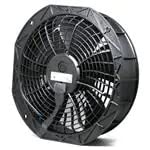
Figure 1: ebm-papst W1G250-HJ87-02 EC Axial Fan. This image shows the general appearance of the axial fan, highlighting its round frame and central motor with blades. It is a 250mm fan designed for efficient air movement in various applications.
5. Operating Instructions
Once installed, the fan is ready for operation.
- Power On: Restore power to the connected 24VDC supply. The fan should begin to operate immediately.
- Verification: Observe the fan for smooth rotation and listen for any unusual noises. Ensure the airflow is in the desired direction.
- Power Off: To stop the fan, disconnect the 24VDC power supply.
6. Maintenance
Regular maintenance ensures optimal performance and extends the lifespan of your fan.
- Cleaning: Periodically clean the fan blades and housing to remove dust and debris. Use a soft brush or compressed air. Ensure power is disconnected before cleaning.
- Inspection: Regularly inspect the fan for any signs of wear, damage, or loose connections. Check for excessive vibration or unusual noises during operation.
- Bearing Maintenance: This fan features ball bearings, which are typically maintenance-free. Avoid lubricating unless specifically instructed by the manufacturer.
7. Troubleshooting
Refer to the table below for common issues and their solutions.
| Problem | Possible Cause | Solution |
|---|---|---|
| Fan does not start | No power supply; Incorrect wiring; Damaged fan. | Check power connection and voltage; Verify wiring polarity; Inspect for damage, replace if necessary. |
| Excessive noise or vibration | Loose mounting; Debris in fan blades; Damaged bearings. | Tighten mounting screws; Clean fan blades; Contact support for bearing issues. |
| Reduced airflow | Blocked intake/exhaust; Dirty fan blades. | Clear obstructions; Clean fan blades. |
8. Specifications
Key technical specifications for the W1G250-HJ87-02 EC Axial Fan.
- Model: W1G250-HJ87-02
- Brand: ebm-papst
- Type: EC Axial Fan
- Size: 250mm Round
- Voltage: 24VDC
- Power: 128W
- Maximum Rotational Speed: 3070 RPM
- Bearing Type: Ball Bearing
- Material: Copper (internal components)
- UPC: 013415003078
- ASIN: B0BB79ZQRV
9. Warranty Information
This ebm-papst product is covered by the manufacturer's standard warranty. Please refer to the official ebm-papst website or contact their customer service for detailed warranty terms and conditions applicable to your region and purchase date. Keep your proof of purchase for warranty claims.
10. Support and Contact
For technical assistance, spare parts, or further inquiries, please contact ebm-papst customer support. Visit the official ebm-papst website for contact details, FAQs, and additional product resources.


