
1. Product Overview
The Aiminu 40W 4-Port USB C Wall Charger (Model HNT-PD3003) is designed for efficient and simultaneous charging of multiple electronic devices. It features a compact design with advanced charging technologies to provide reliable power for your smartphones, tablets, laptops, and other compatible gadgets.
Key Features:
- 4-Port Design: Includes two USB-C Power Delivery (PD20W) ports and two USB-A (3.1A) ports for versatile charging.
- 40W Total Output: Delivers a combined 40 watts of power for fast and efficient charging.
- Fast Charging: Supports Power Delivery (PD) and Quick Charge 3.0 (QC 3.0) protocols for rapid device charging.
- Broad Compatibility: Compatible with a wide range of devices including iPhone 15/14/13/12/11 series, iPad, Samsung Galaxy S series, Motorola, Google Pixel, Kindle Fire, and more.
- Multi-Protection Safety: Integrated safeguards protect against over-current, over-voltage, over-charging, and overheating.
- Compact and Portable: Designed for easy portability, ideal for home, office, and travel use.

Image 1: The Aiminu 40W 4-Port USB C Wall Charger, showcasing its compact black design with two USB-C and two USB-A ports.
2. Safety Information
To ensure safe and optimal operation of your Aiminu 40W 4-Port USB C Wall Charger, please observe the following safety guidelines:
- Do not expose the charger to liquids, moisture, or extreme temperatures.
- Avoid dropping or subjecting the charger to severe impacts.
- Do not attempt to disassemble, repair, or modify the charger.
- Ensure the charger is plugged into a functional wall outlet with the correct voltage (100-240V).
- Built-in safeguards protect your devices against excessive current, overheating, and overcharging. The charger will automatically stop charging when a device's battery is full to prevent damage.
- If the charger feels excessively hot during use, disconnect it immediately and allow it to cool down.
3. Setup Instructions
- Unpack the Charger: Carefully remove the Aiminu 40W 4-Port USB C Wall Charger from its packaging.
- Plug into Power Outlet: Insert the charger's prongs into a standard wall power outlet (AC 100-240V).
- Connect Devices: Use appropriate USB charging cables (not included) to connect your devices to the available ports on the charger. The charger features two USB-C ports (PD20W each) and two USB-A ports (3.1A each).

Image 2: Close-up view of the charger's ports, indicating two PD20W USB-C ports and two 3.1A USB-A ports.
4. Operating Instructions
The Aiminu 40W 4-Port USB C Wall Charger is designed for simple plug-and-play operation. Once connected to a power source and your devices, it will automatically begin charging.
- Automatic Device Detection: The charger intelligently identifies the connected device and delivers the optimal charging current for efficient power delivery.
- Fast Charging Protocols: The USB-C ports support Power Delivery (PD) for compatible devices, offering up to 20W per port. The USB-A ports support Quick Charge 3.0 (QC 3.0) and deliver up to 3.1A.
- Simultaneous Charging: You can charge up to four devices concurrently. The total output is 40W, which is distributed among the active ports.
- Optimizing Fast Charging: For devices that support fast charging, ensure you are using a compatible cable (e.g., USB-C to Lightning for iPhones, USB-C to USB-C for Android/laptops) and that your device is capable of receiving fast charge.
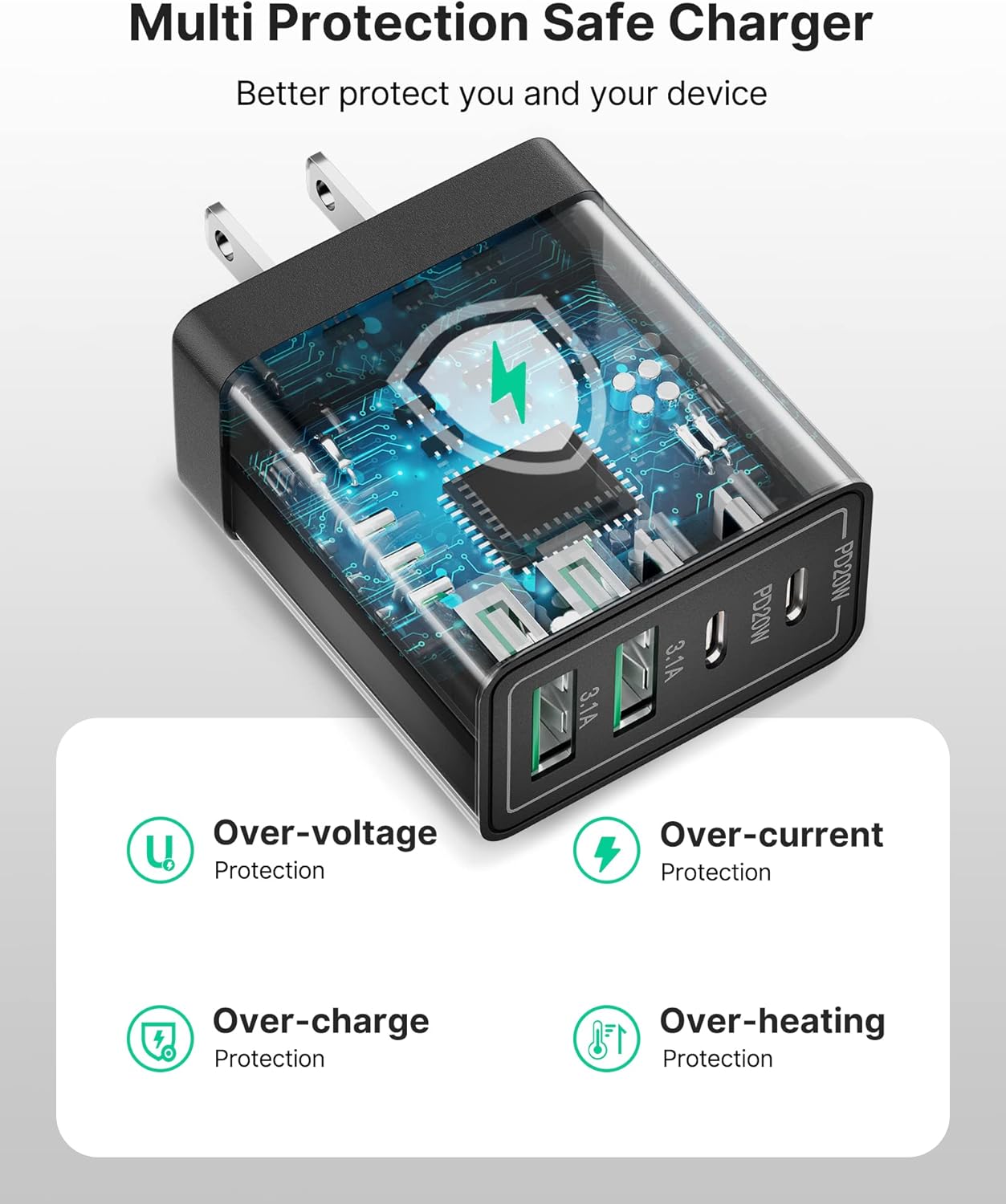
Image 3: The 4-port charger connected to a wall outlet, simultaneously charging a laptop, tablet, and two smartphones.
Video 1: An official product video demonstrating the Aiminu 40W 4-Port Fast Charging Block, highlighting its features and multi-device charging capabilities.
5. Maintenance
Proper maintenance ensures the longevity and continued performance of your charger:
- Cleaning: Disconnect the charger from the power outlet and all devices before cleaning. Use a soft, dry cloth to wipe the surface. Do not use liquid cleaners or aerosols.
- Storage: Store the charger in a cool, dry place away from direct sunlight and extreme temperatures.
- Cable Care: Avoid bending or crimping charging cables excessively, as this can damage them and affect charging performance.
6. Troubleshooting
If you encounter issues with your Aiminu 40W 4-Port USB C Wall Charger, please refer to the following common solutions:
- Device Not Charging:
- Ensure the charger is securely plugged into a live wall outlet.
- Verify that the charging cable is properly connected to both the charger and your device.
- Try using a different charging cable or a different port on the charger.
- If charging multiple devices, especially high-power ones, the total 40W output may be distributed. Try charging devices one at a time to see if the issue resolves.
- Slow Charging:
- Confirm that your device and charging cable support fast charging protocols (Power Delivery or Quick Charge 3.0).
- Reduce the number of devices connected to the charger to allow more power to be allocated to a single device.
- Charger Overheating:
- Immediately disconnect the charger from the power source and all devices.
- Ensure the charger is in a well-ventilated area.
- If overheating persists after cooling down and reducing load, discontinue use and contact customer support.

Image 4: The charger highlighting its multi-protection features, including over-voltage, over-current, over-charge, and over-heating protection.
7. Specifications
| Feature | Detail |
|---|---|
| Model Number | HNT-PD3003 |
| Input Voltage | 100-240V ~ 50/60Hz 0.8A |
| USB-C1 Output | 5V=3A, 9V=2.22A, 12V=1.67A (PD20W Max) |
| USB-C2 Output | 5V=3A, 9V=2.22A, 12V=1.67A (PD20W Max) |
| USB-A1/A2 Output | 5V=3.1A (Max) |
| Total Output | 40W Max |
| Dimensions | 4.02 x 3.03 x 1.26 inches |
| Item Weight | 3.2 ounces |
| Color | Black |
| Included Components | Charger block (cables not included) |
| Compatible Devices | Cameras, Laptops, Smartphones, Smartwatches, Tablets |
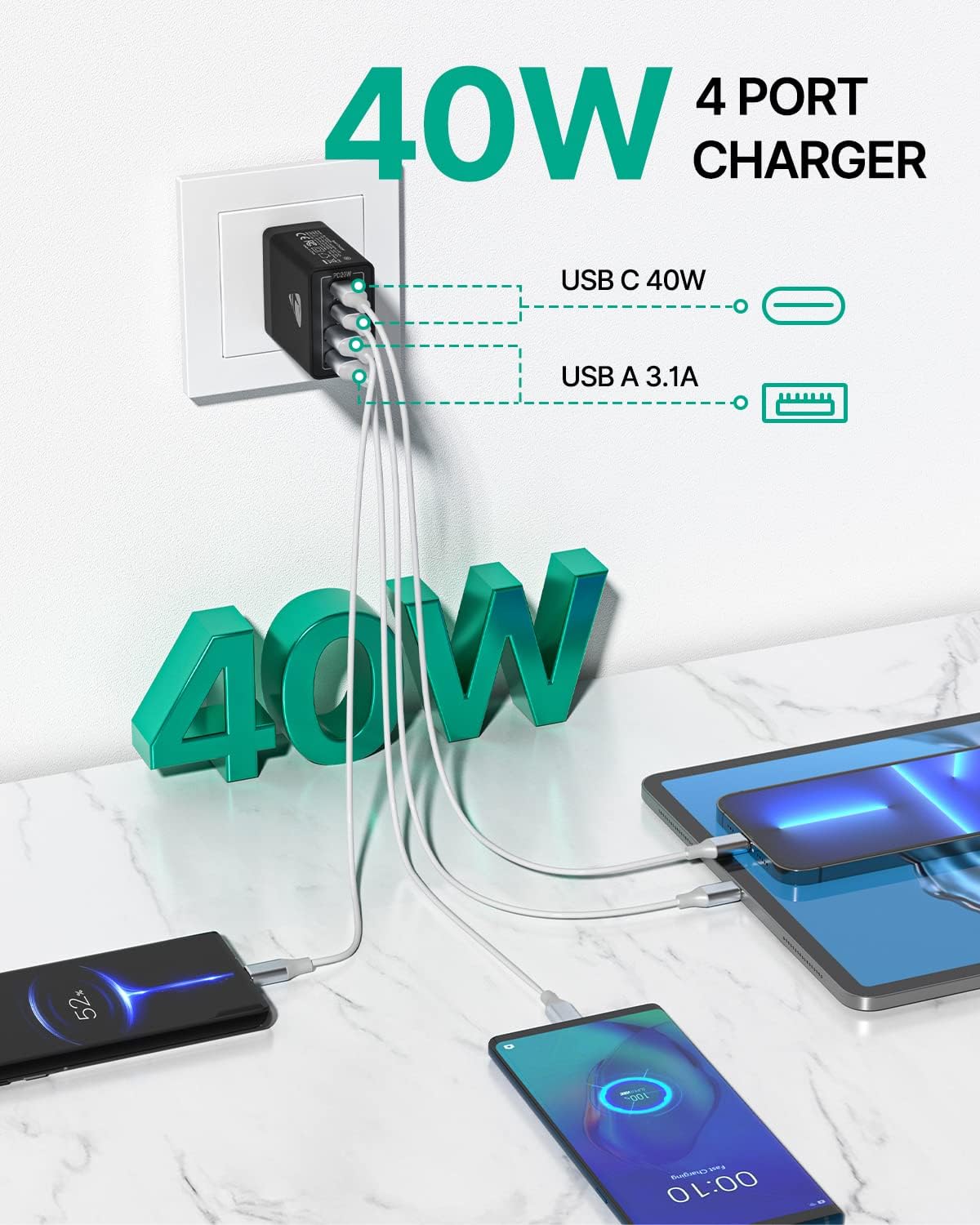
Image 5: A visual representation of the charger's broad compatibility with various mobile phones, laptops, and tablets.
8. Warranty and Support
Aiminu is committed to providing high-quality products and customer satisfaction.
- Warranty: This product comes with an 18-month worry-free replacement warranty.
- Customer Service: For any questions, concerns, or support needs, please contact our 24/7 online customer service. Refer to your purchase documentation for specific contact details or visit the official Aiminu website.

Image 6: A hand holding the compact Aiminu charger, illustrating its portability and small footprint compared to multiple individual chargers.
