
FELEMAN MPD001W
FELEMAN Portable CD Player User Manual
Model: MPD001W
1. Product Overview
The FELEMAN MPD001W is a versatile portable CD player designed for home audio entertainment. It features a built-in rechargeable battery, Bluetooth connectivity, FM radio, and support for various audio formats via CD, USB, and AUX input. Its compact design allows for both desktop placement and wall mounting, making it suitable for various environments.

Image: The FELEMAN Portable CD Player, showcasing its main unit, remote control, and a 2000mAh battery icon.
Key Features
- Built-in 2000mAh Rechargeable Battery: Provides up to 4-5 hours of playback on a full charge, offering portability without constant power connection.
- Multi-functional Player: Supports CD, CDR, HDCD, MP3, and WMA formats. Includes FM radio (76 MHz-108 MHz), Bluetooth receiver, USB port (FAT32, max 32GB), and AUX input.
- Front LED Display & Dual Speakers: Clear LED screen for mode and playback time. Integrated dual speakers deliver high-quality stereo sound.
- Flexible Placement: Comes with a desktop stand and wall-mounted plate for versatile installation in various rooms.
- Convenient Control: Equipped with front panel buttons and a remote control for easy operation.

Image: A visual comparison highlighting the FELEMAN CD player's Hi-Fi dual speakers, dust cover, and front LED display.
2. Package Contents
Please check the package carefully to ensure all items are present and in good condition.
- 1 x FELEMAN CD Player
- 1 x Remote Control
- 1 x Pack of Screws (for wall mounting)
- 1 x Charging Cable
- 1 x USB Power Adapter
- 1 x Wall-Mounted Plate
- 1 x Desktop Stand
- 1 x User Manual
- 1 x AUX Cable

Image: All components included in the FELEMAN CD Player package, neatly laid out.
3. Setup
3.1 Charging the Device
Before first use, fully charge the CD player. Connect the charging cable to the DC 5V port on the player and the USB power adapter. Plug the adapter into a power outlet. The indicator light will show charging status (e.g., red for charging, green for fully charged). A full charge typically takes about 4 hours.

Image: Illustration of the CD player being charged, showing the 2000mAh battery and indicator light changing from red to green when fully charged.
3.2 Wall Mounting Instructions
To mount the CD player on a wall, follow these steps:
- Step 1: Secure the wall-mounted plate to your desired wall location using the provided screws. Ensure it is level and firmly attached.
- Step 2: Align the back of the CD player with the grooves on the wall-mounted plate.
- Step 3: Slide the CD player downwards onto the plate until it clicks securely into place.
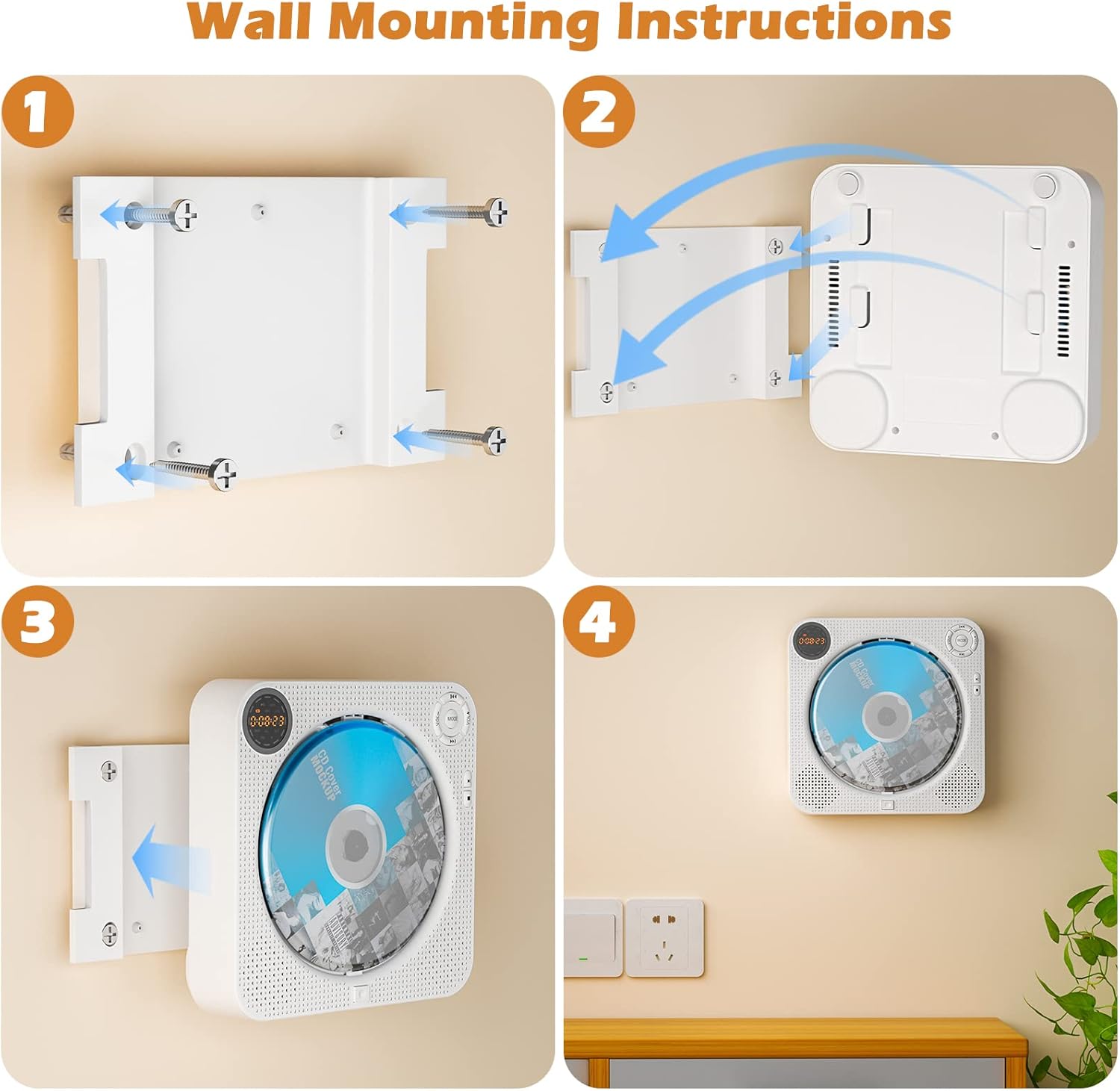
Image: A four-panel guide illustrating the step-by-step process of wall-mounting the CD player.
3.3 Desktop Stand Setup
For desktop use, simply unfold the included desktop stand and place the CD player securely on it. Ensure the stand is stable on a flat surface.
4. Operating Instructions
4.1 Power On/Off
To power on the device, slide the 'POWER' switch to the 'ON' position. To power off, slide it to 'OFF'.
4.2 Mode Selection
Press the 'MODE' button on the front panel or remote control to cycle through available modes: CD, FM, Bluetooth (BT), USB, and AUX. The front LED display will indicate the current mode.

Image: Close-up of the LED display showing different modes: USB, CD, FM, Bluetooth, and AUX.
4.3 CD Playback
Open the dust cover and gently place a CD (CD, CDR, HDCD, MP3, WMA compatible) onto the spindle. Close the dust cover. The player will automatically detect the CD and begin playback. Use the 'Play/Pause', 'Previous', and 'Next' buttons to control playback. Press the 'MODE' button repeatedly to cycle through playback modes: Play in order, A-B repeat, Repeat all, Random play, and Repeat 1. Use the 'EQ' button to select from 5 sound effects: POP, JAZZ, ROCK, CLASSIC, FLAT.

Image: Visual representation of the CD player's compatibility with various disc formats and its multiple playback modes and EQ settings.
4.4 FM Radio Operation
Switch to FM mode. Press the 'Play/Pause' button to auto-scan and save available radio stations. Use the 'Previous' and 'Next' buttons to navigate between saved stations.

Image: The CD player wall-mounted, illustrating its FM radio capability with sound waves.
4.5 Bluetooth Connection
Switch to Bluetooth (BT) mode. The player will enter pairing mode, indicated by a flashing 'BT' on the LED display. On your Bluetooth-enabled device (e.g., smartphone, tablet), search for 'FELEMAN' in the Bluetooth settings and connect. Once connected, the 'BT' indicator will stop flashing. You can now stream audio from your device to the CD player.

Image: The CD player wall-mounted, showing a smartphone connected via Bluetooth, streaming music.
4.6 USB Playback
Insert a USB flash drive (FAT32 format, up to 32GB) into the USB port. Switch to USB mode. The player will automatically detect and play audio files from the USB drive.

Image: The CD player on a desk, with a USB flash drive inserted into its USB port, indicating that the USB drive is not included.
4.7 AUX Input
Connect an external audio device (e.g., MP3 player, smartphone) to the AUX port using the provided AUX cable. Switch to AUX mode. Audio from the external device will now play through the CD player's speakers.

Image: The CD player placed in a car, showing the AUX-in and headphone jack for external audio connection.
4.8 Remote Control Usage
The included remote control allows for convenient operation from a distance of up to 10 meters. Functions include power on/off, mode selection, volume control, track navigation, play/pause, repeat, and EQ settings. Ensure the remote control has working batteries and is pointed towards the player's sensor.

Image: A hand holding the remote control, pointing it towards the wall-mounted CD player.
5. Maintenance
To ensure the longevity and optimal performance of your FELEMAN CD player, follow these maintenance guidelines:
- Cleaning: Use a soft, dry cloth to wipe the exterior of the player. For stubborn marks, a slightly damp cloth can be used, followed by a dry one. Do not use abrasive cleaners or solvents.
- Dust Cover: Always keep the dust cover closed when not inserting or removing a CD. This protects the disc and the internal components from dust and debris, which can affect playback quality and device lifespan.
- Disc Care: Handle CDs by their edges. Store them in their cases when not in use to prevent scratches. Clean dirty discs with a soft, lint-free cloth wiping from the center outwards.
- Storage: When not in use for extended periods, store the player in a cool, dry place away from direct sunlight and extreme temperatures.
6. Troubleshooting
If you encounter issues with your CD player, please refer to the following common problems and solutions:
| Problem | Possible Cause | Solution |
|---|---|---|
| Player does not power on. | Battery is depleted; Power switch is off; Charging cable not connected properly. | Charge the battery fully. Ensure the power switch is in the 'ON' position. Check charging cable connection. |
| CD does not play or skips. | Disc is dirty or scratched; Disc is inserted incorrectly; Disc format is not supported. | Clean the disc with a soft cloth. Reinsert the disc correctly. Ensure the disc format (CD, CDR, HDCD, MP3, WMA) is supported. |
| Bluetooth connection fails. | Player not in BT mode; Device not in pairing mode; Too far from player. | Ensure player is in BT mode. Put your device in pairing mode and search for 'FELEMAN'. Move device closer to the player. |
| No sound from speakers. | Volume is too low; Mute function is active; Incorrect mode selected. | Increase the volume. Check if the player is muted. Ensure the correct playback mode (CD, FM, BT, USB, AUX) is selected. |
7. Specifications
| Brand | FELEMAN |
| Model Number | MPD001W |
| Product Dimensions | 16.51 x 16.51 x 4.06 cm; 500 g |
| Battery | 1 Lithium-ion Polymer battery (included), 2000mAh |
| Supported Audio Formats | CD, CDR, HDCD, MP3, WMA |
| FM Radio Frequency | 76 MHz - 108 MHz |
| USB Support | FAT32 format, up to 32GB |
| Connectivity | Bluetooth, USB, AUX |
| Special Features | Portable, Wall-Mountable, Desktop Stand, Dust Cover, LED Display, Remote Control |
8. Warranty and Support
FELEMAN provides a 12-month warranty for this product. If you encounter any issues or have questions regarding your FELEMAN Portable CD Player, please do not hesitate to contact our customer service team. Our professional support team is committed to providing the best solution within 24 hours.
For support, please refer to the contact information provided on the product packaging or the official FELEMAN website.
Related documentsMPD001W

Ask a question about this manual
Ask about setup, troubleshooting, compatibility, parts, safety, or missing instructions. Manuals+ will review the question and use this page’s manual context to help answer it.