1. Introduction
Thank you for choosing the COSTWAY Electric Height Adjustable Desk. This desk is designed to provide a versatile and ergonomic workspace, allowing you to easily switch between sitting and standing positions. It features a smart control panel with memory presets and an anti-collision system for safe and convenient operation. Please read this manual thoroughly before assembly and use to ensure proper function and longevity of your desk.

Image 1.1: The COSTWAY Electric Height Adjustable Desk in a standing position, demonstrating its ergonomic design.
2. Safety Information
- Ensure all connections are secure before operating the desk.
- Keep children and pets away from the desk during operation to prevent injury.
- Do not place objects taller than the maximum height of the desk underneath it.
- Avoid placing liquids directly on the control panel or near electrical components.
- Do not overload the desk beyond its specified weight capacity.
- If any unusual noise or movement occurs, discontinue use and consult the troubleshooting section or contact support.
3. Package Contents
The COSTWAY Electric Height Adjustable Desk is delivered in two separate packages. Please ensure you have received both boxes before beginning assembly.
- Box 1: Tabletop (x1)
- Box 2: Desk Frame (x1), Control Panel (x1), Accessories (all assembly tools and hardware)

Image 3.1: The desk components are shipped in two distinct packages.
4. Assembly Instructions
Assembly of the electric standing desk is straightforward. An illustrated instruction manual is included in Box 2 to guide you through each step. All necessary assembly tools are provided.
- Unpack all components from both boxes and verify against the parts list in the instruction manual.
- Assemble the desk frame according to the provided diagrams.
- Attach the tabletop to the assembled frame.
- Connect the control panel and motor cables as indicated in the manual.
- Ensure all screws are tightened securely before plugging in the desk.

Image 4.1: Key components of the desk frame and tabletop, including the cable management hole.
5. Operating Instructions
5.1. Height Adjustment
The desk's height can be adjusted between 28 inches (minimum) and 46 inches (maximum) to accommodate both sitting and standing postures. The powerful motor operates quietly (under 50dB) at a speed of 1 inch per second.
- Press the UP button (▲) to raise the desk.
- Press the DOWN button (▼) to lower the desk.
- Release the button at your desired height. The LED display will show the current height.

Image 5.1: Demonstrating the sit-to-stand functionality and height range.
5.2. Memory Positions
The control panel allows you to save up to four preferred height settings for quick adjustment.
- Adjust the desk to your desired height using the UP/DOWN buttons.
- Press one of the memory buttons (1, 2, 3, or 4) until the LED display flashes or indicates the position is saved.
- To recall a saved height, simply press the corresponding memory button. The desk will automatically move to that position.
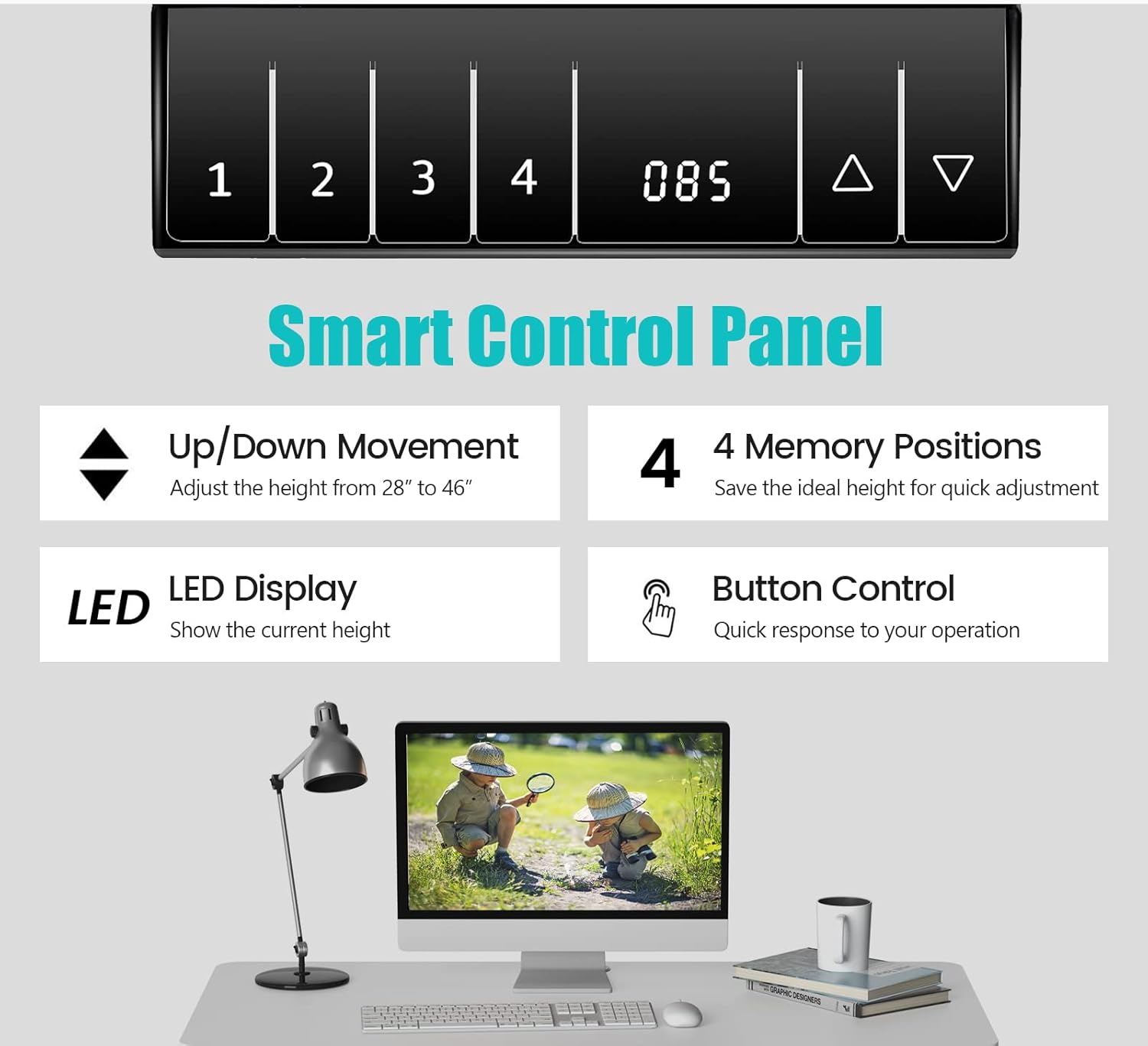
Image 5.2: The smart control panel for height adjustment and memory presets.
5.3. Anti-Collision Design
The desk is equipped with an anti-collision system that detects obstacles during height adjustment. If an obstruction is encountered, the desk will automatically stop and reverse slightly to prevent damage or injury.

Image 5.3: The anti-collision protection system in action.
6. Maintenance
- Cleaning: Wipe the desk surface and frame with a dry, soft cloth. Avoid abrasive cleaners or harsh chemicals that may damage the finish.
- Inspection: Periodically check all screws and connections to ensure they remain tight.
- Cable Management: Utilize the built-in cable hole to keep wires organized and prevent tangling, which can interfere with desk movement.

Image 6.1: The desk surface is designed for easy cleaning.
7. Troubleshooting
- Desk Not Moving:
- Check if the power cord is securely plugged into both the desk and the wall outlet.
- Ensure all motor and control panel cables are properly connected.
- If an error code appears on the LED display, refer to the full instruction manual for specific code meanings.
- Uneven Movement or Wobbling:
- Verify that all assembly screws are tightened.
- Adjust the foot pads at the base of the desk to ensure stability on uneven floors.
- Memory Positions Not Saving/Recalling:
- Ensure you press and hold the memory button until the display confirms the setting is saved.
- If issues persist, try resetting the desk (refer to the full instruction manual for reset procedures).
8. Specifications
| Brand | COSTWAY |
| Model Number | 67581-CYWH |
| Overall Dimensions (L x W x H) | 48" x 24" x 28"-46" (120 cm x 60 cm x 72-116 cm) |
| Minimum Height | 28 Inches |
| Maximum Height | 46 Inches |
| Weight Capacity | 155 lbs (70 kg) |
| Material | MDF, Steel |
| Running Speed | 1"/s |
| Noise Level | <50dB |
| Color | White |

Image 8.1: Visual representation of the desk's dimensions and performance metrics.
9. Warranty and Support
This COSTWAY Electric Height Adjustable Desk comes with a limited warranty. For specific details regarding your warranty coverage, please refer to the documentation included with your purchase or contact COSTWAY customer service.
If you encounter any issues not covered in the troubleshooting section or require further assistance, please contact COSTWAY customer support. Have your model number (67581-CYWH) and purchase information ready when contacting support.
Contact Information: Please refer to the official COSTWAY website or your purchase receipt for the most up-to-date customer service contact details.


