
1. Introduction
This manual provides detailed instructions for the installation, operation, and maintenance of your ZEROXCLUB 10" HD Wired Backup Camera System Kit (Model BY104A). This system is specifically designed for large vehicles such as buses, semi-trucks, trailers, RVs, and campers, offering enhanced visibility and safety during reversing and driving.
Please read this manual thoroughly before using the product to ensure proper function and to prevent damage.
2. What's in the Box
Verify that all components listed below are included in your package:
- 10-inch HD Monitor
- Rear View Camera (x2)
- Side View Camera (x2)
- U-shaped Bracket for Monitor
- Fan-shaped Bracket for Monitor
- Remote Control
- 32GB Memory Card (supports up to 128GB)
- Power Cord
- Extended 4-pin Cables (x4)
- Installation Tools/Screws
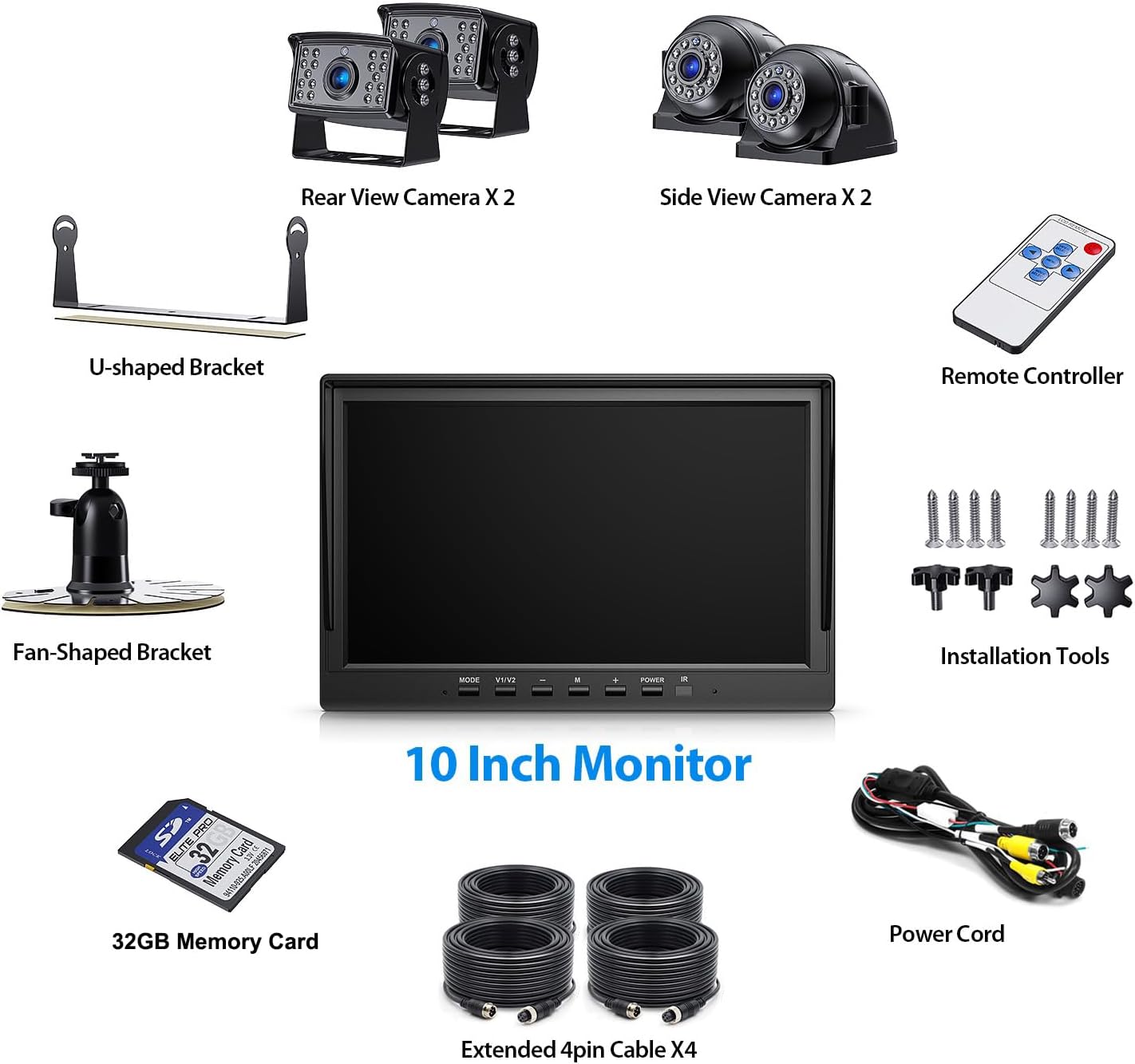
Image: All included components of the ZEROXCLUB BY104A system.
3. Setup and Installation
The BY104A system operates on 12V to 24V DC power. Ensure your vehicle's electrical system is compatible before installation.
3.1 Monitor Installation
- Choose a suitable location on your dashboard or windshield that does not obstruct your view or interfere with vehicle controls.
- Attach the U-shaped bracket for dashboard mounting or the suction cup bracket for windshield mounting to the monitor.
- Secure the monitor firmly in place.
3.2 Camera Installation
- Identify optimal mounting positions for the rear and side cameras to provide maximum visibility. The cameras come with low-profile brackets and larger brackets for flexible mounting.
- Mount the cameras securely using the provided installation tools and screws. Ensure the cameras are positioned to avoid obstruction.
- Connect the cameras to the monitor using the extended 4-pin cables. These cables are designed for easy installation on various large vehicles.
- Connect the monitor's power cord to a 12-24V DC power source in your vehicle.

Image: Example camera installation points on a large vehicle.
4. Operating Instructions
4.1 Monitor Functions
- Split Screen Display: The 10-inch monitor can display feeds from up to four cameras simultaneously or individually, eliminating blind spots. Use the 'MODE' button on the monitor or remote control to cycle through display modes.
- Parking Guidelines: The system features adjustable parking guidelines to assist in judging distances to objects. These guidelines can be turned ON or OFF via the monitor settings.
- Image Flip (Mirror/Normal): You can switch the camera view between mirror image (for rear view) and normal image (for front view or general observation) through the monitor settings. This allows a camera to function as a front-view camera if desired.

Image: Parking guidelines and image flip functionality.

Image: 10-inch HD monitor with split-screen and night vision examples.
4.2 Recording Features
- Loop Recording: The system supports loop recording, which automatically records footage displayed on the monitor. When the included 32GB SD card (expandable up to 128GB) is full, the oldest footage is overwritten with the newest, ensuring continuous recording without manual deletion.

Image: SD card, remote control, and loop recording feature.
4.3 Camera Features
- IR Night Vision: Equipped with a CMOS sensor and 18 automatic LED infrared lights, the cameras provide clear images and capture details even in low-light conditions.
- Wide Angle View: Each camera offers a 120° wide-angle view, significantly expanding your field of vision behind and around the vehicle.
5. Maintenance
The cameras are built with durable metal and are IP69K waterproof, designed to withstand extreme weather conditions such as rain, dust, and snow. They can operate in temperatures between -4℉ and 140℉.
- Regularly clean the camera lenses and monitor screen with a soft, damp cloth to ensure clear visibility. Avoid abrasive cleaners.
- Periodically check all cable connections to ensure they are secure and free from damage.
- Ensure the SD card is properly inserted for continuous loop recording.

Image: IP69K waterproof camera design.
6. Troubleshooting
If you encounter any issues with your ZEROXCLUB backup camera system, please consider the following general troubleshooting steps:
- No Image on Monitor: Check all power connections to the monitor and cameras. Ensure cables are securely plugged in. Verify the vehicle's power source is active.
- Flickering or Distorted Image: Inspect cable connections for looseness or damage. Ensure there is no interference from other electronic devices.
- Recording Issues: Check if the SD card is properly inserted and not full (though loop recording should manage this). Format the SD card if necessary (refer to monitor settings).
- Night Vision Not Working: Ensure the camera lenses are clean and free from obstructions.
For persistent issues or specific technical support, please contact ZEROXCLUB customer service as detailed in the Warranty and Support section.
7. Specifications
| Feature | Detail |
|---|---|
| Model | BY104A |
| Monitor Size | 10 Inches (9.84"L x 6.46"H) |
| Display Technology | LCD |
| Camera Type | Wired Rear View Camera (x2), Side View Camera (x2) |
| Optical Sensor Technology | CMOS |
| Lens Type | Wide Angle, Fixed |
| Real Angle of View | 120° (as per feature bullets, 170° in specs might be a general lens spec) |
| Waterproof Rating | IP69K |
| Operating Temperature | -4℉ to 140℉ (-20℃ to 60℃) |
| Voltage | 12-24V DC |
| Recording | Loop Recording, supports up to 128GB SD card (32GB included) |
| Monitor Dimensions | 9.84 inch(L) x 6.46 inch(H) |
| Rear Camera Size | 3.11"(L) x 2"(W) x 2.56"(H) |
| Side Camera Size | 2.24"(L) x 3.23"(W) x 2.32"(H) |
| Product Dimensions (Package) | 8 x 6 x 7 inches |
| Item Weight | 10.47 pounds |
8. Warranty and Support
8.1 Warranty Information
ZEROXCLUB provides a 36-month (3-year) factory warranty for all products. This warranty covers manufacturing defects and ensures worry-free service.
Additionally, a 30-day buy & try service is offered, allowing customers to evaluate the product.
8.2 Customer Support
Our customer support team is available 24-hours online to assist you with any questions or issues. If you encounter any problems with the product, find an accessory missing or damaged, or require an extended cable, please do not hesitate to contact us.
You can find contact information through the user manual or by checking the customer questions & answers section on the product's retail page.


