
Product Overview
The Wildgame Innovations Mirage 2.0 Lightsout Trail Camera is designed for capturing high-quality images and videos of wildlife. This model features advanced Lightsout technology for discreet nighttime operation, ensuring minimal disturbance to animals.
Key features include:
- 30 Megapixel Images: Capture incredibly detailed still photos.
- 720p HD Video: Record up to 15-second video clips in high definition.
- Lightsout Technology: Utilizes 32 nearly invisible infrared LEDs for covert nighttime recording.
- 90-Foot Detection & Flash Range: Extended range for capturing distant subjects.
- Half-Second Trigger Speed: Ensures quick capture of moving subjects.
- 16:9 Ratio Images: Optimized aspect ratio for wide viewing.
- Built-in Exposure Control: Automatically adjusts for optimal lighting conditions.
- Easy-to-Set Stamps: Time, date, and moon phase stamps for detailed record-keeping.
- Cable-Lock Ready Latch: Provides security for your camera (security accessories not included).
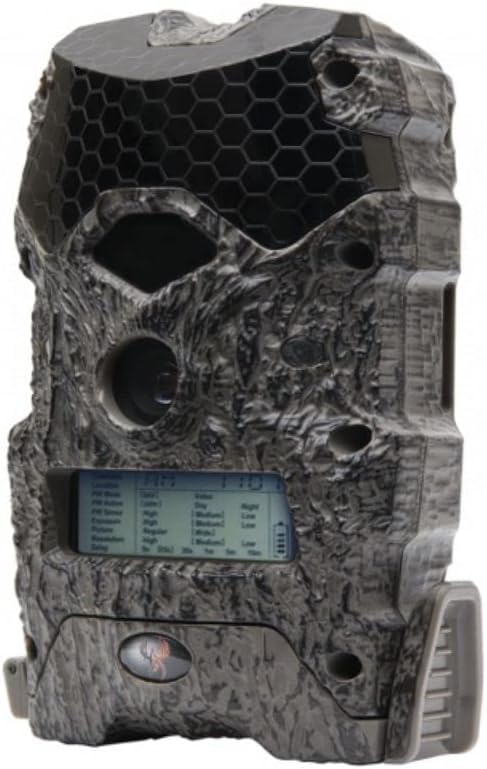
Image: The Wildgame Innovations Mirage 2.0 Lightsout Trail Camera, showcasing its compact and rugged design.
Setup Guide
Battery Installation
The Mirage 2.0 camera is powered by eight AA batteries (not included). Ensure batteries are inserted with correct polarity as indicated inside the battery compartment. For extended use, the camera also supports a 12-volt DC jack compatible with solar power panels (not included).
SD Card Insertion
Locate the SD card slot, typically found behind the main display panel. Insert a compatible SD card (up to 32GB, not included) into the slot until it clicks into place. Ensure the camera is powered off before inserting or removing the SD card.
Mounting the Camera
The camera comes with an adjustable tree strap featuring alligator-style clips. This strap allows for easy and secure mounting to trees of various sizes. Position the camera at the desired height and angle to capture your target area effectively.

Image: A hunter demonstrating the setup of the trail camera on a tree, highlighting its outdoor application.
Operating Instructions
Powering On/Off
To power on the camera, open the front cover and locate the power button. Press and hold the power button until the display screen illuminates. To power off, repeat the process.
Setting Time, Date, and Moon Phase
Use the control buttons located below the display screen to navigate through the menu options. Follow the on-screen prompts to set the current time, date, and enable the moon phase stamp feature. This information will be embedded on your captured images and videos.

Image: A close-up front view of the camera, showing the lens, infrared LEDs, and motion sensor.
Image and Video Capture
The camera automatically captures 30-megapixel photos and 720p HD video clips (up to 15 seconds) when motion is detected within its 90-foot range. The half-second trigger speed ensures minimal delay in capturing activity. The Lightsout technology uses black infrared LEDs for discreet nighttime capture, making the flash invisible to wildlife.

Image: A collage of high-quality images captured by the Mirage 2.0 camera, demonstrating its clarity and effectiveness in different environments.
Maintenance
To ensure the longevity and optimal performance of your trail camera, regular maintenance is recommended:
- Battery Check: Periodically check battery levels and replace them when low to prevent interruption of recording.
- SD Card Management: Regularly offload and format your SD card to ensure sufficient storage space and prevent data corruption.
- Cleaning: Gently wipe the camera lens and sensors with a soft, dry cloth to remove dirt, dust, or moisture that may affect image quality.
- Environmental Protection: While designed for outdoor use, avoid prolonged exposure to extreme weather conditions when possible. Ensure the latch is securely closed to protect internal components.
Troubleshooting
If you encounter issues with your Mirage 2.0 Trail Camera, consider the following common solutions:
- Camera Not Powering On: Check battery installation and ensure batteries are fresh. Verify the 12V DC power source if using an external supply.
- No Images/Videos Captured: Ensure the SD card is properly inserted and has sufficient free space. Check camera settings to confirm it's in the correct operating mode (photo or video). Verify motion sensor is clear of obstructions.
- Poor Image/Video Quality: Clean the camera lens and infrared LEDs. Ensure the camera is mounted securely and not subject to excessive movement. Check for proper exposure control settings.
- Short Battery Life: This can be influenced by frequent triggers, extreme temperatures, or using non-alkaline batteries. Consider using a 12V DC external power source for longer deployments.
For persistent issues, please refer to the contact information in the Support section.
Technical Specifications
| Feature | Specification |
|---|---|
| Effective Still Resolution | 30 MP |
| Video Capture Resolution | 720p HD |
| Trigger Speed | 0.5 seconds |
| Detection & Flash Range | 90 feet |
| Infrared LEDs | 32 (nearly invisible black infrared) |
| Power Source | 8 AA Batteries (not included) or 12V DC Jack |
| Connectivity Technology | Wireless (Wi-Fi) |
| International Protection Rating | IP65 |
| Item Dimensions (L x W x H) | 1 x 1 x 1 inches |
| Item Weight | 0.01 Ounces |
| Model Name | WGI-MIRG2LO |
| UPC | 888151039175 |
Warranty and Support
Legal Disclaimer
Warning: This product may contain chemicals known to the state of California to cause cancer and reproductive harm. For more information, visit www.P65Warnings.ca.gov.
Protection Plans
Extended protection plans are available for purchase to cover your device beyond the standard manufacturer's warranty:
- 2-Year Protection Plan: Available for $9.99 (one-time billing).
- 3-Year Protection Plan: Available for $13.49 (one-time billing).
- Complete Protect: One plan covers all eligible past and future purchases for $16.99/month.
For details on coverage and terms, please refer to the respective plan documentation.
Contact Information
For additional support, product inquiries, or to explore other Wildgame Innovations products, please visit the official Wildgame Innovations Store:
