
REYAX RYLR993_Lite
RYLR993 LoRaWAN® & Proprietary Dual Mode Transceiver Module User Manual
Model: RYLR993_Lite | Brand: REYAX
1. Introduction
The REYAX RYLR993 868/915MHz LoRaWAN® Transceiver Module is designed to provide ultra-long range spread spectrum communication with high interference immunity, while minimizing current consumption. This module integrates the LoRa long range modem, making it suitable for various IoT applications requiring robust and efficient wireless connectivity.
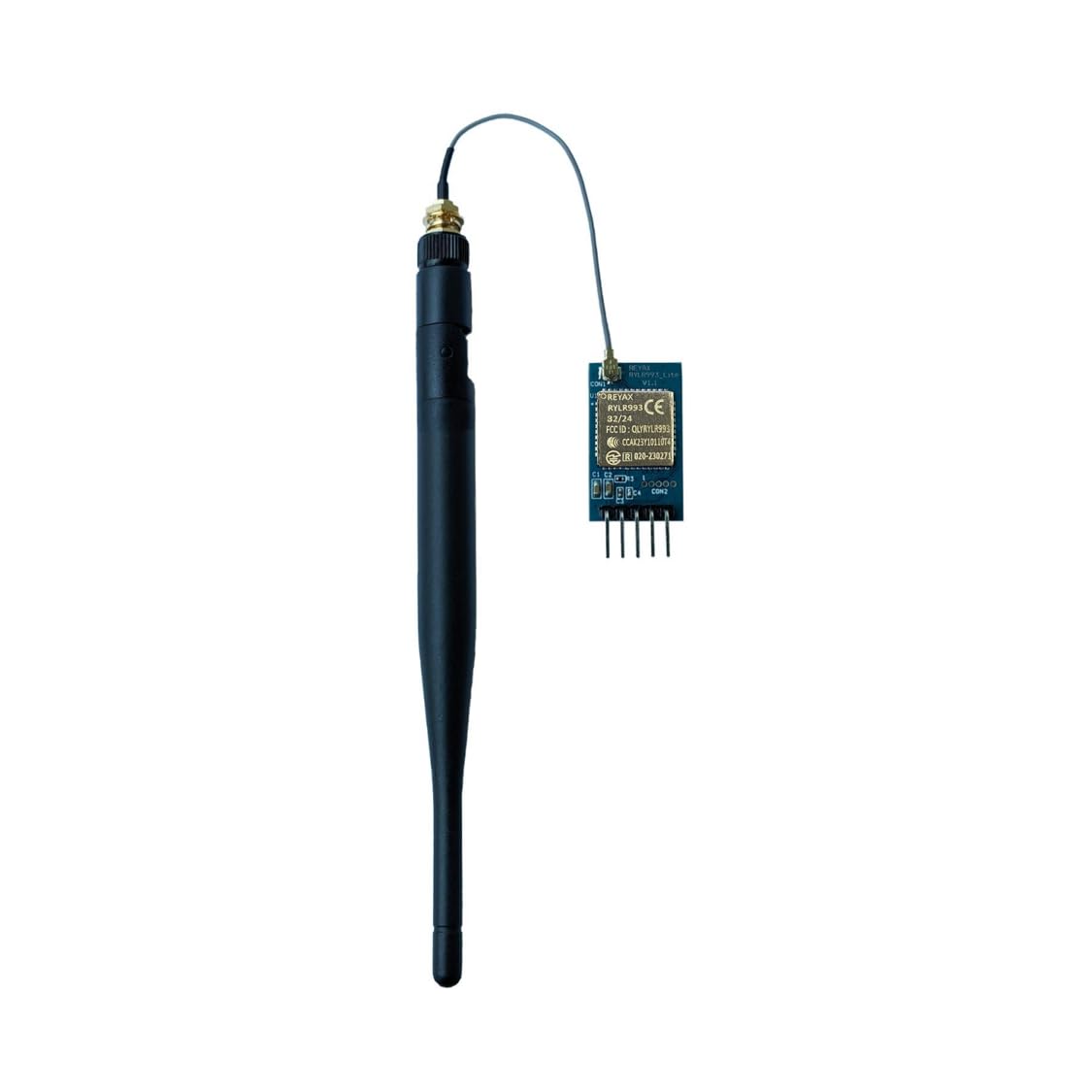
Figure 1: REYAX RYLR993 LoRaWAN Transceiver Module with attached antenna.
2. Key Features
- Helium Compatible.
- Industrial LoRa® SOC Engine.
- Customized firmware design service is available.
- AT Command over UART interface.
- High sensitivity.
- Temperature sensor.
- Low power consumption.
- AES128 CCM Data encryption.
- LoRaWAN® class A, B & C support.
- LoRaWAN® and LoRa® Proprietary selection.
- Support bands: US915, EU868, AS923, IN865, KR920, RU864.
- Support REYAX RYLR998 proprietary mode.
3. Applications
- IoT Applications
- Mobile Equipment
- Home Security
- Industrial Monitoring and Control Equipment
- Car Alarm
4. Setup Guide
The RYLR993 module communicates via a UART interface. To set up the module, follow these steps:
- Power Supply: Connect the module to a stable 3.3V power supply. Ensure proper grounding.
- UART Connection: Connect the module's TX (Transmit) pin to the RX (Receive) pin of your microcontroller or UART-to-USB converter, and the module's RX pin to the TX pin of your microcontroller or converter.
- Antenna Connection: Securely attach the provided antenna to the module's antenna connector.
- Initial Baud Rate: By default, the module operates at a baud rate of 9600. Ensure your host system's UART is configured to match this baud rate for initial communication.
- Recommended Tool: For convenient testing and communication, it is recommended to use the REYAX RYLS135 USB to UART Bridge.
5. Operating Instructions
The RYLR993 module is controlled using AT commands sent over the UART interface. These commands allow configuration of operating modes, frequency bands, data encryption, and more.
5.1. AT Command Interface
Commands are sent as ASCII strings terminated by a carriage return and newline character. The module will respond with "OK" or "AT_ERROR" followed by relevant information.
- Baud Rate: While the default is 9600, some users of similar modules (like RYLR998) might be accustomed to 115200. Be sure to configure your serial terminal or code to 9600 baud for initial connection.
- Proprietary Mode: To utilize the REYAX proprietary mode, you must explicitly set the module to this mode using the appropriate AT command and then reset the module. Refer to the detailed AT command document for specific syntax.
- LoRaWAN® Modes: The module supports LoRaWAN® Class A, B, and C operations. Configuration for these modes, including Device EUI (DEUI), Application EUI (APPEUI), and Network Key (NWKKEY), is done via specific AT commands.
5.2. Data Transmission
Once configured, the module can send and receive data packets. The specific AT commands for sending and receiving data will depend on whether you are operating in LoRaWAN® or proprietary mode.
6. Maintenance
The RYLR993 module is designed for robust operation, but proper handling and care can extend its lifespan and ensure reliable performance:
- Environmental Conditions: Operate the module within its specified temperature and humidity ranges. Avoid extreme temperatures and high humidity.
- Static Electricity: Always handle the module with anti-static precautions (e.g., using an anti-static wrist strap) to prevent damage from electrostatic discharge (ESD).
- Physical Protection: Protect the module from physical shock, vibration, and direct exposure to liquids or corrosive substances.
- Cleaning: If necessary, gently clean the module with a dry, soft cloth. Do not use solvents or abrasive cleaners.
- Firmware Updates: Periodically check the manufacturer's website for any available firmware updates that may improve performance or add new features.
7. Troubleshooting
If you encounter issues with your RYLR993 module, consider the following troubleshooting steps:
- No Response from Module:
- Verify power supply (3.3V) and ground connections are correct and stable.
- Check UART wiring (TX to RX, RX to TX).
- Ensure your serial terminal or microcontroller UART is set to the correct baud rate (default 9600).
- Try holding down the reset button on the module for approximately 10 seconds to perform a hard reset.
- AT Command Errors (AT_ERROR):
- Double-check the AT command syntax. Ensure correct capitalization, parameters, and termination characters (carriage return and newline).
- Some commands may require the module to be in a specific mode (e.g., proprietary mode) before they can be executed.
- Ensure the module has been reset after changing critical settings like operating mode.
- Communication Issues (e.g., no data transmission/reception):
- Confirm both transmitting and receiving modules are configured to the same frequency band and mode (LoRaWAN® or proprietary).
- Check antenna connections on both modules.
- Verify that the LoRaWAN® credentials (DEUI, APPEUI, NWKKEY) are correctly set if operating in LoRaWAN® mode.
- Consider environmental factors that might interfere with wireless communication (e.g., obstacles, other RF sources).
8. Specifications
| Attribute | Value |
|---|---|
| Product Dimensions | 1.26 x 0.55 x 0.09 inches; 0.63 ounces |
| Item Model Number | RYLR993_Lite |
| Date First Available | July 19, 2021 |
| Manufacturer | REYAX |
| ASIN | B0B9XQ2822 |
| Country of Origin | Taiwan |
| Brand | REYAX |
| Connector Type | 0.254 Inch Pin Header |
| Cable Type | USB |
| Compatible Devices | Modem |
| Special Feature | Long Range |
9. Certifications
The RYLR993 module has obtained various certifications to ensure compliance with international standards:

Figure 2: FCC Grant of Equipment Authorization (903.0 - 914.2 MHz).

Figure 3: FCC Grant of Equipment Authorization (902.3 - 914.9 MHz).

Figure 4: MIC (Ministry of Internal Affairs and Communications, Japan) Type Certificate.

Figure 5: NCC (National Communications Commission, Taiwan) Certification.

Figure 6: Eurofins CE Verification of Compliance.
10. Warranty and Support
REYAX products are manufactured to high quality standards. For specific warranty information, please refer to the documentation provided with your purchase or contact REYAX directly.
For technical support, inquiries, or assistance with the RYLR993 module, please visit the official REYAX website or contact their customer support channels. It is recommended to have your product model number (RYLR993_Lite) and any relevant purchase details ready when seeking support.
REYAX Official Store: Visit the REYAX Store on Amazon
Related documentsRYLR993_Lite

Ask a question about this manual
Ask about setup, troubleshooting, compatibility, parts, safety, or missing instructions. Manuals+ will review the question and use this page’s manual context to help answer it.