
1. Introduction
Thank you for choosing the HiQuick SW-8N 8-Bay Smart Battery Charger. This manual provides essential information for the safe and efficient operation of your new charger and rechargeable batteries. Please read these instructions carefully before use and retain for future reference.
2. Product Features
- Independent Charging Function: Charges 1-8 NiMH/NiCD AA/AAA batteries independently.
- Smart LED Indicators: LED screen displays the charging process and status for each battery.
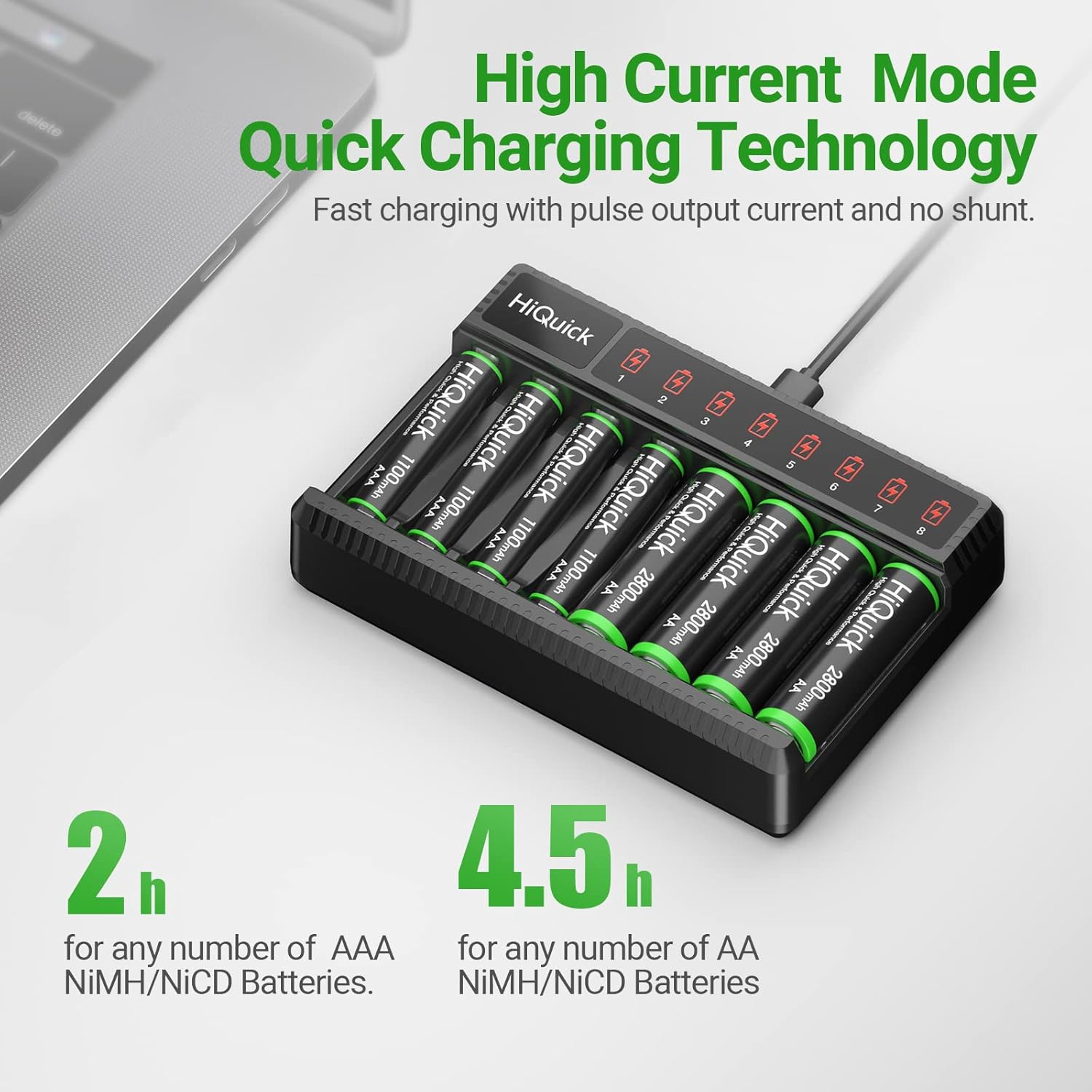
- Fast Charging: Equipped with a 5V 2A Type-C high-current charging port for quick charging.
- Multiple Intelligent Protection: Features overcharge, overcurrent, overvoltage, overheating, and short-circuit protection.
- Low Self-Discharge Performance: HiQuick 1.2V AAA Ni-MH batteries retain 80% capacity after 36 months of non-use.
- Long Cycle Life: Rechargeable AAA batteries are designed for up to 1200 charging cycles.
- Universal Compatibility: AAA batteries are compatible with a wide range of common household devices.
3. Package Contents
The HiQuick SW-8N Charger package typically includes:
- 1 x HiQuick SW-8N 8-Bay Smart Battery Charger
- 8 x HiQuick 1100mAh AAA Ni-MH Rechargeable Batteries
- 1 x USB Type-C Charging Cable
- 1 x User Manual

4. Safety Instructions
To ensure safe operation and prevent damage, please adhere to the following safety guidelines:
- Use only Ni-MH or Ni-CD rechargeable batteries with this charger. Do not attempt to charge alkaline, carbon, or other non-rechargeable batteries.
- Ensure correct polarity (+/-) when inserting batteries into the charger slots.
- Do not disassemble, modify, or short-circuit the charger or batteries.
- Avoid exposing the charger to water, moisture, direct sunlight, or high temperatures.
- Keep the charger and batteries out of reach of children.
- Unplug the charger from the power source when not in use or when cleaning.
- Operate the charger within an ambient temperature range of 0-35°C (32-95°F).
- If any battery shows signs of damage, leakage, or overheating, discontinue use immediately.


5. Setup
- Connect the provided USB Type-C charging cable to the charger's input port.
- Plug the other end of the USB cable into a compatible 5V 2A USB power adapter (not included), laptop USB port, power bank, or car charger.
- The charger's LED indicators will briefly light up upon power connection.


6. Operating Instructions
6.1 Inserting Batteries
Carefully insert 1 to 8 Ni-MH/Ni-CD AA or AAA rechargeable batteries into the charging slots. Ensure the positive (+) and negative (-) ends of the batteries match the polarity markings in the charger slots. The charger supports mixed charging of AA and AAA batteries simultaneously.

6.2 Charging Process and LED Indicators
- When batteries are correctly inserted, the corresponding LED indicator for each slot will turn RED, indicating that charging is in progress.
- Once a battery is fully charged, its corresponding LED indicator will turn GREEN.
- The charger will automatically stop charging when batteries are full to prevent overcharging.

6.3 Estimated Charging Times
- For AAA NiMH/NiCD batteries: Approximately 2 hours for any number of batteries.
- For AA NiMH/NiCD batteries: Approximately 4.5 hours for any number of batteries.

6.4 Official Product Video
7. Battery Care and Maintenance
- Initial Use: New batteries reach their best performance after 3-5 charge/discharge cycles.
- Storage: For long-term storage, fully charge the batteries before storing them. Store in a cool, dry place.
- Low Self-Discharge: HiQuick Ni-MH batteries are designed to retain a significant charge even after extended periods of non-use.
- Recycling: These batteries are free from harmful substances like Hg/Cd/Pb and are recyclable. Please dispose of them responsibly.


8. Troubleshooting
- LEDs not lighting up: Ensure the charger is properly connected to a power source and the batteries are inserted with correct polarity.
- Battery not charging: Check if the battery is a compatible Ni-MH/Ni-CD type. Ensure it's not damaged. Try re-inserting the battery.
- Slow charging: Verify that your USB power adapter provides at least 5V 2A output. Lower output may result in slower charging.
- Incompatible batteries: The charger is designed for Ni-MH and Ni-CD rechargeable batteries only. Other battery types will not charge.
9. Specifications
| Model | SW-8N |
| Input | Type-C DC 5V 2A (Min) |
| Output (AA/AAA) | 1.48V DC 500mA±10% |
| Battery Type | Ni-MH / Ni-CD (AA/AAA) |
| Charging Rate | ≥80% |
| Charging Method | Constant voltage and current control |
| Product Dimensions | 1.1"D x 4.9"W x 3.3"H |
| Weight | 9.14 ounces |
10. Warranty and Support
HiQuick is committed to providing reliable and high-quality products. This product comes with a 30-day worry-free money-back guarantee and a one-year warranty. For any questions, concerns, or support needs, please contact HiQuick customer service through the retailer where you purchased the product.


