
Dude Pruner DP-01
Dude Pruner Fuzz Gun 2.0 Instruction Manual
Model: DP-01
Brand: Dude Pruner
Introduction
The Dude Pruner Fuzz Gun 2.0 is an advanced IPL (Intense Pulsed Light) hair removal device designed for effective and comfortable hair reduction. This manual provides essential information for safe and optimal use of your device. Please read it thoroughly before first use and retain it for future reference.
Safety Information
Always prioritize safety when using the Fuzz Gun 2.0. This device is FDA-cleared, ensuring a safe and effective hair removal experience when used as directed.
- Do not use on broken, irritated, or sunburned skin.
- Avoid direct eye exposure to the light flash. Protective eyewear (sunglasses provided) should be worn during operation.
- Consult the skin tone and hair color chart to ensure suitability for your skin and hair type.
- Keep out of reach of children.
- Ensure the device is clean and dry before each use.
- If you experience any discomfort or adverse reactions, discontinue use immediately and consult a healthcare professional.

Image: The Fuzz Gun 2.0 highlighting its FDA approval and Snow Balls Ice Cooling Technology.
Package Contents
Upon opening your Fuzz Gun 2.0 package, please verify that all components are present and undamaged:
- Dude Pruner Fuzz Gun 2.0 IPL Handset
- Power Adapter (Corded Electric)
- Protective Eyewear (Sunglasses)
- Manual Razor
- Instruction Manual (this document)

Image: Contents of the Fuzz Gun 2.0 package, including the device, sunglasses, and razor.
Setup
- Prepare the Area: Ensure the skin area to be treated is clean, dry, and free of any lotions, creams, or deodorants. Shave the area thoroughly before treatment.
- Connect Power: Plug the power adapter into the Fuzz Gun 2.0 device and then into a suitable electrical outlet. The device will power on.
- Wear Protective Eyewear: Always wear the provided protective sunglasses before operating the device to shield your eyes from the intense pulsed light.
Operating Instructions
The Fuzz Gun 2.0 features Snow Balls Cooling technology for a comfortable experience and multiple intensity levels.
- Power On: The device powers on automatically when plugged in.
- Select Intensity Level: Press the power button briefly to cycle through the 5 intensity levels. Start with a lower level and gradually increase as your comfort allows.
- Apply to Skin: Place the flash window firmly against the skin. The device will detect skin contact and the cooling function will activate.
- Initiate Flash: Press the flash button to emit a single flash. For larger areas, use the Auto-Glide Mode by holding down the flash button and slowly gliding the device across the skin. The device will automatically flash at regular intervals.
- Move to Next Area: After each flash or glide, move the device to the next untreated area. Avoid overlapping flashes excessively.
- Power Off: Unplug the device from the power outlet to turn it off.

Image: Demonstrating the use of the Fuzz Gun 2.0 on an arm.
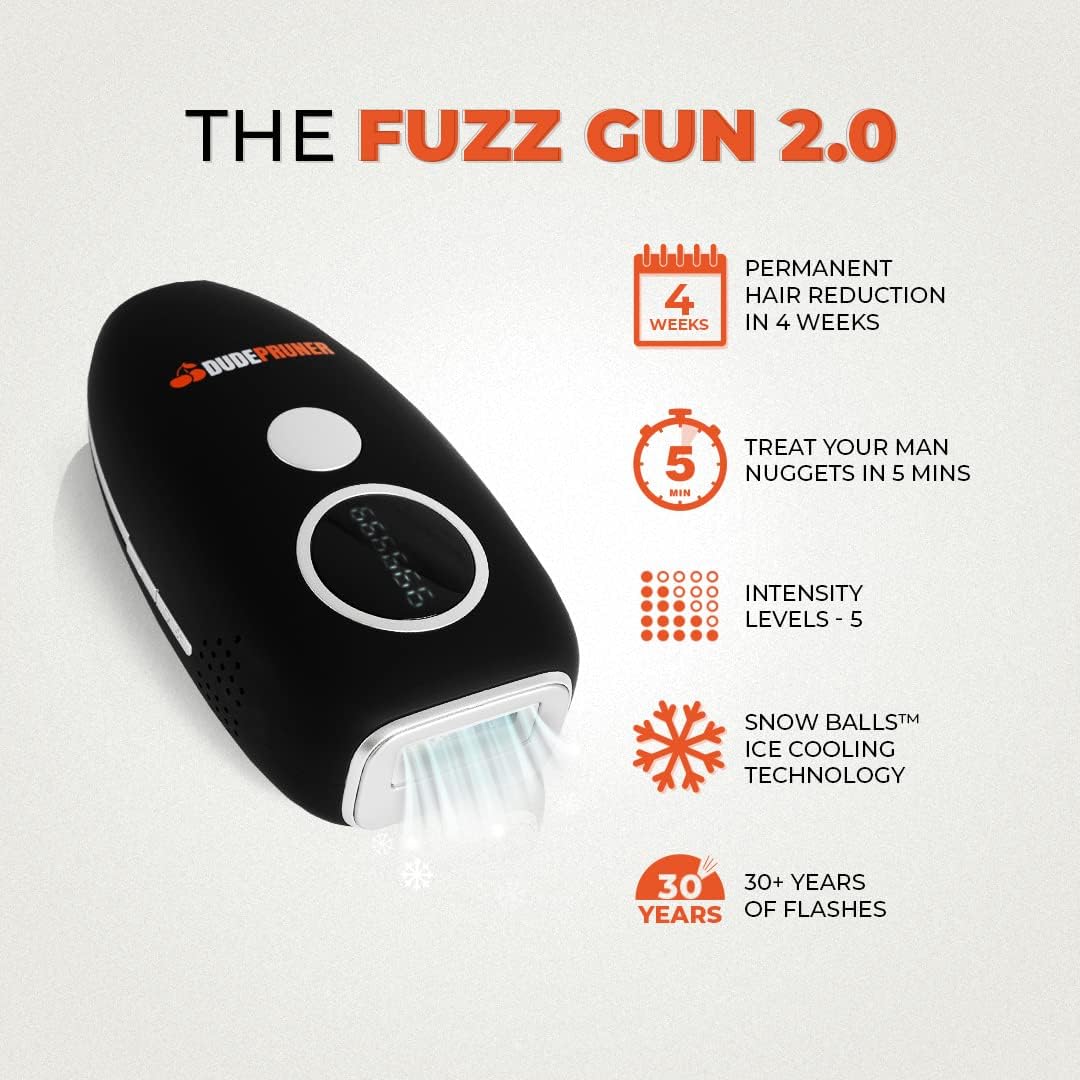
Image: Key features of the Fuzz Gun 2.0, including treatment duration and intensity levels.
Treatment Plan
For optimal results, follow the recommended treatment schedule:
- Start-up Phase (Weeks 1-12): Treat the desired area once per week for the first 4 to 12 weeks. Hair will gradually fall out and regrowth will be delayed.
- Maintenance Phase: After the initial phase, continue IPL treatments as needed, typically every 1-2 months, to maintain hair-free skin.
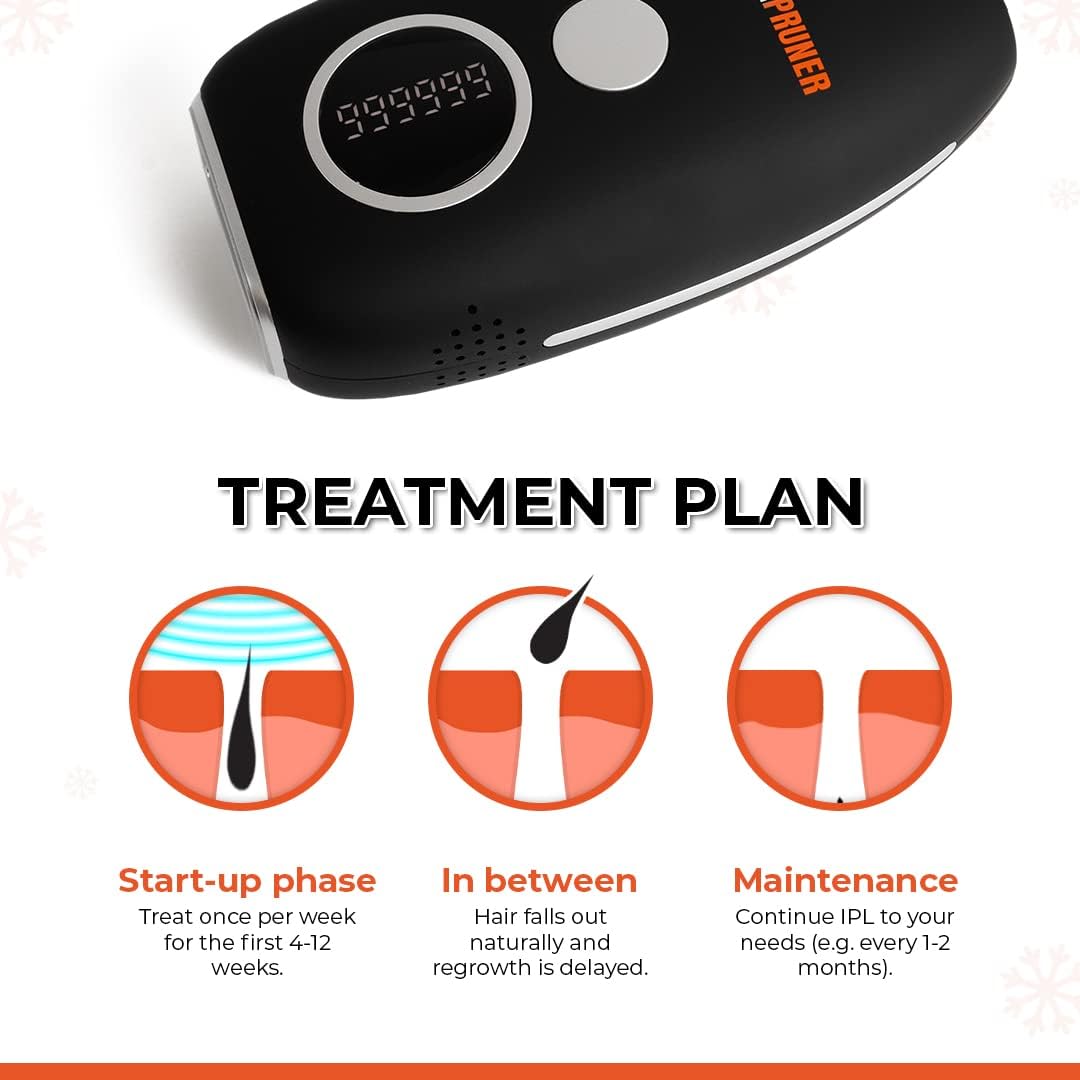
Image: Visual representation of the recommended Fuzz Gun 2.0 treatment plan.

Image: Before and after comparison demonstrating hair reduction results after 4 weeks of use.
Skin Tone and Hair Color Suitability
The effectiveness of IPL treatment depends on the contrast between hair color and skin tone. Refer to the chart below to determine if the Fuzz Gun 2.0 is suitable for your specific combination.
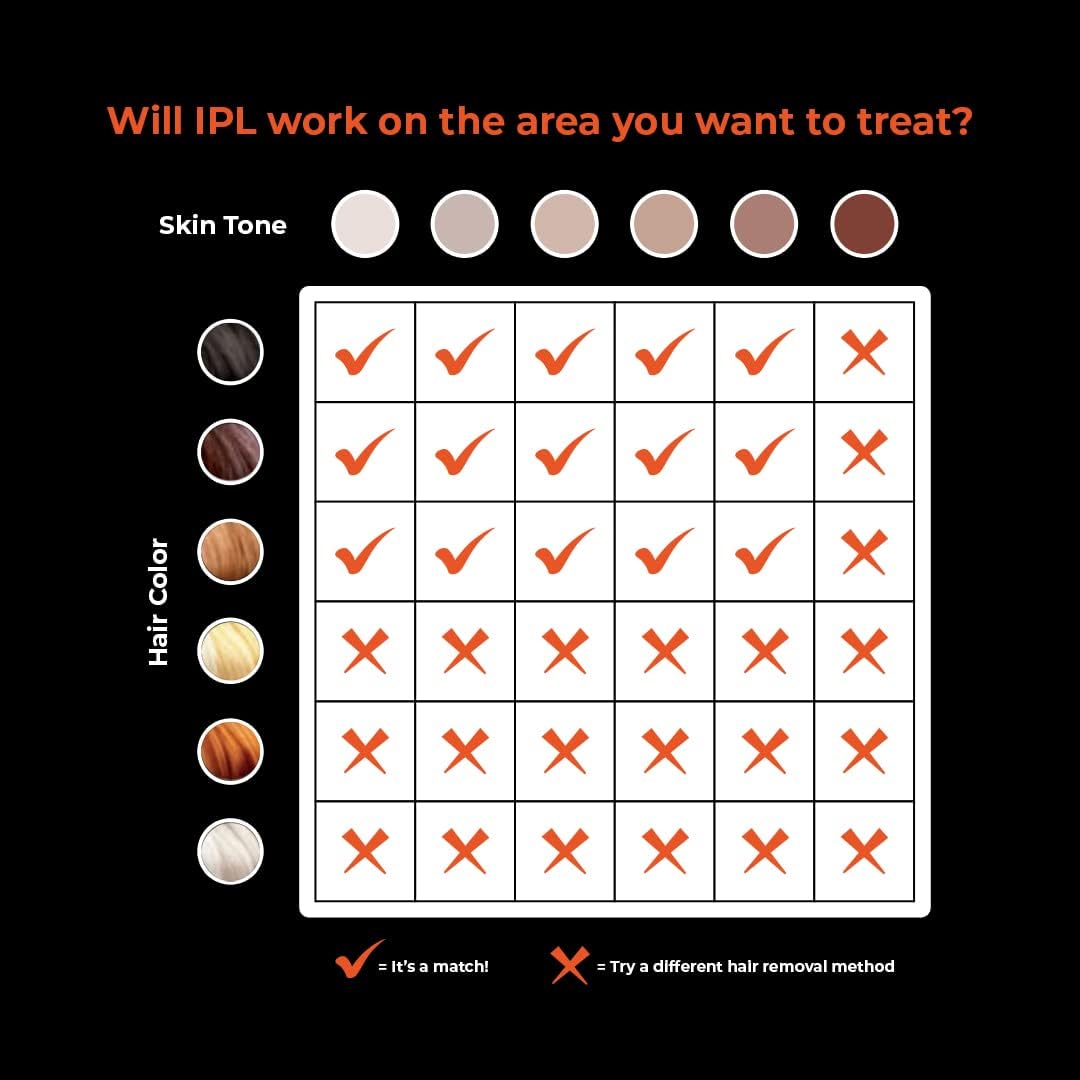
Image: Chart illustrating the compatibility of the Fuzz Gun 2.0 with different skin tones and hair colors.
Note: IPL is most effective on lighter skin tones with darker hair. It is not recommended for very dark skin tones or very light hair colors (white, grey, red, very light blonde) as there may not be enough pigment for the light to target effectively.
Maintenance
Proper maintenance ensures the longevity and optimal performance of your Fuzz Gun 2.0.
- Cleaning: After each use, unplug the device and allow it to cool down. Gently wipe the flash window and the device body with a soft, dry cloth. Do not use abrasive cleaners or immerse the device in water.
- Storage: Store the device in a cool, dry place, away from direct sunlight and moisture. Keep it in its original packaging or a protective case to prevent damage.
Troubleshooting
| Problem | Possible Cause | Solution |
|---|---|---|
| Device does not power on. | Not properly plugged in; power outlet issue. | Ensure the power adapter is securely connected to the device and the wall outlet. Try a different outlet. |
| No flash emitted. | Flash window not in full contact with skin; device malfunction. | Ensure the flash window is pressed firmly and completely against the skin. If the issue persists, contact customer support. |
| Skin irritation after use. | Intensity level too high; unsuitable skin type. | Reduce the intensity level for subsequent treatments. Review the skin tone/hair color chart. Discontinue use if irritation persists. |
Specifications
- Model: DP-01
- Item Weight: 630 g
- Package Dimensions: 19.99 x 17.3 x 5.69 cm
- Color: Black
- Power Source: Corded Electric
- Voltage: 9 Volts
- Amperage: 10 Milliamps
- Technology: IPL (Intense Pulsed Light) with Snow Balls Cooling Technology
- Intensity Levels: 5
- Flashes: Designed for 30+ years of flashes
Warranty and Support
The Fuzz Gun 2.0 comes with a manufacturer's warranty. For specific warranty terms, conditions, and duration, please refer to the warranty card included in your product packaging or visit the official Dude Pruner website. For technical support, troubleshooting assistance, or any product-related inquiries, please contact Dude Pruner customer service.
While specific contact details are not provided in this manual, general support information can often be found on the product's official website or through the retailer where the product was purchased.
Related documentsDP-01

Ask a question about this manual
Ask about setup, troubleshooting, compatibility, parts, safety, or missing instructions. Manuals+ will review the question and use this page’s manual context to help answer it.