
Andoer Camera Cage Kit for Sony A7 IV
Andoer Aluminum Alloy Camera Cage Kit User Manual
Model: Camera Cage Kit for Sony A7 IV
Product Overview
The Andoer Aluminum Alloy Camera Cage Kit is a professional accessory designed to enhance the functionality and protection of your Sony A7 IV camera. This comprehensive kit includes a camera cage, a top handle, and a wooden side grip, providing a secure and ergonomic solution for various shooting scenarios.
Crafted from high-quality aluminum alloy and wood, the components are durable and designed for long-lasting use. The cage is precisely engineered to fit the Sony A7 IV without obstructing the battery compartment or other essential camera parts. Multiple mounting points are integrated for attaching external accessories.

Figure 1: Fully assembled Andoer Camera Cage Kit.
Safety Information
Warning:
Store the product separately from children's toys and other items to avoid accidental ingestion or choking hazards.

Figure 2: Safety warning regarding small parts and choking hazards.
Package Contents
Before proceeding with installation, please verify that all components listed below are present in your package:
- 1 x Camera Cage
- 1 x Top Handle
- 1 x Side Grip (Wooden)
- 1 x Wrench
- 3 x Screws
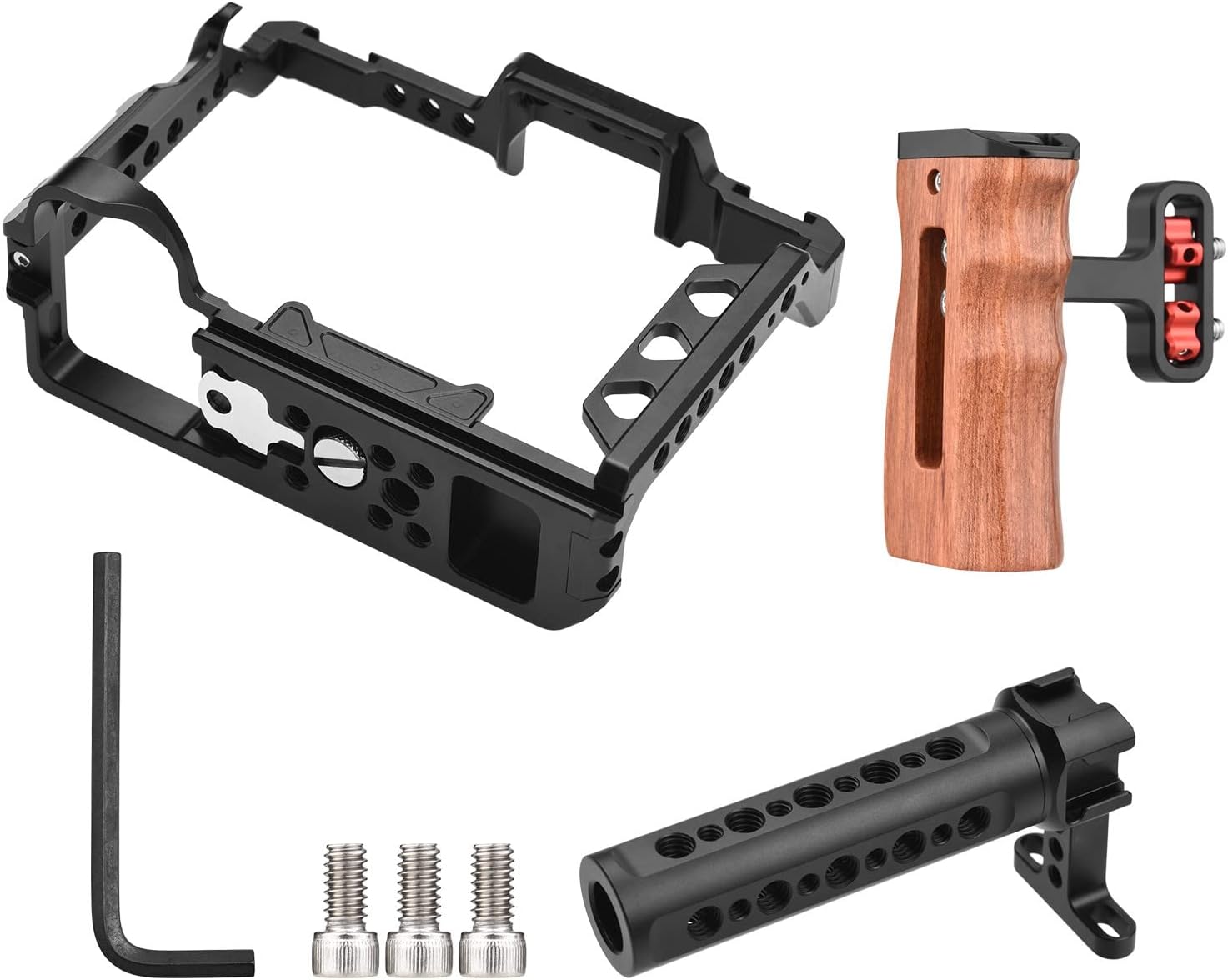
Figure 3: Contents of the Andoer Camera Cage Kit.
Setup and Installation
Follow these steps to properly assemble and install the camera cage kit onto your Sony A7 IV camera.
- Attach the Camera Cage to your Camera:
Carefully align your Sony A7 IV camera with the camera cage. The cage is designed to fit snugly around the camera body without obstructing access to controls or the battery compartment. Secure the camera to the cage using the integrated screw at the bottom of the cage. Ensure it is tightened firmly but do not overtighten.
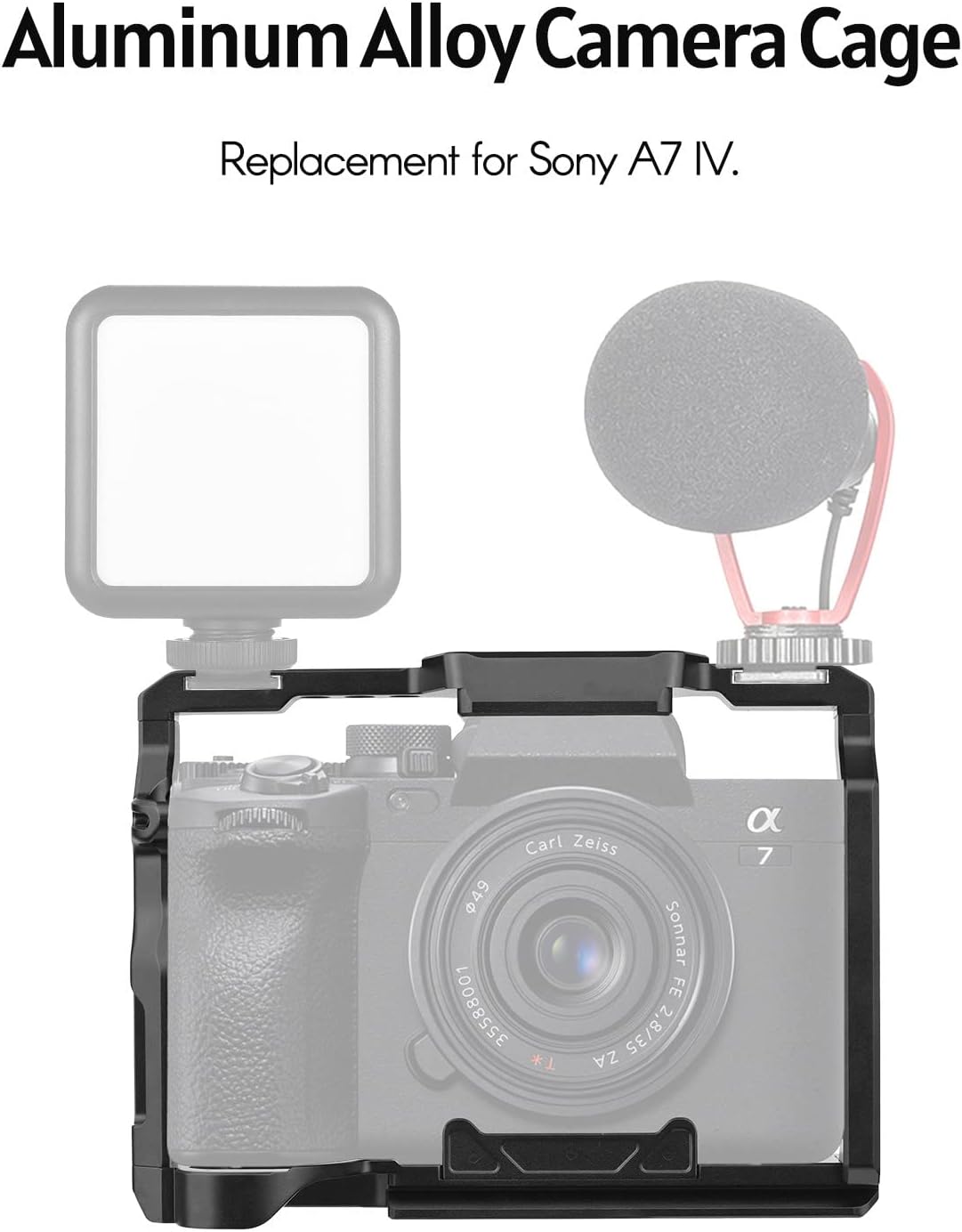
Figure 4: Camera mounted within the cage, showing accessory mounting points.
- Install the Top Handle:
Position the top handle onto the cold shoe mount or 1/4-inch screw holes located on the top of the camera cage. Use the provided screws and wrench to secure the top handle firmly. This handle provides a comfortable grip for low-angle shots and easy carrying.
- Attach the Wooden Side Grip:
Align the wooden side grip with the mounting points on the side of the camera cage. Secure it using the provided screws and wrench. The ergonomic design of the wooden grip offers enhanced comfort and stability during handheld operation.

Figure 5: Demonstrating the comfortable grip of the wooden side handle.
- Utilize Mounting Points:
The camera cage and handles feature multiple 1/4-inch and 3/8-inch screw holes, as well as cold shoe mounts. These are designed for attaching various accessories such as microphones, external monitors, LED video lights, and more. Refer to Figure 6 for a detailed view of these mounting points.

Figure 6: Detailed view of accessory mounting points and included tools.
Operating Instructions
Once assembled, the Andoer Camera Cage Kit provides enhanced stability and versatility for your camera setup. Here are general guidelines for operation:
- Handheld Shooting: Use the top handle for stable low-angle shots or the side grip for comfortable handheld operation, especially during extended shooting sessions.
- Accessory Integration: Attach microphones, video lights, external monitors, and other essential accessories to the various 1/4-inch, 3/8-inch screw holes, and cold shoe mounts on the cage and handles. Ensure all accessories are securely fastened before use.
- Tripod Mounting: The bottom of the camera cage typically includes a standard 1/4-inch screw hole, allowing you to mount the entire setup onto a tripod or monopod for static shots.
Maintenance
To ensure the longevity and optimal performance of your Andoer Camera Cage Kit, follow these maintenance guidelines:
- Cleaning: Wipe the aluminum alloy and wooden surfaces with a soft, dry cloth. For stubborn dirt, a slightly damp cloth can be used, followed by immediate drying. Avoid using harsh chemicals or abrasive cleaners.
- Storage: Store the kit in a dry, cool place away from direct sunlight and extreme temperatures. If disassembling for storage, keep all screws and the wrench together in a secure container to prevent loss.
- Screw Tightness: Periodically check all screws for tightness, especially after extensive use. Re-tighten any loose screws using the provided wrench to maintain stability and prevent accidental detachment of components or accessories.
Troubleshooting
This section addresses common issues you might encounter with your camera cage kit. If you experience problems not covered here, please refer to the Support section.
- Loose Components: If any part of the cage or handles feels loose, ensure all screws are properly tightened using the provided wrench.
- Difficulty Attaching Camera: Verify that you are using the kit with a Sony A7 IV camera. Ensure the camera is correctly aligned with the cage's mounting points before attempting to secure it. Do not force the camera into the cage.
- Accessories Not Securing: Check that the screws on your accessories match the 1/4-inch or 3/8-inch screw holes on the cage/handles. Ensure the cold shoe mounts are clear of debris and accessories are fully inserted before tightening.
Specifications
Detailed specifications for the Andoer Camera Cage Kit:
| Feature | Detail |
|---|---|
| Brand | Andoer |
| Compatibility | Sony A7 IV Camera |
| Material | Aluminum Alloy, Wood |
| Color | Black |
| Camera Cage Size | 15 x 11 x 6 cm (5.9 x 4.3 x 2.3 inches) |
| Camera Cage Weight | 185g (6.5oz) |
| Top Handle Size | 13.5 x 7 x 4.8 cm (5.3 x 2.7 x 1.8 inches) |
| Top Handle Weight | 163g (5.7oz) |
| Side Handle Size | 10 x 8.5 x 5 cm (3.9 x 3.3 x 1.9 inches) |
| Side Handle Weight | 160g (5.6oz) |
| Mounting Points | 1/4-inch screw holes, 3/8-inch screw holes, Cold Shoe Mounts |
| Package Dimensions | 8.66 x 4.92 x 3.03 inches |
| Country of Origin | China |

Figure 7: Dimensional specifications of the camera cage kit components.
Warranty and Support
Warranty Information: Specific warranty details for this product are not provided within this manual. Please refer to the manufacturer's official website, the product packaging, or your point of purchase for comprehensive warranty terms and conditions.
Customer Support: For technical assistance, troubleshooting beyond this guide, or inquiries regarding product parts, please contact Andoer customer support through their official channels. Contact information can typically be found on the manufacturer's website or on the product packaging.
Related documentsCamera Cage Kit for Sony A7 IV

Ask a question about this manual
Ask about setup, troubleshooting, compatibility, parts, safety, or missing instructions. Manuals+ will review the question and use this page’s manual context to help answer it.