
Introduction
This manual provides detailed instructions for the installation, operation, and maintenance of your Aqonsie Solar Shed Light L-02. This solar-powered pendant light is designed for both indoor and outdoor use, featuring multiple lighting modes, motion sensing, and remote control capabilities. Please read this manual thoroughly before use to ensure proper function and longevity of your product.
Safety Information
- Ensure the solar panel is installed in a location that receives direct sunlight for optimal charging.
- Do not stare directly into the LED light when it is active, as it is very bright and may cause eye strain.
- Keep the product away from open flames or extreme heat sources.
- Do not attempt to disassemble or modify the product. This may void the warranty and pose a safety risk.
- Ensure all connections are secure and waterproof, especially for outdoor installations.
- Dispose of batteries according to local regulations.
Package Contents
Verify that all items listed below are included in your package:
- 1 x Solar Pendant Light (Model L-02)
- 1 x Solar Panel with connecting cable
- 1 x Remote Control
- Mounting Hardware (screws, anchors)
- Instruction Manual (this document)
Setup Instructions
1. Initial Charging
Before first use, connect the solar pendant light to the solar panel. Place the solar panel in direct sunlight for 6-8 hours to ensure the internal battery is fully charged. The light will not operate optimally without sufficient initial charge.

Image: Solar panel positioned to receive direct sunlight for charging, with the pendant light connected. This illustrates the initial charging process.
2. Mounting the Solar Panel
Select a location for the solar panel that receives maximum direct sunlight throughout the day. Use the provided mounting bracket and hardware to securely attach the solar panel. Ensure the panel is angled to capture sunlight effectively. The connecting cable is 16.4 feet (5 meters) long, allowing flexibility in panel placement relative to the light fixture.

Image: A diagram illustrating the dimensions of the solar pendant light and the solar panel, along with the 16.4ft connecting cable. This helps in planning installation locations.
3. Mounting the Pendant Light
The pendant light can be hung indoors or outdoors in locations such as sheds, barns, garages, patios, or gazebos. Use the integrated hook or appropriate mounting hardware to secure the light fixture. Ensure the light is positioned to illuminate the desired area effectively.

Image: The solar pendant light installed in a garage and on an outdoor patio, demonstrating its versatility for both indoor and outdoor applications.
Operating Instructions
Remote Control Functions
The included remote control allows for easy adjustment of lighting modes, brightness, and timer settings. The remote has an effective range of approximately 16.5 feet.

Image: A close-up diagram of the remote control, highlighting buttons for ON/OFF, MODE Switch, Brightness Adjustment (+/-), and Timer Settings (2H/4H/6H).
Lighting Modes
The light features 5 distinct lighting modes, selectable via the remote control or the MODE switch button on the light itself:
- MODE 1 (Night): Dim light, brightens to full intensity for 20 seconds upon motion detection, then returns to dim.
- MODE 2 (Night): Light is off, brightens to full intensity for 20 seconds upon motion detection, then turns off.
- MODE 3 (Night): Constant ON at full brightness throughout the night.
- MODE 4 (Daytime): Light is off, brightens to full intensity for 20 seconds upon motion detection. This mode works during both day and night.
- MODE 5 (Daytime): Constant ON at full brightness all day and night.
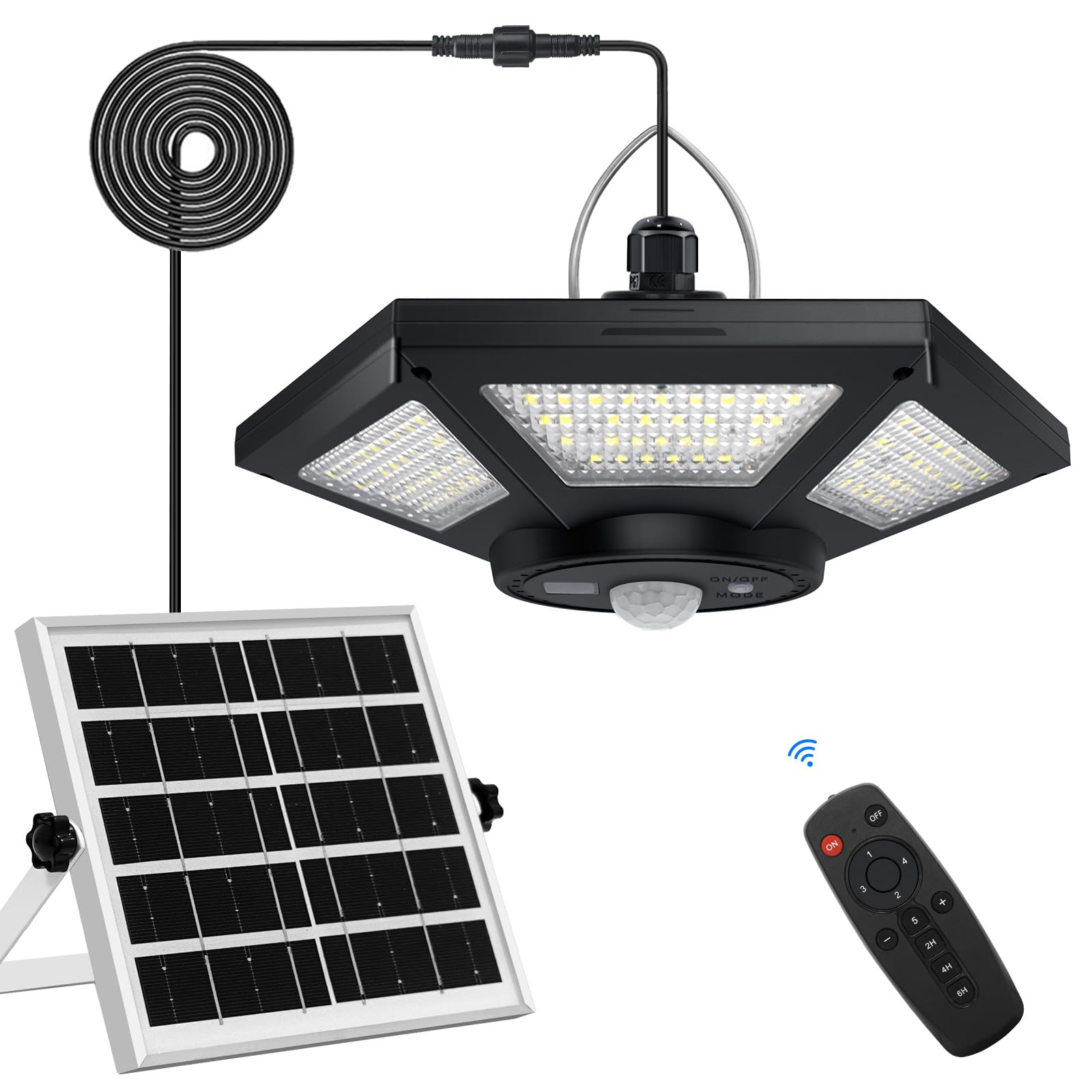
Image: A visual representation of the five lighting modes, showing how the light behaves with and without motion detection during night and day.
Timer Settings
For Modes 4 and 5, you can set a timer for the light to stay on for a specific duration before automatically turning off. Available timer settings are 2 hours, 4 hours, and 6 hours.

Image: An outdoor patio scene with the solar light illuminated, and an overlay of the remote control highlighting the 2H/4H/6H timer settings.
Brightness Adjustment
Use the "+" and "-" buttons on the remote control to adjust the brightness of the light in 4 levels.
Video: An official product video from Aqonsie-US demonstrating the solar pendant light's features, including brightness adjustment and various modes.
Maintenance
- Cleaning: Regularly wipe the solar panel with a soft, damp cloth to remove dust, dirt, or debris that may hinder charging efficiency.
- Battery: The light contains a 4400mAh Lithium Polymer battery. Ensure the solar panel receives adequate sunlight (6-8 hours) daily for optimal performance, providing 10-12 hours of working time.
- Waterproof Rating: The product has an IP65 waterproof rating, making it resistant to rain and other extreme weather conditions. However, avoid submerging the unit in water.

Image: The solar light and panel shown in a rainy environment, highlighting its IP65 waterproof, heat-resistant, and frost-resistant features.
Troubleshooting
| Problem | Possible Cause | Solution |
|---|---|---|
| Light does not turn on. | Insufficient charge; MODE switch is OFF; remote battery low. | Ensure solar panel receives 6-8 hours of direct sunlight. Press the "ON" button on the light or remote. Check/replace remote battery. |
| Light is dim or flickers. | Low battery charge; dirty solar panel. | Allow more charging time in direct sunlight. Clean the solar panel surface. |
| Motion sensor not working. | Incorrect mode selected; sensor obstructed. | Ensure a motion-sensing mode (Mode 1, 2, or 4) is selected. Clear any obstructions from the sensor. |
| Remote control not responding. | Remote battery low; out of range. | Replace the remote control battery. Ensure you are within 16.5 feet of the light. |
Specifications
| Feature | Detail |
|---|---|
| Brand | Aqonsie |
| Model Name | Solar Pendant Light Outdoor Indoor (L-02) |
| Power Source | Solar Powered |
| Light Source Type | LED (180 LEDs) |
| Brightness | 1800 Lumens |
| Battery | 1 Lithium Polymer (4400mAh) |
| Charging Time | 6-8 hours (direct sunlight) |
| Working Time | 10-12 hours (fully charged) |
| Control Method | Remote Control, MODE Switch Button |
| Special Features | 5 Lighting Modes, Motion Sensor, 3 Timers, Dimmable |
| Water Resistance Level | IP65 Waterproof |
| Material | Aluminum, Plastic (Acrylonitrile Butadiene Styrene) |
| Product Dimensions | 8.3"L x 7.3"W x 4.9"H |
| Solar Panel Cable Length | 16.4 FT / 5M |
| Item Weight | 1.76 Pounds |
For extended cable length, search ASIN: B0DKXJZ4H5.
Warranty & Support
For warranty information or technical support, please refer to the contact details provided with your purchase or visit the official Aqonsie website. Keep your purchase receipt for warranty claims.