
1. Introduction
This manual provides instructions for the BTF-LIGHTING WS2814 IC RGBW LED Strip, Model HD-12V-WS2814-60L-B-IP65. This addressable LED strip features RGB and Warm White (3000K) LEDs, operating at DC12V with 60 LEDs per meter and 20 pixels per meter. It is designed for flexible lighting applications and has an IP65 rating, indicating protection against dust and low-pressure water jets.
The WS2814 IC allows for individual control of groups of 3 LEDs, enabling dynamic and customizable lighting effects. This product is an upgrade from WS2812B RGB or WS2811 RGB strips, offering enhanced pure white light capabilities and improved energy efficiency.

Image 1.1: The BTF-LIGHTING WS2814 RGBW LED strip, coiled, showing its flexible design and attached 3-pin JST-SM connectors.
2. Safety Information
- Ensure the power supply voltage matches the strip's requirement (DC12V). Using incorrect voltage (e.g., DC5V or DC24V) will damage the product.
- Disconnect power before installation, cutting, or maintenance.
- Avoid bending the strip sharply or applying excessive force, which can damage the circuit board or LEDs.
- Do not submerge IP65 rated strips in water. IP65 is suitable for indoor use and protection against splashes, not submersion.
- Keep out of reach of children.
3. Product Overview
The WS2814 IC RGBW LED strip integrates four colors (Red, Green, Blue, Warm White) into a single 5050 SMD LED package. Each WS2814 IC controls a group of three LEDs, allowing for addressable control and a wide range of color and white light options.

Image 3.1: A close-up view of the WS2814A IC chip integrated into the LED strip, demonstrating its role in controlling the individual LED segments.

Image 3.2: Illustration comparing Cool White (6000K-6500K) and Warm White (2700K-3000K) LED components, highlighting the integrated RGB elements.
3.1 Package Contents
- 1x 16.4FT (5m) WS2814 RGBW LED Strip
- 1x 3-pin Male JST Connector
Note: A power supply and controller are not included and must be purchased separately.
3.2 Product Variations
The BTF-LIGHTING WS2814 LED strip is available in various configurations, including different LED densities (e.g., 60LED/m, 84LED/m), color temperatures (e.g., RGB+3000K, RGB+6000K), and IP ratings (IP30, IP65, IP67, IP68). This manual specifically covers the RGB+3000K 60LED/m DC12V IP65 model.

Image 3.3: Visual comparison of different WS2814 LED strip types (60LED/m and 30LED/m) and their respective IP ratings (IP30, IP65, IP67), including dimensions.
4. Setup and Installation
4.1 Power Supply Connection
The LED strip requires a DC12V power supply. Ensure the power supply's wattage is sufficient for the length of the strip being used. For a 16.4FT (5m) strip, a DC12V 10A (120W) power supply is recommended.
4.2 Controller Connection
Connect the 3-pin JST-SM connector from the LED strip to a compatible addressable RGBW LED controller. Ensure the data input (DI) and ground (GND) pins are correctly aligned. The strip has a data direction indicated by arrows; connect the controller to the data input side.
Compatible controllers include SPI RGBW controllers such as WLED, K-1000C, Rasp Pi, ESP-8266, ESP-32, SP617E, SP530E, SP803E, and DR04W.
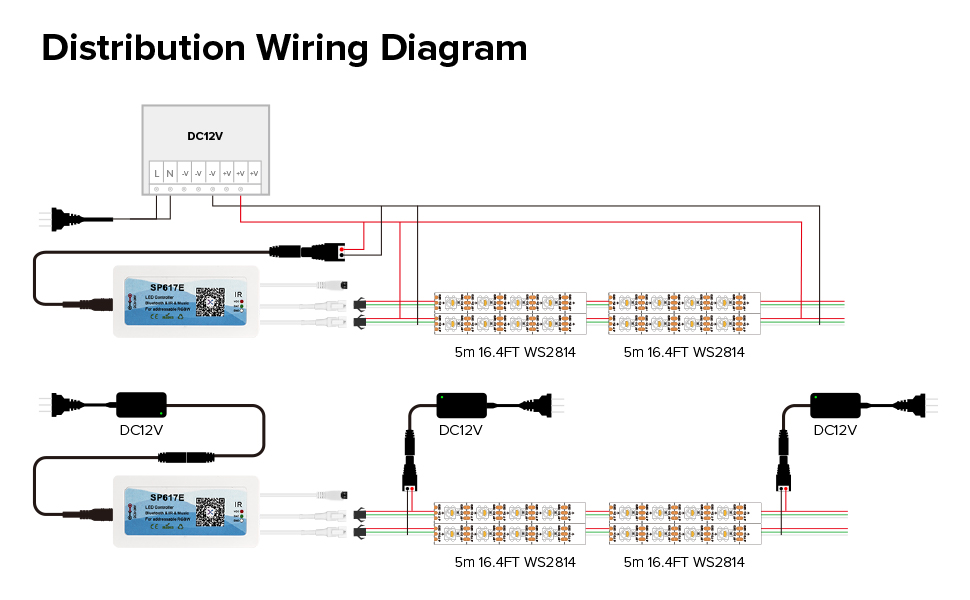
Image 4.1: A detailed wiring diagram illustrating how to connect multiple WS2814 LED strips to a DC12V power supply and an SP617E controller for proper operation.
4.3 Mounting the LED Strip
- IP30 and IP65 Strips: These versions typically come with double-sided adhesive tape on the back. Clean the mounting surface thoroughly before peeling off the tape backing and pressing the strip firmly into place.
- IP67 Strips: IP67 rated strips do not have double-sided tape. Use screws and mounting clips (not included) to secure the strip.
4.4 Cutting and Extending
The LED strip can be cut every 3 LEDs at designated cut marks without damaging the remaining sections. This allows for customization of length. The strip features 3-pin JST-SM connectors on both ends, enabling easy extension by chaining multiple strips together.

Image 4.2: Visual guide demonstrating various modification options for the LED strip, including cutting points, adhesive application, connector usage, bending flexibility, and DIY project potential.
5. Operating Instructions
Once properly installed and connected to a compatible controller, the LED strip can be operated to display various lighting effects.
5.1 Color and Effect Control
The WS2814 RGBW strip supports a wide range of colors and dynamic effects. Through your chosen controller's interface (e.g., mobile app, remote control), you can:
- Select from 16 million monochrome effects.
- Choose from 142 kinds of dynamic lighting effects.
- Utilize 10 kinds of chasing pure white lighting effects.
- Access 18 kinds of music lighting effects (if supported by controller).
- Adjust brightness and speed of effects.

Image 5.1: Examples of compatible control devices, including the SP617E Bluetooth controller, Raspberry Pi 3, and UNO R3 development board, which can be used to manage the LED strip.

Image 5.2: Demonstrates the versatility of the LED strip, displaying full color, cool white, natural white, and warm white light outputs.
5.2 Controller Demonstration Video
Video 5.1: A demonstration of the SP617E LED controller, showcasing its capabilities for color selection, dynamic lighting effects, and music synchronization with the LED strip.
6. Maintenance
- Cleaning: Gently wipe the strip with a dry, soft cloth if dust accumulates. Do not use harsh chemicals or abrasive materials.
- Inspection: Periodically check connections for looseness or damage.
- Storage: If storing the strip, ensure it is coiled loosely and kept in a dry, cool environment away from direct sunlight.
7. Troubleshooting
| Problem | Possible Cause | Solution |
|---|---|---|
| LED strip does not light up | No power, incorrect voltage, faulty connection, faulty controller. | Check power supply connection and output. Ensure DC12V. Verify all wiring. Test with a different controller if possible. |
| Incorrect colors or flickering | Incorrect controller settings, data line issue, voltage drop. | Verify controller settings (e.g., LED type SK6812 RGBW, color order BRG, Swap W&G for WLED). For long runs, consider injecting power at multiple points to mitigate voltage drop. |
| Adhesive tape not holding | Surface not clean, unsuitable surface, adhesive degradation. | Clean surface thoroughly with isopropyl alcohol. For better adhesion, use additional high-quality double-sided tape (e.g., 3M VHB) or mounting clips. |
| Only part of the strip lights up | Damage to a section, data signal interruption. | Inspect the unlit section for physical damage. Check connections between segments. Ensure data direction is correct. |
8. Specifications
| Feature | Specification |
|---|---|
| Model Number | HD-12V-WS2814-60L-B-IP65 |
| LED Type | WS2814 RGBW (5050 SMD) |
| Input Voltage | DC12V |
| LEDs per Meter | 60 LEDs/m |
| Pixels per Meter | 20 Pixels/m (1 IC controls 3 LEDs) |
| Strip Length | 16.4 FT (5 meters) |
| Color Temperature (Warm White) | 3000K |
| Ingress Protection (IP) Rating | IP65 (Dust protected, protected against low-pressure water jets) |
| Power Consumption (approx.) | Pure White: 0.1W/LED; RGB: 0.3W/LED |
| Average Lifespan | 50,000 hours |
| Cuttable Segments | Every 3 LEDs |
9. Warranty and Support
BTF-LIGHTING products are covered by a manufacturer's warranty. For specific warranty details, returns, or technical support, please refer to the product packaging or contact BTF-LIGHTING directly through their official website or the platform where the product was purchased.
For additional resources and product information, visit the BTF-LIGHTING Store on Amazon.


