
Introduction
This manual provides detailed instructions for the installation, operation, and maintenance of your CGOGC Android Car Radio. Designed for Toyota Highlander models from 2008 to 2013, this multimedia player enhances your driving experience with advanced features like wireless CarPlay, Android Auto, GPS navigation, and a high-resolution IPS touchscreen.
What's in the Box
Verify that all components are present before beginning installation.
- Car Radio Head Unit
- Power Cable
- RCA Cable
- Dual USB Cables
- Backup Camera
- Camera Input Cable
- GPS Antenna
- Microphone
- Crowbar (for trim removal)
- Metal Bracket
Note: The backup camera is included with the car radio.
Setup and Installation
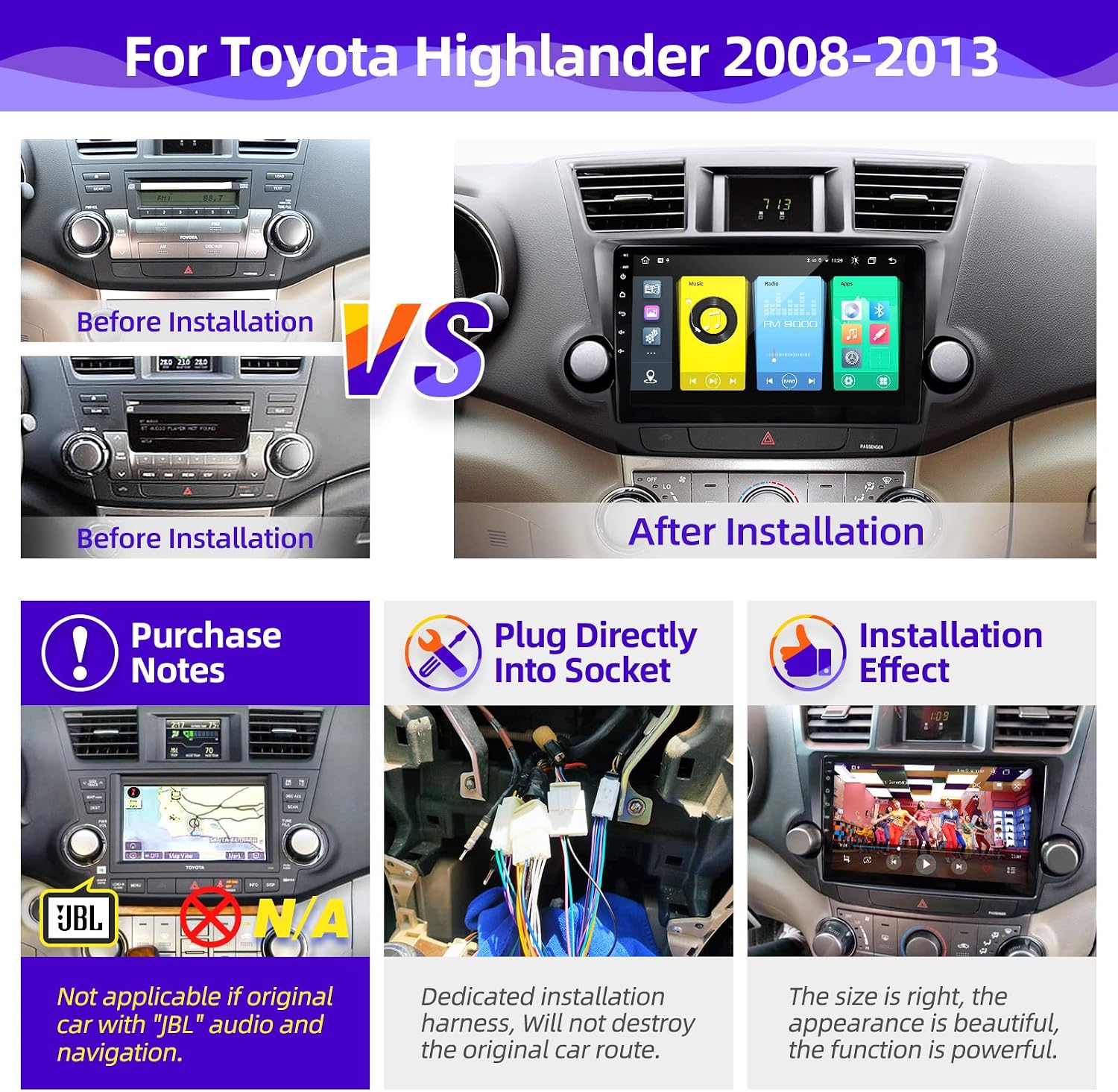
This unit is suitable for Toyota Highlander models from 2008 to 2013. It is not suitable for original car models equipped with factory navigation or JBL audio systems. Installation tools are provided for your convenience.
Installation Steps
- Carefully remove the original car radio player from the dashboard using the provided crowbar.
- Connect the harness plug to the corresponding socket on the back of the product.
- Connect the reversing image detection cable and video plug.
- Install the product into the center console, ensuring all connections are secure.

For a visual guide on the installation process, please refer to the video below:
Operating Instructions
The CGOGC Android Car Radio features a 10.2-inch IPS screen with 1280x720 resolution, powered by an Octa-Core 2.0GHz processor, 2GB RAM, and 32GB ROM, running on the Android 11 operating system. It offers a wide range of functions for an enhanced in-car experience.
Key Features and Functions
- Wireless CarPlay & Android Auto: Connect your smartphone wirelessly or via USB for seamless access to navigation, music, calls, and messages.
- GPS Navigation: Utilize built-in GPS with support for various map applications.
- FM/AM Radio: Enjoy your favorite radio stations with one-click search functionality.
- Bluetooth Connectivity: For hands-free calling and audio streaming.
- Multimedia Playback: Supports multiple audio and 1080p video formats via USB.
- 5G WiFi: For internet connectivity and app downloads from the Google Play Store.
- Backup Camera Support: Integrates with the included backup camera for enhanced safety.
- DSP Audio Processing: Built-in TDA7388 power amplifier chip with 6 sound settings (Smart Bass, Balance, Emperor, 30-EQ, Loudness, Filter) for customizable audio.
- Steering Wheel Control (SWC): Compatible with your vehicle's existing steering wheel controls for convenient operation.


Observe the product in action, demonstrating various features and user interface interactions:
Maintenance
To ensure optimal performance and longevity of your CGOGC Android Car Radio, follow these general maintenance guidelines:
- Regularly clean the touchscreen with a soft, lint-free cloth. Avoid abrasive cleaners.
- Keep the unit free from dust and debris.
- Ensure proper ventilation around the unit to prevent overheating.
- Avoid exposing the unit to extreme temperatures or direct sunlight for prolonged periods.
- Periodically check all cable connections for security.
Troubleshooting
If you encounter any issues with your CGOGC Android Car Radio, please refer to the following general advice. For specific problems, contact customer support.
- No Power: Check all power connections and ensure the vehicle's ignition is on. Verify fuses.
- No Sound: Check speaker connections, volume settings, and audio output mode. Ensure the correct audio source is selected.
- Touchscreen Unresponsive: Try restarting the unit. If the issue persists, a factory reset might be necessary (consult support before performing).
- CarPlay/Android Auto Connection Issues: Ensure your smartphone's Bluetooth and Wi-Fi are enabled. Try reconnecting or restarting both devices.
- GPS Signal Loss: Ensure the GPS antenna is properly installed and has a clear view of the sky.
Specifications
| Brand | CGOGC |
| Vehicle Service Type | Car |
| Screen Size | 10.2 Inches |
| Special Feature | Bluetooth, Touchscreen |
| Connectivity Technology | Bluetooth, USB, Wi-Fi |
| Map Type | North America |
| Included Components | Car radio, backup camera |
| Audio Output Mode | AUX, Stereo |
| Resolution | 720 x 1280 |
| Operating System | Android |
| Memory Storage Capacity | 32 GB |
| Touch Screen Type | Capacitive |
| Display Type | LCD |
| Human-Interface Input | Touchscreen |
| Compatible Devices | Android, iPhone |
| Supported Satellite Navigation System | GPS |
Warranty and Support
Warranty Information
This product comes with a 1-year warranty from the date of purchase. Please retain your proof of purchase for warranty claims.
Customer Support
For any questions, technical assistance, or warranty inquiries, please contact our customer support team:
- Email: CGOGCZCT@outlook.com
