
1. Product Overview
The Satisfyer Air Pump Vibrator 5+ Connect App is designed for targeted G-spot stimulation, featuring an innovative inflatable shaft and multiple vibration programs. It is controllable via an intuitive app, offering personalized experiences.

Image 1: Satisfyer Air Pump Vibrator 5+ Connect App. This image displays the overall design of the vibrator, highlighting its ergonomic shape and smooth, body-friendly silicone material.
Key Features:
- Inflatable Shaft: Diameter adjustable by up to 15 mm.
- 12 Vibration Programs: For varied stimulation.
- Satisfyer Connect App: Control via smartphone for custom patterns and remote play.
- Body-Friendly Silicone: Soft, hygienic, and easy to clean.
- Waterproof (IPX7): Suitable for use in water.
2. Setup
2.1 Initial Charging
- Before first use, fully charge the device.
- Connect the magnetic USB charging cable to the charging points on the device. Ensure the cable is correctly oriented for magnetic attachment.
- Plug the USB end into a compatible USB power adapter (not included) or computer port.
- The indicator light will show charging status (refer to device for specific light patterns).
2.2 First Use Preparation
- Clean the device thoroughly with warm water and a sexual wellness device cleaner before its first use.
- Ensure the device is completely dry before storage or charging.
2.3 App Connection
- Download the 'Satisfyer Connect' app from your device's app store (available for iOS and Android).
- Ensure your smartphone's Bluetooth is enabled.
- Turn on the Satisfyer Air Pump Vibrator 5+ by pressing and holding the power button for 3 seconds.
- Open the Satisfyer Connect app and follow the on-screen instructions to pair your device.

Image 2: Satisfyer Connect App features. This image illustrates the various functionalities available through the Satisfyer Connect App, including chat, vibration creator, remote control, and playlist stimulation.
3. Operating Instructions
3.1 Basic Operation
- Power On: Press and hold the power button (usually the bottom button) for approximately 3 seconds until the device activates.
- Power Off: Press and hold the power button for approximately 3 seconds until the device deactivates.

Image 3: Satisfyer Air Pump Vibrator 5+ control panel. This image shows the control buttons on the device, including the power button and buttons for adjusting inflation and vibration.
3.2 Inflation Function
- To Inflate: Continuously press the inflation button (refer to device for specific button icon). The shaft's diameter will increase gradually, up to 15 mm, within 12 seconds. Release the button to pause inflation at any desired diameter.
- To Deflate: Double-click the inflation button to release the air and return the shaft to its original diameter.
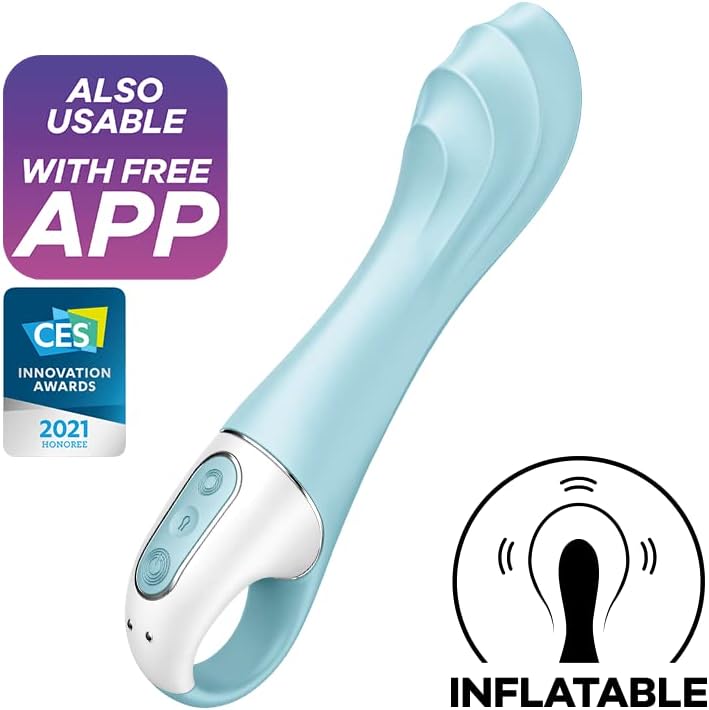
Image 4: Satisfyer Air Pump Vibrator 5+ highlighting the inflatable shaft. This image visually demonstrates the inflatable feature of the vibrator's shaft, which expands for intensified stimulation.
3.3 Vibration Programs
- Press the vibration button (refer to device for specific button icon) to cycle through the 12 distinct vibration programs.
- The vibration function operates independently of the inflation function.
3.4 App Control
- Once paired, use the Satisfyer Connect app to access additional features, including creating custom vibration patterns, syncing with music rhythms, and remote control options.
4. Maintenance
4.1 Cleaning
- Clean the device after each use with warm water and a mild sexual wellness device cleaner.
- The body-friendly silicone is non-porous and easy to sanitize.
- Avoid using harsh chemicals, alcohol-based cleaners, or oil-based lubricants, as these can damage the silicone material.
- Ensure the charging port is dry before connecting the charging cable.
4.2 Storage
- Store the device in a clean, dry place, away from direct sunlight and extreme temperatures.
- Keep it separate from other toys made of different materials to prevent material degradation.
5. Troubleshooting
- Device not turning on: Ensure the device is fully charged. If the issue persists, try a different USB power source.
- Inflation/Deflation not working: Check if the device is sufficiently charged. Ensure the inflation button is pressed continuously for inflation and double-clicked for deflation.
- App connection issues: Verify Bluetooth is enabled on your smartphone and the device is powered on. Restart both the app and the device if necessary. Ensure the app is updated to the latest version.
- Weak vibrations: Recharge the device. If vibrations remain weak after a full charge, contact customer support.
6. Specifications
| Model Number | 7102842 |
| Material | Body-friendly Silicone |
| Dimensions | 1.57 x 2.44 x 7.95 inches |
| Weight | 6.07 ounces |
| Battery | 1 Lithium Ion battery (included) |
| Waterproof Rating | IPX7 |
7. Warranty and Support
7.1 Warranty Information
The Satisfyer Air Pump Vibrator 5+ Connect App comes with a 15-year warranty, ensuring long-lasting product satisfaction. Please retain your proof of purchase for warranty claims.

Image 5: Visual representation of the 15-year warranty. This image highlights the extended warranty period offered for the product.
7.2 Customer Support
For further assistance, troubleshooting, or warranty inquiries, please visit the official Satisfyer website or contact their customer support directly. Refer to the product packaging for specific contact details.


