
1. Introduction
This manual provides detailed instructions for the installation, setup, operation, and maintenance of your Blindsmart Smart Curtains System Electric Curtain Track. This system is designed to automate your curtains, offering convenience through smart home integration and various control methods. Please read this manual thoroughly before installation and use to ensure proper functionality and safety.
The Blindsmart Smart Curtains System is compatible with Apple HomeKit, Alexa, and Google Home, allowing for seamless integration into your smart home ecosystem.
2. Product Overview
2.1 Components Included
The Blindsmart Smart Curtains System includes the following main components:
- Smart Curtain Track (3.1M / 122 inch)
- Curtain Motor
- Remote Control
- Installation Accessories (brackets, screws, etc.)
- DIY Track Segments: 1 x 0.5m, 2 x 0.2m, 1 x 0.1m (for customization)
Note: Curtain fabric is not included with this system.

Image 2.1: Overview of the Blindsmart Smart Curtains System components, including the track, motor, power cable, remote control, and a wall-mounted switch.
2.2 Key Features
- Material: Durable Aluminium construction.
- Capacity: Suitable for heavy-duty curtains up to 50 KGs.
- Connectivity: Built-in WiFi for direct connection to Apple HomeKit, Alexa, and Google Home (no additional adapter required).
- Control Methods: App control, voice control, remote control, and manual pull control.
- Automation: Schedule curtain opening and closing times via the mobile application.
- Installation: Versatile mounting options for both ceiling and wall installation.
- Quiet Operation: Designed for smooth and quiet curtain movement.
3. Safety Information
- Ensure the power supply is disconnected before performing any installation or maintenance.
- Do not attempt to modify the motor or track system. Unauthorized modifications may void the warranty and pose safety risks.
- Keep children and pets away from the curtain track during operation to prevent entanglement or injury.
- Verify that the mounting surface (wall or ceiling) can support the weight of the curtain track and your curtains.
- Use only the provided or recommended installation accessories.
- If any part is damaged, discontinue use and contact customer support.
4. Installation
4.1 Measuring Track Length
Accurate measurement is crucial for optimal performance. Determine the required track length based on your window or wall dimensions.
- Curtain covers the whole wall: Track Length = Wall Width - 4cm
- Curtain covers the window only: Track Length = Window Width + 60cm
- Curtain with U/L Shape Track: Track Length = Sum of all segments (e.g., AB + BC + CD)
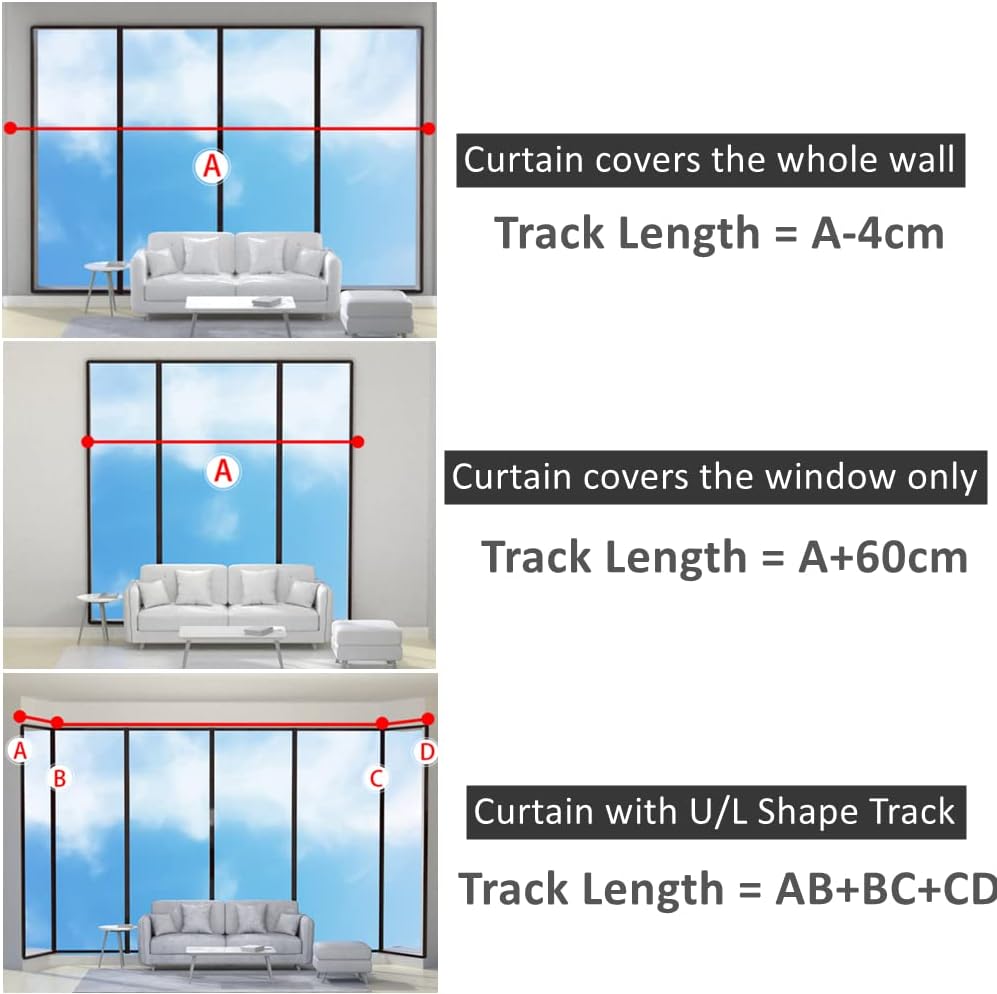
Image 4.1: Visual guide for calculating the appropriate track length for different curtain setups, including full wall coverage, window-only coverage, and U/L-shaped tracks.
4.2 Track Assembly and Configuration
The track system is modular and can be assembled to your desired length using the provided segments and spliced track connectors. Ensure all seams are securely connected for smooth operation.
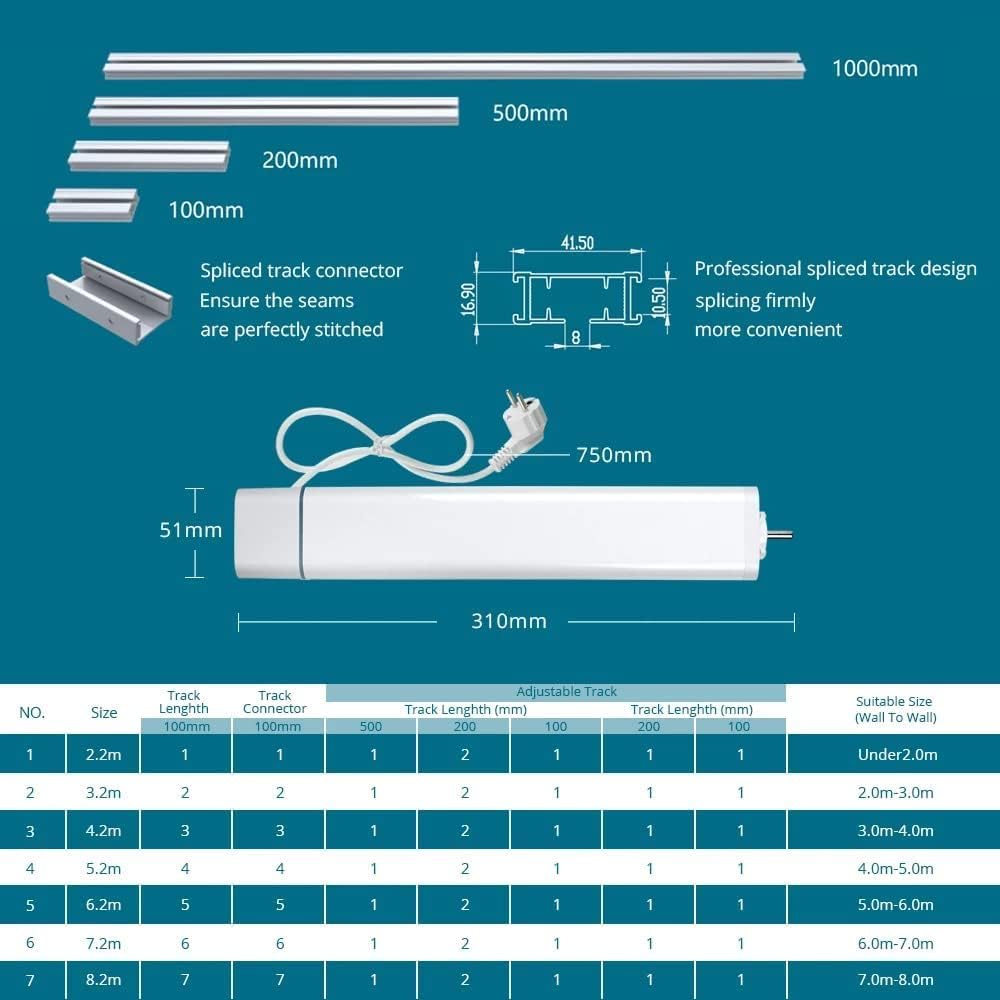
Image 4.2: Illustration of various track segments (100mm, 200mm, 500mm, 1000mm) and a spliced track connector, demonstrating how to assemble the track to the desired length. Also shows the motor dimensions and a table for track length vs. suitable size.
4.3 Mounting Options
The Smart Curtains System supports both ceiling and wall mounting. Choose the appropriate method for your installation.
- Ceiling Mounting: Attach the track directly to the ceiling using the provided brackets.
- Wall Mounting: Use wall brackets to secure the track to the wall.
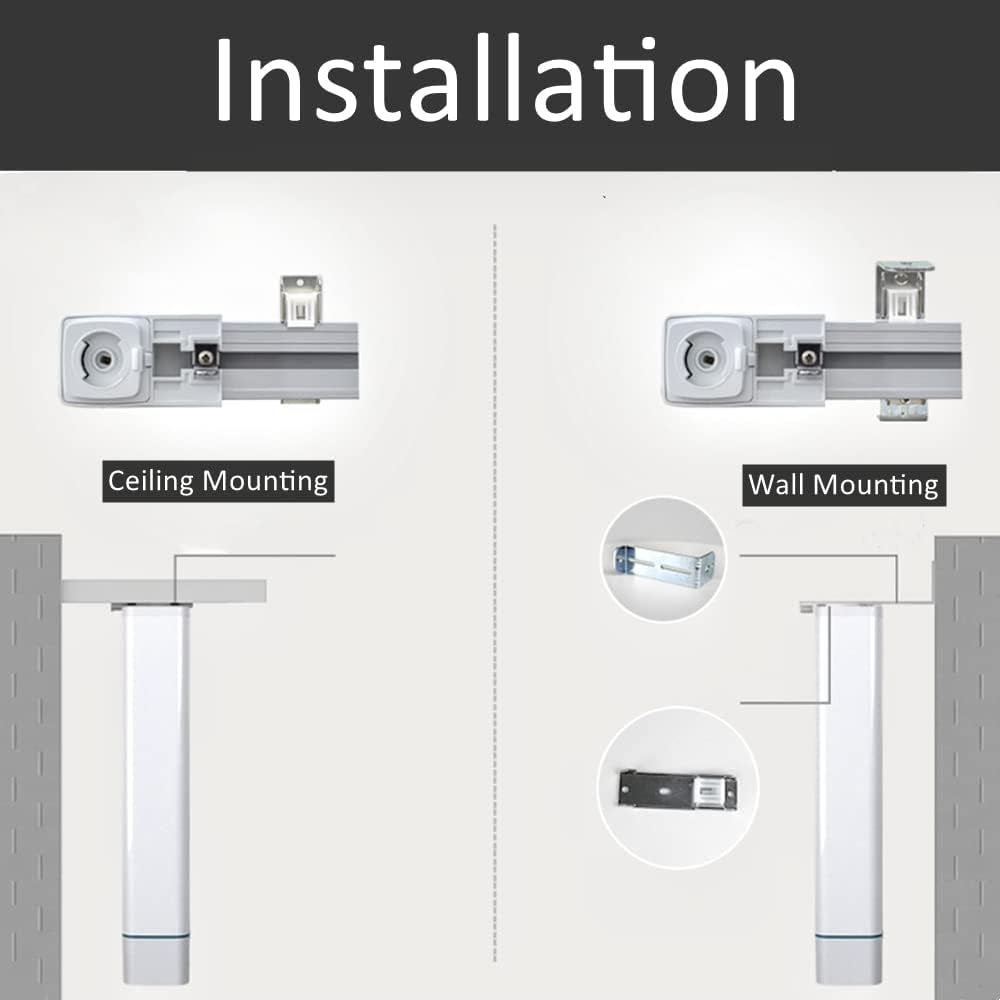
Image 4.3: Comparison of ceiling mounting and wall mounting methods for the curtain track, showing the motor's position relative to the mounting surface.
4.4 Installation Tips and Clearance
Ensure sufficient clearance for the motor and track movement, especially for curved or double track installations.
- Single Curtain Track - Straight: Reserve more than 10cm from the curtain box inner width for assembly space.
- Double Curtain Track - Straight: Reserve more than 18cm from the curtain box inner width for assembly space.
- Single Curtain Track - 90° Bend: Reserve more than 15cm from the curtain box inner width for assembly space.
- Double Curtain Track - 90° Bend: Reserve more than 23cm from the curtain box inner width for assembly space.
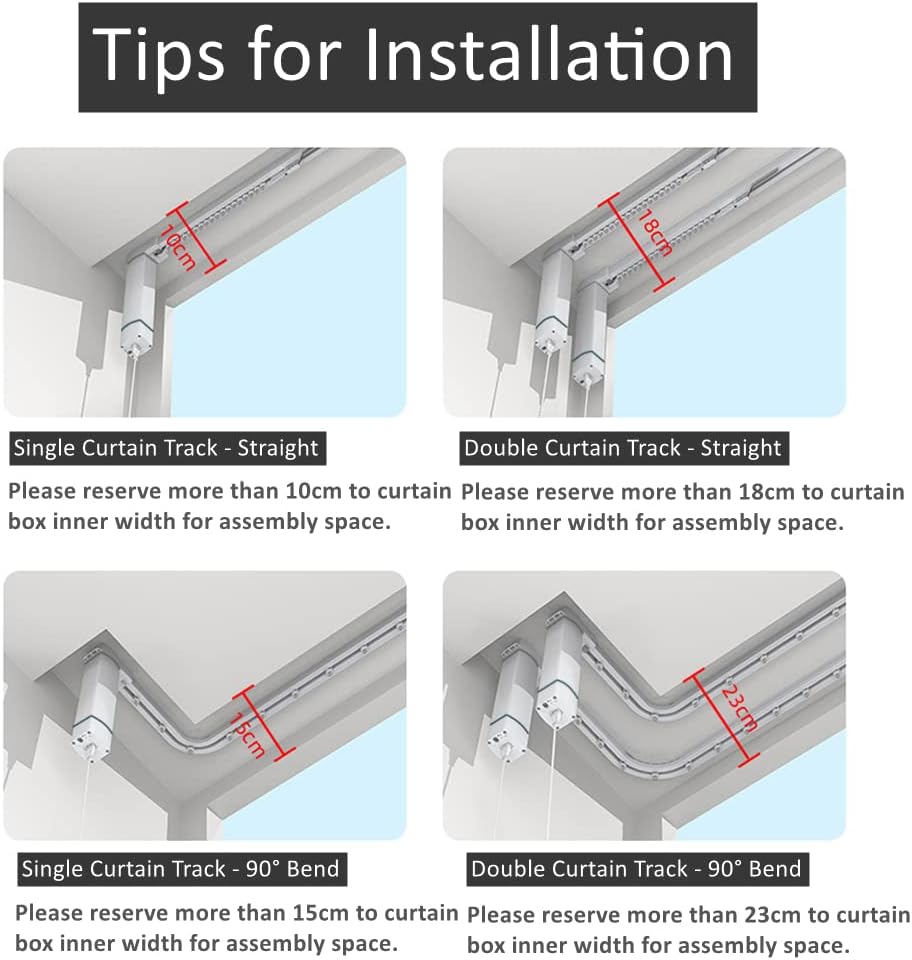
Image 4.4: Diagrams illustrating recommended clearance measurements for single and double curtain tracks, both straight and with 90-degree bends, to ensure adequate assembly and operational space.
5. Setup and Smart Home Integration
5.1 Apple HomeKit Integration
The Blindsmart Smart Curtains System supports Apple HomeKit directly via WiFi, requiring no additional gateway.
- Ensure your iPhone is connected to the same WiFi network as the curtain system.
- Open the Apple Home app on your iOS device.
- Scan the QR code provided on the product label or in the instruction manual to add the device to HomeKit.
- Follow the on-screen prompts in the Home app to complete the setup.
Note: For remote control of HomeKit-enabled accessories, a HomePod, Apple TV (tvOS 11.0 or later), or an iPad (iOS 12.0 or later) configured as a home hub is required.

Image 5.1: Steps for integrating the smart curtain system with Apple HomeKit, showing scanning a QR code to add the product and controlling curtains via the Apple Home app interface.
5.2 Alexa and Google Home Integration
The system is compatible with Alexa and Google Home devices for voice control.
- Ensure your curtain system is connected to your WiFi network.
- Open the Alexa app or Google Home app on your mobile device.
- Navigate to the 'Skills & Games' (Alexa) or 'Works with Google' (Google Home) section.
- Search for the 'Blindsmart' or 'Zemismart' skill/service and enable it.
- Link your Blindsmart account (if prompted) and discover devices.
- You can now use voice commands to control your curtains.
6. Operation
6.1 Control Methods
Your smart curtain system offers multiple ways to control your curtains:
- Mobile App Control: Use the Apple Home app or the dedicated Blindsmart/Zemismart app to open, close, or adjust your curtains from anywhere.
- Voice Control: Integrate with Alexa, Google Home, or Siri (via HomeKit) to control curtains with voice commands (e.g., "Alexa, open the curtains.").
- Remote Control: Use the included remote control for convenient operation within your home.
- Manual Control: When powered on, gently pull the curtain by approximately 10cm to trigger automatic opening or closing. If power is off, curtains can be operated manually by hand.
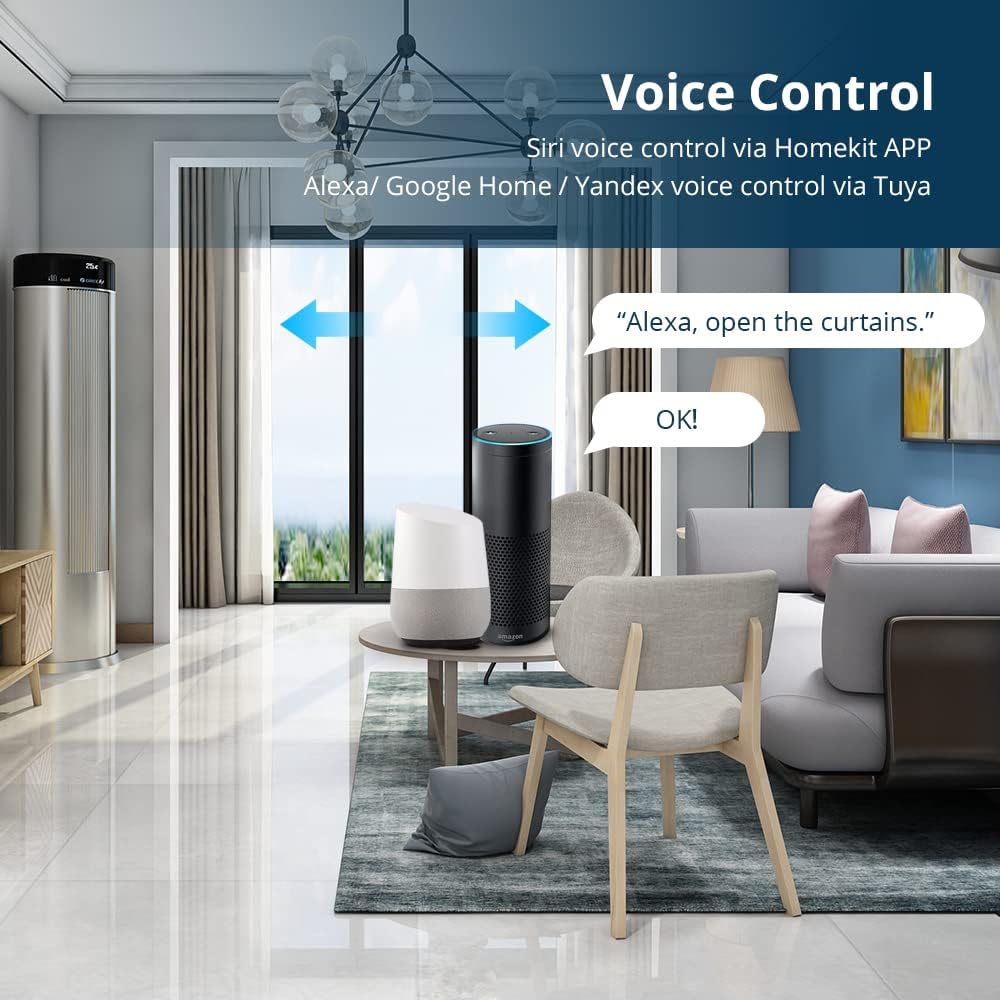
Image 6.1: An illustration of voice control functionality, showing a user commanding "Alexa, open the curtains" with an Amazon Echo and Google Home device present.
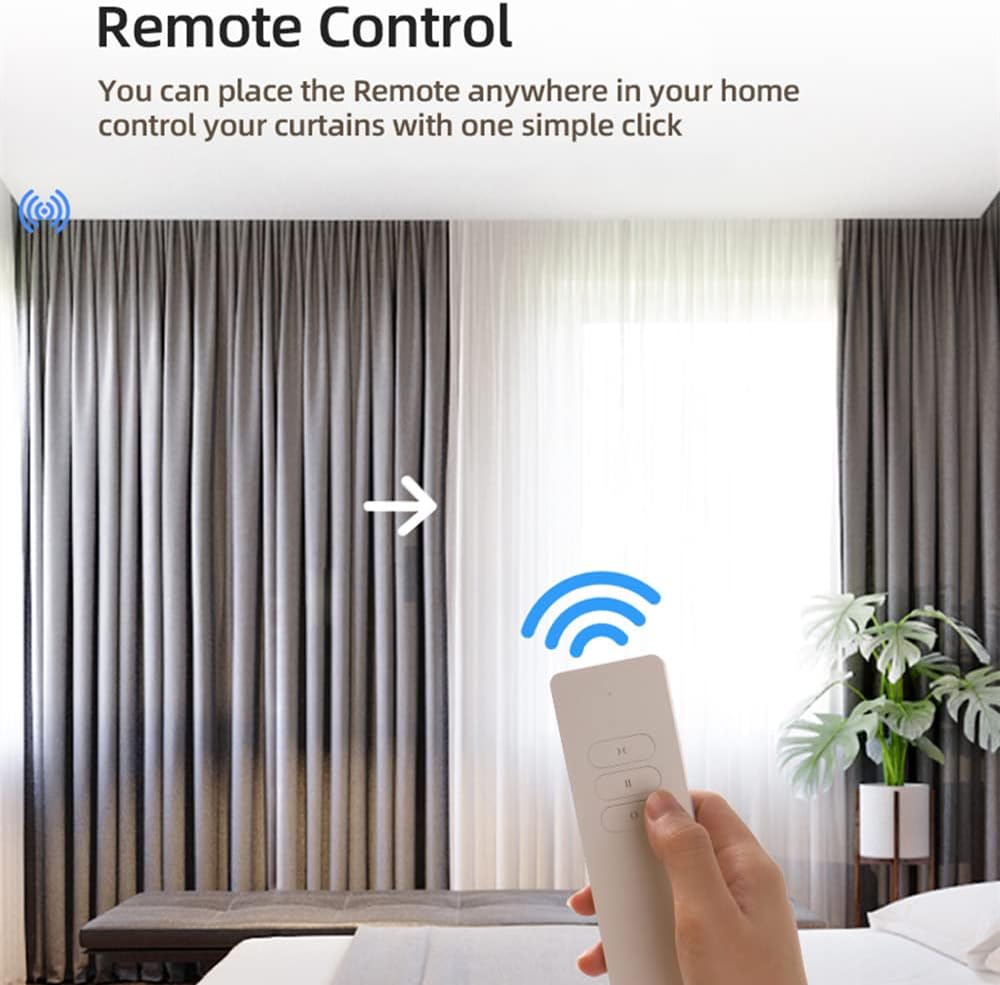
Image 6.2: A hand holding the remote control, demonstrating its use to operate the curtains with a single click.
6.2 Timing Settings
Set schedules via the mobile application to automatically open or close your curtains at specific times, such as morning or evening.

Image 6.3: A visual representation of setting timing schedules within a mobile app to automatically open curtains in the morning (e.g., 8:00 AM) and close them in the evening (e.g., 6:00 PM).
6.3 Curtain Opening Methods
The system supports various curtain opening configurations:
- Single Track One-Way Opening: Curtains open or close from one side to the other.
- Single Track Two-Way Opening: Curtains open or close from the center outwards.
- Dual Track Open in Both Directions: Two separate tracks allowing independent or synchronized movement of curtains in both directions.
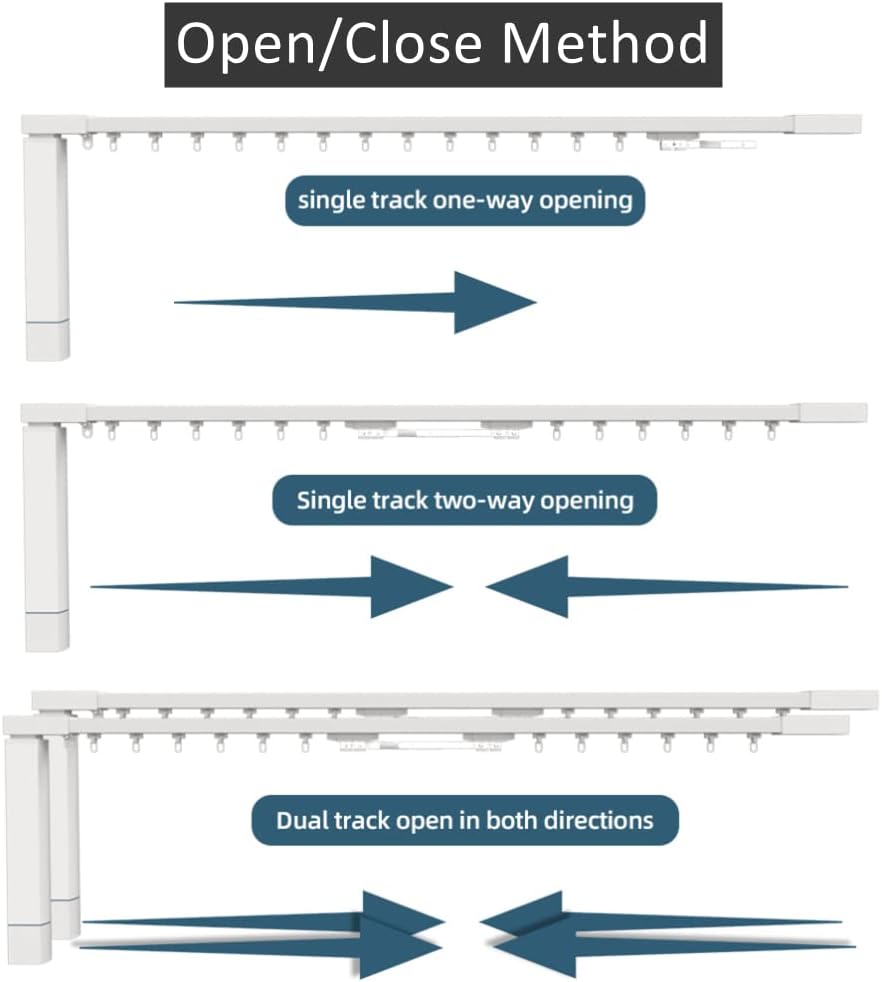
Image 6.4: Diagrams illustrating different curtain movement configurations: single track one-way opening, single track two-way opening, and dual track opening in both directions.
7. Maintenance
- Regularly inspect the track for any obstructions or debris that might hinder smooth operation.
- Wipe the track and motor housing with a soft, dry cloth to keep them clean. Do not use abrasive cleaners or solvents.
- Check all mounting brackets and screws periodically to ensure they remain secure.
- If the motor's operation becomes noisy or sluggish, ensure the track is clean and free of friction.
- Do not lubricate the track unless specifically instructed by customer support, as this may attract dust and cause issues.
8. Troubleshooting
If you encounter issues with your Blindsmart Smart Curtains System, refer to the following common problems and solutions:
| Problem | Possible Cause | Solution |
|---|---|---|
| Curtains do not move or stop unexpectedly. | Power issue, obstruction in track, motor malfunction, track not properly assembled. | Check power connection. Remove any obstructions. Ensure track segments are securely connected. Try unplugging and replugging the motor. |
| Remote control not working. | Battery low/dead, remote not paired, incorrect remote settings. | Replace remote batteries. Refer to pairing instructions (often involves a button sequence on the remote and motor). Verify remote settings. |
| Difficulty with smart home (HomeKit/Alexa/Google Home) integration. | Incorrect WiFi connection, app pairing issues, skill/service not enabled. | Ensure device and phone are on the same 2.4GHz WiFi network. Re-attempt pairing process. Verify the correct skill/service is enabled in your smart home app. |
| Motor is noisy or slow. | Track friction, heavy curtains exceeding weight limit, motor issue. | Clean the track. Ensure curtains do not exceed the 50 KG weight limit. If the issue persists, contact support. |
| Curtains only move a few inches then stop. | Obstruction, limit switch issue, motor calibration. | Check for subtle obstructions. Perform a factory reset and re-calibrate the motor's open/close limits if possible (refer to specific motor instructions or contact support). |
If you are unable to resolve an issue using the troubleshooting steps above, please contact Blindsmart customer support for further assistance.
9. Specifications
| Parameter | Value |
|---|---|
| Brand | Blindsmart |
| Model Number | BSKHL-BCM500DS-HK |
| Track Length (Current Product) | 3.1M (122 inch) |
| Material | Aluminium |
| Color | Silver |
| Mounting Type | Ceiling Mounted, Wall Mounted |
| Max Curtain Weight | 50 KGs |
| Motor Model | BCM500DS-TYW |
| Motor Drive Speed | 0.16m/s |
| Motor Current | 1.2A |
| Motor Voltage | 100-240 VAC |
| Motor Torque | 1.2Nm |
| Waterproof Rating | IPX-4 |
| Operating Temperature | -10~65°C |
| Operating Humidity | RH≤80% |
| Connectivity | Built-in WiFi, Apple HomeKit, Alexa, Google Home |
10. Warranty and Support
For warranty information, product support, or to report any issues not covered in this manual, please contact Blindsmart customer service. Keep your purchase receipt as proof of purchase for warranty claims.
You can typically find contact information on the Blindsmart official website or through your point of purchase.