
1. Introduction
This manual provides essential information for the safe and effective use of your XLAQ CS-F550 7.4V Lithium-Ion Battery. This battery is designed as a replacement for various Hitachi VM series camcorders, including models such as VM-E360E, VM-E530A, VM-E535LA, VM-E535LE, VM-E540, VM-E540E, VM-E555, VM-E565, VM-E565LE, VM-E635LA, VM-E635LE, and VM-E645. Please read this manual thoroughly before using the battery.
2. Safety Information
WARNING: Failure to follow these safety instructions may result in fire, electric shock, injury, or damage to the battery or device.
- Do not attempt to disassemble, open, or service the battery pack. Unauthorized modification can lead to hazards.
- Replace only with the battery pack designated for this product. Using incompatible batteries may cause damage or injury.
- Do not crush, puncture, short external contacts, or dispose of in fire or water. These actions can cause the battery to overheat, explode, or leak.
- Do not store above 60°C (140°F). High temperatures can degrade battery performance and pose a safety risk.
- Keep the battery away from children.
- If the battery leaks, avoid contact with skin and eyes. In case of contact, rinse immediately with plenty of water and seek medical advice.
- Dispose of used batteries according to local regulations. Do not dispose of with household waste.
3. Setup
3.1 Initial Charging
Before first use, fully charge the battery. Connect the battery to a compatible charger designed for Lithium-Ion batteries. The charging indicator on your device or charger will typically show when charging is complete.
3.2 Battery Installation
- Ensure your camcorder or device is powered off before installing or removing the battery.
- Locate the battery compartment on your device.
- Align the battery with the compartment, ensuring the contacts match.
- Gently slide the battery into place until it clicks or locks securely. Do not force the battery.
- Close the battery compartment cover, if applicable.

Figure 1: XLAQ CS-F550 Lithium-Ion Battery. This image shows the overall view of the battery, highlighting its compact design and connection terminals.
4. Operating Instructions
4.1 Charging the Battery
Use only chargers compatible with Lithium-Ion batteries and your specific camcorder model. Overcharging or using an incompatible charger can damage the battery and pose a safety risk. Refer to your camcorder's manual for specific charging instructions.
4.2 Battery Usage
The battery provides power to your compatible Hitachi VM series camcorder. Monitor the battery level indicator on your device to avoid unexpected power loss during operation. For optimal performance, avoid completely draining the battery frequently.
5. Maintenance
5.1 Storage
If storing the battery for an extended period, ensure it is charged to approximately 50-70% capacity. Store the battery in a cool, dry place, away from direct sunlight and extreme temperatures (below 0°C or above 30°C). Avoid storing fully charged or completely discharged batteries for long periods.
5.2 Cleaning
Clean the battery contacts periodically with a dry, soft cloth to ensure good connection with your device and charger. Do not use liquid cleaners or solvents.
5.3 Battery Life
Lithium-Ion batteries have a finite lifespan, typically measured in charge cycles. Battery capacity will gradually decrease over time and with use. This is normal and not a defect.
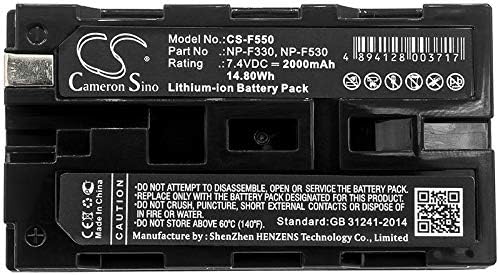
Figure 2: XLAQ CS-F550 Battery Label Details. This image provides a close-up view of the battery's label, showing model number, part numbers, rating, and safety warnings.
6. Troubleshooting
- Battery not charging: Ensure the charger is properly connected and functional. Check battery contacts for cleanliness. Verify the charger is compatible with Lithium-Ion batteries.
- Short operating time: The battery may not be fully charged, or its capacity may have degraded over time due to normal wear. Ensure proper charging cycles.
- Battery not recognized by device: Ensure the battery is correctly installed and securely seated in the compartment. Clean the battery and device contacts.
- If issues persist after attempting these steps, please contact customer support.
7. Specifications
| Feature | Detail |
|---|---|
| Model Number | CS-F550 |
| Part Numbers | NP-F330, NP-F530 |
| Battery Type | Lithium-Ion |
| Voltage | 7.4VDC |
| Capacity | 2000mAh |
| Energy | 14.80Wh |
| Dimensions | 70.8 x 38.5 x 21mm |
| Weight | 168.0g |
| Standard | GB 31241-2014 |
| Manufacturer | Shenzhen HEINZENS Technology Co., Limited |
8. Warranty and Support
Your XLAQ CS-F550 battery comes with a 12-month warranty and a 14-day money-back guarantee. We are committed to your satisfaction.
8.1 Customer Support
For any questions, concerns, or support needs, please feel free to contact us. We offer 24/7 email support to assist you.
You may also find additional information and support on the manufacturer's website: www.cameronsino.com