
Yoidesu Yoidesui5g61bveta5663
Yoidesu Karaoke Machine SD-306 User Manual
Portable Bluetooth Speakers System with 2 Microphones
1. Introduction
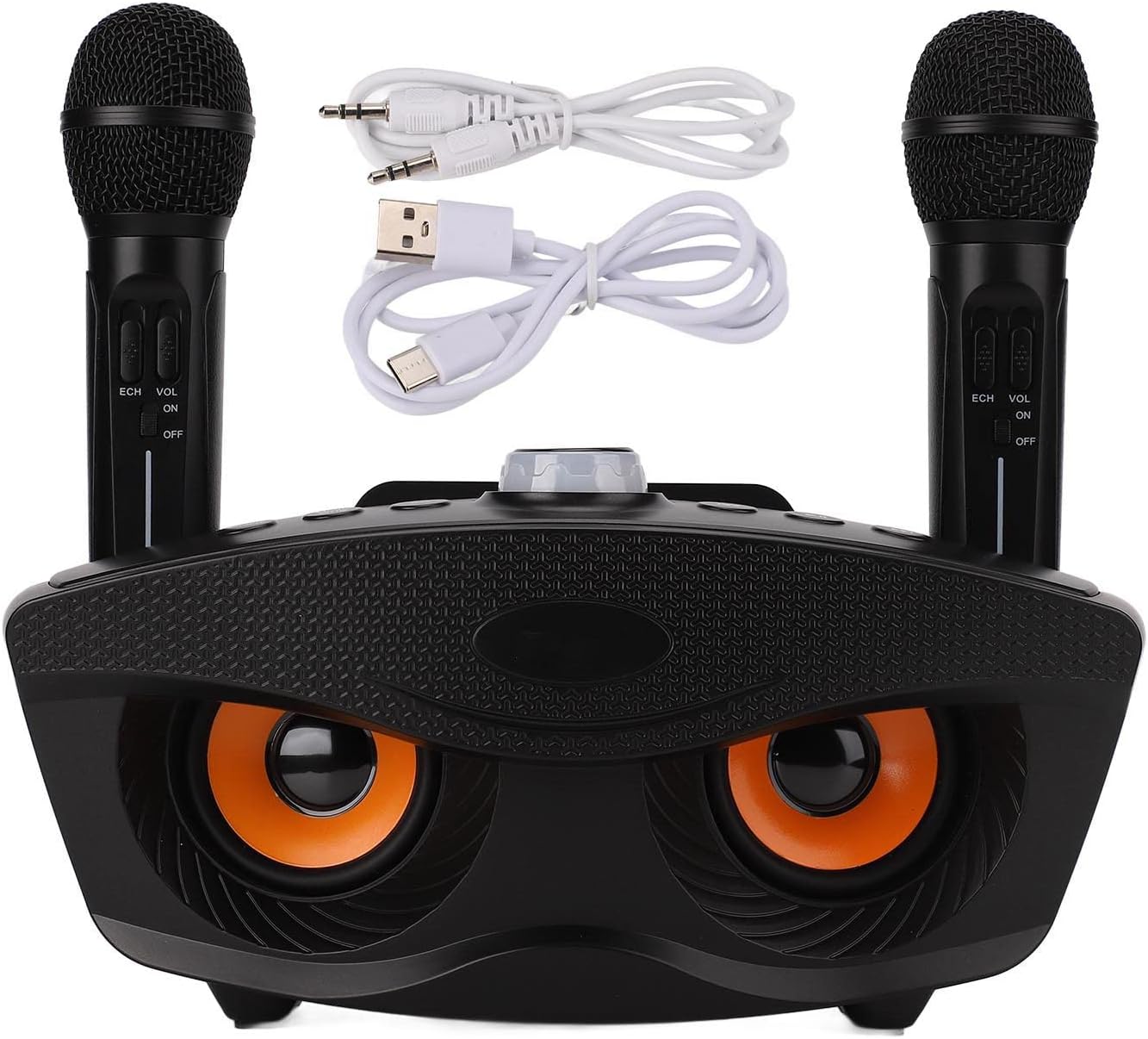
Thank you for purchasing the Yoidesu Karaoke Machine SD-306. This portable Bluetooth speaker system is designed to provide an enjoyable karaoke experience with its integrated speaker and two wireless microphones. It features a high-capacity built-in battery for extended use and supports various input methods including Bluetooth, AUX, memory card, and U Disk. This manual provides detailed instructions for setup, operation, and maintenance to ensure optimal performance and longevity of your device.
2. Package Contents
Please verify that all items listed below are included in your package:
- 1 x Karaoke Machine
- 2 x Microphone
- 1 x Charging Cable (Micro USB)
- 1 x Sound Cable (AUX)
- 1 x User Manual
3. Setup
Follow these steps to set up your Yoidesu Karaoke Machine:
- Charging the Device: Before first use, fully charge the karaoke machine and both microphones using the provided Micro USB charging cable. Connect the cable to a standard USB power adapter (not included). The charging indicator will typically show charging status and turn off when fully charged.
- Powering On: Locate the power button on the karaoke machine and the microphones. Press and hold to turn them on.
- Microphone Pairing: The microphones are designed to automatically pair with the karaoke machine upon power-on. If pairing does not occur automatically, refer to the troubleshooting section.
- Positioning: Place the karaoke machine on a stable, flat surface. The top of the machine is designed to safely hold your phone or tablet, allowing for easy viewing of lyrics or content.

4. Operating Instructions
The Yoidesu Karaoke Machine offers multiple ways to play your favorite music:
4.1. Bluetooth Connection
- Ensure the karaoke machine is powered on and in Bluetooth mode (indicated by a specific light or voice prompt).
- On your smartphone, tablet, or other Bluetooth-enabled device, go to the Bluetooth settings.
- Search for available devices and select "Yoidesu SD-306" (or similar name).
- Once connected, you can play music from your device through the karaoke machine. The Bluetooth connection range is approximately 10 meters (32.8 feet).

4.2. AUX Input
Use the provided sound cable to connect external devices:
- Connect one end of the AUX cable to the AUX input port on the karaoke machine.
- Connect the other end to the audio output jack of your external device (e.g., TV, computer, projector, smartphone).
- The machine will automatically switch to AUX mode or you may need to select it using the mode button.

4.3. Memory Card and U Disk Playback
Insert a memory card (TF card) or a U Disk (USB flash drive) with your favorite music files into the designated slots on the karaoke machine. The machine will automatically detect and play the music.
4.4. Microphone Controls
- Volume Control: Each microphone has its own volume control (VOL) to adjust your singing volume.
- Echo Effect: Adjust the echo effect (ECH) on the microphone for a more professional karaoke sound.
- Power Switch: Use the ON/OFF switch to power the microphone on or off.

5. Maintenance
To ensure the longevity and optimal performance of your Yoidesu Karaoke Machine, follow these maintenance guidelines:
- Cleaning: Use a soft, dry cloth to clean the exterior of the machine and microphones. Do not use abrasive cleaners or solvents.
- Storage: When not in use, store the device in a cool, dry place away from direct sunlight and extreme temperatures.
- Battery Care: To preserve battery life, avoid fully discharging the device frequently. Charge it regularly, even if not in constant use.
- Handling: Handle the microphones and main unit with care to prevent drops or impacts that could damage internal components.
6. Troubleshooting
If you encounter any issues with your Yoidesu Karaoke Machine, please refer to the following common solutions:
| Problem | Possible Cause | Solution |
|---|---|---|
| No power | Battery is low or dead. | Charge the karaoke machine and microphones fully. |
| No sound from speaker | Volume too low; incorrect input mode; device not connected. | Increase volume on both the machine and connected device. Ensure correct input mode (Bluetooth, AUX, etc.) is selected. Reconnect the device. |
| Microphones not working | Microphones are off; battery low; not paired. | Ensure microphones are powered on. Charge microphones. Power cycle both the machine and microphones to re-initiate pairing. |
| Bluetooth connection unstable | Device too far; interference. | Move the connected device closer to the karaoke machine. Avoid obstacles and other strong wireless signals. |
7. Specifications
Detailed technical specifications for the Yoidesu Karaoke Machine SD-306:
- Model: Yoidesui5g61bveta5663 (SD-306)
- Bluetooth Version: V4.2
- Driver Unit: 3INx2
- Frequency Range: 100Hz-18KHz
- SNR: ≥80dB
- Output Power: 10W and 10W (Total 20W)
- Microphone Distance: 10m/32.8ft
- Charging Interface: Micro USB
- Functions: Bluetooth, Memory Card, Aux, U Disk, K Song Mode
- Speaker Battery Type: 1800mAh Lithium Ion Battery (Built-in)
- Microphone Battery Type: 1500mAh Lithium Ion Battery (Built-in)
- Power Source: Battery Powered
- Connector Type: Aux, USB
- Material: ABS
- Number of Channels: 2
- Package Dimensions: 12.2 x 7.87 x 6.3 inches
- Item Weight: 3.58 pounds
- Country of Origin: China
- Included Components: Microphones
- Compatible Devices: Tablet, Amplifier, Smartphone
- Mounting Type: Tabletop
8. Warranty and Support
Yoidesu products are manufactured with high-quality standards. For any warranty claims or technical support, please contact the seller or manufacturer directly through your purchase platform. Please retain your proof of purchase for warranty validation.
For additional assistance, you may visit the official Yoidesu Store on Amazon: Yoidesu Store
Ask a question about this manual
Ask about setup, troubleshooting, compatibility, parts, safety, or missing instructions. Manuals+ will review the question and use this page’s manual context to help answer it.