
Swann 856804
Swann Home DVR Security Camera System User Manual
Model: 856804
Brand: Swann
Introduction
This manual provides comprehensive instructions for the installation, operation, and maintenance of your Swann Home DVR Security Camera System. This 4K UHD system is designed to provide reliable surveillance for your home or business, featuring an 8-channel DVR with a 1TB hard drive and four 4K cameras equipped with active deterrence features like spotlights and color night vision.
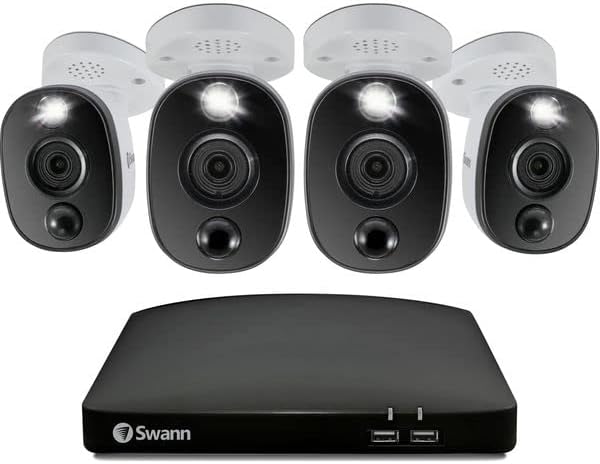
Image: The Swann Home DVR Security Camera System, showing the central DVR unit and four 4K security cameras.
Package Contents
Please verify that all items listed below are included in your package:
- 1 x 8-Channel 4K UHD DVR with 1TB HDD
- 4 x 4K UHD Wired Security Cameras with Active Deterrence
- 4 x BNC Cables for Camera Connection
- 1 x DVR Power Adapter
- 4 x Camera Power Adapters
- 1 x HDMI Cable
- 1 x Ethernet Cable
- 1 x USB Mouse
- Mounting Screws and Plugs
- Operating Instructions
- The system includes 4 Lithium Ion batteries.
Setup Guide
1. DVR Connection
- Connect the DVR to a Monitor: Use the provided HDMI cable to connect the DVR's HDMI output to a monitor or TV.
- Connect the USB Mouse: Plug the USB mouse into one of the USB ports on the DVR.
- Connect to Network (Optional but Recommended): Connect an Ethernet cable from the DVR's LAN port to your router for remote viewing capabilities.
- Power On the DVR: Connect the DVR power adapter to the DVR and then to a power outlet. The DVR will power on automatically.
2. Camera Installation
- Choose Camera Locations: Select strategic locations for your cameras, ensuring they cover desired areas and are within reach of power outlets and BNC cable lengths. The cameras are designed for both indoor and outdoor use and are weatherproof.
- Mount the Cameras: Use the provided mounting screws and plugs to securely attach each camera to a wall or ceiling.
- Connect Cameras to DVR: Connect one end of a BNC cable to the camera's BNC port and the other end to an available BNC input on the DVR.
- Power On Cameras: Connect each camera's power adapter to the camera and then to a power outlet.
3. Initial Setup Wizard
Upon first power-up, the DVR will guide you through an initial setup wizard. Follow the on-screen prompts to:
- Set up a password for the DVR.
- Configure date and time settings.
- Adjust video output settings.
- Format the hard drive (if prompted).
Operating Instructions
Live View and Recording
Once the system is set up, you will see the live camera feeds on your connected monitor. The DVR is configured for continuous 24/7 recording by default. You can also configure it for Swann True Detect heat and motion-triggered event-only recordings to optimize storage.
Mobile App Access
To view your cameras remotely and receive alerts, download the Swann Security app on your smartphone or tablet. The app allows for multi-camera live streaming and playback of recorded footage.

Image: A smartphone screen showing the Swann Security app with multiple live camera views, demonstrating remote monitoring capabilities.
Active Deterrence Features
The 4K cameras feature active deterrence with built-in spotlights. These spotlights can be configured to activate upon motion detection, deterring potential intruders. The cameras also provide Dusk-to-Dawn color night vision up to 32ft and black and white night vision up to 130ft.
Voice Assistant Integration
The system supports voice assistant integration, allowing you to "speak to see" your camera feeds on compatible smart displays.
Maintenance
- Clean Camera Lenses: Periodically clean camera lenses with a soft, damp cloth to ensure clear image quality. Avoid abrasive cleaners.
- Check Cable Connections: Ensure all BNC and power cable connections are secure and free from damage, especially for outdoor cameras.
- Firmware Updates: Regularly check for and install firmware updates for your DVR and cameras through the Swann Security app or DVR interface to ensure optimal performance and security.
- Hard Drive Health: The 1TB HDD is designed for continuous recording. Monitor its health through the DVR settings and ensure sufficient storage space.
Troubleshooting
| Problem | Possible Cause / Solution |
|---|---|
| No video signal from camera |
|
| DVR not powering on |
|
| Cannot access DVR remotely via app |
|
| Poor image quality |
|
Specifications
| Feature | Detail |
|---|---|
| Model Number | 856804 |
| Part Number | SWDVK-856804WL-EU |
| Video Capture Resolution | 4K UHD (2160p) |
| Number of Channels | 8 |
| Memory Storage Capacity | 1 TB HDD (pre-installed) |
| Connectivity Technology | Ethernet (for DVR), Wired BNC (for cameras) |
| Power Source | Corded Electric |
| Product Dimensions (DVR) | 23 x 30 x 6.4 cm |
| Item Weight | 5.03 kg (total package) |
| Batteries | 4 Lithium Ion batteries (included) |
| Night Vision | Color Night Vision (up to 32ft), Black & White (up to 130ft) |
| Active Deterrence | Spotlights |
Warranty and Support
Swann provides a 2-year warranty against factory defects for this product. Additionally, comprehensive technical support is available to assist you with any challenges you may experience with your security system.
For technical assistance or warranty claims, please visit the official Swann support website or contact their customer service. You can find more information and contact details on the Swann Store on Amazon or the official Swann website.

Image: Various awards and recognitions received by Swann, highlighting their commitment to security innovation and quality.
Related documents856804


Ask a question about this manual
Ask about setup, troubleshooting, compatibility, parts, safety, or missing instructions. Manuals+ will review the question and use this page’s manual context to help answer it.