
1. Safety Information
Always observe basic safety precautions when using electrical tools to reduce the risk of fire, electric shock, and personal injury. Read all instructions before operating this tool.
General Safety Warnings:
- Work Area Safety: Keep your work area clean and well-lit. Cluttered or dark areas invite accidents. Do not operate power tools in explosive atmospheres, such as in the presence of flammable liquids, gases, or dust.
- Electrical Safety: Power tool plugs must match the outlet. Never modify the plug in any way. Do not abuse the cord. Never use the cord for carrying, pulling, or unplugging the power tool. Keep cord away from heat, oil, sharp edges, or moving parts.
- Personal Safety: Always wear eye protection. Use dust masks, non-skid safety shoes, hard hats, or hearing protection for appropriate conditions. Dress properly. Do not wear loose clothing or jewelry. Keep your hair, clothing, and gloves away from moving parts.
- Tool Use and Care: Do not force the power tool. Use the correct power tool for your application. Disconnect the plug from the power source before making any adjustments, changing accessories, or storing power tools.
- Dust Collection: This sander is equipped with a dust collection system. Ensure the dust bag is properly attached and emptied regularly to maintain efficient dust extraction and a cleaner work environment.
2. Product Overview
The INGCO RS3208 Rotary Sander is a powerful and versatile tool designed for various sanding applications. It features a 320W motor, a 125mm sanding pad, and a self-vacuum function for efficient dust collection.
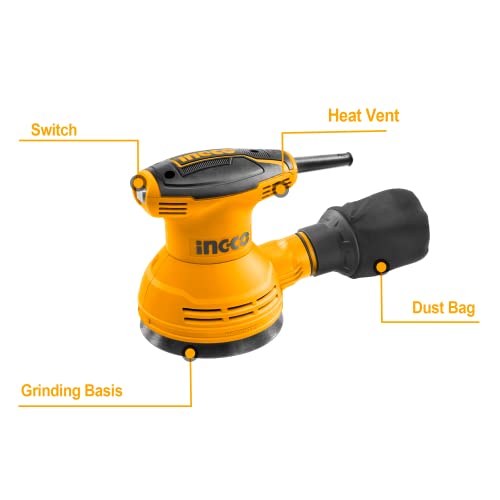
Figure 2.1: Components of the INGCO RS3208 Rotary Sander. Key parts include the On/Off Switch, Motor Head, Dust Bag, and Grinding Base.
Key Features:
- 320W high-performance motor for smooth operation.
- 12,000 RPM maximum rotational speed for efficient material removal.
- 125mm sanding pad suitable for various surfaces.
- Integrated dust collection system with an easy-to-clean container.
- Compact size and ergonomic design for access to tight spaces and enhanced user control.
- Low vibration design with a soft rubber grip for reduced hand fatigue.
- Dust-sealed On/Off switch for durability and ease of use.
3. Specifications
| Feature | Specification |
|---|---|
| Model Number | RS3208 |
| Power Input | 320W |
| Disc Diameter | 125 mm |
| Maximum Rotational Speed | 12000 RPM |
| Power Source | Corded Electric |
| Voltage | 28 Volts (Note: This may refer to internal motor voltage; actual operating voltage depends on region and power supply) |
| Amperage Capacity | 50 Amps (AC Adapter Current) |
| Item Weight | 1990 Grams |
| Included Components | 5pcs sand papers (AKRS125051) |
4. What's in the Box
Upon unpacking your INGCO RS3208 Rotary Sander, ensure all items are present and undamaged:
- 1 x INGCO RS3208 Rotary Sander Unit
- 1 x Dust Bag
- 5 x Sand Papers (AKRS125051)
- 1 x User Manual (this document)
5. Setup
Before operating the sander, proper setup is crucial for safety and performance.
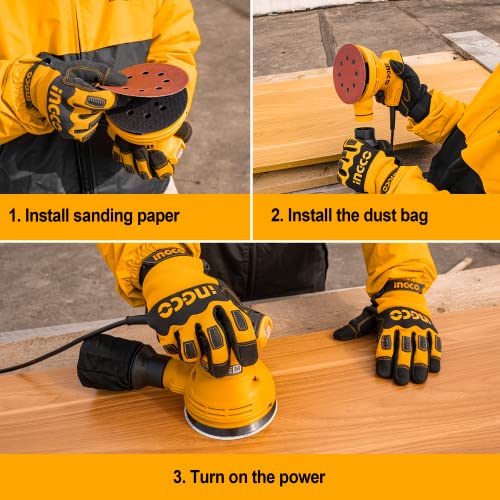
Figure 5.1: Visual guide for installing sanding paper and dust bag.
5.1. Attaching Sanding Paper
- Ensure the sander is unplugged from the power source.
- Align the holes on the sanding paper with the holes on the sanding pad.
- Press the sanding paper firmly onto the hook-and-loop sanding pad until it is securely attached.
5.2. Attaching the Dust Bag
- Locate the dust exhaust port on the sander.
- Slide the dust bag onto the exhaust port, ensuring a snug fit to prevent dust leakage.
- Verify the dust bag is securely attached before operation.
6. Operation
Follow these steps for safe and effective operation of your INGCO Rotary Sander.

Figure 6.1: Proper grip and ergonomic design for comfortable operation.
6.1. Powering On/Off
- Ensure the sander is properly set up with sanding paper and dust bag.
- Plug the power cord into a suitable electrical outlet.
- To turn on the sander, press the dust-sealed On/Off switch to the 'On' position.
- To turn off the sander, press the switch to the 'Off' position.
6.2. Sanding Techniques
- Hold the sander firmly with both hands, ensuring a secure grip.
- Place the sanding pad flat on the workpiece before turning the tool on.
- Apply light, even pressure. Do not press too hard, as this can reduce sanding efficiency and damage the workpiece or tool.
- Move the sander in overlapping circular or elliptical patterns for best results and to avoid swirl marks.
- For optimal dust collection, ensure the dust bag is properly attached and empty it regularly.
- When finished, lift the sander from the workpiece before turning it off.
7. Maintenance
Regular maintenance ensures the longevity and optimal performance of your INGCO Rotary Sander.
7.1. Cleaning the Dust Bag
- Unplug the sander from the power source.
- Remove the dust bag from the exhaust port.
- Empty the collected dust into a waste receptacle. Tap the bag gently to dislodge any trapped dust.
- Reattach the dust bag securely before next use.
7.2. General Cleaning
- Always unplug the tool before cleaning.
- Use a soft brush or compressed air to clean dust and debris from the ventilation openings.
- Wipe the exterior of the tool with a damp cloth. Do not use harsh chemicals or abrasive cleaners.
- Inspect the power cord for any damage. If damaged, have it replaced by a qualified technician.
8. Troubleshooting
If you encounter issues with your INGCO Rotary Sander, refer to the following common problems and solutions:
Common Issues:
- Sander does not start:
- Check if the power cord is securely plugged into a working outlet.
- Ensure the On/Off switch is in the 'On' position.
- Check the circuit breaker or fuse for the outlet.
- Poor sanding performance:
- Replace worn-out sanding paper.
- Ensure the correct grit of sanding paper is used for the task.
- Apply light, even pressure; excessive pressure can hinder performance.
- Excessive dust:
- Ensure the dust bag is securely attached and not full. Empty if necessary.
- Check if the sanding paper holes align with the sanding pad holes for proper dust extraction.
- Excessive vibration or noise:
- Ensure the sanding paper is properly centered and securely attached.
- Inspect the sanding pad for damage or wear.
- If the issue persists, discontinue use and contact customer support.
9. Warranty & Support
INGCO products are manufactured to high-quality standards. For specific warranty terms and conditions, please refer to the warranty card included with your product or visit the official INGCO website. Keep your purchase receipt as proof of purchase.
For technical assistance, spare parts, or service inquiries, please contact INGCO customer support through their official channels. Provide your product model number (RS3208) and purchase details when seeking support.

