
1. Product Overview
The Zealtron 5.5mm Dual Camera Endoscope is an industrial inspection tool designed for examining hard-to-reach areas. It features a dual-lens system, a 4.5-inch IPS display, adjustable LED illumination, and a waterproof probe.
Key Features:
- Ultra-thin 5.5mm Probe: Allows access to narrow spaces.
- Dual Lenses: Front and side cameras for comprehensive viewing.
- 4.5-inch IPS Screen: Provides clear, high-resolution images and video.
- 6+1 Adjustable LED Lights: Ensures clear visibility in dark environments.
- IP68 Waterproof: Probe can operate underwater up to 1 meter for over an hour.
- 3800mAh Battery: Offers 3-4 hours of continuous operation.
- 32GB TF Card Included: For storing captured images and videos.
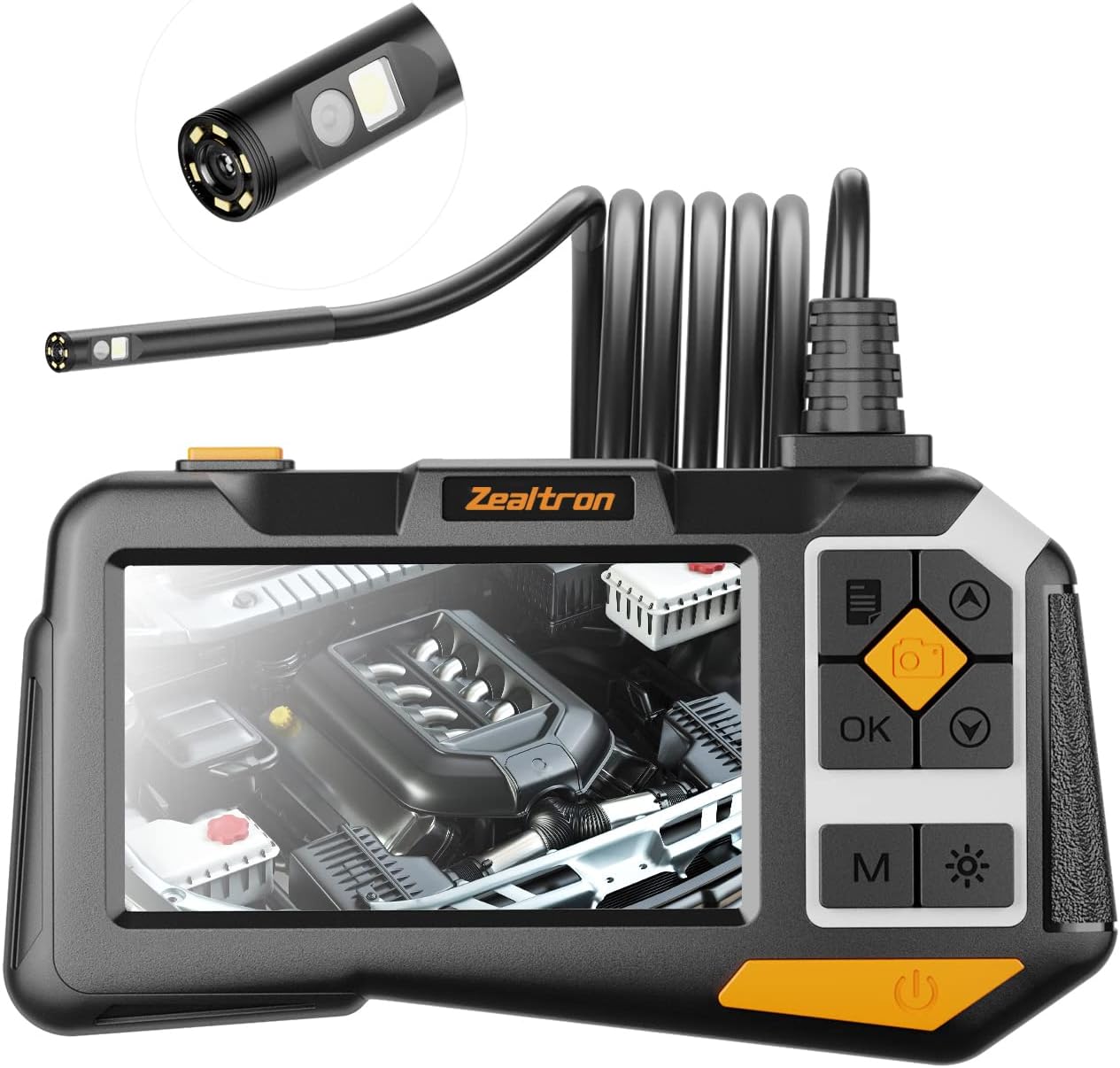
Image 1.1: The Zealtron Dual Camera Endoscope, showing the main unit with IPS screen and the flexible probe with dual cameras.
2. Safety Information
- Do not use the device in environments with flammable or explosive gases.
- Keep the device away from strong electromagnetic fields.
- Ensure the probe is clean and dry before and after use, especially when inspecting liquids.
- Do not attempt to disassemble or modify the device. Refer all servicing to qualified personnel.
- Store the device in a cool, dry place, away from direct sunlight and extreme temperatures.
3. Package Contents
Verify that all items are present in the package:
- 1 x 4.5-inch IPS Endoscope Unit
- 1 x 5-meter Semi-rigid Camera Cable
- 1 x Micro USB Charging Cable
- 1 x 32GB TF Card
- 1 x Accessory Kit (includes protective cap, hook, magnet)
- 1 x User Manual

Image 3.1: Contents of the product package, including the endoscope unit, cable, accessories, and manual.
4. Setup
- Charge the Device: Connect the endoscope unit to a power source using the provided Micro USB cable. The charging indicator will show the charging status. Ensure the device is fully charged before first use.
- Insert TF Card: Locate the TF card slot on the side of the main unit. Insert the 32GB TF card until it clicks into place. This card is essential for saving photos and videos.
- Attach Camera Probe: Connect the semi-rigid camera cable to the designated port on the main unit. Ensure a secure connection.
- Power On: Press and hold the power button (usually marked with a power symbol) for a few seconds until the screen illuminates. The device is ready for immediate use without requiring smartphone connection or driver software.
5. Operating Instructions
5.1 Power On/Off
- Power On: Press and hold the power button for approximately 3 seconds.
- Power Off: Press and hold the power button for approximately 3 seconds until the screen turns off.
5.2 Camera Modes (Front, Side, Dual View)
The endoscope features dual lenses, allowing for versatile inspection. Use the 'M' button to cycle through camera views:
- Front Camera: Displays the view directly ahead of the probe.
- Side Camera: Displays the view from the side of the probe.
- Dual View: Displays both front and side views simultaneously on a split screen.

Image 5.1: Diagram illustrating the dual lens system, showing both front and side cameras on the probe tip.

Image 5.2: The 4.5-inch IPS screen displaying options for Front Camera, Side Camera, and Dual Camera views.
5.3 Adjusting LED Brightness
The probe is equipped with 6+1 adjustable LED lights. Press the light adjustment button (often marked with a sun or light bulb icon) to cycle through different brightness levels. This helps illuminate dark inspection areas.

Image 5.3: Close-up of the IP68 waterproof probe tip, highlighting the 6+1 adjustable LED lights for illumination.
5.4 Capturing Images and Videos
- Take a Photo: Press the 'OK' button (often marked with a camera icon) once to capture an image. The image will be saved to the inserted TF card.
- Record Video: Press and hold the 'OK' button to start video recording. Press and hold again to stop recording. Videos are also saved to the TF card.
5.5 Accessing Stored Media
Use the navigation buttons (up/down arrows) to browse through the menu options. Select the 'Gallery' or 'Playback' option to view saved photos and videos. You can also connect the device to a computer via the Micro USB cable to transfer files, or remove the TF card and insert it into a card reader.
6. Maintenance
- Cleaning the Probe: After each use, especially in dirty or wet environments, gently wipe the camera probe with a soft, damp cloth. For stubborn dirt, use a mild cleaning solution and ensure the probe is completely dry before storage.
- Screen Care: Clean the IPS screen with a soft, lint-free cloth. Avoid abrasive materials or harsh chemicals.
- Battery Care: To prolong battery life, avoid fully discharging the battery frequently. Charge the device regularly, even if not in use for extended periods. Store the device with a partial charge (around 50%).
- Storage: Store the endoscope and its accessories in a protective case in a dry, dust-free environment.
7. Troubleshooting
| Problem | Possible Cause | Solution |
|---|---|---|
| Device does not power on. | Low battery. | Charge the device for at least 2 hours. |
| No image on screen. | Camera probe not connected properly. | Ensure the camera cable is securely plugged into the main unit. |
| Image is blurry or dark. | Insufficient lighting; dirty lens. | Adjust LED brightness. Clean the camera lens with a soft cloth. |
| Cannot save photos/videos. | TF card full or not inserted. | Insert TF card. Delete unnecessary files or replace with a new TF card. |
| Device freezes. | Software issue. | Press and hold the power button for 10 seconds to force a restart. |
8. Specifications
| Feature | Specification |
|---|---|
| Model | NEW 5.5MM |
| Probe Diameter | 5.5 mm |
| Camera Type | Dual Lens (Front & Side) |
| Screen Size | 4.5-inch IPS HD |
| Video Resolution | 1080p |
| LED Lights | 6+1 Adjustable LEDs |
| Waterproof Rating | IP68 |
| Battery Capacity | 3800 mAh Lithium-polymer |
| Working Time | 3-4 hours |
| Charging Time | Approx. 2 hours |
| Storage | 32GB Micro SD Card (included) |
| Connectivity | USB |
| Cable Length | 5 meters |
| Color | Black |

Image 8.1: Diagram illustrating the 3800mAh rechargeable battery, providing 3-4 hours of working time.
9. Applications
The Zealtron Dual Camera Endoscope is suitable for various inspection tasks, including but not limited to:
- Automotive inspection (engine, exhaust, chassis)
- Mechanical maintenance (machinery, pipes, gears)
- Household appliance inspection (HVAC, plumbing, drains)
- Wall structure inspection
- Industrial equipment diagnostics

Image 9.1: Examples of endoscope applications, including air conditioner inspection, washbasin plumbing, car repair, and engine diagnostics.
10. Warranty and Support
For any questions or issues regarding your Zealtron Dual Camera Endoscope, please contact customer support. Refer to the product packaging or the official Zealtron website for specific warranty details and contact information.