1. Introduction
This manual provides detailed instructions for the installation, operation, and maintenance of your Tenda TEG1105PD 5-Port Gigabit PoE Switch. This unmanaged switch is designed to simplify network deployment by providing both data and power over a single Ethernet cable, making it ideal for various home and small business applications.
2. Product Overview
2.1 Key Features
- 5 Gigabit Ethernet Ports: Features 5 10/100/1000 Mbps auto-negotiating MDIX RJ45 Ethernet ports.
- PoE Power Input (Port 5): Port 5 supports IEEE 802.3af/at standard PoE power input, eliminating the need for an external power adapter when powered by a compatible PoE+ switch.
- 4 PoE Power Output Ports (Ports 1-4): Provides Power over Ethernet (PoE) to connected devices on ports 1-4, with up to 15.4W per port and a total PoE power budget of 30W.
- Plug & Play: Requires no configuration or software for quick and easy setup.
- Upgraded Extend Mode: Extends data and PoE transmission range up to 325 meters. Gigabit speed is maintained within 200 meters, while speed is downgraded to 100 Mbps for distances between 200-325 meters.
- Sturdy Metal Casing: Durable metal design ensures efficient heat dissipation and fanless operation for silent performance.
- 6KV Lightning Protection: Integrated professional lightning protection circuit for stable operation in harsh environments.
- Flexible Installation: Supports desktop placement or wall-mounting.
2.2 Package Contents
- Tenda TEG1105PD 5-Port Gigabit PoE Switch
Note: This model is designed to be powered via PoE on Port 5 and typically does not include an external power adapter. Please ensure your upstream device provides PoE+ power.
2.3 Physical Description

Figure 1: Front view of the Tenda TEG1105PD switch, showing five RJ45 ports labeled 1 through 5, with ports 1-4 designated as PoE OUT and port 5 as PoE IN. Status LEDs for Link/Act, PoE, and Power are visible above the ports.

Figure 2: Diagram illustrating the 5 Gigabit ports with PSE (Power Sourcing Equipment) and PD (Powered Device) design. It highlights Port 5 as PoE IN and ports 1-4 as PoE OUT, capable of powering low-power APs and webcams.
3. Setup
3.1 Powering the Switch
The TEG1105PD switch is designed to be powered via Power over Ethernet (PoE) on its Port 5. No external power adapter is required for its operation.
- Connect an Ethernet cable from an IEEE 802.3at (PoE+) compliant switch or PoE injector to Port 5 (PoE IN) on the TEG1105PD.
- Ensure the upstream PoE+ device is powered on and providing sufficient power.
- The Power LED on the TEG1105PD will illuminate, indicating successful power-up.
3.2 Connecting Network Devices
Once the switch is powered, you can connect your network devices.
- Connect your PoE-powered devices (e.g., IP cameras, wireless access points, IP phones) to Ports 1-4 (PoE OUT) using standard Ethernet cables. These ports will supply both data and power to the connected devices.
- For non-PoE devices that require network connectivity but not power from the switch, connect them to any available port (1-4) if the switch is powered by Port 5.
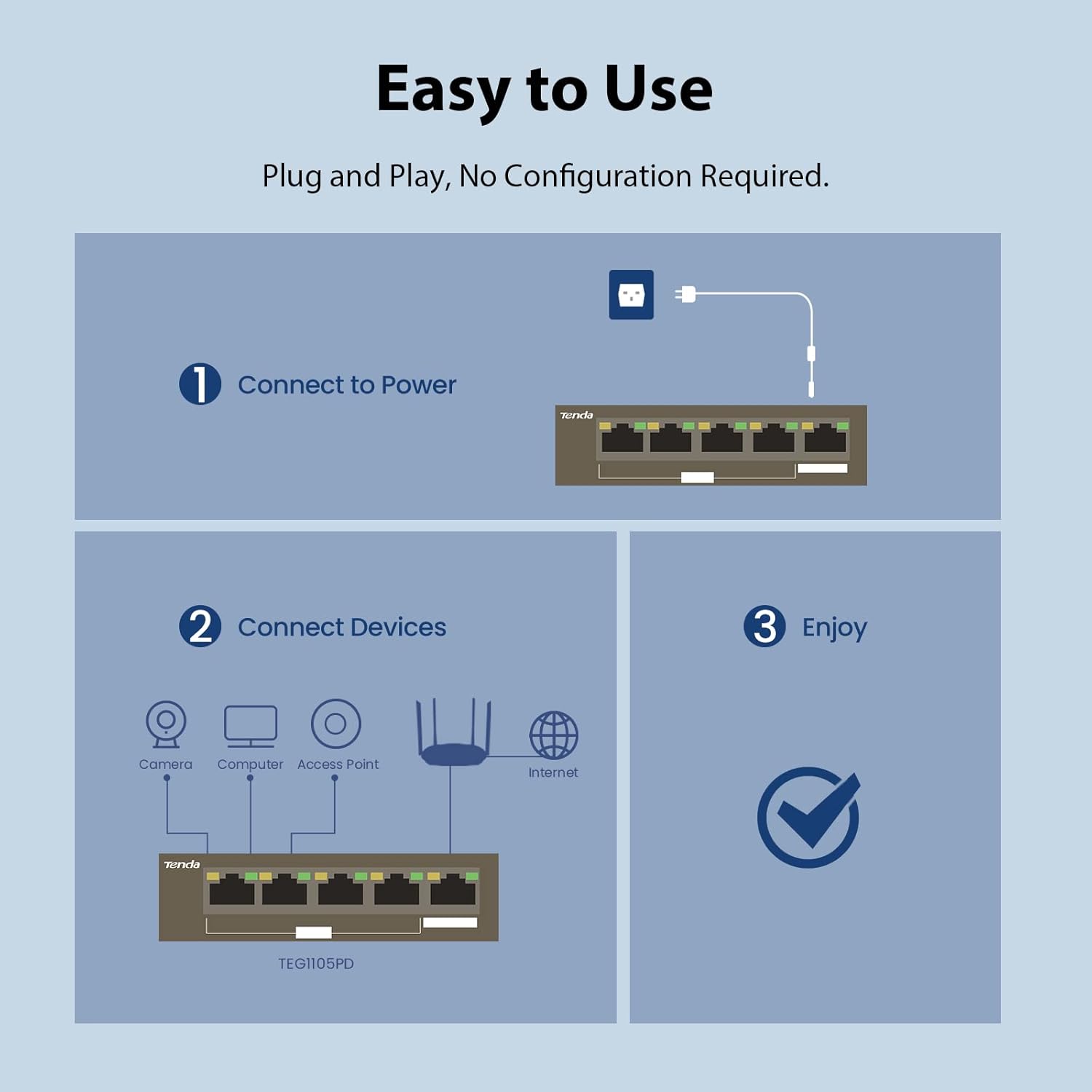
Figure 3: Visual guide demonstrating the simple plug-and-play setup: 1. Connect to power (via PoE IN Port 5). 2. Connect devices (cameras, computers, access points) to other ports. 3. Enjoy network connectivity.

Figure 4: This diagram shows how the 5-Port Unmanaged PoE Switch connects to various devices. Port 5 acts as PoE IN, powered by an 802.3at PoE+ switch, and provides power to IEEE 802.3af PoE devices via ports 1-4, such as cameras, IP phones, computers, and access points.
3.3 Installation Flexibility

Figure 5: The compact design of the TEG1105PD allows for flexible installation options, including placement on a desktop or wall-mounting.
4. Operating Modes
4.1 Extend Mode
The TEG1105PD features an 'Extend Mode' switch (often labeled AI/PoE Switch with 'Extend OFF/Normal' option) that allows for extended PoE transmission distances.
- Normal Mode (OFF): Standard Gigabit Ethernet transmission (10/100/1000 Mbps) up to 100 meters.
- Extend Mode (ON): Extends data and power transmission up to 325 meters. In this mode, ports 1-4 operate at 100 Mbps for distances between 200-325 meters, while maintaining Gigabit speed within 200 meters. This is particularly useful for long-distance surveillance camera deployments.

Figure 6: This diagram illustrates the benefit of Extend Mode, showing stable Gigabit transmission within 200m and stable 100 Megabit transmission up to 325m, compared to potential instability with other PoE switches over distance.
5. Maintenance
The Tenda TEG1105PD is designed for low maintenance due to its fanless and sturdy metal construction.
- Cleaning: Periodically clean the device with a soft, dry cloth to prevent dust buildup, especially around ventilation areas.
- Ventilation: Ensure the switch is placed in a well-ventilated area to allow for proper heat dissipation. Avoid blocking the ventilation slots.
- Cable Management: Keep network cables organized to prevent accidental disconnections or damage.
6. Troubleshooting
6.1 Power LED Not Lit
- Ensure the Ethernet cable connected to Port 5 is securely plugged into both the switch and the upstream PoE+ device.
- Verify that the upstream PoE+ device is powered on and functioning correctly.
- Confirm the upstream PoE+ device is IEEE 802.3at compliant and provides sufficient power.
6.2 Link/Act LED Not Lit
- Check the Ethernet cable connection between the switch port and the connected device. Try a different cable if necessary.
- Ensure the connected device is powered on and operating correctly.
- Verify that the cable length does not exceed 100 meters (or 325 meters if Extend Mode is active).
6.3 PoE Ports Not Supplying Power
- Confirm the total power consumption of connected PoE devices does not exceed the switch's 30W PoE budget.
- Ensure the connected device is a standard IEEE 802.3af compliant PoE device.
- Check the status of the PoE LED indicators on the switch. A flashing green LED typically indicates a PoE fault.
7. Specifications
| Model | TEG1105PD |
| Brand | Tenda |
| Number of Ports | 5 (5x 10/100/1000 Mbps RJ45 Ports) |
| PoE Input | Port 5: IEEE 802.3af/at compliant (PoE Powered Device) |
| PoE Output | Ports 1-4: IEEE 802.3af compliant (up to 15.4W per port) |
| Total PoE Budget | 30W |
| Data Transfer Rate | 10/100/1000 Mbps (Gigabit) |
| Extend Mode | Up to 325m (Gigabit within 200m, 100Mbps for 200-325m) |
| Lightning Protection | 6KV |
| Case Material | Sturdy Metal |
| Fanless Design | Yes |
| Dimensions (LxWxH) | 8.66 x 5.57 x 1.93 inches |
| Item Weight | 9.5 ounces |
8. Warranty and Support
The Tenda TEG1105PD 5-Port Gigabit PoE Switch comes with a Limited Lifetime Protection.
For technical support or any inquiries, please contact Tenda customer support:
- Email: support.us@tenda.cn
- Manufacturer Support: 3-year manufacturer support
9. Official Product Videos
9.1 Product Overview Video
This video provides a general overview of the Tenda TEG1105PD PoE Switch, highlighting its features and capabilities. Note: While this video may show an external power adapter, the TEG1105PD model is designed to be powered via PoE on Port 5 and typically does not require an external adapter.
9.2 TEG110DPD 5 Port Gigabit PoE Switch with 4 PoE+ Ports
This video specifically demonstrates the Tenda TEG1105PD 5-Port Gigabit PoE Switch, showcasing its 4 PoE+ output ports and its functionality as a PoE-powered device.


