
Princess 01.368020.01.001
Princess Smart WiFi Dehumidifier User Manual
Model: 01.368020.01.001
1. Introduction
This user manual provides essential information for the safe and efficient operation of your Princess Smart WiFi Dehumidifier. Please read this manual thoroughly before using the appliance and keep it for future reference. Proper use and maintenance will ensure optimal performance and longevity of your dehumidifier.
Maintaining an ideal indoor humidity level (between 40% and 60%) is crucial for both your health and the preservation of your home. Excessive humidity can lead to the growth of dust mites and mold, increasing the risk of respiratory illnesses and allergies. Conversely, overly dry air can irritate respiratory passages and exacerbate conditions like asthma. Your Princess Smart WiFi Dehumidifier helps you control your indoor environment, ensuring a healthier and more comfortable living space.
2. Safety Instructions
Always observe the following safety precautions to reduce the risk of fire, electric shock, or injury:
- Ensure the power supply voltage matches the rating label on the dehumidifier.
- Do not operate the dehumidifier with a damaged cord or plug.
- Keep the appliance away from heat sources, direct sunlight, and flammable materials.
- Do not block the air inlet or outlet. Maintain at least 20 cm clearance around the unit.
- Do not insert objects into the air vents.
- Always unplug the dehumidifier before cleaning, maintenance, or moving it.
- Do not use the appliance in bathrooms or other excessively humid environments where it may come into contact with water.
- This appliance is not intended for use by persons (including children) with reduced physical, sensory or mental capabilities, or lack of experience and knowledge, unless they have been given supervision or instruction concerning use of the appliance by a person responsible for their safety.
- Children should be supervised to ensure that they do not play with the appliance.
- If the supply cord is damaged, it must be replaced by the manufacturer, its service agent, or similarly qualified persons to avoid a hazard.
3. Product Overview
Familiarize yourself with the main components of your Princess Smart WiFi Dehumidifier.
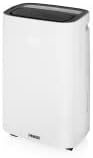
Figure 3.1: Front view of the Princess Smart WiFi Dehumidifier, showcasing its sleek white design and top air outlet.
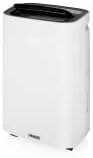
Figure 3.2: Side view of the dehumidifier, highlighting its compact profile and integrated handle for portability.

Figure 3.3: Detail of the durable swivel wheels located at the base, allowing for easy movement between rooms.
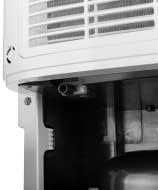
Figure 3.4: Close-up view of the continuous drainage port, located at the rear of the unit, for direct water disposal.

Figure 3.5: Detailed view of the top control panel with its digital display, showing a humidity reading of '50'.
4. Setup
- Unpacking: Carefully remove the dehumidifier from its packaging. Retain the packaging for future storage or transport.
- Placement: Place the dehumidifier on a firm, level surface. Ensure there is at least 20 cm of clear space around all sides of the unit to allow for proper airflow. Do not place it near heat sources or in direct sunlight.
- Power Connection: Insert the power plug into a grounded electrical outlet.
- Water Tank: Ensure the 6-liter water tank is correctly inserted into the unit. The dehumidifier will not operate if the tank is full or improperly placed.
- Optional Continuous Drainage: For continuous operation without needing to empty the tank, connect a standard drainage hose (not included) to the continuous drainage port at the rear of the unit. Ensure the hose is sloped downwards to allow gravity drainage into a suitable drain or container.
- App Connection (Smart Features):
- Download the free Princess Home app from the iOS App Store or Google Play Store.
- Follow the in-app instructions to connect your dehumidifier to your home WiFi network. The device is compatible with single-band 2.4 GHz WiFi networks.
5. Operating Instructions
Your Princess Smart WiFi Dehumidifier offers multiple ways to control your indoor humidity.
5.1. Control Panel Operation
The intuitive control panel on top of the unit allows for direct manual control.
- Power Button: Turns the unit on or off.
- Mode Button: Cycles through available operating modes.
- Humidity Setting Buttons: Adjusts the desired humidity level (e.g., up/down arrows).
- Fan Speed Button: Selects between low and high fan speeds.
- Timer Button: Sets the operating duration (1-24 hours).
- Louver Oscillation Button: Activates or deactivates the automatic louver swing.
- Child Lock Button: Engages or disengages the child lock feature to prevent accidental changes.
5.2. Operating Modes
- Dehumidification Mode: Allows you to manually set the desired humidity level between 30% and 90%. The unit will operate until the set humidity is reached.
- Continuous Mode: The dehumidifier operates continuously, regardless of the room's humidity level, ideal for very damp conditions or drying specific areas.
- Automatic Mode: The appliance automatically regulates the humidity based on the room temperature:
- 5-20 °C: Target humidity 60%
- 20-27 °C: Target humidity 55%
- Above 27 °C: Target humidity 50%
- Laundry Mode: Designed to dry laundry faster. This mode uses the highest fan speed and aims to reduce humidity to approximately 40%.
- Ventilation Mode: The unit operates as a fan, circulating air without dehumidifying. You can select between low and high fan speeds.
5.3. Smart Control (App & Voice)
Once connected to the Princess Home app, you can control your dehumidifier remotely from your smartphone or tablet.
- Remote Control: Adjust settings, change modes, and monitor humidity levels from anywhere.
- Scheduling: Create custom schedules and programs for different rooms or times of day to optimize humidity control and energy savings.
- Voice Control: The dehumidifier is compatible with voice assistants like Siri, allowing for hands-free operation.
5.4. Water Tank Full Indicator & Auto-Shutoff
The dehumidifier is equipped with a light indicator that illuminates when the 6-liter water tank is full. The unit will automatically shut off to prevent overflow. Empty the tank and reinsert it correctly for operation to resume.
6. Maintenance
Regular maintenance ensures the efficient and long-lasting performance of your dehumidifier.
- Emptying the Water Tank: When the tank full indicator lights up, carefully remove the water tank and empty the collected water. Clean the tank periodically with mild soap and water to prevent mold growth.
- Cleaning the Air Filter: The air filter should be cleaned regularly (e.g., every two weeks or as needed) to maintain optimal performance. Remove the filter and clean it using a vacuum cleaner to remove dust and debris. If heavily soiled, wash it gently with lukewarm water and mild detergent, then allow it to air dry completely before reinserting.
- Cleaning the Unit Exterior: Wipe the exterior of the dehumidifier with a soft, damp cloth. Do not use harsh chemicals, abrasive cleaners, or solvents, as these can damage the surface.
- Storage: If storing the unit for an extended period, ensure the water tank is empty and clean, and the filter is clean and dry. Store the dehumidifier in a cool, dry place, preferably in its original packaging.
7. Troubleshooting
Before contacting customer support, please refer to the following common issues and solutions:
| Problem | Possible Cause | Solution |
|---|---|---|
| Dehumidifier does not turn on. | No power supply; Water tank full or incorrectly placed. | Check power plug and outlet; Empty and correctly reinsert water tank. |
| No water collected or low dehumidification. | Air filter clogged; Room temperature too low; Humidity level already low; Air inlet/outlet blocked. | Clean the air filter; Dehumidifiers are less effective below 5°C; Check room humidity; Ensure clear space around the unit. |
| Unit is noisy. | Unit not on a level surface; Air filter clogged. | Place on a flat, stable surface; Clean the air filter. |
| App connection issues. | Incorrect WiFi network (not 2.4 GHz); Weak WiFi signal; Incorrect pairing steps. | Ensure you are connecting to a 2.4 GHz WiFi network; Move unit closer to router; Refer to app's pairing guide. |
8. Specifications
| Feature | Specification |
|---|---|
| Brand | Princess |
| Model Number | 01.368020.01.001 |
| Color | White |
| Product Dimensions (L x W x H) | 26.5 x 42.8 x 59.5 cm |
| Item Weight | 14.7 Kilograms |
| Dehumidification Capacity | 20 Liters/day |
| Water Tank Capacity | 6 Liters |
| Recommended Floor Area | Up to 30 m² |
| Power | 350 Watts |
| Voltage | 240 Volts |
| Material | Acrylonitrile Butadiene Styrene (ABS) |
| Number of Speeds | 2 (Fan) |
| Special Features | Timer, WiFi Connectivity, App Control, Voice Control, Child Lock, Continuous Drainage |
| Compatibility | Smartphone, Tablet (iOS, Android) |
| Included Components | Princess Dehumidifier, User Manual |
9. Warranty and Support
For warranty information and customer support, please refer to the documentation provided with your purchase or contact Princess customer service directly. Keep your proof of purchase for any warranty claims. Information regarding the availability of spare parts is not provided in the product details.
Ask a question about this manual
Ask about setup, troubleshooting, compatibility, parts, safety, or missing instructions. Manuals+ will review the question and use this page’s manual context to help answer it.