
1. Introduction
Thank you for choosing the VIHELM GM8805 Gas Analyzer Air Quality Monitor. This handheld digital CO-tester is designed for accurate detection of carbon monoxide (CO) in the air, providing reliable measurements for various applications. Please read this manual thoroughly before operating the device to ensure safe and efficient use.
2. Safety Information
- Always operate the device in accordance with the instructions provided in this manual.
- Do not expose the device to extreme temperatures, humidity, or direct sunlight.
- Avoid dropping or subjecting the device to strong impacts.
- Do not attempt to disassemble or modify the device. Refer all servicing to qualified personnel.
- Ensure proper ventilation when testing for gases. This device is a detection tool and not a substitute for proper safety protocols.
- Keep the device out of reach of children.
- Remove batteries if the device will not be used for an extended period to prevent leakage.
3. Package Contents
Upon unpacking, please verify that all items listed below are present and in good condition:
- 1 x VIHELM GM8805 Gas Analyzer Air Quality Monitor
- 1 x User Manual (this document)
- Note: Batteries (2 x 1.5V AAA) are NOT included and must be purchased separately.
4. Product Features and Components
The GM8805 is designed for ease of use and reliable performance. Familiarize yourself with its key components:
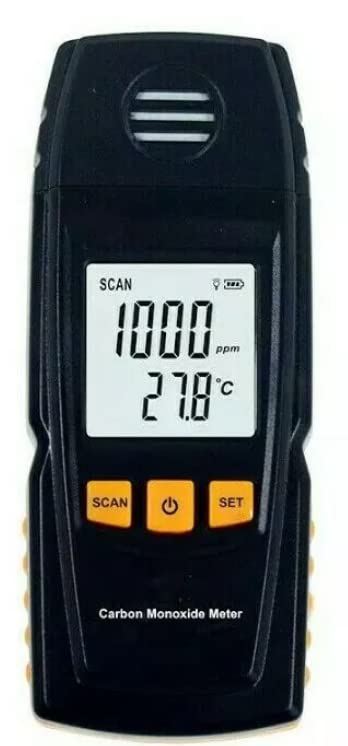
Figure 4.1: Front View with Display
This image shows the front of the GM8805 device. It features a large digital display indicating a reading of "1000 ppm" and a temperature of "27.8°C". Below the display are three orange buttons labeled "SCAN", a power symbol (On/Off), and "SET". The top part has a grille for the sensor, and the bottom reads "Carbon Monoxide Meter".
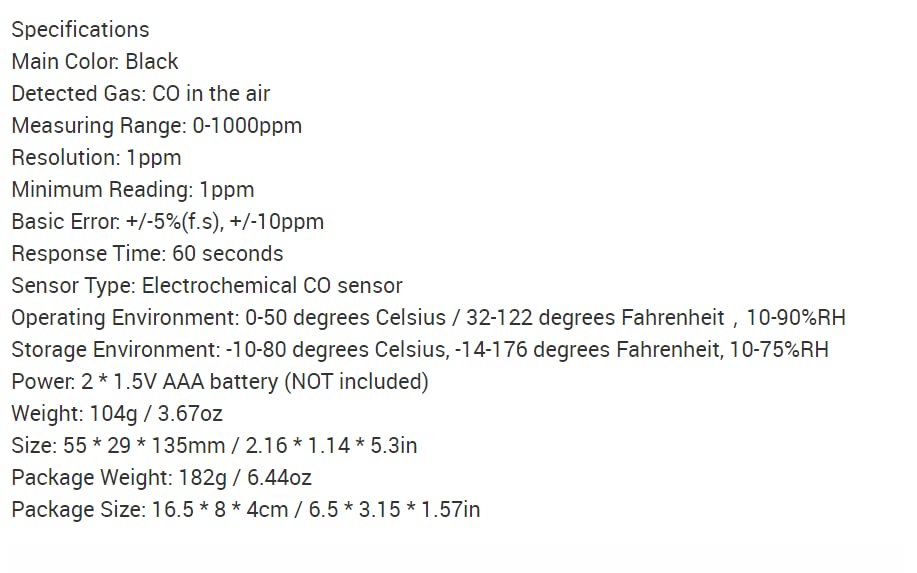
Figure 4.2: Front View (Idle/Hold)
Similar to Figure 4.1, this image displays the front of the GM8805. The digital screen shows "0 ppm" and "30.3°C", indicating either an idle state or a held reading. The same three orange buttons (SCAN, Power, SET) are visible below the display.
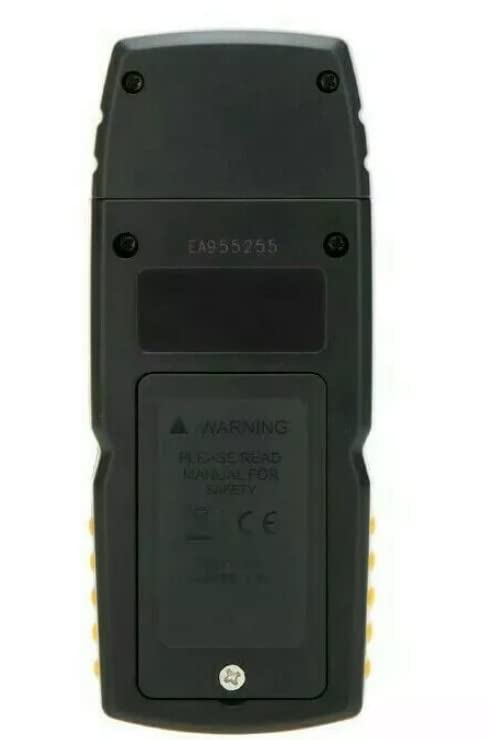
Figure 4.3: Rear View
This image shows the back of the GM8805. A large battery compartment cover is visible, secured by a screw. The cover has a warning label that reads "WARNING PLEASE READ MANUAL FOR SAFETY" and includes CE certification marks.
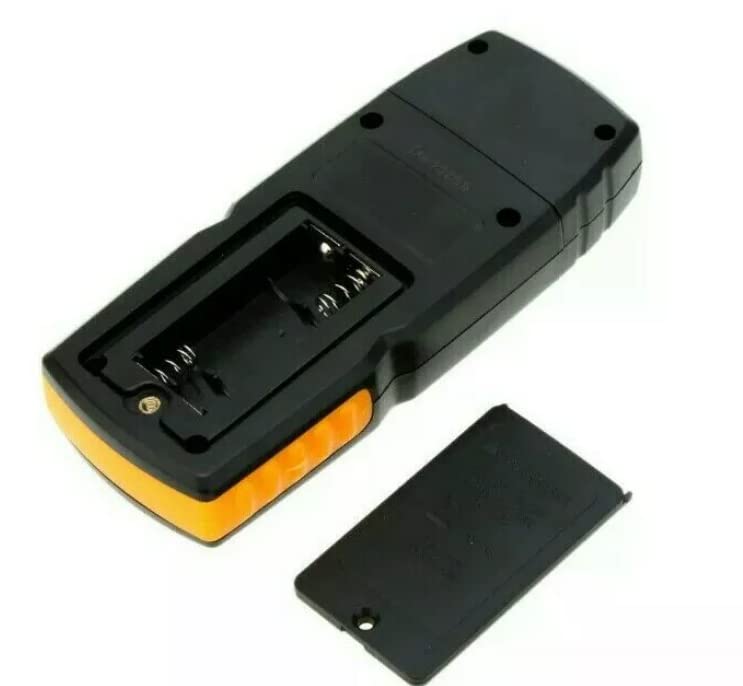
Figure 4.4: Battery Compartment
This image displays the GM8805 with its battery compartment cover removed, revealing the internal slots designed for two AAA batteries. The metal contacts for the batteries are clearly visible.
Key Components:
- LCD Display: Shows CO concentration in ppm and ambient temperature in °C.
- SCAN Button: Initiates a scan or measurement cycle.
- Power Button: Turns the device On/Off.
- SET Button: Used for setting parameters or entering calibration mode (refer to advanced settings).
- CO Sensor: Located at the top, responsible for detecting carbon monoxide.
- Battery Compartment: Located on the rear, holds 2 x 1.5V AAA batteries.
- Kickstand (optional): Some models may include a retractable kickstand on the back for desktop use.
5. Setup
5.1 Battery Installation
- Locate the battery compartment on the back of the GM8805 (refer to Figure 4.3).
- Using a small Phillips head screwdriver, loosen the screw securing the battery compartment cover.
- Remove the cover.
- Insert two (2) 1.5V AAA batteries into the compartment, ensuring correct polarity (+/-) as indicated inside (refer to Figure 4.4).
- Replace the battery compartment cover and tighten the screw securely.
The device is now ready for operation.
6. Operating Instructions
6.1 Powering On/Off
- To Power On: Press and hold the Power button (center orange button) for approximately 2 seconds. The display will light up and show initial readings.
- To Power Off: Press and hold the Power button again for approximately 2 seconds until the display turns off.
6.2 Taking a Measurement
- Ensure the device is powered on.
- Position the GM8805 in the area where you wish to measure CO concentration. Ensure the sensor grille at the top is unobstructed.
- Press the SCAN button (left orange button). The device will begin its measurement cycle.
- Wait for approximately 60 seconds for the response time to stabilize. The CO concentration in parts per million (ppm) and the ambient temperature (°C) will be displayed on the LCD.
- The device will continuously update the readings.
6.3 Interpreting Readings
- CO (ppm): This value indicates the concentration of carbon monoxide in the air. Higher values indicate higher concentrations.
- Temperature (°C): This value indicates the ambient temperature.
- Audible Alarm: The device may emit an audible alarm if CO levels exceed a certain threshold. Refer to local safety guidelines for dangerous CO levels.
6.4 Using the SET Button
The SET button (right orange button) is typically used for advanced settings or calibration. For standard operation, it is generally not required. Refer to the full technical manual (if available) for detailed instructions on calibration or setting specific thresholds.
7. Maintenance
7.1 Cleaning
- Wipe the device with a soft, dry cloth.
- Do not use abrasive cleaners, solvents, or strong chemicals, as these may damage the casing or internal components.
- Keep the sensor grille free from dust and debris.
7.2 Battery Replacement
Replace batteries when the low battery indicator appears on the display or when the device fails to power on. Follow the steps outlined in Section 5.1 for battery installation.
7.3 Storage
- When not in use for extended periods, store the device in a cool, dry place.
- Remove batteries before long-term storage to prevent potential leakage and damage to the device.
- Store within the specified storage environment temperature and humidity ranges.
8. Troubleshooting
| Problem | Possible Cause | Solution |
|---|---|---|
| Device does not power on. | Low or dead batteries; Incorrect battery polarity. | Replace batteries with new ones; Ensure batteries are inserted with correct polarity. |
| Inaccurate or fluctuating readings. | Sensor obstructed; Device not stabilized; Extreme environmental conditions. | Ensure sensor grille is clear; Allow 60 seconds for stabilization; Operate within specified environmental ranges. |
| No audible alarm when CO is detected. | CO level below alarm threshold; Alarm function disabled (if applicable). | Verify CO levels are above the alarm threshold; Check device settings (if applicable) to ensure alarm is enabled. |
| Display is dim or flickering. | Low battery power. | Replace batteries. |
If the problem persists after trying these solutions, please contact customer support.
9. Specifications
| Main Color: | Black |
| Detected Gas: | CO in the air |
| Measuring Range: | 0-1000ppm |
| Resolution: | 1ppm |
| Minimum Reading: | 1ppm |
| Basic Error: | +/-5%(f.s), +/-10ppm |
| Response Time: | 60 seconds |
| Sensor Type: | Electrochemical CO sensor |
| Operating Environment: | 0-50°C (32-122°F), 10-90%RH |
| Storage Environment: | -10-80°C (-14-176°F), 10-75%RH |
| Power: | 2 x 1.5V AAA battery (NOT included) |
| Item Weight: | 104g / 3.67oz (Device only) |
| Product Dimensions (L x W x H): | 135 x 55 x 29mm / 5.3 x 2.16 x 1.14 inches |
| Package Weight: | 182g / 6.44oz |
| Package Size (L x W x H): | 16.5 x 8 x 4cm / 6.5 x 3.15 x 1.57 inches |
| Manufacturer: | VIHELM |
| Country of Origin: | China |
10. Warranty and Support
VIHELM products are manufactured to high-quality standards. For information regarding warranty coverage, technical support, or service, please contact the seller or manufacturer directly. Keep your purchase receipt as proof of purchase.
For further assistance, please visit the official VIHELM website or contact their customer service department.