
SONRU B50
SONRU B50 Bluetooth Audio Adapter User Manual
Model: B50
Introduction
The SONRU B50 is a versatile 2-in-1 Bluetooth audio adapter, functioning as both a transmitter (TX) and a receiver (RX). It allows you to wirelessly stream audio from non-Bluetooth devices to Bluetooth headphones/speakers (TX mode) or stream audio from Bluetooth-enabled devices to non-Bluetooth audio systems (RX mode). Featuring advanced AptX HD and AptX Low Latency technologies, it ensures high-fidelity sound and minimal audio delay. This manual provides detailed instructions for setup, operation, and maintenance of your SONRU B50 device.
Package Contents
Please check the package for the following items:
- 1 x SONRU B50 Bluetooth Adapter
- 1 x User Manual
- 1 x Optical Audio Toslink Cable
- 1 x 3.5mm AUX Audio Cable
- 1 x RCA Audio Cable
- 1 x USB Charging Cable

Image: Contents of the SONRU B50 package, including the adapter, various audio cables (optical, AUX, RCA), and a USB charging cable.
Product Overview
The SONRU B50 features intuitive controls and multiple connectivity options. Familiarize yourself with the device's layout:

Image: Detailed view of the SONRU B50 showing its power switch, TX/RX mode switch, LED indicator, song/volume control buttons, pause/playback button, Bluetooth quick pairing button, AUX port, SPDIF TX/RX port, and USB charging port.
Key Features:
- Power Switch: On/Off control for the device.
- TX/RX Mode Switch: Toggle between Transmitter and Receiver modes.
- LED Indicator: Displays real-time status of codec transmission (e.g., AUX, SPDIF, AptX, SBC, AAC, LL, HD) and pairing status.
- Song/Volume Control: Buttons for skipping tracks and adjusting volume (volume control primarily in RX mode).
- Pause/Playback: Control audio playback.
- Bluetooth Quick Pairing: Button for initiating Bluetooth pairing.
- AUX Port: 3.5mm audio input/output.
- SPDIF TX/RX Port: Optical audio input/output.
- USB Charging Port: For charging the device.
Setup and Charging
Charging the Device:
Before first use, fully charge the SONRU B50. Connect the provided USB charging cable to the device's USB charging port and a standard USB power adapter (not included). The device takes approximately 3 hours to fully charge. A full charge provides up to 24 hours of continuous playback.

Image: Visual representation of the SONRU B50's battery life, indicating 3 hours for a full charge and up to 30 hours in TX mode or 28 hours in RX mode.
Operating Modes
1. Transmitter (TX) Mode
In TX mode, the SONRU B50 transmits audio from non-Bluetooth devices (e.g., TV, PC, projector) to Bluetooth headphones or speakers.
- Switch to TX Mode: Slide the TX/RX switch to the "TX" position.
- Connect Audio Source:
- Optical (SPDIF): Connect the optical cable from your TV/PC's optical audio output to the SPDIF TX/RX port on the B50.
- AUX (3.5mm): Connect the 3.5mm AUX cable from your device's audio output to the AUX port on the B50.
- RCA: Use the RCA cable to connect your device's RCA audio output to the AUX port on the B50 (via the 3.5mm end of the RCA cable).
- Pair with Bluetooth Device:
- Ensure your Bluetooth headphones/speakers are in pairing mode.
- The B50 will automatically search for nearby Bluetooth devices. The LED indicator will flash to show pairing status.
- Once connected, the LED indicator will show the active codec (e.g., AptX HD, AptX LL, SBC, AAC).
- Dual Connection (TX Mode): The B50 supports connecting to two Bluetooth headphones/speakers simultaneously. After connecting the first device, put the second device into pairing mode and press the Bluetooth quick pairing button on the B50 to connect the second device.
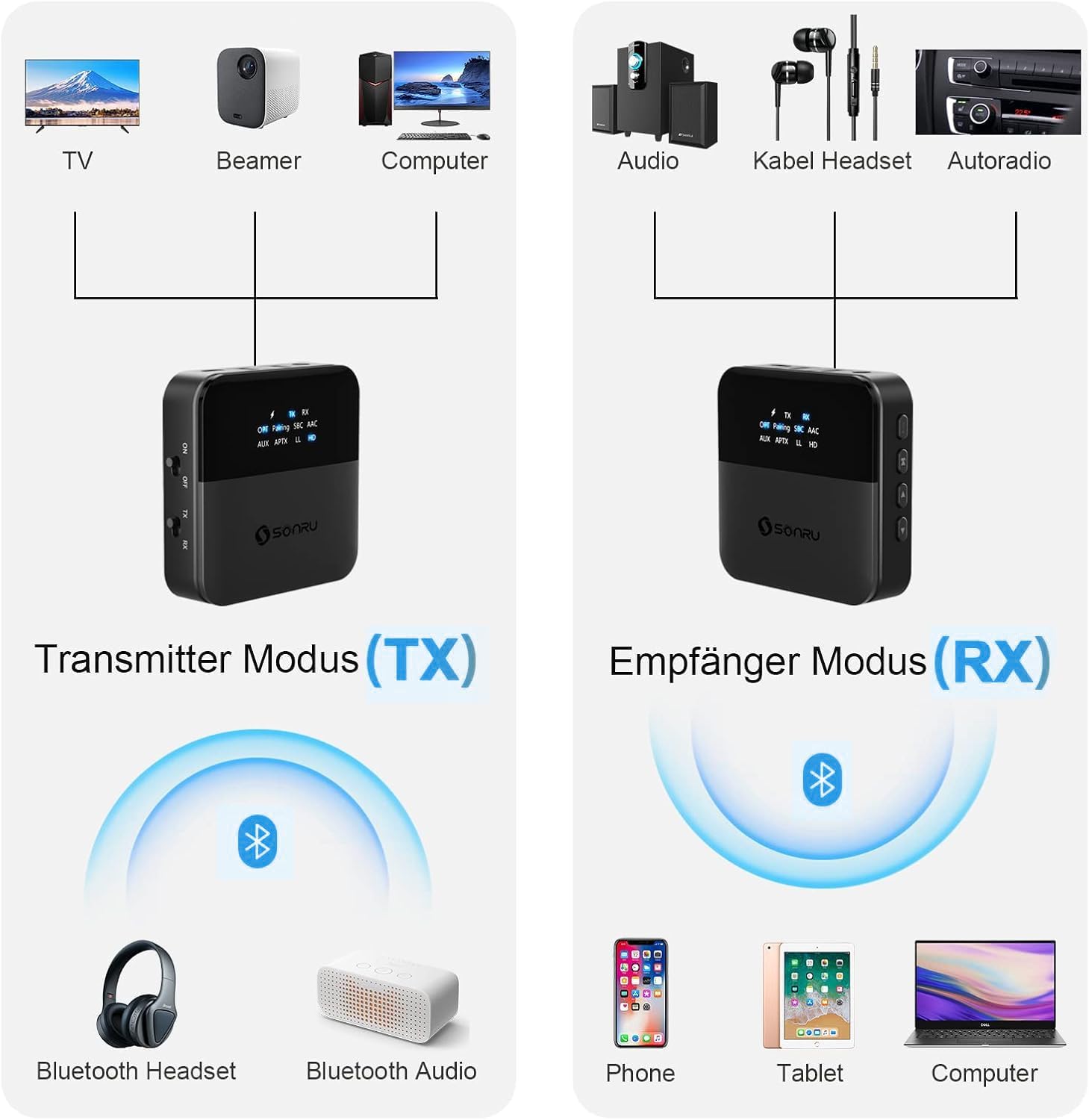
Image: Diagram illustrating the SONRU B50 in Transmitter (TX) mode, showing connections from TV, Beamer, or Computer to the adapter, and then wirelessly to Bluetooth headphones or Bluetooth audio devices.

Image: A couple watching TV with the SONRU B50 connected, each wearing Bluetooth headphones, demonstrating the dual connection feature in TX mode for shared audio experience.
2. Receiver (RX) Mode
In RX mode, the SONRU B50 receives audio from Bluetooth-enabled devices (e.g., smartphone, tablet, laptop) and outputs it to non-Bluetooth audio systems (e.g., home stereo, car stereo, wired headphones).
- Switch to RX Mode: Slide the TX/RX switch to the "RX" position.
- Connect Audio Output:
- AUX (3.5mm): Connect the 3.5mm AUX cable from the B50's AUX port to your audio system's AUX input.
- RCA: Use the RCA cable to connect the B50's AUX port (via the 3.5mm end) to your audio system's RCA input.
- Optical (SPDIF): Connect the optical cable from the B50's SPDIF TX/RX port to your audio system's optical audio input.
- Pair with Bluetooth Device:
- Enable Bluetooth on your smartphone, tablet, or laptop.
- Search for "SONRU B50" (or similar name) in your device's Bluetooth settings and select it to pair.
- Once connected, the LED indicator will show the active codec.
- Dual Connection (RX Mode): The B50 supports connecting to two Bluetooth-enabled devices simultaneously. After connecting the first device, pair the second device. You can play music from either connected phone, with the B50 automatically switching between them.

Image: Diagram illustrating the SONRU B50 in Receiver (RX) mode, showing wireless connections from Phone, Tablet, or Computer to the adapter, and then wired connections to Audio systems, Wired Headsets, or Car Stereos.
AptX HD and AptX Low Latency (LL)
The SONRU B50 supports AptX HD for high-resolution audio and AptX LL for minimal audio-visual synchronization delay. For these codecs to function, both the transmitting and receiving devices must also support AptX HD or AptX LL respectively. The LED indicator on the B50 will show if AptX HD or LL is active.

Image: A person watching a football match on TV with headphones, demonstrating the low latency feature of the SONRU B50, ensuring audio and video are synchronized.
Troubleshooting
If you encounter issues with your SONRU B50, please refer to the following common problems and solutions:
| Problem | Possible Cause / Solution |
|---|---|
| Device does not power on. | Battery is low. Charge the device fully. Ensure the power switch is in the "ON" position. |
| Cannot pair with Bluetooth device. |
|
| No audio output/input. |
|
| Audio delay/latency. | Ensure both the B50 and your connected Bluetooth device support AptX Low Latency (LL). If not, some delay may be unavoidable. |
| Short Bluetooth range. | Obstacles (walls, furniture) and interference can reduce range. Try to minimize obstructions between the B50 and connected devices. |
Specifications
| Feature | Detail |
|---|---|
| Model Number | B50 |
| Bluetooth Version | 5.0 (CSR8675 Chipset) |
| Supported Codecs | AptX HD, AptX Low Latency, SBC, AAC |
| Operating Modes | Transmitter (TX), Receiver (RX) |
| Connectivity Technology | Bluetooth, AUX, Optical (SPDIF), RCA |
| Battery Capacity | 600mAh Lithium-Ion |
| Charging Time | Approx. 3 hours |
| Playtime | Up to 24 hours (continuous) |
| Wireless Range | Up to 20 meters (65 feet) without obstacles |
| Dimensions | Approx. 6.6 x 6.6 x 1.96 cm |
| Weight | 140 grams |
Maintenance
To ensure the longevity and optimal performance of your SONRU B50, follow these maintenance guidelines:
- Keep the device dry. Do not expose it to moisture or extreme temperatures.
- Clean the device with a soft, dry cloth. Do not use harsh chemicals or abrasive cleaners.
- Avoid dropping or subjecting the device to strong impacts.
- Store the device in a cool, dry place when not in use for extended periods.
Warranty and Support
For warranty information or technical support, please refer to the contact details provided with your purchase or visit the official SONRU website. If you experience any issues not covered in this manual, please contact customer service for assistance.
Related documentsB50


Ask a question about this manual
Ask about setup, troubleshooting, compatibility, parts, safety, or missing instructions. Manuals+ will review the question and use this page’s manual context to help answer it.