Introduction
Thank you for purchasing the IRONCK Vanity Desk with LED Lighted Mirror and Power Outlet. This manual provides essential information for the safe assembly, operation, and maintenance of your new vanity desk. Please read all instructions carefully before assembly and retain this manual for future reference.
Important Safety Information
WARNING: This product requires assembly. Always follow the instructions provided. Be cautious of sharp edges and pinch points during assembly. The charging station contains electrical components. Always unplug the product before cleaning or storing. Do not use the product if the power cord or charging station is damaged. Keep the product dry and do not expose it to extreme temperatures.
- Ensure all parts are present and undamaged before beginning assembly.
- Assemble on a soft, clean surface to prevent scratches.
- Do not overtighten screws during assembly.
- Keep small parts away from children.
- Always unplug the vanity from the power outlet before cleaning or performing any maintenance.
- Do not expose the electrical components to water or excessive moisture.
- For stability, it is recommended to anchor the vanity to a wall, especially if children are present.
Package Contents
Verify that all components listed below are included in your package. If any parts are missing or damaged, please contact customer support.
- Vanity Desk Components (panels, drawers, hardware)
- LED Lighted Mirror
- Power Outlet with USB Ports
- Storage Bench/Stool
- Assembly Hardware (screws, dowels, cam locks, etc.)
- Assembly Tools (basic wrench/screwdriver, if provided)
- Instruction Manual
Setup and Assembly
Assembly is required for this vanity desk. It is recommended to have two people for assembly to ensure stability and ease of handling. Follow the step-by-step instructions provided in the separate assembly guide included in your package.
- Unpack and Organize: Carefully unpack all components and lay them out on a clean, soft surface. Group similar parts and hardware together.
- Assemble the Base: Begin by assembling the main desk frame according to the provided diagrams. Ensure all connections are secure.
- Install Drawers: Assemble the four drawers and install them into their respective slots.
- Attach Mirror Unit: Secure the LED lighted mirror unit to the top of the desk. Connect the power cable for the mirror.
- Install Power Outlet: Integrate the power outlet and USB ports into the designated area on the side of the desk.
- Assemble Storage Bench: Construct the storage bench, ensuring the hinged lid operates smoothly.
- Final Checks: Verify all screws are tightened, and the vanity is stable. Plug the vanity into a standard electrical outlet.

Figure 1: Product Dimensions and Components Overview.

Figure 2: Vanity Desk with Drawers Open, illustrating storage space.
Operating Instructions
LED Lighted Mirror
The integrated LED mirror offers adjustable lighting to suit your needs.
- Power On/Off: Touch the power symbol on the mirror surface to turn the LED lights on or off.
- Change Color Mode: Briefly touch the power symbol to cycle through three different light color modes: Warm Yellow, Warm White, and Cold White.
- Adjust Brightness: Long press the power symbol to adjust the brightness level within the selected color mode. Release when the desired brightness is achieved.

Figure 3: LED Mirror Lighting Modes and Brightness Adjustment.
Integrated Power Outlet & USB Ports
The vanity desk includes a convenient charging station with two standard AC outlets and two USB ports.
- Plug in hair styling tools (hair dryer, curling iron, flat iron) into the 110V/12A AC outlets.
- Charge mobile devices (phones, tablets) using the 5V/2A USB ports.
- Ensure the vanity is properly plugged into a wall outlet for the charging station to function.

Figure 4: Integrated Power Outlet and USB Ports.
Storage Bench
The included bench features a cushioned seat and hidden storage.
- Lift the cushioned top of the bench to access the internal storage compartment.
- Use this space for storing larger items like hair dryers, towels, or other accessories.
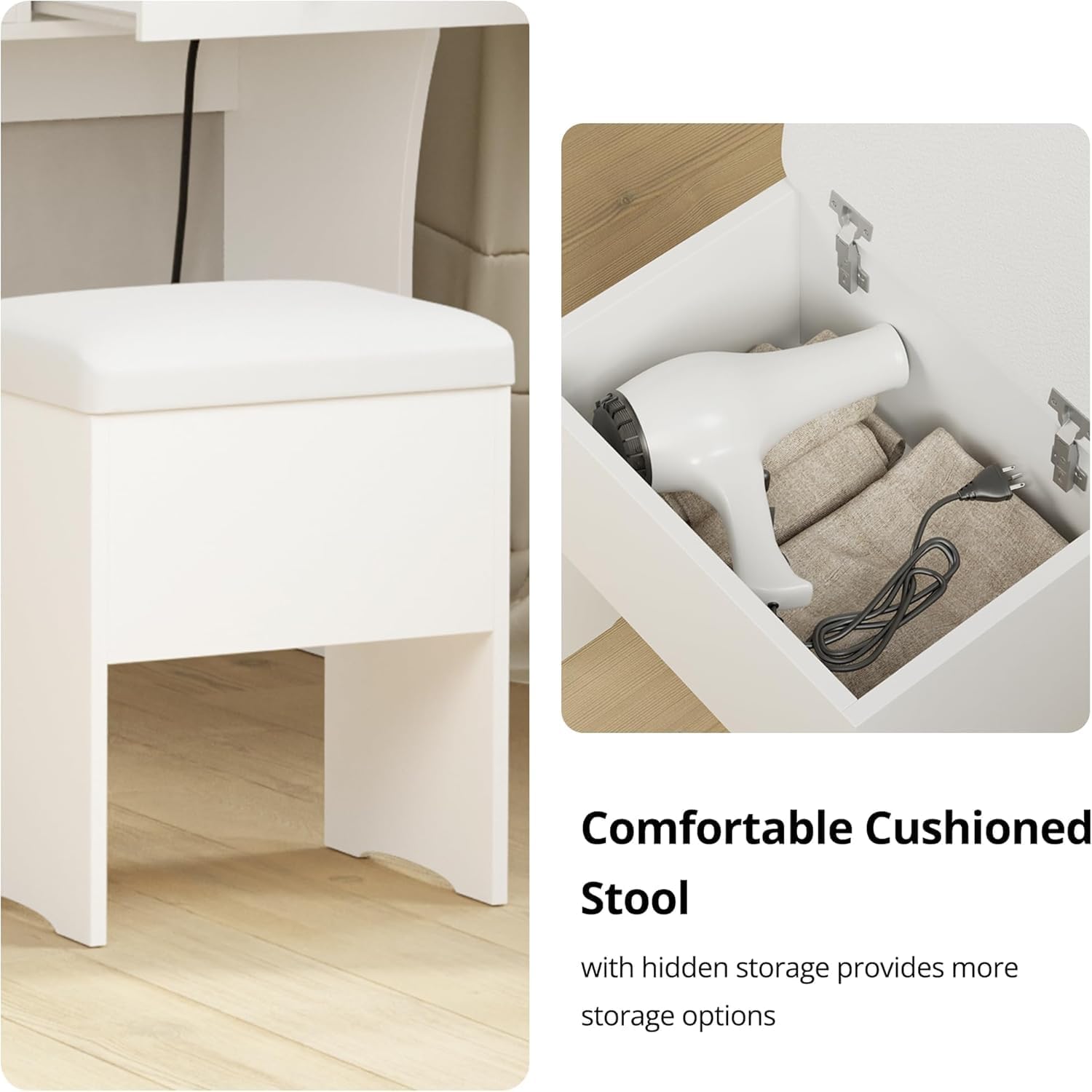
Figure 5: Storage Bench with Hidden Compartment.
Maintenance
- Cleaning: Wipe the vanity desk and mirror surfaces with a dry, soft cloth. Avoid abrasive cleaners or harsh chemicals that may damage the finish or mirror.
- Electrical Components: Ensure the power cord and charging station are free from damage. Do not attempt to repair electrical components yourself.
- Hardware: Periodically check all screws and fasteners to ensure they remain tight. Retighten if necessary.
Troubleshooting
| Problem | Possible Cause | Solution |
|---|---|---|
| LED Mirror lights not turning on. | Not plugged in; loose connection; power outage. | Ensure the vanity is plugged into a working outlet. Check all electrical connections. |
| Power outlets/USB ports not working. | Not plugged in; loose connection; device not compatible. | Verify the main power cord is connected. Check device compatibility and ensure it's properly inserted. |
| Drawers are stiff or do not close smoothly. | Improper assembly; obstruction. | Recheck drawer slide installation. Ensure no items are blocking the drawer's path. |
| Vanity feels unstable. | Loose fasteners; uneven surface. | Tighten all assembly screws. Place the vanity on a level surface. Consider wall anchoring. |
Specifications
- Model Number: HK-JCS-05
- Brand: IRONCK
- Material: Engineered Wood
- Frame Material: Wood
- Color: White
- Product Dimensions: 15.7"D x 31.5"W x 55.3"H (15.7 x 31.5 x 55.3 inches)
- Item Weight: 69.5 pounds
- Assembly Required: Yes
- Power Outlet: 2 Standard AC Outlets (110V/12A)
- USB Ports: 2 USB Ports (5V/2A)
- LED Mirror Lighting: 3 Color Modes (Warm Yellow, Warm White, Cold White), Dimmable
- Product Care: Wipe with Dry Cloth
Warranty and Customer Support
For warranty information, missing parts, or any questions regarding your IRONCK Vanity Desk, please refer to the warranty card included in your package or contact IRONCK customer support directly. Please have your model number (HK-JCS-05) and purchase information ready when contacting support.
You can also visit the official IRONCK Store for more information: IRONCK Store on Amazon


