Introduction
The BOYA BY-BM2040 is a versatile super-cardioid shotgun microphone designed to significantly enhance the audio quality of your video recordings. Its lightweight and battery-free design make it an ideal companion for various devices, including smartphones, tablets, DSLR cameras, and camcorders. This manual provides comprehensive instructions for setting up, operating, and maintaining your microphone to ensure optimal performance.
What's in the Box?
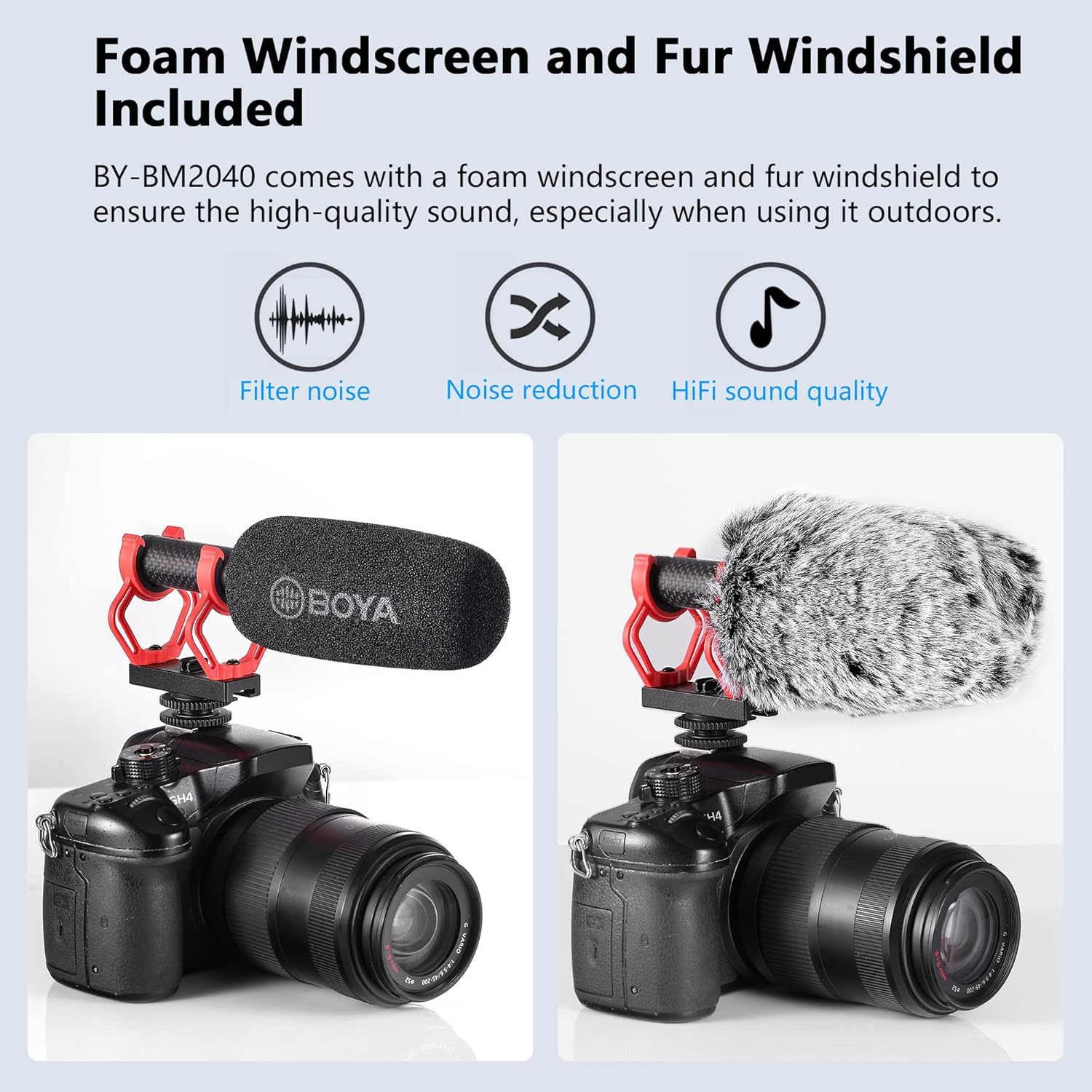
Figure 1: Package Contents of the BOYA BY-BM2040 Microphone.
- BY-BM2040 Microphone: The main super-cardioid shotgun microphone unit.
- Shock Mount: Designed to minimize handling and vibration noise during recording.
- Foam Windscreen: Provides basic wind and plosive noise reduction.
- Fur Windshield: Offers superior wind noise reduction, especially useful for outdoor recording.
- 3.5mm TRS Output Cable: For connecting the microphone to DSLR cameras, camcorders, and audio recorders.
- 3.5mm TRRS Output Cable: For connecting the microphone to smartphones, tablets, and Mac computers.
- Carrying Pouch: A soft pouch for convenient storage and transport of the microphone and its accessories.
Product Overview

Figure 2: Key features and dimensions of the BY-BM2040 microphone.
The BY-BM2040 features a compact and lightweight design, weighing approximately 79g, making it highly portable. It is constructed from reinforced carbon fiber and ABS for durability. The microphone operates without the need for external batteries, drawing power directly from the connected device via its 3.5mm audio output jack. The included shock mount effectively minimizes unwanted handling and vibration noise, ensuring cleaner audio recordings.
Setup & Installation
- Attach the Microphone: Slide the microphone's integrated 1/4 hot shoe mount adapter onto your camera's hot shoe or a compatible smartphone rig. Ensure it is securely fastened.
- Select the Correct Cable:
- For DSLR cameras, camcorders, or audio recorders, use the 3.5mm TRS Output Cable.
- For smartphones, tablets, or Mac computers, use the 3.5mm TRRS Output Cable.
- Connect the Cable: Plug one end of the selected 3.5mm cable into the microphone's audio output jack and the other end into the microphone input port of your recording device.
- Power On Device: The microphone is battery-free and will draw power directly from your connected device. Ensure your device is powered on and ready to record.

Figure 3: Universal compatibility with various devices using included cables.
Unboxing and Setup Demonstration
Video 1: This video demonstrates the unboxing process and initial setup of the BOYA BY-BM2040 Shotgun Microphone, showing how to attach it to a camera and connect the necessary cables.
Operating Instructions
The BOYA BY-BM2040 features a super-cardioid pickup pattern, which means it primarily captures sound from directly in front of the microphone, effectively reducing background noise from the sides and rear. This directional focus is ideal for isolating your subject's voice or specific sounds.
Wind Protection
For optimal audio quality, especially in outdoor or windy conditions, utilize the included windshields:
- Foam Windscreen: Use for general indoor recording or light breeze conditions to reduce plosives and minor wind noise.
- Fur Windshield: For significant wind noise reduction in outdoor environments, place the fur windshield over the foam windscreen. This greatly improves sound clarity by minimizing wind interference.

Figure 4: Foam Windscreen and Fur Windshield for varied noise reduction.
Audio Performance Test
Video 2: This video provides an audio test of the BOYA BY-BM2040 Super-Cardioid Shotgun Microphone, demonstrating its sound quality and directional pickup capabilities in different environments.
Applications
The BOYA BY-BM2040 is designed for a wide range of audio recording applications, making it suitable for both amateur and professional content creators:
- Vlogging: Capture clear audio for your daily vlogs, ensuring your voice is prominent.
- Live Streaming: Enhance your live broadcasts with professional-grade sound.
- Interviews: Focus on interview subjects' voices while minimizing ambient distractions.
- Video Recording: Improve the overall audio quality of any video project, from short films to documentaries.
- Mobile Journalism: Ideal for on-the-go reporting with smartphones and tablets.
- ASMR Recording: Its sensitive pickup can capture subtle sounds with clarity.

Figure 5: Diverse applications for the BY-BM2040 microphone.
Specifications
| Feature | Detail |
|---|---|
| Microphone Form Factor | Shotgun |
| Polar Pattern | Super Cardioid |
| Connectivity Technology | Auxiliary (3.5mm Jack) |
| Power Source | Corded Electric (Device Powered) |
| Item Weight | 79 Grams (2.79 ounces) |
| Material | Carbon Fiber, ABS, Foam |
| Frequency Range | 40 Hz - 20 KHz |
| Signal-to-Noise Ratio | 80 dB |
| Audio Sensitivity | 35 dB |
| Compatible Devices | DSLR, Camcorder, Camera, Smartphone |
Troubleshooting
- No Sound/Low Volume:
- Ensure the correct 3.5mm cable (TRS for cameras, TRRS for smartphones/Mac) is used and fully inserted into both the microphone and the recording device.
- Check your device's audio input settings to ensure the external microphone is selected and input levels are adequate.
- Verify that your recording device's volume is turned up.
- Excessive Background Noise:
- Confirm the microphone is pointed directly at your sound source, utilizing its super-cardioid pattern.
- Use the appropriate windshield (foam for light wind, fur for heavy wind) to reduce environmental noise.
- Minimize ambient noise in your recording environment where possible.
- Distorted Audio:
- Check your device's audio input levels. If they are too high, the audio may clip and distort. Reduce the input gain.
- Ensure the microphone is not too close to the sound source, which can also cause distortion.
Maintenance
- Cleaning: Use a soft, dry cloth to clean the microphone body. Do not use harsh chemicals or abrasive materials.
- Storage: When not in use, store the microphone and its accessories in the provided carrying pouch to protect them from dust, moisture, and physical damage.
- Handling: Handle the microphone with care. Avoid dropping it or exposing it to extreme temperatures or humidity.
Warranty & Support
BOYA products typically come with a manufacturer's warranty. Please refer to the warranty card included in your package or visit the official BOYA website for detailed warranty terms and conditions. For technical support, product inquiries, or service requests, please contact BOYA customer support through their official channels.
You can also find additional resources and frequently asked questions on the BOYA brand store page on Amazon: BOYA Store.


