
1. Introduction
The Shelly Plus 1 is a compact, smart relay switch designed to automate your home or office devices. It offers Wi-Fi and Bluetooth connectivity, allowing you to control lights, garage doors, irrigation systems, and other electrical appliances remotely via the Shelly Smart Control app, or through voice assistants like Amazon Alexa and Google Home. This device features dry contacts, making it versatile for various low-voltage applications.

Image 1.1: Shelly Plus 1 Smart Relay Switch. This image shows the compact blue device with its terminal connectors.
2. Safety Information
WARNING!
- Installation must be performed by a qualified electrician or person with electrical knowledge, in accordance with local electrical codes and regulations.
- Disconnect power to the circuit before installation, maintenance, or any work on the device.
- Do not expose the device to direct sunlight, high humidity, or extreme temperatures.
- Ensure the device is used within its specified electrical ratings (16A, 240V AC).
- Keep the device away from children.
3. Package Contents
Your Shelly Plus 1 package should contain:
- 1x Shelly Plus 1 Smart Relay Switch
4. Product Overview and Features
The Shelly Plus 1 is a versatile smart relay switch with the following key features:
- Wi-Fi & Bluetooth Connectivity: Connects directly to your home Wi-Fi network (2.4 GHz) and uses Bluetooth for quick pairing.
- 16A Max Load: Capable of controlling devices up to 16 Amperes.
- Dry Contacts: Ideal for controlling garage doors, gate openers, and other low-voltage systems without supplying power to the controlled circuit.
- Compact Design: Small enough to fit behind most wall switches or power outlets.
- Voice Assistant Compatible: Works with Amazon Alexa and Google Home.
- No Hub Required: Operates independently or as part of a larger smart home ecosystem.
- Enhanced Security: Supports MQTT, WSS, TLS, and custom certificates.
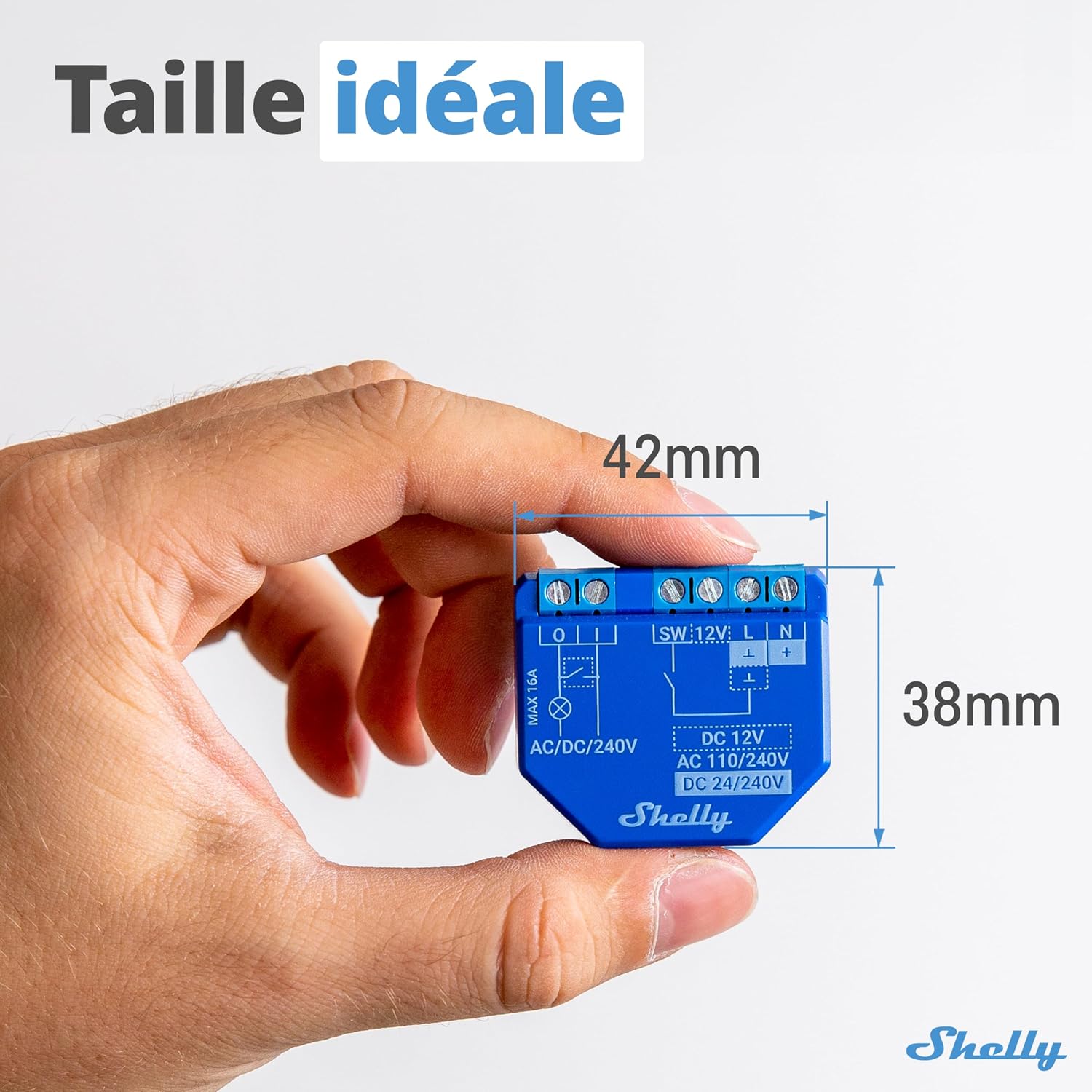
Image 4.1: Shelly Plus 1 Dimensions. The device measures 42mm by 38mm, highlighting its compact size.

Image 4.2: Wi-Fi & Bluetooth Connectivity. Illustrates the device connecting to a smartphone via Wi-Fi and Bluetooth.

Image 4.3: Dry Contacts Feature. Shows a garage door opening, indicating the use of dry contacts for control.
5. Technical Specifications
| Power Supply AC | 110-240V ±10%, 50/60Hz |
| Power Supply DC | 12V / 24-48V |
| Max Load | 16A / 240V AC |
| Wireless Protocol | Wi-Fi 802.11 b/g/n (2.4 GHz) & Bluetooth |
| Operating Temperature | -20°C to 40°C (-4°F to 104°F) |
| Dimensions (HxWxD) | 42 x 38 x 17 mm |
| Dry Contacts | Yes |
| Power Consumption | < 1.2 W |
| Model Number | 3800235265000 |
6. Installation and Setup
6.1. Wiring Diagram
The Shelly Plus 1 is designed for installation inside standard wall consoles, electrical control panels, or behind light switches and power outlets. Always ensure the main power supply is OFF before proceeding with any wiring.

Image 6.1: Easy Installation. Shows a hand connecting wires to the Shelly Plus 1, indicating it can be installed in under 10 minutes.
Typical Wiring (AC Power):
- L: Live wire (Phase)
- N: Neutral wire
- O: Output to the load (e.g., light, appliance)
- SW: Switch input (for connecting a physical wall switch)
- +: Positive DC input (for DC power supply)
- -: Negative DC input (for DC power supply)
For detailed wiring diagrams specific to your application (e.g., light control, garage door opener), please refer to the official Shelly support website or consult a qualified electrician.
6.2. Initial Power On and Device Inclusion
- After wiring the device, restore power to the circuit.
- The Shelly Plus 1 will create an open Wi-Fi Access Point (AP).
- Download the Shelly Smart Control app from the Google Play Store or Apple App Store.
- Open the app and create an account or log in.
- Follow the in-app instructions to add your new device. The app will guide you through connecting the Shelly Plus 1 to your home Wi-Fi network.
- You can also use the device's built-in web interface by connecting to its AP and navigating to its IP address in a web browser.
7. Operation
7.1. Controlling Devices via Shelly App
Once added to the Shelly Smart Control app, you can:
- Turn connected devices ON/OFF remotely from anywhere.
- Set schedules for automatic operation (e.g., turn lights on at sunset).
- Create scenes to control multiple Shelly devices simultaneously.
- Monitor the status of your connected devices.
7.2. Voice Control Integration
The Shelly Plus 1 is compatible with popular voice assistants:
- Amazon Alexa: Enable the "Shelly" skill in the Alexa app and link your Shelly account. Then, you can say commands like, "Alexa, turn on the living room light."
- Google Home: Link your Shelly account in the Google Home app. You can then use commands such as, "Hey Google, turn off the garage door."

Image 7.1: Compatibility. Shows a smart speaker, indicating compatibility with Alexa, Google Home, Android, iOS, Homey, and SmartThings.
7.3. Automation and Schedules
Leverage the power of automation within the Shelly app:
- Timers: Set countdown timers for devices to turn off after a certain period.
- Schedules: Program devices to turn on/off at specific times or based on sunrise/sunset.
- Scripts: For advanced users, custom scripts can be written to create complex automation routines.
8. Maintenance
- Cleaning: Gently wipe the device with a dry, soft cloth. Do not use harsh chemicals or abrasive cleaners.
- Firmware Updates: Regularly check for and install firmware updates via the Shelly Smart Control app to ensure optimal performance, security, and access to new features.
9. Troubleshooting
| Problem | Possible Solution |
|---|---|
| Device not connecting to Wi-Fi |
|
| Device unresponsive |
|
| Voice control not working |
|
10. Warranty and Support
The Shelly Plus 1 comes with a 2-year manufacturer's warranty from the date of purchase. Please retain your proof of purchase for warranty claims.
For technical support, detailed guides, FAQs, and community forums, please visit the official Shelly support website:
You can also find a network of certified installers and Facebook support groups for additional assistance.


